Chapter1-1. CORS, SOP

- 위와 같은 콘솔창의 에러는 CORS policy 에러임
- CORS가 필요하게 된 배경인 SOP을 알아보겠음
SOP (Same-Origin Policy)
-
동일 출처 정책 = ‘같은 출처의 리소스만 공유가 가능하다’는 정책
-
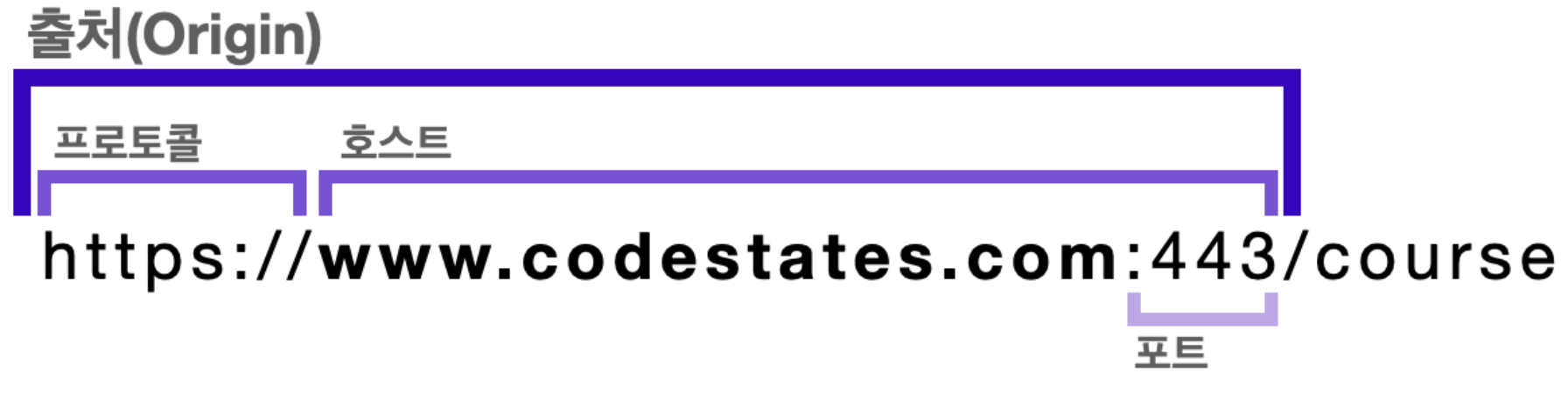
여기서 '출처(Origin)'는 프로토콜, 호스트, 포트의 조합으로 하나라도 다르면 동일한 출처로 아니게 됨.
http://codestates.com:81vshttp://codestates.com
http 프로토콜의 기본 포트는 80
⇒ 두 URI는 포트가 다르기 때문에 동일 출처 X ( :81 / :80 )https://codestates.com:443vshttps://codestates.com
https 프로토콜의 기본 포트는 443
⇒ 두 URI는 프로토콜, 호스트, 포트가 모두 같은 동일 출처 O
-
잠재적으로 해로울 수 있는 문서를 분리함으로써 공격받을 수 있는 경로를 줄여줌
- 해킹 등의 보안문제에서 안전해서 모든 브라우저에서 기본적으로 사용.
-
But, 실제 개발에서는 모두 다른 출처의 리소스를 사용하게 되기 때문에 이를 해결해줄 CORS가 필요함.
CORS (Cross-Origin Resource Sharing)
-
교차 출처 리소스 공유 = 추가 HTTP 헤더를 사용해 한 출처에서 실행 중인 웹 애플리케이션이 다른 출처의 선택한 자원에 접근할 수 있는 권한을 부여하도록 브라우저에 알려주는 체제 (MDN 정의)
- 즉, 브라우저는 SOP에 의해 기본적으로 다른 출처의 리소스 공유를 막지만, CORS는 추가 HTTP 헤더를 사용해 접근 권한을 얻을 수 있음

-
이 에러를 다시 해석해보면
다른 출처의 리소스를 가져오려고 했지만 SOP 때문에 접근이 불가능합니다.
CORS 설정을 통해 서버의 응답 헤더에 ‘Access-Control-Allow-Origin’을 작성하면 접근 권한을 얻을 수 있습니다.
⇒ 즉, CORS는 오히려 위의 에러를 해결해줄 수 있는 방안!!
CORS의 3가지 동작 방식
1.프리플라이트 요청 (Preflight Request)
-
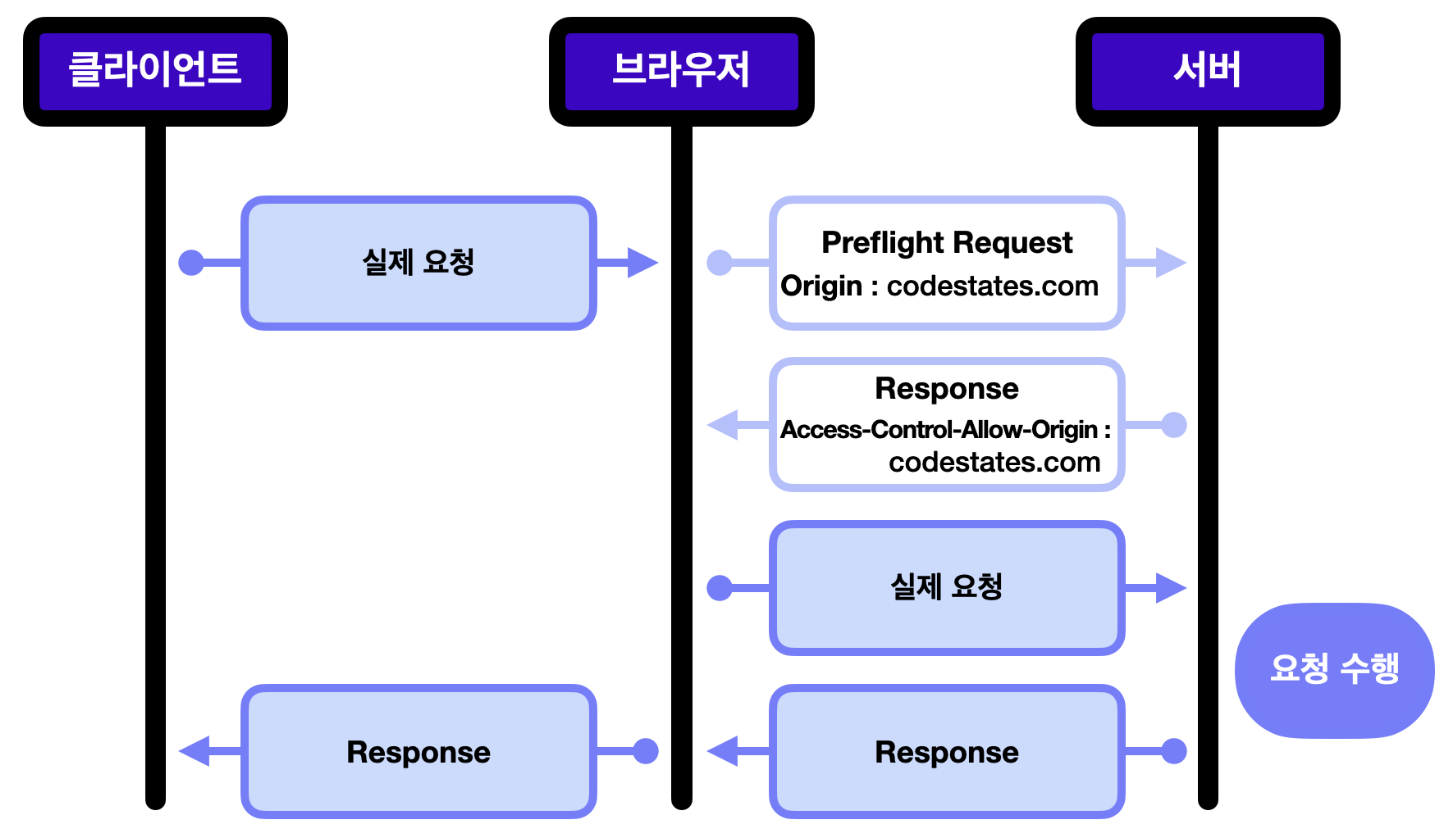
실제 요청을 보내기 전, OPTIONS 메서드로 사전 요청을 보내 해당 출처 리소스에 접근 권한이 있는지부터 확인하는 것
-
위의 그림과 같이 브라우저는 서버에 실제 요청을 보내기 전, 프리플라이트 요청을 보내고, 응답 헤더의
Access-Control-Allow-Origin으로 요청을 보낸 출처가 돌아오면 실제 요청을 보내게 됨.
-
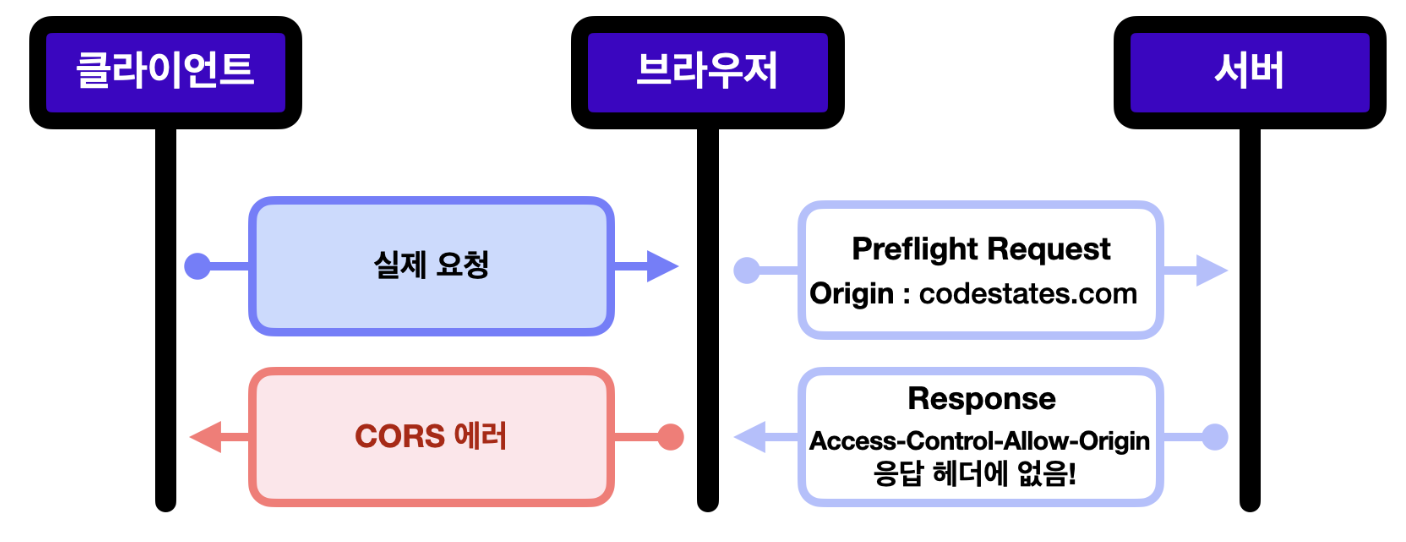
만약에 요청을 보낸 출처가 접근 권한이 없다면, 브라우저에서 CORS 에러를 띄우게 되고, 실제 요청은 전달 X
프리플라이트 요청은 왜 필요할까??
- 미리 권한 확인을 할 수 있어, 실제 요청을 처음부터 통째로 보내는 것보다 리소스 측면에서 효율적
- CORS에 대비가 되어있지 않은 서버를 보호가능. CORS 이전의 서버들은 SOP 요청만 고려해 다른 출처에서 들어오는 요청에 대한 대비가 되어있지 않음
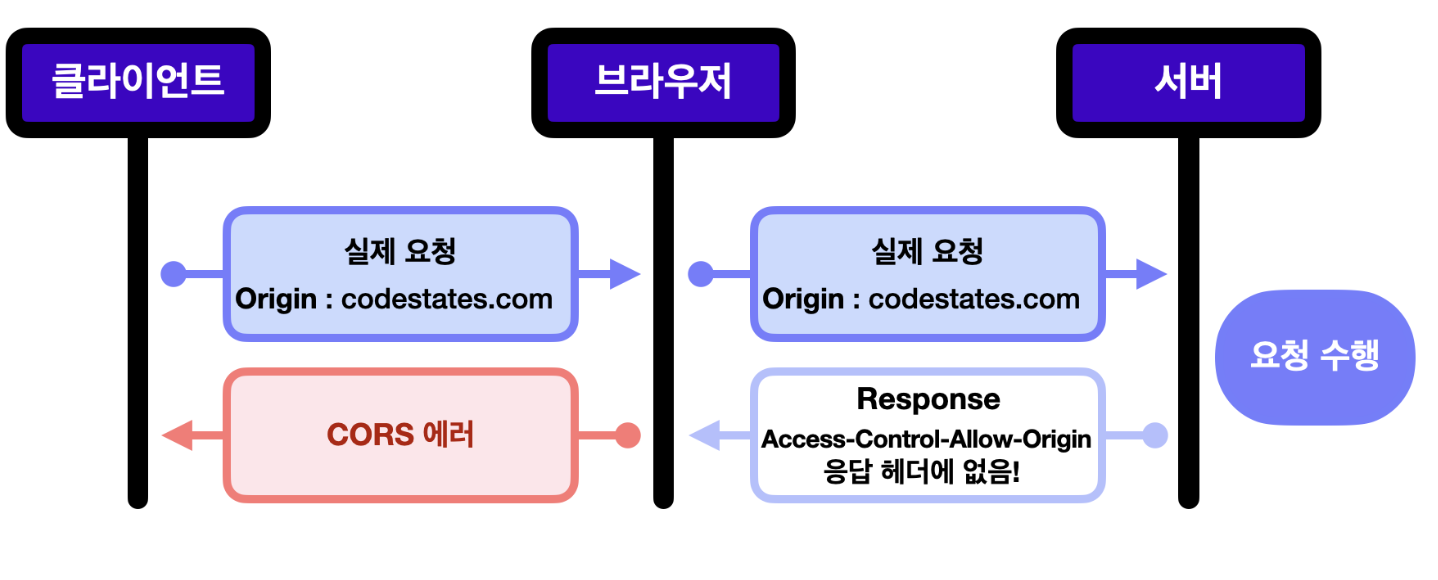
- 위의 나쁜예시 처럼 실행되선 안 되는 Cross-Origin 요청이 실행되는 것을 방지 가능(DELETE, PUT)
2. 단순 요청 (Simple Request)
- 특정 조건이 만족되면 프리플라이트 요청을 생략하고 요청을 보내는 것
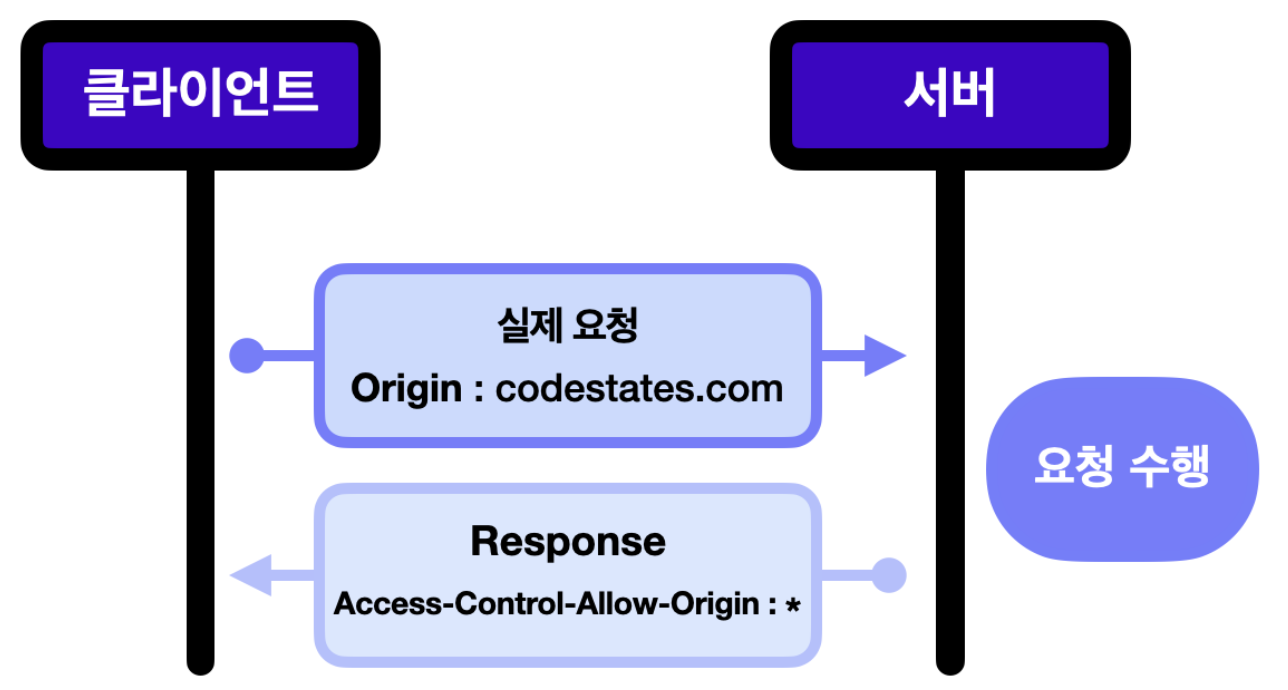
<조건들 But, 이 조건들을 모두 만족시키기는 어려우니 참고만> GET,HEAD,POST요청 중 하나- 자동으로 설정되는 헤더 외에,
Accept,Accept-Language,Content-Language,Content-Type헤더의 값만 수동으로 설정가능Content-Type헤더에는application/x-www-form-urlencoded,multipart/form-data,text/plain값만 허용
3. 인증정보를 포함한 요청 (Credentialed Request)
- 요청 헤더에 인증 정보를 담아 보내는 요청
- 출처가 다를 경우에는 별도 설정을 하지 않으면 쿠키를 보낼 수 없음. (민감함 정보라서) 이 경우에는 프론트, 서버 양측 모두 CORS 설정이 필요
프론트 측: 요청 헤더에 withCredentials : true 를 넣어줘야 함.
서버 측: 응답 헤더에 Access-Control-Allow-Credentials : true 를 넣어줘야 함.
서버 측: Access-Control-Allow-Origin 을 설정할 때, 모든 출처를 허용한다는 뜻의 와일드카드(*)로 설정하면 에러가 발생. 인증 정보를 다루는 만큼 출처를 정확하게 설정해야 함.
CORS 설정 방법
1. Node.js 서버
- Node.js로 간단한 HTTP 서버를 만들 경우, 다음과 같이 응답 헤더를 설정가능
const http = require('http');

const server = http.createServer((request, response) => {
// 모든 도메인
  response.setHeader("Access-Control-Allow-Origin", "*");

// 특정 도메인
  response.setHeader("Access-Control-Allow-Origin", "https://codestates.com");

// 인증 정보를 포함한 요청을 받을 경우
  response.setHeader("Access-Control-Allow-Credentials", "true");
})
2. Express 서버
- Express 프레임워크를 사용해 서버를 만드는 경우, cors 미들웨어를 사용해서 간단하게 CORS 설정가능
const cors = require("cors");
const app = express();

//모든 도메인
app.use(cors());

//특정 도메인
const options = {
  origin: "https://codestates.com", // 접근 권한을 부여하는 도메인
  credentials: true, // 응답 헤더에 Access-Control-Allow-Credentials 추가
  optionsSuccessStatus: 200, // 응답 상태 200으로 설정
};

app.use(cors(options));

//특정 요청
app.get("/example/:id", cors(), function (req, res, next) {
  res.json({ msg: "example" });
});
⇒ Node.js 뿐만 아니라 Express, Fastify 등 다른 서버 환경에서도 CORS 설정가능
과제 - Mini Node Server
HTTP 트랜잭션 해부(Anatomy of an HTTP Transaction)
참고해서 문제 품.
const http = require('http');

const PORT = 4999;

const ip = 'localhost';

const server = http.createServer((request, response) => {
 // 메소드가 options이면 CORS 설정을 돌려줘야 한다
 if (request.method === 'OPTIONS') {
   response.writeHead(200, defaultCorsHeader)
   response.end('hello mini-server sprints')
 }

// 메소드가 POST고, url이 /upper면 대문자로 응답을 돌려줘야 한다
 if(request.method === 'POST' && request.url === '/upper') {
    let body = ''; //여기 다시함
    request.on('data', (chunk) => {
       body = body + chunk;
     })
     request.on('end',() => {
       body = body.toUpperCase();
       response.writeHead(200, defaultCorsHeader) //이건 왜 하는거지?
       response.end(body);
     })
   }//메소드가 POST고, url이 /lower면 소문자로 응답을 돌려줘야 한다
   else if(request.method === 'POST' && request.url === '/lower') {
           let body = '';
           request.on('data', (chunk) => {
             body = body + chunk;
           })
           request.on('end', ()=> {
             body = body.toLowerCase();
             response.writeHead(200, defaultCorsHeader)
             response.end(body);
           })
   } else {  //에러로 처리합니다 bad request
    /*response.statusCode = 404;  처음에는 이코드 적음*/
     response.writeHead(404, defaultCorsHeader);
     response.end();
   }

    console.log(
      `http request method is ${request.method}, url is ${request.url}`
    );
    //response.writeHead(200, defaultCorsHeader);
    //response.end('hello mini-server sprints');
   });

server.listen(PORT, ip, () => {
  console.log(`http server listen on ${ip}:${PORT}`);
});

const defaultCorsHeader = {
  'Access-Control-Allow-Origin': '*',
  'Access-Control-Allow-Methods': 'GET, POST, PUT, DELETE, OPTIONS',
  'Access-Control-Allow-Headers': 'Content-Type, Accept',
  'Access-Control-Max-Age': 10
};