실습 18일 차
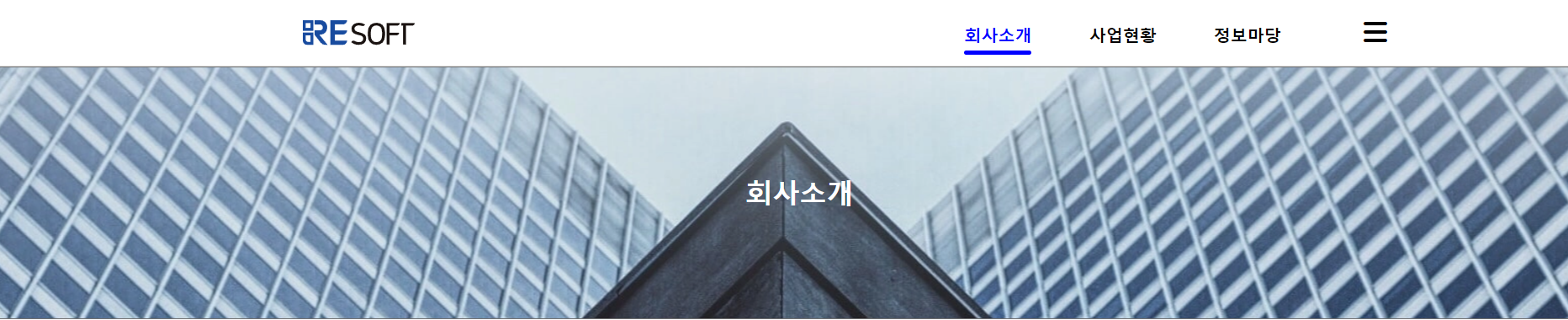
1. 학습한 내용
- position 문제부터 해결하기 위해 개념부터 다시 찾아보면서 방도를 찾음
- code 자체를 뜯어 이리저리 고치고 수정하면서 최대한 근접하게 만들어 봄
- html 코드 위치, 순서부터 문제가 있었음, 수정하니 생각보다 간단하게 문제를 해결
- 해결 후 다른 헤더 부분의 애니메이션 구현
<html lang="en">
<head>
    <meta charset="UTF-8">
    <meta http-equiv="X-UA-Compatible" content="IE=edge">
    <meta name="viewport" content="width=device-width, initial-scale=1.0">
    <title>Document</title>
    <link rel="stylesheet" href="./css/company.css">
    <!-- fontawesome -->
    <script src="https://kit.fontawesome.com/01f338039f.js" crossorigin="anonymous"></script>
    <!-- jQuery -->
    <script src="https://code.jquery.com/jquery-3.6.0.min.js"
    integrity="sha256-/xUj+3OJU5yExlq6GSYGSHk7tPXikynS7ogEvDej/m4=" crossorigin="anonymous"></script>
    <!-- underline-animation-->
    <script src="./js/underline-animation.js"></script>
</head>

<body>
    <header>
        <div class="container">
            <h1>
                <!-- Resoft Logo -->
                <a href="index3.html"><img src="./img/Header-Logo.svg"></a>
            </h1>
                <!-- Nav Bar -->
            <nav>
                <ul id="nav-bar">
                    <li class="btn-one">
                        <a href="#" class="one-cl">회사소개</a>
                    </li>
                    <li class="btn-two">
                        <a href="#business-header" class="two-cl">사업현황</a>
                    </li>
                    <li class="btn-three">
                        <a href="#information-header" class="three-cl">정보마당</a>
                    </li>
                    <li class="bottom-line"></li>

                <!-- Hamberger Button -->
                    <li class="btn">
                        <button type="button" onclick="doDisplay()"><i class="fa-solid fa-bars" style="color:black"></i></button>
                    </li>
                </ul>
            </nav>

        </div>

        <!-- company header -->
        <div id="company-header">
            <h1>정보마당</h1>
        </div>


                <!-- Hamberger Navbar -->
        <div id="myNav" class="overlay">
            <div class="overlay-content">
                <a href="#">REsoft소개</a>
                <a href="#">연혁</a>
                <a href="#">조직도</a>
                <a href="#">특허&인증</a>
                <a href="#">오시는 길</a>
            </div>
            <div class="overlay-content">
                <a href="#">ECOCE</a>
                <a href="#">moaDo</a>
                <a href="#">Etc</a>
              </div>
              <div class="overlay-content">
                <a href="#">REsoft소식</a>
              </div>
        </div>

        <!-- Hamberger Script -->
        <script>
            var bDisplay = true;
            function doDisplay(){
                var con = document.getElementById("myNav");
                if(con.style.display=='none'){
                    con.style.display = 'block';
                }else{
                    con.style.display = 'none';
                }
            }
        </script>
    </header>
-css
@charset "utf-8";
@import url('https://fonts.googleapis.com/css2?family=Noto+Sans&family=Noto+Sans+KR&display=swap');

* {
    margin: 0;
    padding: 0;
    font-family: 'Noto Sans', sans-serif;
    box-sizing: border-box;
    vertical-align: baseline;
}

body {
    max-width: 1920px;
    margin: 0 auto;
}
li {
    list-style: none;
}


/********************************* 헤더부분 *************************************/
header {
    width: 100%;
    height: 900px;
    z-index: 1000;
    top:0;
}

header .container{
    display: flex;
    justify-content: space-between; /* 양 끝으로 배치 */
    align-items: center;
    width: 100%;
    border: 1px solid #DBDBDB;
    height: 80px;
}

header nav ul{
    position: relative;
}

header nav ul li{
    padding: 2rem;
    display: inline-block;
}

header button {
    background: transparent;
    border: 0;
    cursor: pointer;
    font-weight: bold;
}
/******************nav bar animation *********************/
#nav-bar a{
    font-weight: bold;
    text-decoration: none;
    font-size: 20px;
    cursor: pointer;
    color: black;
}

.bottom-line {
    position:absolute;
    top:70px;
    left:2rem;
    width:80px;
    height:5px;
    border-radius: 5px;
    background-color: blue;
    padding: 0;
}
.bottom-active {
    transform: translate3d(0%, 0, 0);
    transition:all linear 240ms;
}
.bottom-active1 {
    transform: translate3d(188%, 0, 0);
    transition:all linear 240ms;
}
.bottom-active2 {
    transform: translate3d(373%, 0, 0);
    transition:all linear 240ms;
}

.color,
.color1,
.color2 {
    color: blue !important;
    transition: all linear 100ms;
}

/************************************* 로고 ****************************************/
header h1 a {
    margin-left: 360px;
}
header h1 a img {
    width: 133px;
    height: 30px;
}

/*************************** 메뉴 ********************************/
header nav ul li button {
    font-size: 20px;
}
header nav ul li.btn button {
    margin-right: 220px;
    margin-left: 30px;
    font-size: 32px;
}

/********************* company-header ***********************/
#company-header {
    background: url(../img/company-main.png) no-repeat center;
    width: 100%;
    height: 300px;
    display: flex;
    justify-content: center;
    align-items: center;
}
#company-header h1 {
    color: white;
}

/************************** Hidden **************************/
.overlay {
    height: 210px;
    width: 100%;
    z-index: 1;
    top: 80px;
    left: 0;
    background-color: rgba(47, 88, 163, 0.9);
    overflow-y: hidden;
    transition: 0.5s;
    position: absolute;
}

.overlay-content {
    float: left;
    top: 10%;
    text-align: left;
    margin-right: 50px;
    margin-top: 15px;
    line-height: 0.7;
}
.overlay-content:first-child {
    margin-left: 1140px;
}
.overlay-content:nth-child(2) {
    margin-left: -18px;
}
.overlay-content:last-child {
    margin-left: 15px;
}

.overlay a {
    padding: 8px;
    text-decoration: none;
    font-size: 20px;
    color: #ffff;
    display: block;
    transition: 0.3s;
}

.overlay a:hover, .overlay a:focus {
    color: black;
}- js
$(document).ready(function(){
    $(".one-cl").addClass("color");
  //   First active item
    $(".btn-one").click(function(){
       $(".bottom-line").addClass("bottom-active");
       $(".one-cl").addClass("color");
       $(".two-cl").removeClass("color1");
       $(".three-cl").removeClass("color2");
       $(".bottom-line").removeClass("bottom-active1 bottom-active2");
    });

    //  Second active item
    $(".btn-two").click(function(){
        $(".bottom-line").addClass("bottom-active1");
        $(".two-cl").addClass("color1");
        $(".one-cl").removeClass("color");
        $(".three-cl").removeClass("color2");
        $(".bottom-line").removeClass("bottom-active bottom-active2");
    });

    // Third active item
     $(".btn-three").click(function(){
          $(".bottom-line").addClass("bottom-active2");
          $(".three-cl").addClass("color2");
          $(".one-cl").removeClass("color");
          $(".two-cl").removeClass("color1");
          $(".bottom-line").removeClass("bottom-active bottom-active1");
    });
});- 헤더 부분 underline, click event 구현
- click event가 해당 태그에 color를 줬을 때 자꾸 바뀌지 않아서 event 후 !imfortant를 줘서 적용시킴
2. 학습한 내용 중 어려웠던 점
- 어제까지는 이번 프로젝트는 내가 민폐여서 망했다고 생각했는데 생각보다 기초적인 부분에서 코드를 고쳐서 실행시킬 수 있었음
- 물론 화살표 모양이 다른 부분이 문제이긴 하나 현재까지는 최선
- 나머지 애니메이션 부분도 만들 수 있어서 매우 다행스럽다
- 아직은 구글링이 없으면 아무것도 못하고, 구글링조차 제대로된 키워드를 찾지 못해서 몇 시간씩 헤메고, 찾아도 응용할 수 없어서 또 헤메는 초보
3. 해결방법
- 그래도 민폐가 되지 않으려고 어떻게든 방법을 찾았다
- 나땜에 프로젝트 망하는 줄 알고 밤잠을 설쳤는데 그저 다행스럽다
- 생각지도 못한 곳에서 코드가 수정되고 적용될 수 있는걸 보고 기초가 중요한걸 다시 알았다
- 코드가 가지는 의미, 역할들을 좀 더 세부적으로, 확실하게 공부할 필요가 있겠다
4. 학습소감
- 아직 아무런 책임도 지지 않아도 되는 상황에서도 이렇게나 쉽지않고 도망가고싶었는데 돈 받고 일하면서 책임을 져야하는 상황이 되면 얼마나 큰 부담감이 있을지...
- 포기만 안하면 어떻게든 방법이 나올거라고 믿고..그저 포기만하지말자
- 컴퓨터의 좋은 점은 내가 이해를 못할 뿐, 어떻게든 길은 있고 이유는 있고 답은 있다는 것, 찾기만 하면 된다.

코딩공부중