1. 학습한 내용
-
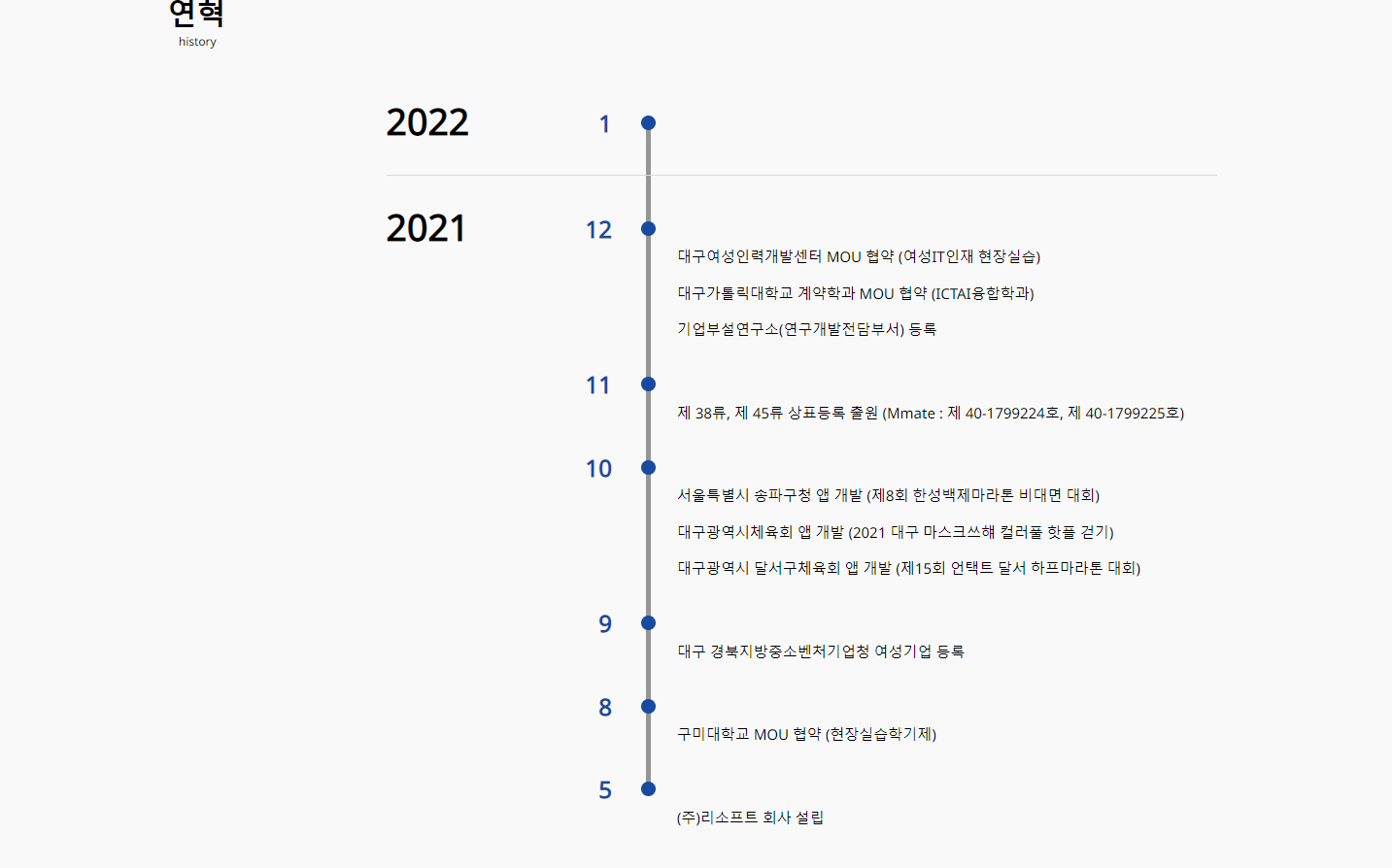
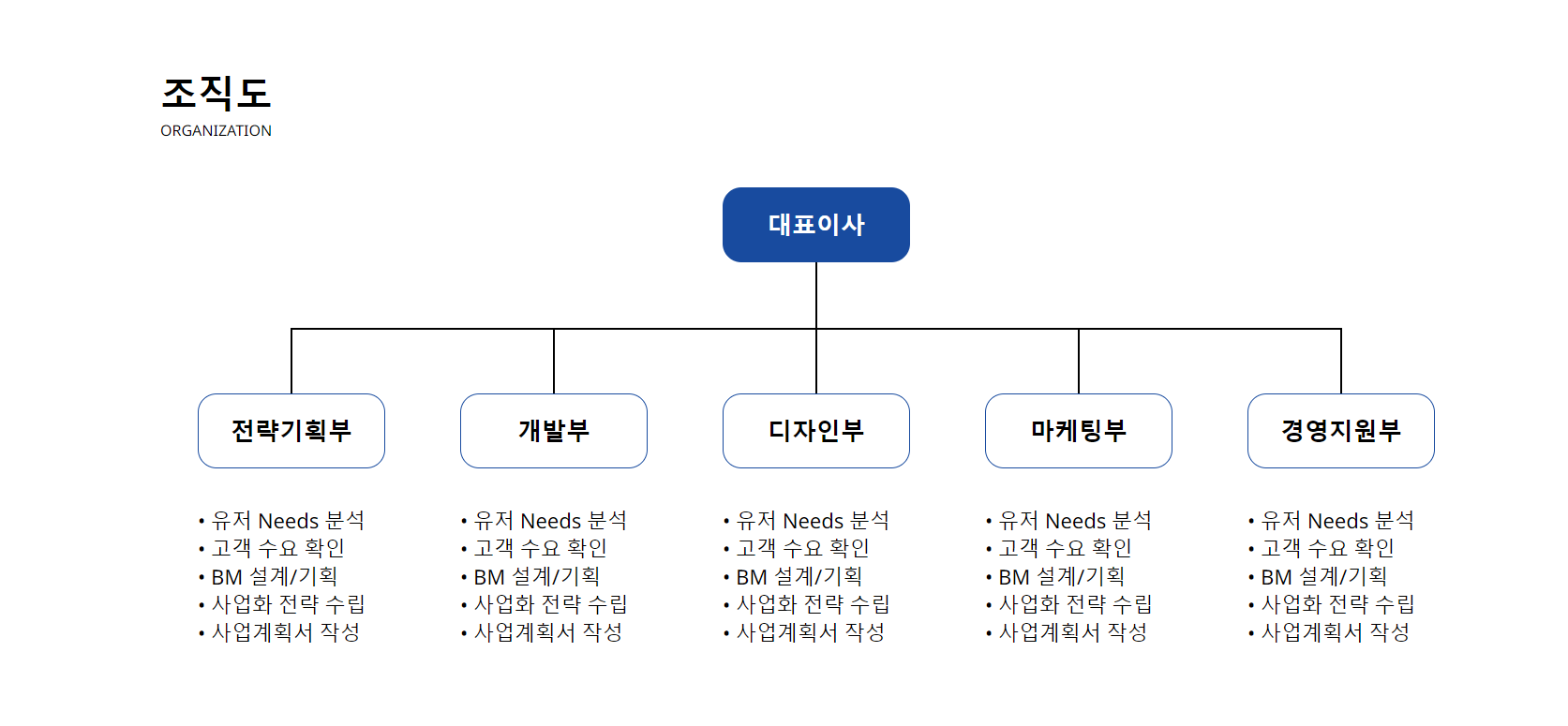
연혁 및 조직도 만들기
-
연혁
<!--------------------- 연혁 --------------------------->
<section id="history">
<div class="history-title">
<p>연혁</p>
<span>history</span>
</div>
<ul class="history-ul">
<li class="ul-line">
<h1>2022</h1>
<h4>1</h4>
<p> </p>
</li>
<li>
<h1>2021</h1>
<h4 class="history-point">12</h4>
<p>대구여성인력개발센터 MOU 협약 (여성IT인재 현장실습)</p>
<p>대구가톨릭대학교 계약학과 MOU 협약 (ICTAI융합학과)</p>
<p>기업부설연구소(연구개발전담부서) 등록</p>
</li>
<li>
<h4>11</h4>
<p>제 38류, 제 45류 상표등록 출원 (Mmate : 제 40-1799224호, 제 40-1799225호)</p>
</li>
<li>
<h4>10</h4>
<p>서울특별시 송파구청 앱 개발 (제8회 한성백제마라톤 비대면 대회)</p>
<p>대구광역시체육회 앱 개발 (2021 대구 마스크쓰햬 컬러풀 핫플 걷기)</p>
<p>대구광역시 달서구체육회 앱 개발 (제15회 언택트 달서 하프마라톤 대회)</p>
</li>
<li>
<h4>9</h4>
<p>대구 경북지방중소벤처기업청 여성기업 등록</p>
</li>
<li>
<h4>8</h4>
<p>구미대학교 MOU 협약 (현장실습학기제)</p>
</li>
<li>
<h4>5</h4>
<p>(주)리소프트 회사 설립</p>
</li>
</ul>
</section>-css
/********************* history ********************/
#history {
    width: 1920px;
    height: 1314px;
    background-color: #F9F9F9;
}

.history-title p {
    position: relative;
    font-size: 40px;
    padding-top: 100px;
    margin-left: 240px;
    font-weight: bolder;
}
.history-title span {
    margin-left: 255px;
}

/******************* history-ul *******************/
.history-ul {
    position: relative;
    width: 1140px;
    height: 980px;
    margin-left: 540px;
    margin-top: 78px;
}

.history-ul h1 {
    position: absolute;
    width: 125px;
    height: 72px;
    font-size: 50px;
    line-height: 40px;
}

.history-ul .ul-line {
    border-bottom: 1px solid #DBDBDB;
}

/******** 세로 라인 만들기 *********/
.history-ul::before {
    content: "";
    display: block;
    position: absolute;
    background-color: #959595;
    left: 31.5%;
    margin-left: -2px;
    padding: 20px 0;
    width: 6px;
    height: 88%;
    margin-top: 30px;
}

.history-ul li {
    position: relative;
    margin-bottom: 20px;
}

.history-ul li h4 {
    font-size: 32px;
    color: #184B9F;
    text-align: right;
    margin-right: 830px;
}

/************ 세로라인 동그라미 만들기 ************/
.history-ul li h4::before {
    content:"";
    position: absolute;
    left: 30.7%;
    transform: translateY(60%);
    border-radius: 100%;
    background:#fff;
    border: 10px solid #184B9F;
    box-sizing: border-box;
}


.history-ul li p {
    padding-left: 35%;
    line-height: 65px;
    margin-top: -15px;
    font-size: 20px;
}


/************** 2021 위치 조정 *************/
.history-point {
    margin-top: 50px;
}
- 조직도
<!------------------------- Organization chart ------------------------------->
    <section id="Organization-chart"
        data-aos="zoom-in"
        data-aos-offset="200"
        data-aos-easing="ease-out-sine"
        data-aos-duration="1000">
        <div class="Organization-title">
            <p>조직도</p>
            <span>ORGANIZATION</span>
        </div>
        <div class="org-tree">
            <h1 class="level-1 CEO">대표이사</h1>
            <ol class="level-2-wrapper">
                <li>
                    <h2 class="level-2 department1">전략기획부</h2>
                    <div class="level-3-desc">
                        • 유저 Needs 분석<br>
                        • 고객 수요 확인<br>
                        • BM 설계/기획<br>
                        • 사업화 전략 수립<br>
                        • 사업계획서 작성
                    </div>
                </li>
                <li>
                    <h2 class="level-2 department2">개발부</h2>
                    <div class="level-3-desc">
                        • 유저 Needs 분석<br>
                        • 고객 수요 확인<br>
                        • BM 설계/기획<br>
                        • 사업화 전략 수립<br>
                        • 사업계획서 작성
                    </div>
                </li>
                <li>
                    <h2 class="level-2 department3">디자인부</h2>
                    <div class="level-3-desc">
                        • 유저 Needs 분석<br>
                        • 고객 수요 확인<br>
                        • BM 설계/기획<br>
                        • 사업화 전략 수립<br>
                        • 사업계획서 작성
                    </div>
                </li>
                <li>
                    <h2 class="level-2 department4">마케팅부</h2>
                    <div class="level-3-desc">
                        • 유저 Needs 분석<br>
                        • 고객 수요 확인<br>
                        • BM 설계/기획<br>
                        • 사업화 전략 수립<br>
                        • 사업계획서 작성
                    </div>
                </li>
                <li>
                    <h2 class="level-2 department5">경영지원부</h2>
                    <div class="level-3-desc">
                        • 유저 Needs 분석<br>
                        • 고객 수요 확인<br>
                        • BM 설계/기획<br>
                        • 사업화 전략 수립<br>
                        • 사업계획서 작성
                    </div>
                </li>
            </ol>
        </div>

        <script>
            AOS.init(); // 자바스크립트로 init()을 해야 동작한다.
        </script>

</section>- css
/********************* Organization-chart *******************/
#Organization-chart {
    background-color: #FFFFFF;
    width: 1920px;
    height: 906px;
    margin: 0 260px;
}

.Organization-title p {
    position: relative;
    font-size: 40px;
    padding-top: 140px;
    font-weight: bolder;
}

/************************* tree-title & box **********************/
.Org-tree {
    width: 1400px;
    height: 532px;
    margin-top: 50px;
}

.Org-tree .CEO {
    background-color: #184B9F;
    color: #FFFFFF;
    width: 200px;
    height: 80px;
    padding: 22px 48px;
    font-size: 26px;
    border-radius: 20px;
}

.Org-tree .department1 {
    width: 200px;
    height: 80px;
    padding: 21px 34px;
    font-size: 26px;
    border: 1px solid #184B9F;
    border-radius: 20px;
}

.Org-tree .department2 {
    width: 200px;
    height: 80px;
    padding: 21px 60px;
    font-size: 26px;
    border: 1px solid #184B9F;
    border-radius: 20px;
}

.Org-tree .department3 {
    width: 200px;
    height: 80px;
    padding: 21px 47px;
    font-size: 26px;
    border: 1px solid #184B9F;
    border-radius: 20px;
}

.Org-tree .department4 {
    width: 200px;
    height: 80px;
    padding: 21px 47px;
    font-size: 26px;
    border: 1px solid #184B9F;
    border-radius: 20px;
}

.Org-tree .department5 {
    width: 200px;
    height: 80px;
    padding: 21px 34px;
    font-size: 26px;
    border: 1px solid #184B9F;
    border-radius: 20px;
}

/********************* 위치 조절 **********************/
.level-1,
.level-2,
.level-3 {
    position: relative;
}

/********************* LEVEL-1 STYLES ************************/
.level-1 {
    width: 50%;
    margin: 0 auto;
    /* 중앙 정렬 */
}

/******************* LEVEL-1 중앙 세로선 **************************/
.level-1::before {
    content: "";
    position: absolute;
    top: 100%;
    left: 50%;
    transform: translateX(-50%);
    width: 2px;
    height: 140px;
    background: black;
}

/***************** LEVEL-2 STYLES *********************/
.level-2-wrapper {
    position: relative;
    display: grid;
    grid-template-columns: repeat(5, 1fr);
    /* fr = 컨테이너 내의 공간 비율을 분수로 나타내는 단위 */
    /* 5개의 부서를 가로로 나눠서 배치 */
}

/*************** LEVEL-2 가로선 & 위치 ***************/
.level-2-wrapper::before {
    content: "";
    position: absolute;
    top: 70px;
    left: 10%;
    width: 80%;
    height: 2px;
    background: black;
}

/*************** LEVEL-2 세로선 & 위치 ***************/
/*.level-2-wrapper::after {
    display: none;
    content: "";
    position: absolute;
    left: -20px;
    bottom: -20px;
    width: calc(100% + 20px);
    height: 2px;
    background: black;
}*/

.level-2-wrapper li {
    position: relative;
    margin-top: 140px;
}

.level-2-wrapper > li::before {
    content: "";
    position: absolute;
    bottom: 100%;
    left: 50%;
    transform: translateX(-50%);
    width: 2px;
    height: 70px;
    background: black;
}

.level-2 {
    width: 70%;
    margin: 0 auto 40px;
}

/*.level-2::before {
    content: "";
    position: absolute;
    top: 100%;
    left: 50%;
    transform: translateX(-50%);
    width: 2px;
    height: 0px;
    background: black;
}

만약 그 밑에 하위 요소를 배치하기위해 선을 만들어야할 때 사용

.level-2::after {
    display: none;
    content: "";
    position: absolute;
    top: 50%;
    left: 0%;
    transform: translate(-100%, -50%);
    width: 20px;
    height: 2px;
    background: black;
}*/

/**************** LEVEL-3 STYLES ****************/
.level-3-desc {
    margin-left: 40px;
    font-size: 22px;
}
2. 학습한 내용 중 어려웠던 점
- 처음에 transform에 대한 이해도가 너무 없어서 코드가 뭐가 뭔지 계속 헤멨다
- 개념만 봐서는 잘 이해가 되지 않아서 선이 만들어진 코드를 이리 저리 수정해보면서 어떻게 만들어지고 구성되는지 알 수 있었다
- html 구성을 제대로 해서 자리를 잡아줘야 이 후에 css로 위치를 조정하고 효과를 넣기가 좋다는걸 알 수 있었다
- html에서 문제가 생겨서 몇 번을 다시 엎었다가 만들었다가를 반복했다
3. 해결방법
- 개념들을 정리하고, 코드들이 쓰이는 이유들을 찾은 뒤 직접 코드들을 조정하면서 이해할 수 있었다
- 애니메이션은 이전에 리소프트 홈페이지를 만들면서 찾아봤었던 스크롤 애니메이션을 적용해서 손쉽게 만들 수 있었다
4. 학습소감
- 막히거나 안되는 부분은 감도 안오지만 풀리기 시작하는 부분들은 만들고 나서 놀랄 정도로 술술 풀린다
- 아직 진도가 많이 나간 상태는 아니지만 하루에 하나는 어떻게든 구현한다는 생각으로 집중해야겠다

코딩공부중