eslint 무한 저장 오류해결 - Saving 'fileName' : Getting code actions from ''ESLint'
Saving 'index.tsx': Getting code actions from ''ESLint',
'TypeScript and JavaScript Language Features'' (configure).
Saving 'index.tsx': Getting code actions from ''ESLint',
'TypeScript and JavaScript Language Features'' (configure).요약
unplugin eslint-plugin-prettier
배경
24.06.10 기준으로 vscode v1.90.0과 eslint v2의 충돌로 아래 이슈가 있었다.
파일 저장 중 무한 로딩
Getting code actions from ''ESLint', ~

eslint가 vscode 최신 버전과 무언가 맞지 않는듯 (아마 Node 버전문제였나보다)
그래서 vscode를 1.89버전으로 낮춰서 쓰고 있었다.
24.07.09 기준으로 3주 전인 eslint v3.0.10에서 수정 되었다
이슈 상황
format on save가 팀원들과 동일하게 동작하지 않았다.
내가 수정한 파일을 받으면 추가적인 포맷이 일어나는 문제.
이 이슈를 잡기 위해서는 팀원들과 동일한 환경인 eslint 최신버전을 사용해야하고,
최신 버전인 eslint v3은 vscode v1.9~ 이상만 사용이 가능했기 때문에 모두 업데이트를 해야했다.
vscode와 eslint 모두 업데이트했다. 그런데 나온 에러
Saving 'index.tsx': Getting code actions from ''ESLint',
'TypeScript and JavaScript Language Features'' (configure).무한 로딩을 하는 상황
ESLint: Restart ESLint Server 도 먹히지 않았다
1. 싹 지우고 재설치 (실패)
vscode 관련된 파일, 캐시, 추가 익스텐션 싹 지우고 앱까지 지웠다가 재설치
rm -fr ~/Library/Preferences/com.microsoft.VSCode.helper.plist
rm -fr ~/Library/Preferences/com.microsoft.VSCode.plist
rm -fr ~/Library/Caches/com.microsoft.VSCode
rm -fr ~/Library/Caches/com.microsoft.VSCode.ShipIt/
rm -fr ~/Library/Application\ Support/Code/
rm -fr ~/Library/Saved\ Application\ State/com.microsoft.VSCode.savedState/
rm -fr ~/.vscode/
2. setting.json 직접 설정하기 (실패)
아래 내용을 vscode/setting.json에 넣는 방법
    "eslint.alwaysShowStatus": true,
    "editor.codeActionsOnSave": {
        "source.fixAll.eslint": true
    },
    "eslint.lintTask.enable": true,
    "eslint.quiet": true,
설정파일을 직접 건드린다는 것은 아주.... 엄청난 일이다
3. unplugin eslint-plugin-prettier (해결)
https://github.com/microsoft/vscode-eslint/issues/1856
아래 플러그인을 언플러그인
unplugin eslint-plugin-prettier
범인 검거

범인은 바로 eslint-plugin-prettier
eslint와 prettier를 같이 쓰고 있다면 이 플러그인이 devDependancies로,
eslintrc 파일에 extends로 추가되어있을 것이다.
eslint-plugin-prettier
prettier와 관련된 eslint 규칙들을 모아놓은 plugin.
eslint-config-prettier
prettier 설정 중 eslint 설정과 충돌이 나는 설정들을 비활성화
eslint 자체적인 문제가 아닌 플러그인의 문제였다.
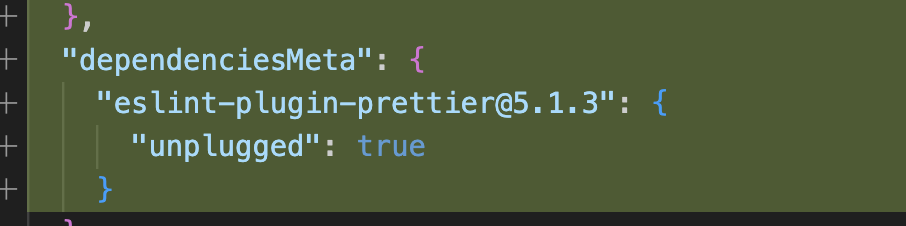
eslint가 아닌 prettier 쪽의 문제일 수도 있겠다.
우선 언플러그인한 상태에서 작업하고, 프리티어가 이슈 고쳐주기를 기다려봐야겠다....
결론
아래 명령어를 실행
yarn unplug eslint-plugin-prettier
그리고 vscode 껐다 키면 해결