
https://eslint.org/docs/latest/use/migrate-to-9.0.0
Eslint 9 버전으로 변경되면서 8버전과 비교했을 때 무엇이 달라졌는지 확인해보았다.
breaking change - Eslint 사용자
1. Node.js < v18.18, v19 are no longer supported
ESLint v9.0.0 버전부터는
- Node.js ≤ v18.18.0
- Node.js ≤ v20.9.0
- Node.js ≤ v21
이렇게만 지원한다.
Eslint 를 editor integration 모드(ex. vscode eslint plugin)로 사용한다면 에디터에서도 해당 node 버전을 지원하는지 추가적으로 확인해볼 것.
Node.js 에서 EOL 된 버전이라서 Eslint 에서도 함께 해당 버전을 지원하지 않기로 했다. (관련 issue) 만약 당장 올릴 수 없다면 ESLint v8.56.0 을 사용하도록 하자.
2. ⭐️ New default config format(eslint.config.js)
Eslint9에서 가장 중요한 변경점이 아닐까 싶다. (관련 PR)
관련 블로그 글
마이그레이션 가이드 를 통해 eslintrc → eslint.config.js 로 변경할 수 있다.
eslint9 으로 올린 이후에도 여전히 eslintrc 를 사용하고 싶다면, 환경 변수 ESLINT_USE_FLAT_CONFIG 를 false 로 설정하면 된다.
환경 변수 세팅하기
eslint 에서 node.js 의 환경변수를 보고 flat config 를 사용할 지 판단하고 있다.
1. 스크립트 돌릴 때 설정하기
bash 기준으로 스크립트를 돌릴 때 환경변수를 세팅해주면서 명령어를 실행시킬 수 있다.
일시적으로 실행 시에만 설정해주는 것이므로 필요하면 돌릴 때마다 환경변수를 세팅해줘야 한다.
ESLINT_USE_FLAT_CONFIG=false npx eslint .2. 터미널 세션에 저장
bashrc 등 터미널 환경변수 세팅 파일에 저장해놓고 사용할 수 있다.
export ESLINT_USE_FLAT_CONFIG=false3. env 파일
env 파일에 저장해놓고 불러오도록 설정할 수 있다. 다만 이 또한 eslint 가 자동으로 env 파일을 불러오는 것은 아니므로 추가적인 세팅이 필요하다. (ex. dotenv)
3. Removed multiple formatters
core 에서 formatter 가 제거 되었다. formatter 가 필요하면 직접 설치해야 한다.
| Removed Formatter | Replacement npm Package |
|---|---|
checkstyle | eslint-formatter-checkstyle |
compact | eslint-formatter-compact |
jslint-xml | eslint-formatter-jslint-xml |
junit | eslint-formatter-junit |
tap | eslint-formatter-tap |
unix | eslint-formatter-unix |
visualstudio | eslint-formatter-visualstudio |
formatter 의 역할
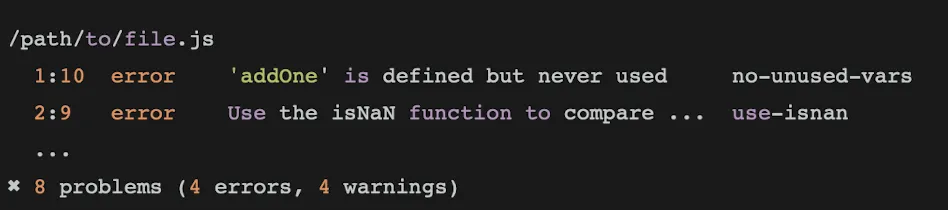
린트 결과물을 예쁘게 보여주기 위한 용도였다. 기본값 stylish 를 사용하면 아래와 같이 보기 좋게 결과를 보여준다.
제거한 이유
- 대부분이 default 옵션(stylish) 말고는 사용하지 않기 때문.
tapformatter 가 필요로 하는js-yamlpackage 가 여기 말고는 eslint 어디에도 필요하지 않은 패키지라서. ⇒ formatter 제거하면 dependency 를 줄일 수 있음
4. Removed require-jsdoc and valid-jsdoc rules
이미 2018년도에 deprecated 되었던 룰이며, 이번에 제거 되었다.
eslint-plugin-jsdoc 를 대체제로 사용할 수 있다.
5. eslint:recommended has been updated
추가된 rule
no-constant-binary-expressionno-empty-static-blockno-new-native-nonconstructorno-unused-private-class-members
삭제된 rule
no-extra-semi 와 no-mixed-spaces-and-tabs 는 스타일링 관련된 부분이라 타 라이브러리로 빠지게 되었고, no-new-symbol 은 Symbol 뿐만 아니라 BigInt 와 같은 전역 변수들도 다 같이 포함하도록 no-new-native-nonconstructor 로 대체되었다.
6. --quiet no longer runs rules set to "warn"
적용되기 이전에는 —quiet 옵션을 적용했을 때에 warn 로 설정한 rule 들을 다 돌리긴 하되 결과만 보여주지 않았었다. 불필요한 리소스 낭비를 줄이기 위해서 이제는 warn 으로 설정한 rule 을 돌리지 않고 건너뛰게 되었다.
따라서 ci 나 pre-commit 등에서 시간이 빨라지게 되고 리소스를 줄일 수 있게 되었다.
7. --output-file now writes a file to disk even with an empty output
- as-is: output 이 없으면 파일 미생성
- to-be(v9.0.0): 무조건 파일 생성
8. Change in behavior when no patterns are passed to CLI
- as-is: 파일이나 디렉토리 위치를 옵션에 설정하지 않는 경우 아무 동작을 하지 않는다.
- 아무 파일도 린트하지 않음
- code 0 을 반환하며 스크립트 실행 종료
- to-be:
- flat config 사용 시: 현재 디렉토리를 린트함 (path: ‘.’ 와 동일)
- eslintrc 사용 시: error 반환
만약, eslint 8 버전(as-is)처럼 동작하게 하고 싶으면 --pass-on-no-patterns 플래그를 포함해서 린트를 실행시키면 된다.
기존에 eslint 가 실행된 줄 알았는데(에러가 안 났으니 완벽한 줄..) 아무 것도 실행이 안 되고 있었을 상황을 이제는 방지할 수 있게 되었다!
9. /* eslint */ comments with only severity now retain options from the config file
// eslint.config.js

export default [
	{
		rules: {
			curly: ["error", "multi"],
		},
	},
];
// my-file.js
/* eslint curly: "warn" *//* eslint curly: "warn" */ 와 같이 옵션 없이 심각도만 지정하는 주석을 작성하면,
- as-is:
- 상세 옵션(예: “multi”)은 무시되고, 룰의 기본 옵션으로 적용됨
- [”warn”, “all”]
- to-be:
- 심각도만 변경되고, 그 외의 옵션은 유지됨
- [”warn”, “multi”]
10. Multiple /* eslint */ comments for the same rule are now disallowed
/* eslint semi: ["error", "always"] */
/* eslint semi: ["error", "never"] */

foo(); // valid, because the configuration is "never"- as-is: 마지막 것만 적용되고, 위쪽에 작성한 주석들은 모두 무시됨
/* eslint semi: ["error", "always"] */
/* eslint semi: ["error", "never"] */ // error: Rule "semi" is already configured by another configuration comment in the preceding code. This configuration is ignored.

foo(); // error: Missing semicolon- to-be: 주석 여러 개 작성하면 에러 발생
11. Stricter /* exported */ parsing
exported 의 파싱 규칙이 더 엄격해져서 문법적으로 오류가 발생하면 완전히 무시하게 변경되었다.
/* exported foo: true, bar: false */

// and

/* exported foo bar */
위와 같이 작성하는 경우, 파싱을 하지 않음.
exported 란?
- ESLint에서 사용하는 특별한 주석으로, 해당 파일 내에서 정의된 변수(또는 함수 등)가 외부에서 참조된 것처럼 간주하도록 지정하는 역할
- 변수/함수가 외부에서 참조된다고 처리해서 에러를 방지
- 주로 글로벌 스크립트 환경이나, 외부에서 참조되는 변수를 선언할 때 사용
no-unused-vars(사용하지 않는 변수 경고) 규칙은, 파일 내에서 선언만 하고 사용하지 않은 변수에 대해 경고를 발생키는데, 어떤 변수는 실제로는 파일 외부(예: <script> 태그, 다른 파일 등)에서 사용되지만 ESLint가 이를 알지 못해 “사용되지 않았다”고 잘못 경고할 수 있다.
12. no-constructor-return and no-sequences rule schemas are stricter
기존에 있던 버그가 수정되었다.
- no-constructor-return: 옵션 안 받도록 변경됨
- no-sequences:
- 옵션 1개 받도록 변경됨
{ "allowInParentheses": boolean }
{
	"rules": {
		"no-constructor-return": ["error"],
		"no-sequences": ["error", { "allowInParentheses": false }]
	}
}
13. New checks in no-implicit-coercion by default
-(-foo);
foo - 0;**no-implicit-coercion** 옵션에 두 케이스가 추가되었다.
no-implicit-coercion
javascript 특성 상 다양한 방법으로 데이터 형변환을 시킬 수 있는데, 그 중에서 불명확한 형변환을 막는 규칙이다.
const b = !!foo;
const b1 = ~foo.indexOf(".");
const n = +foo;
const n1 = -(-foo);
const n2 = foo - 0;
const n3 = 1 * foo;
const s = "" + foo;
foo += ``;
14. Case-sensitive flags in no-invalid-regexp
no-invalid-regexp 규칙의 allowConstructorFlags 옵션에 해당되는 값들 대소문자를 엄격하게 구분하도록 변경되었다.
/*eslint no-invalid-regexp: ["error", { "allowConstructorFlags": ["a", "z"] }]*/
new RegExp('.', 'a')   // 허용됨
new RegExp('.', 'az')  // 허용됨
new RegExp('.', 'A')   // 오류 (대문자 'A'는 허용되지 않음)
15. varsIgnorePattern option of no-unused-vars no longer applies to catch arguments
no-unused-vars 의 옵션
- vars / varsIgnorePattern
- args / argsIgnorePattern
- caughtErrors / caughtErrorsIgnorePattern
varsIgnorePattern 에 작성하면 catch 의 param 도 함께 무시되었던 버그가 수정되었다.
- 변수 ⇒ vars
- 함수 인자 ⇒ args
- catch 의 param ⇒ caughtErrors
를 사용하면 된다.
16. no-restricted-imports now accepts multiple config entries with the same name
- as-is: 같은 이름일 때는 마지막 config 만 적용됨
- to-be: 같은 이름이어도 여러 개 중복으로 모두 적용됨
{
    rules: {
        "no-restricted-imports": ["error", {
            paths: [
                {
                    name: "react-native",
                    importNames: ["Text"],
                    message: "import 'Text' from 'ui/_components' instead"
                },
                {
                    name: "react-native",
                    importNames: ["View"],
                    message: "import 'View' from 'ui/_components' instead"
                }
            ]
        }]
    }
}
import { Text } from "react-native"
// import 'Text' from 'ui/_components' instead
import { View } from "react-native"
// import 'View' from 'ui/_components' instead같은 패키지이지만 다른 컴포넌트를 import 할 때 각기 다른 에러가 발생하도록 변경되었다.
17. ⭐️ "eslint:recommended" and "eslint:all" no longer accepted in flat config
v8.x 버전에서도 flat config 를 사용할 수는 있는데(8.21.0 에서 실험적으로 적용됨), string 으로 작성해도 됐었다.
// eslint.config.js
export default ["eslint:recommended", "eslint:all"];
eslint v9.x 버전 부터는 string 은 지원하지 않고 @eslint/js 에서 config 객체를 import 해서 사용해야 한다.
// eslint.config.js
import js from "@eslint/js";

export default [js.configs.recommended, js.configs.all];
18. no-inner-declarations has a new default behavior with a new option
eslint 9.x 버전에서 no-inner-declarations 룰이 새롭게 추가되었다.
옵션 - { blockScopedFunctions: "allow" }
blockScopedFunctions: allow 가 기본 옵션이며 ESM 환경, strict mode 에선 블록 내부에서 함수/변수 선언을 허용하는 옵션이다.
ESM 환경, strict mode 에서는 block scope 이기 때문에 내부에서 선언해도 블록 스코프에서만 동작하므로 안전하다고 판단한 것으로 보인다.
strict 모드
JavaScript에서 코드의 오류를 더 엄격하게 검사하고, 안전하지 않은 문법이나 실수를 사전에 방지하기 위해 도입된 실행 모드로, ECMAScript 5(ES5)에서 처음 도입되었다.
ES6+ 의 모듈(ESM)과 클래스는 별도 선언 없이 자동으로 strict 모드가 적용된다.
cjs 환경에서는 모듈 스코프이기 때문에 'use strict'; 를 선언해주지 않으면 non-strict mode 다.
scope
- 글로벌 스코프: 코드 어디서나 접근 가능(모듈 시스템에서는 각 모듈이 사실상 글로벌 역할을 함)
- 모듈 스코프: (Node.js CJS, ESM) 파일(모듈) 단위로 격리됨. 각 파일이 자기만의 글로벌 스코프를 가짐.
- 함수 스코프: 함수 내에서만 접근 가능 (
var, 함수 선언) - 블록 스코프: 블록 내에서만 접근 가능 (
let,const,class, strict mode의 함수 선언)
19. no-unused-vars now defaults caughtErrors to "all"
/*eslint no-unused-vars: "error"*/
try {
} catch (error) {
	// 'error' is defined but never used
}- as-is: catch 의 param 을 사용하지 않아도 에러 발생 X
- to-be: catch 의 param 을 사용하지 않으면 에러 발생
- 에러 발생이 싫으면
(error)을 제거할 것!
- 에러 발생이 싫으면
20. no-useless-computed-key flags unnecessary computed member names in classes by default
/*eslint no-useless-computed-key: "error"*/

class SomeClass {
	["someMethod"]() {} // ok in ESLint v8, error in ESLint v9.
}- as-is: 사용하지 않는 computed key 허용
- to-be: 사용하지 않는 computed key 비허용
21. camelcase allow option only accepts an array of strings
기존에는 camelcase 의 옵션으로 string 이외에 다른 것도 들어갈 수 있었던 오류가 수정되었다. 기존에는 첫 번째 아이템이 string 인지만 검사하고 있어서 오류가 발생했었다.