h2 database는 작고 가벼운 인메모리 DB어서 개발시 유용하게 쓰고 있다. h2의 장점 중 하나는 웹브라우저로 콘솔을 확인할 수 있다는 것이다. 스프링부트 프로젝트에서 application.yml 파일에 다음과 같이 적용하면 웹에서 콘솔에 접속 할 수 있다.
spring:
  datasource:
    driver-class-name: org.h2.Driver
    url: jdbc:h2:mem:test
    username: sa
    password:
  h2:
    console:
      enabled: true
적용 후 프로젝트를 실행하면 아래와 같은 로그가 찍히는 것을 볼 수 있다.
INFO 10322 --- [todo] [main] o.s.b.a.h2.H2ConsoleAutoConfiguration : H2 console available at '/h2-console'. Database available at 'jdbc:h2:mem:test'이제 아래 주소로 이동하면 콘솔 로그인창이 보이게 된다.
localhost:{port}/h2-console
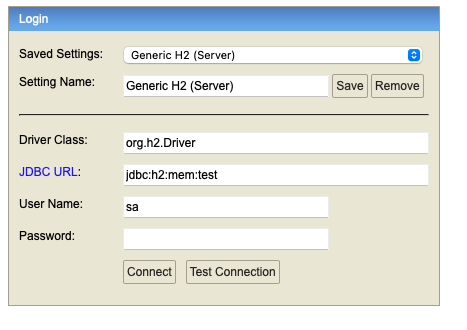
설정 파일에서 설정한 url, username, password를 입력하고 connect를 누르면 성공적으로 접속할 수 있다.
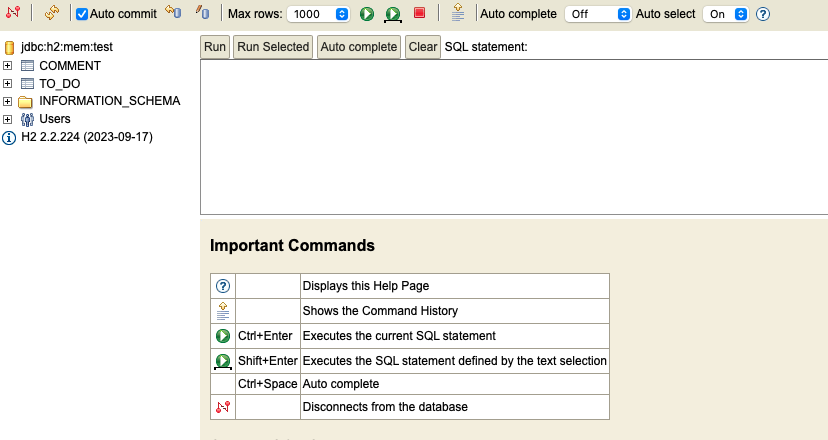
이제 콘솔을 통해 쿼리문을 작성하여 데이터를 확인하거나 수정할 수 있다.
