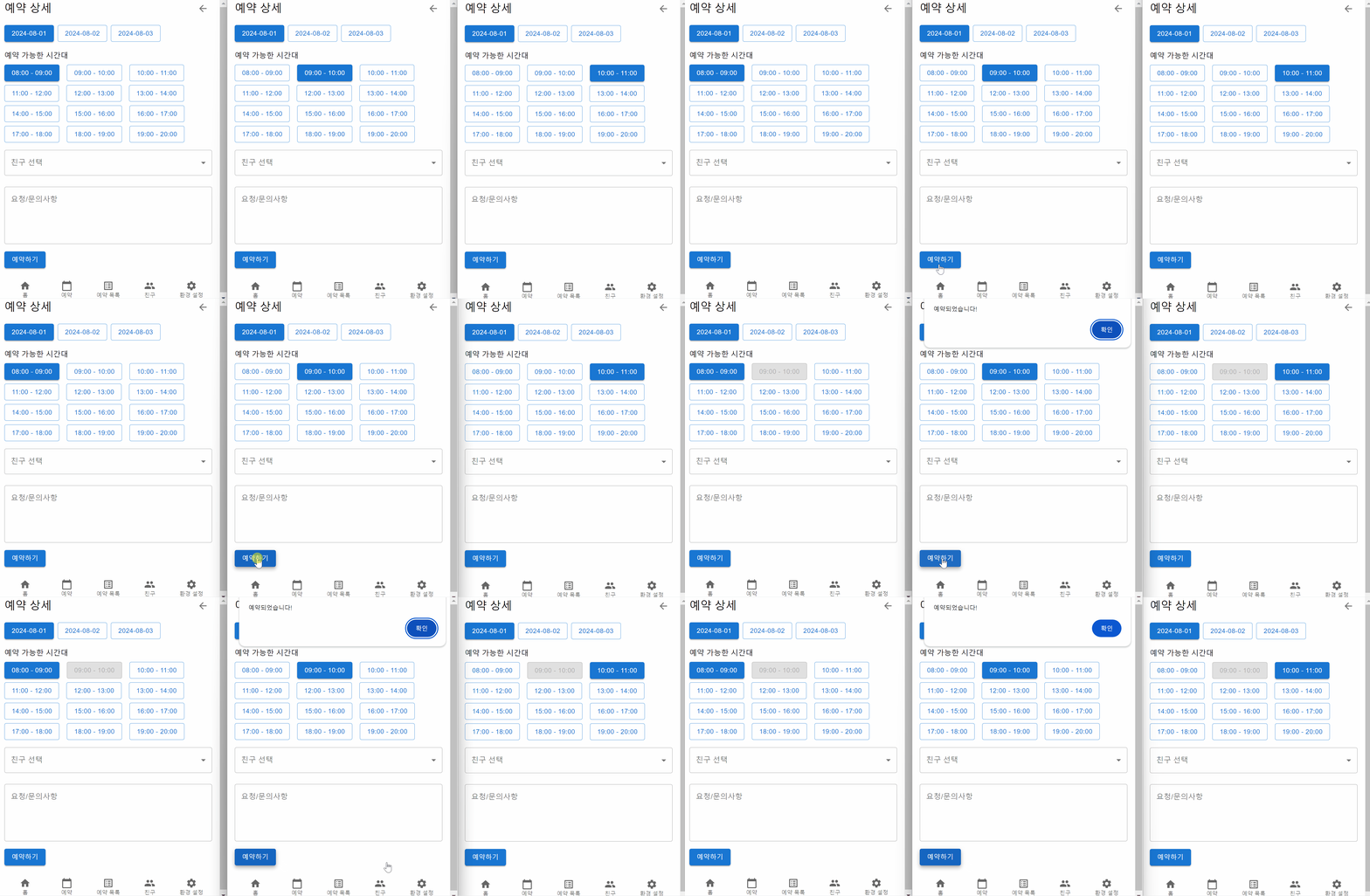
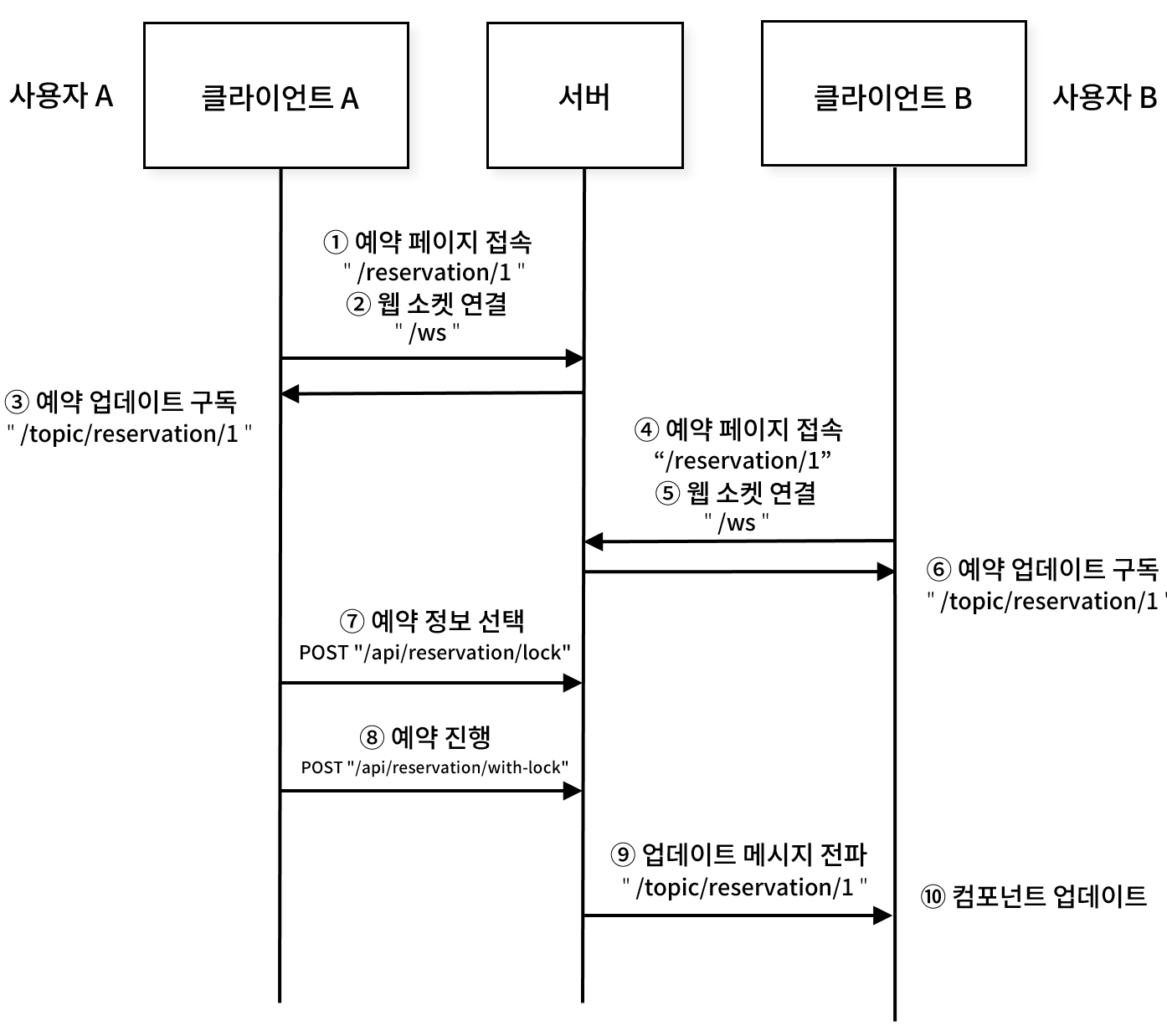
웹 소켓을 이용하여 기능을 구현하고자 한다.
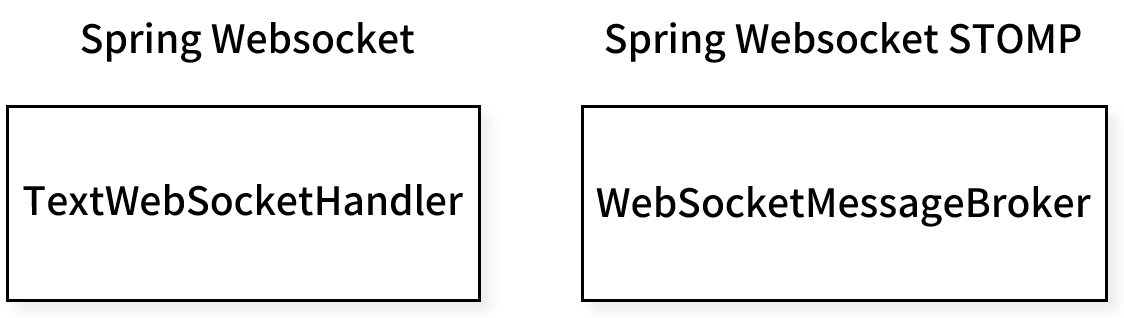
Spring Boot에서 웹 소켓을 사용하는 방법에는 여러가지가 있다. 그 중 주요한 두가지 접근 방식이 바로 TextWebSocketHandler를 이용한 방식과 STOMP를 이용한 방식이다.
WebSocketHandler
@Configuration
@EnableWebSocket
public class WebSocketConfig implements WebSocketConfigurer {

    @Override
    public void registerWebSocketHandlers(WebSocketHandlerRegistry registry) {
        registry.addHandler(new MyWebSocketHandler(), "/ws")
        		.setAllowedOrigins("*");
    }
}
public class MyWebSocketHandler extends TextWebSocketHandler {
/*
* 세션 정보를 저장하는 Map. <세션 ID, 세션> 형태로 세션 정보를 관리한다.
* 세션 ID 기반의 작업이 필요하지 않은 경우 Set<세션>을 사용할 수 있다.
*/
private final Map<String, WebSocketSession> sessions = new ConcurrentHashMap<>();
// 양방향 데이터 통신
@Override
protected void handleTextMessage(WebSocketSession session, TextMessage message) throws Exception {}
// 웹 소켓 연결
@Override
public void afterConnectionEstablished(WebSocketSession session) {}
// 웹 소켓 연결 종료
@Override
public void afterConnectionClosed(WebSocketSession session) {}
// 소켓 통신 에러
@Override
public void handleTransportError(WebSocketSession session) {}
}WebSocketHandler를 이용할 경우 STOMP를 이용하는 것과 비교히면 webSocket을 비교적 직접적으로 제어할 수 있다.
연결, 메시지 처리, 연결 해제, 통신 오류 발생시 등의 세부 사항을 직접 제어할 수 있는 것이다.
또한 원하는 방식으로 WebSocket 메시지를 처리하고 커스텀 로직을 쉽게 추가할 수 있어 유연하다는 장점이 있다.
STOMP
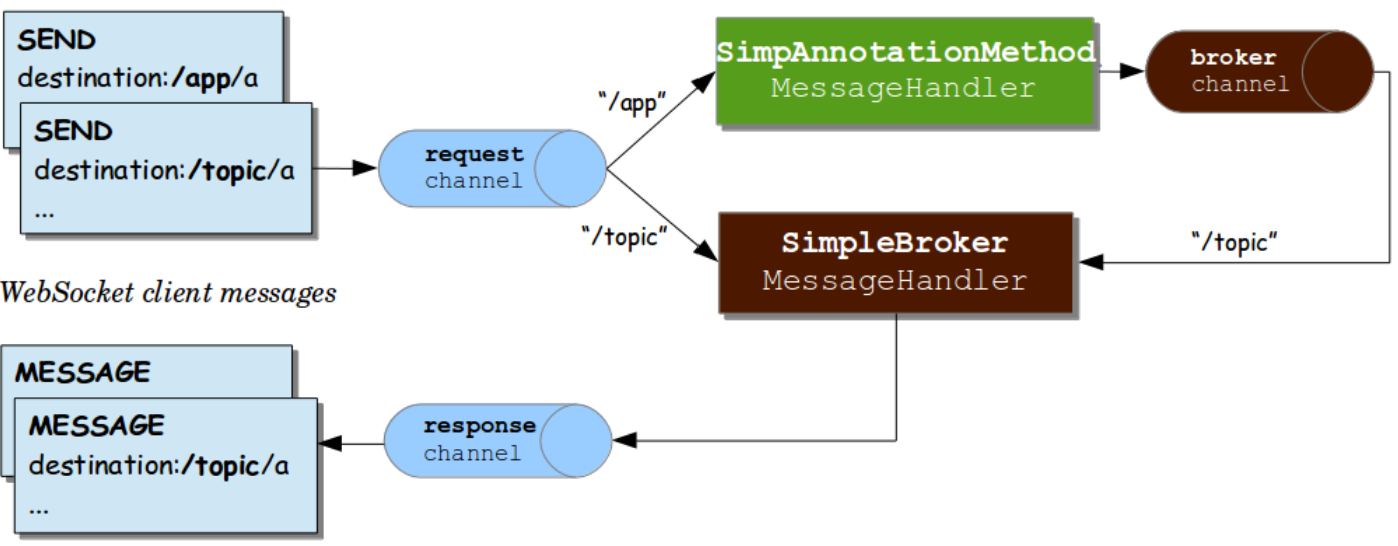
[그림 출처 : https://docs.spring.io/spring-framework/docs/4.3.x/spring-framework-reference/html/websocket.html]
@Configuration
@EnableWebSocketMessageBroker
public class WebSocketConfig implements WebSocketMessageBrokerConfigurer {

    @Override
    public void configureMessageBroker(MessageBrokerRegistry config) {
        config.enableSimpleBroker("/topic");
        config.setApplicationDestinationPrefixes("/app");
    }

    @Override
    public void registerStompEndpoints(StompEndpointRegistry registry) {
        registry.addEndpoint("/ws").setAllowedOrigins("*").withSockJS();
    }
}
STOMP(Simple Text Oriented Messaging Protocol)는 간단한 메시지를 전달하기 위한 텍스트 기반의 메시징 프로토콜로서 클라이언트와 서버간의 양방향 통신을 지원하는 WebSocket 프로토콜 위에서 동작한다.
STOMP는 스프링 부트 서버 내부 메모리에 존재하는 간단한 메시지 브로커를 통해 메시지를 라우팅하고 관리할 수 있는 pub/sub 모델을 지원한다.
또한, 표준화된 프로토콜로서 RabbitMQ, Kafka 등 다양한 외부 메시징 브로커와 쉽게 통합할 수 있다.
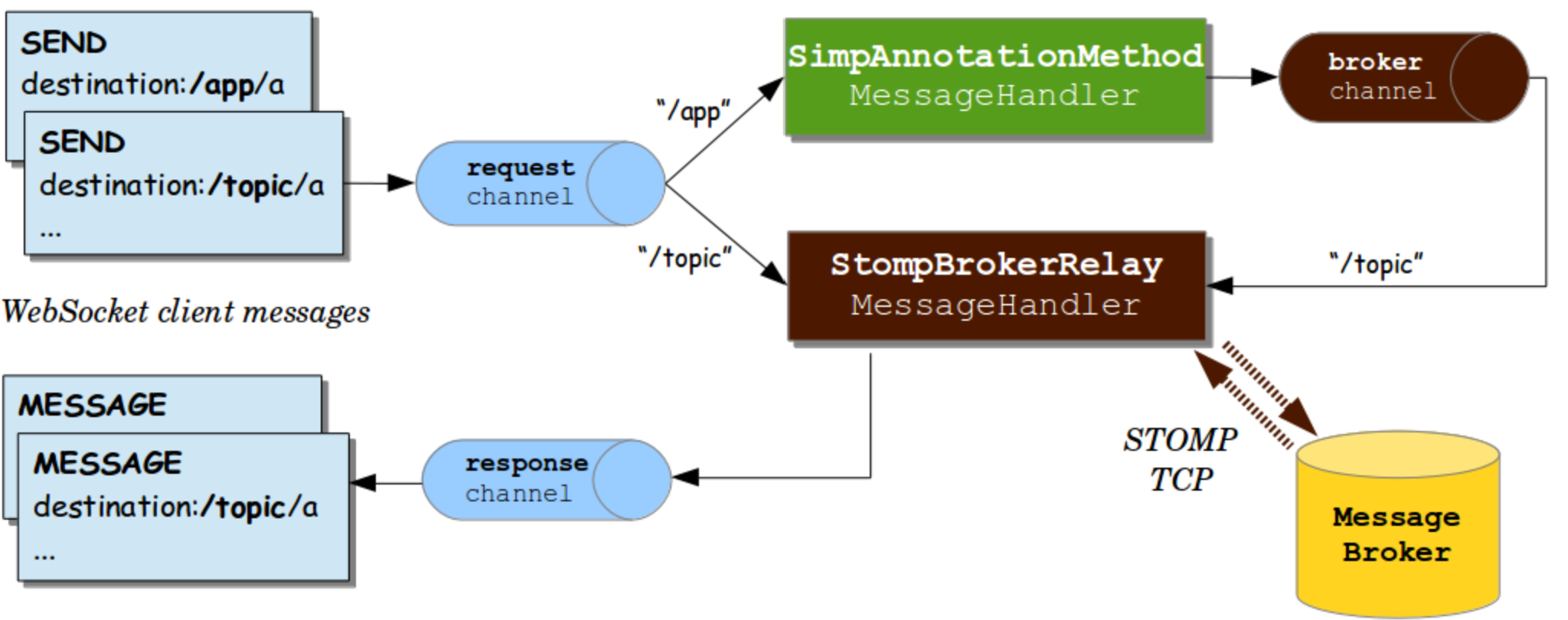
예약 정보 업데이트 메시지를 전송하는 간단한 기능을 구현한다는 것을 감안해서 STOMP 방식을 사용하기로 결정했다.
구현
@Configuration
@EnableWebSocketMessageBroker
public class WebSocketConfig implements WebSocketMessageBrokerConfigurer {

    @Override
    public void configureMessageBroker(MessageBrokerRegistry config) {
        config.enableSimpleBroker("/topic");
        config.setApplicationDestinationPrefixes("/app");
    }

    @Override
    public void registerStompEndpoints(StompEndpointRegistry registry) {
        registry.addEndpoint("/ws")
                .setAllowedOrigins("http://localhost:3000")
                .withSockJS();;
    }
}
// ReservationController.java에 메서드 추가
private final SimpMessagingTemplate messagingTemplate;
@PostMapping("/reservation/with-lock")
public ResponseEntity<?> makeReservationWithLock(@RequestBody ReservationDto.reservationRequest request, Authentication authentication) {
UserDetailsImpl userDetails = (UserDetailsImpl) authentication.getPrincipal();
User user = userDetails.getUser();
try {
ReservationDto.reservationResponse response = reservationService.makeReservationWithLock(request, user);
// 예약 성공 시 웹소켓으로 메시지 발송
messagingTemplate.convertAndSend("/topic/reservations/" + request.getRoomId(),
new ReservationUpdateMessage(request.getRoomId(), request.getReserveDate(), request.getTimeSlotId()));
return ResponseEntity.ok(new Result<>(200, "예약 성공", response));
} catch (IllegalStateException e) {
return ResponseEntity.badRequest().body(new Result<>(400, e.getMessage(), null));
}
} //ReservationDto.java에 추가
@Data
@NoArgsConstructor
@AllArgsConstructor
public static class ReservationUpdateMessage {
private Long roomId;
private LocalDate reserveDate;
private Long timeSlotId;
}프론트엔드
const ReservationDetailPage = () => {
    // ...
    const [stompClient, setStompClient] = useState(null);

    useEffect(() => {
        fetchReservationSchedule();
        fetchFriends();
      	// 웹소켓 연결
        connectWebSocket();

        return () => {
            disconnectWebSocket();
        };
    }, []);

  	// 웹소켓 연결
    const connectWebSocket = () => {
        const socket = new SockJS('http://localhost:8080/ws');
        const client = Stomp.over(socket);

        client.connect({}, () => {
            setStompClient(client);
            client.subscribe(`/topic/reservations/${roomId}`, (message) => {
                const reservationUpdate = JSON.parse(message.body);
                handleReservationUpdate(reservationUpdate);
            });
        });
    };

    // 웹소켓 연결 해제
    const disconnectWebSocket = () => {
        if (stompClient && stompClient.connected) {
            stompClient.disconnect();
        }
    };

  	// 서버로부터 예약 정보 메시지 도착 시 컴포넌트에 반영하는 Hook
    const handleReservationUpdate = useCallback((update) => {
        setScheduleData(prevScheduleData => {
            return prevScheduleData.map(dateItem => {
                if (dateItem.availableDate === update.reserveDate) {
                    const updatedAvailableTimes = dateItem.availableTimes.filter(
                        timeSlot => timeSlot.timeSlotId !== update.timeSlotId
                    );
                    const updatedUnavailableTimes = [
                        ...dateItem.unavailableTimes,
                        dateItem.availableTimes.find(timeSlot => timeSlot.timeSlotId === update.timeSlotId)
                    ];
                    return {
                        ...dateItem,
                        availableTimes: updatedAvailableTimes,
                        unavailableTimes: updatedUnavailableTimes
                    };
                }
                return dateItem;
            });
        });
    }, [selectedTimeSlot]);

    // ...

    const handleReservationSubmit = async () => {
        try {
            const response = await axios.post(
                'http://localhost:8080/api/reservation/with-lock',
                // ...
            );
            console.log('예약 성공:', response.data);
            alert('예약되었습니다!');
            // 예약 성공 시 서버에서 웹소켓 메시지 전송
            navigate('/reservation/list');
        } catch (error) {
            console.error('예약 에러:', error);
        }
    };

    // ...
};

export default ReservationDetailPage;
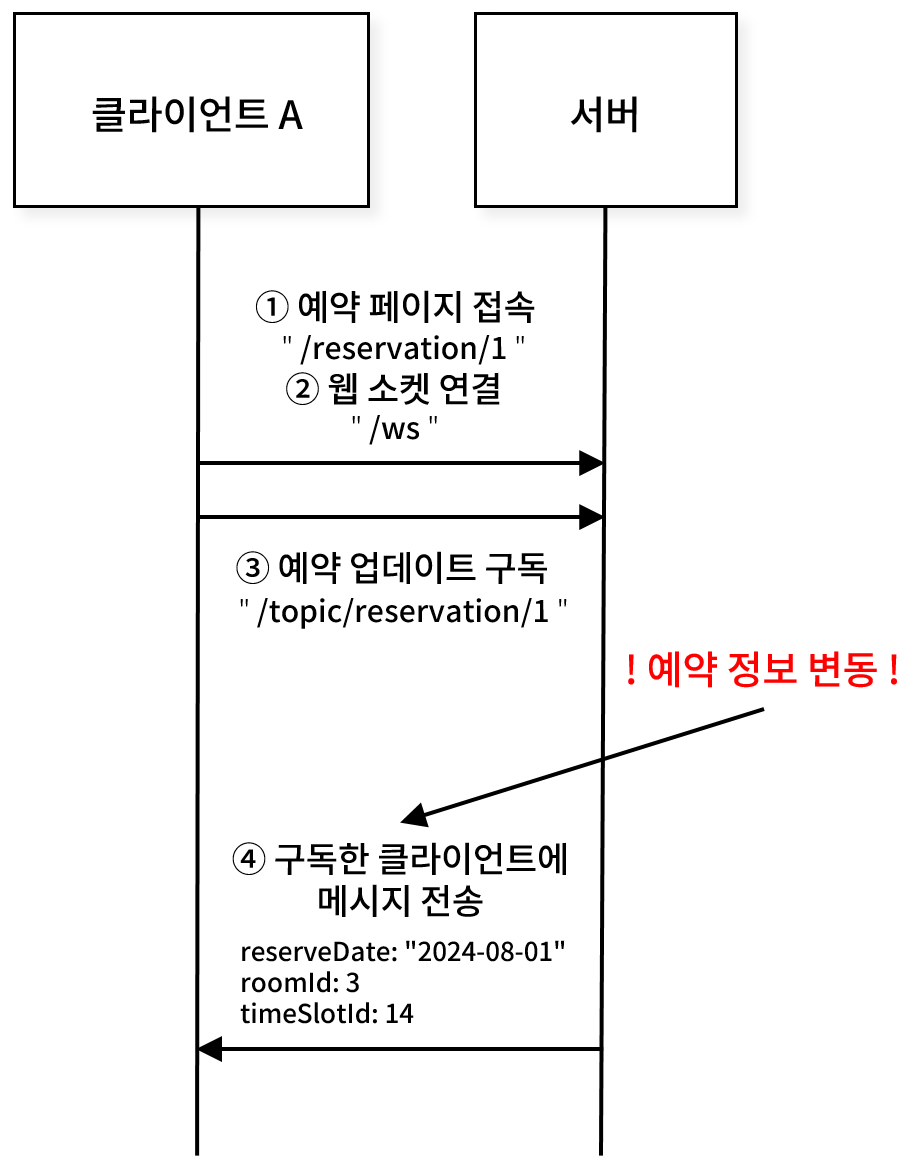
클라이언트와 서버가 주고 받은 웹소켓 통신 기록은 다음과 같다.
<<< CONNECTED
heart-beat:0,0
version:1.2
content-length:0

>>> SUBSCRIBE
id:sub-0
destination:/topic/reservations/3

Received data
<<< MESSAGE
content-length:55
message-id:zsvgqrqe-10
subscription:sub-0
content-type:application/json
destination:/topic/reservations/3
content-length:55

Object
reserveDate: "2024-08-01"
roomId: 3
timeSlotId: 14
결과
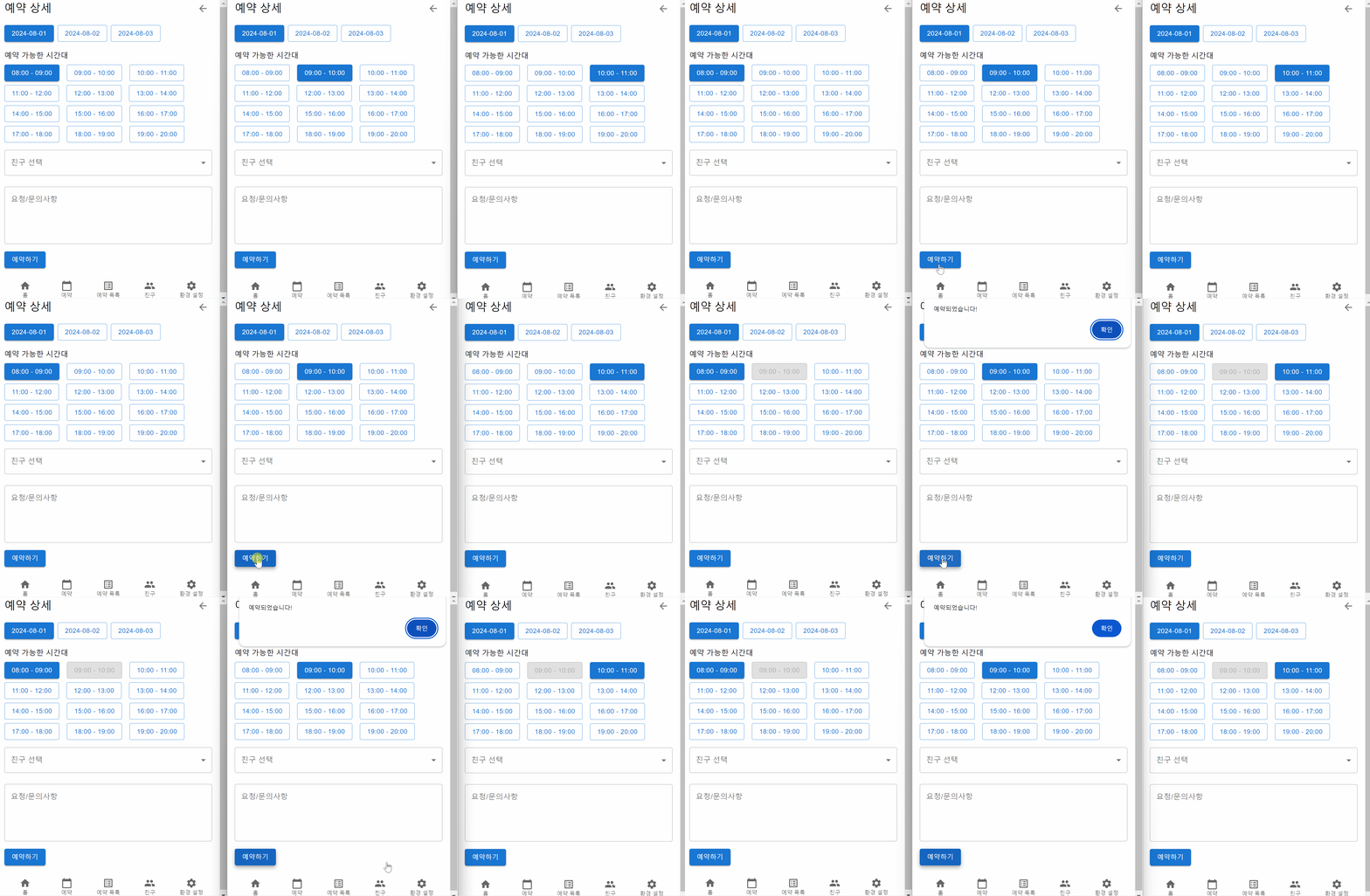
예약 페이지에 접속한 클라이언트에서 예약을 성공적으로 진행하여 예약 정보에 변화가 발생한 경우, 예약 성공 메시지를 웹 소켓으로 전송한다.
messagingTemplate.convertAndSend("/topic/reservations/" + request.getRoomId(),
            new ReservationUpdateMessage(request.getRoomId(), request.getReserveDate(), request.getTimeSlotId()));
해당 예약 정보를 구독하고 있던 클라이언트는 컴포넌트 상태를 업데이트 하는 함수를 실행한다.
client.connect({}, () => {
            setStompClient(client);
            client.subscribe(`/topic/reservations/${roomId}`, (message) => {
                const reservationUpdate = JSON.parse(message.body);
                // 컴포넌트 상태 업데이트
              	handleReservationUpdate(reservationUpdate);
            });
        });
참고자료