5. Blue Zone
드디어 자기장이다.
이 게임에서 자기장은 단순히 주기적으로 피해를 입히는 기믹이 아니라, 각 플레이어마다 주어진 카운트다운 시간을 1초씩 깎는 기믹이다.
따라서 굳이 GAS 시스템을 넣지 않아도 된다.
또한 자기장 이펙트를 나이아가라 시스템으로 한 번 넣어보려고 한다.
Zone Countdown Component
//CRZoneCountdownComponent.h

#pragma once

#include "CoreMinimal.h"
#include "Components/ActorComponent.h"
#include "CRZoneCountdownComponent.generated.h"

DECLARE_DYNAMIC_MULTICAST_DELEGATE_OneParam(FOnZoneTimeChanged, int32, NewSeconds);
DECLARE_DYNAMIC_MULTICAST_DELEGATE_OneParam(FOnZoneCountingChanged, bool, bIsCounting);

UCLASS( ClassGroup=(Custom), meta=(BlueprintSpawnableComponent) )
class COPANDROBBER_API UCRZoneCountdownComponent : public UActorComponent
{
	GENERATED_BODY()

public:
	UCRZoneCountdownComponent();

	UPROPERTY(ReplicatedUsing=OnRep_Remaining)
	int32 RemainingSeconds;

	UPROPERTY(EditAnywhere, BlueprintReadWrite, Category="Zone")
	int32 MaxSeconds = 30;

	UPROPERTY(ReplicatedUsing=OnRep_Counting)
	bool bCountingDown = false;

	UPROPERTY(BlueprintAssignable)
	FOnZoneTimeChanged OnZoneTimeChanged;
	UPROPERTY(BlueprintAssignable)
	FOnZoneCountingChanged OnZoneCountingChanged;

	UFUNCTION(BlueprintCallable, Category="Zone")
	void ServerStartCountdown();
	UFUNCTION(BlueprintCallable, Category="Zone")
	void ServerStopCountdown();

	UFUNCTION(BlueprintCallable, Category="Zone")
	void ServerResetCountdown();

protected:
	virtual void GetLifetimeReplicatedProps(TArray<FLifetimeProperty>& OutLifetimeProps) const override;

	UFUNCTION() void OnRep_Remaining();
	UFUNCTION() void OnRep_Counting();

	void TickOneSecond();

	FTimerHandle TimerHandle_Zone;

	bool HasAuth() const { return GetOwner() && GetOwner()->HasAuthority(); }
};
ZoneCountdownComponent 헤더 파일이다.
우선 액터 컴포넌트를 부모 클래스로 해서 만들었다.
나중에 캐릭터에 붙일 예정이다.
먼저 델리게이트 이벤트를 정의해두었는데,
카운트다운이 이루어져 초가 줄어들 때마다 감지하는 FOnZoneTimeChanged.
현재 카운트다운이 이루어지는 중인지 아닌지를 판별하는 FOnZoneCountingChanged 가 있다.
또한 변수로는 각 플레이어마다 주어질 최대 카운트다운 초 MaxSeconds.
MaxSeconds 로 부터 줄어들고 남은 시간 초 RemainingSeconds.
그리고 카운트다운이 시작되어 초가 줄어들고 있는지 판단하는 bCountingDown 이 있다.
위에 있는 델리게이트 이벤트를 이용하는 함수를 선언해주고, 서버 권위에서 작동하는 카운트다운 시작, 종료, 리셋 함수를 선언했다.
마지막으로 초마다 아까의 RemainingSeconds 를 1씩 감소해주는 함수 TickOneSecond() 와,
오너의 유효성과 서버 권위를 동시에 체크하는 헬퍼 HasAuth() 함수를 만들었다.
//CRZoneCountdownComponent.cpp

#include "CRZoneCountdownComponent.h"

#include "Net/UnrealNetwork.h"

UCRZoneCountdownComponent::UCRZoneCountdownComponent()
{
	SetIsReplicated(true);
	RemainingSeconds = MaxSeconds;
	PrimaryComponentTick.bCanEverTick = false;
}
소스 파일이다.
먼저 생성자에서 오너 액터의 Replicate 값을 따라갈지 결정하는 SetIsReplicated() 함수에 true 를 적용시켜준다.
또한 RemainingSeconds 는 초기값이 최대로 되어있어야하기에 MaxSeconds 로 설정해준다.
그리고 틱 대신 타이머로 1초마다 갱신할 것이기때문에 틱은 false 로 설정해준다.
void UCRZoneCountdownComponent::ServerStartCountdown()
{
	if (!HasAuth() || bCountingDown) return;

	bCountingDown = true;
	OnRep_Counting();

	GetWorld()->GetTimerManager().SetTimer(
			TimerHandle_Zone,
			this,
			&UCRZoneCountdownComponent::TickOneSecond,
			1.0f,
			true
		);
}
ServerStartCountdown() 함수이다.
서버에서만 작동하는 타이머로,
함수 호출 시 bCountingDown 값을 true 로 바꾼다.
OnRep_Counting() 함수를 통해 UI 에 갱신할 수 있게 해주었다.
이후 타이머매니저를 통해 1초마다 TickOneSecond() 함수를 호출하는 걸 반복시킨다.
void UCRZoneCountdownComponent::ServerStopCountdown()
{
	if (!HasAuth() || !bCountingDown) return;

	bCountingDown = false;
	OnRep_Counting();
	GetWorld()->GetTimerManager().ClearTimer(TimerHandle_Zone);
}
ServerStopCountdown() 함수이다.
이번엔 반대로 타이머를 멈추기 위해 Clear 시키는 함수이다.
void UCRZoneCountdownComponent::ServerResetCountdown()
{
	if (!HasAuth()) return;

	RemainingSeconds = MaxSeconds;
	OnRep_Remaining();
}
ServerResetCountdown() 함수이다.
RemainingSeconds 를 MaxSeconds 로 만들어 타이머를 초기화시킨다.
void UCRZoneCountdownComponent::GetLifetimeReplicatedProps(TArray<FLifetimeProperty>& OutLifetimeProps) const
{
	Super::GetLifetimeReplicatedProps(OutLifetimeProps);
    DOREPLIFETIME(UCRZoneCountdownComponent, RemainingSeconds);
	DOREPLIFETIME(UCRZoneCountdownComponent, bCountingDown);
}
GetLifetimeReplicatedProps() 함수에서는
RemainingSeconds 와 bCountingDown 값을 복사해서 클라로 보내야 UI 에 띄울 수 있기때문에 복제를 해준다.
void UCRZoneCountdownComponent::OnRep_Remaining()
{
	OnZoneTimeChanged.Broadcast(RemainingSeconds);
}

void UCRZoneCountdownComponent::OnRep_Counting()
{
	OnZoneCountingChanged.Broadcast(bCountingDown);
}
브로드캐스트로 다른 곳에 값의 변화를 알려주는 함수들이다.
void UCRZoneCountdownComponent::TickOneSecond()
{
	if (!HasAuth()) return;

	RemainingSeconds = FMath::Max(0, RemainingSeconds-1);
	OnRep_Remaining();

	if (AActor* OwnerActor = GetOwner())
	{
		UE_LOG(LogTemp, Warning, TEXT("%s Zone Timer: %d seconds left"),
			*OwnerActor->GetName(), RemainingSeconds);
	}

	if (RemainingSeconds <= 0)
	{
		// 탈럭 함수 가져오기
		ServerStopCountdown();
	}
}
마지막으로 TickOneSecond() 함수이다.
FMath 에 있는 Max() 함수를 통해 매초마다 RemainingSeconds - 1 의 값을 넣어주며
0보다 작아지면 0을 가져오도록 설정했다.
그 아래에는 로그를 통해 어떤 플레이어가 몇초 남았는지를 체크한다.
마지막으로 카운트다운이 0보다 작아지면, 해당 플레이어의 탈락 함수를 가져오고 ServerStopCountdown() 를 호출해 타이머를 중지시킨다.
탈락 함수는 다른 코드에서 가져올 예정이다.
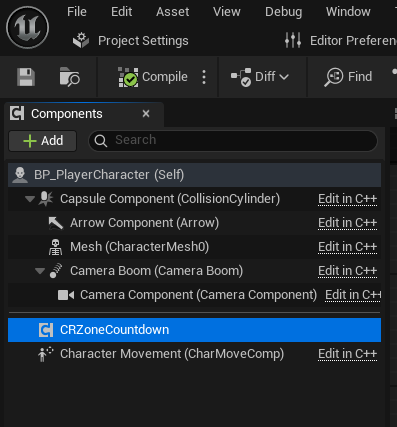
이후 이것을 캐릭터의 컴포넌트에 넣어주면 된다.
Blue Zone Actor
다음은 실제로 레벨에 배치할 블루존 액터를 구현할 것이다.
//CRBlueZone.h

#pragma once

#include "CoreMinimal.h"
#include "GameFramework/Actor.h"
#include "CRBlueZone.generated.h"

class UCapsuleComponent;

UCLASS()
class COPANDROBBER_API ACRBlueZone : public AActor
{
	GENERATED_BODY()

public:
	ACRBlueZone();

	UPROPERTY(VisibleAnywhere, BlueprintReadOnly)
	UCapsuleComponent* SafeZone;
	UPROPERTY(EditAnywhere, Category = "Zone")
	float ZoneRadius = 800.f;
	UPROPERTY(EditAnywhere, Category = "Zone")
	float ZoneHalfHeight = 1200.f;

protected:
	virtual void BeginPlay() override;

	UFUNCTION()
	void OnZoneBeginOverlap(
		UPrimitiveComponent* Overlapped,
		AActor* Other,
		UPrimitiveComponent* OtherComp,
		int32 BodyIndex, bool bFromSweep,
		const FHitResult& Sweep
		);

	UFUNCTION()
	void OnZoneEndOverlap(UPrimitiveComponent* Overlapped,
		AActor* Other,
		UPrimitiveComponent* OtherComp,
		int32 BodyIndex
		);
};
BlueZone 헤더 파일이다.
먼저 원통 모양으로 하고싶었지만 없는 관계로 Capsule 컴포넌트로 만들어주었다.
메시는 이따가 나이아가라를 이용할 것이기 때문에 스킵했다.
존의 반지름과 높이도 설정해주었다.
블루존 액터는 사실 안전구역이다.
오버랩 시에 카운트다운이 멈추고, 해제 시에 카운트다운이 시작되는 형식이다.
//CRBlueZone.cpp

#include "CRBlueZone.h"

#include "Components/CapsuleComponent.h"
#include "CRZoneCountdownComponent.h"
#include "DrawDebugHelpers.h"

ACRBlueZone::ACRBlueZone()
{
	SafeZone = CreateDefaultSubobject<UCapsuleComponent>(TEXT("SafeZone"));
	SetRootComponent(SafeZone);

	bReplicates = true;
	PrimaryActorTick.bCanEverTick = false;
}
소스 파일이다.
생성자에서 컴포넌트를 설정해주고 복제를 허용해준다.
static UCRZoneCountdownComponent* GetCountdownComp(AActor* Actor)
{
	if (APawn* Pawn = Cast<APawn>(Actor))
	{
		return Pawn->FindComponentByClass<UCRZoneCountdownComponent>();
	}
	return nullptr;
}
이건 로컬 헬퍼 함수로, 이 액터 내부에서만 플레이어에 ZoneCountdwnComponent 가 달려있는지 확인하기 위한 함수이다.
void ACRBlueZone::BeginPlay()
{
	Super::BeginPlay();

	DrawDebugCapsule(
	GetWorld(),
	SafeZone->GetComponentLocation(),
	SafeZone->GetScaledCapsuleHalfHeight(),
	SafeZone->GetScaledCapsuleRadius(),
	SafeZone->GetComponentQuat(),
	FColor::Cyan, true, -1.f, 0, 2.f
	);

	SafeZone->InitCapsuleSize(ZoneRadius, ZoneHalfHeight);

	SafeZone->OnComponentBeginOverlap.AddDynamic(this, &ACRBlueZone::OnZoneBeginOverlap);
	SafeZone->OnComponentEndOverlap.AddDynamic(this, &ACRBlueZone::OnZoneEndOverlap);

	TArray<AActor*> OverlappingActors;
	SafeZone->GetOverlappingActors(OverlappingActors, APawn::StaticClass());
	for (AActor* Actor : OverlappingActors)
	{
		if (UCRZoneCountdownComponent* Comp = GetCountdownComp(Actor))
		{
			Comp->ServerStopCountdown();
		}
	}
}
BeginPlay() 함수에서는 우선 디버그캡슐로 자기장의 위치를 표현해두었지만, 나중에 나이아가라 적용을 시키고 나면 지울 예정이다.
또한 캡슐의 자기장의 크기를 설정해주고,
게임을 시작하자마자 자기장 바깥에 있지는 않기 때문에 현재 오버랩 되어있는 플레이어를 비긴플레이에서 찾아서 카운트다운도 멈춰놓는다.
void ACRBlueZone::OnZoneBeginOverlap(
	UPrimitiveComponent* Overlapped,
	AActor* Other,
	UPrimitiveComponent* OtherComp,
	int32 BodyIndex,
	bool bFromSweep,
	const FHitResult& Sweep
	)
{
	if (!HasAuthority()) return;

	if (UCRZoneCountdownComponent* Zone = GetCountdownComp(Other))
	{
		Zone->ServerStopCountdown();
	}
}

void ACRBlueZone::OnZoneEndOverlap(
	UPrimitiveComponent* Overlapped,
	AActor* Other,
	UPrimitiveComponent* OtherComp,
	int32 BodyIndex
	)
{
	if (!HasAuthority()) return;

	if (UCRZoneCountdownComponent* Zone = GetCountdownComp(Other))
	{
		Zone->ServerStartCountdown();
	}
}
아까 설명했듯이 오버랩되면 카운트다운 중지, 해제 시 카운트다운 시작된다.
학습 내용 요약 & 느낀점
이번엔 자기장을 구현해보았다.
원래라면 초당 피해를 입는 기믹이라 생각해서 GAS 시스템을 넣을 생각에 솔직히 조금 기대가 됐는데, 시간초를 다루는 기믹이면 GAS 를 굳이 안 써도 된다는 말에 실망과 안심을 했다.. 아이템에 적용시킬 때 너무 어려웠다..