Firebase란?
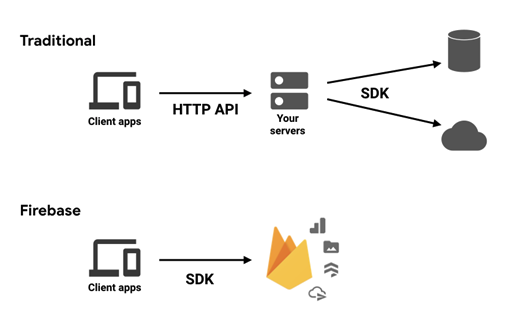
구글이 지원하는 모바일 및 웹 어플리케이션 개발 플랫폼이다.
인증, 데이터베이스, 클라우드 스토리지, 호스팅 등 여러 기능을 한번에 제공해준다.
여러가지 기능을 제공하지만 특히 API 서버 개발을 할 필요가 없게 해주기 때문에, 간단한 어플리케이션을 만들 때 주로 사용하게 된다.
Firebase 설정 및 적용
Firebase
Firebase 프로젝트를 설정하고, iOS 앱을 등록한 후, GoogleService-Info.plist 를 다운로드 받아서 프로젝트 파일에 추가한다.
Xcode Package (SPM)
File -> Add Package dependencies 로 firebase-ios-sdk 를 선택하고 필요한 라이브러리 들을 선택하여 패키지를 추가한다.
AppDelegate
AppDelegate 에서 Firebase 를 초기화한다.
class AppDelegate: NSObject, UIApplicationDelegate {
    func application(
        _ application: UIApplication,
        didFinishLaunchingWithOptions launchOptions: [UIApplication.LaunchOptionsKey : Any]? = nil
    ) -> Bool {

        FirebaseApp.configure()
        return true
    }
}

// MyApp.swift
@main
struct MyApp: App {
    @UIApplicationDelegateAdaptor(AppDelegate.self) var delegate
    //..
}
주요 API
Authentication
계정 로그인 기능을 쉽게 만들게 해준다. 휴대폰, 이메일, 여러가지 소셜 로그인을 제공한다.
이메일 방식 기본 코드
import SwiftUI
import FirebaseAuth

struct AuthView: View {
    @State private var email = ""
    @State private var password = ""
    @State private var isSignedIn = false

    var body: some View {
        VStack {
            TextField("Email", text: $email)
                .textFieldStyle(RoundedBorderTextFieldStyle())
                .padding()
            SecureField("Password", text: $password)
                .textFieldStyle(RoundedBorderTextFieldStyle())
                .padding()
            Button(action: signUp) {
                Text("회원가입")
            }
            .padding()
            Button(action: signIn) {
                Text("로그인")
            }
            .padding()
            Button(action: signOut) {
                Text("로그아웃")
            }
            .padding()
        }
    }

    func signUp() {
        Auth.auth().createUser(withEmail: email, password: password) { authResult, error in
            if let error = error {
                print("회원가입 실패: \(error.localizedDescription)")
            } else {
                print("회원가입 성공")
                isSignedIn = true
            }
        }
    }

    func signIn() {
        Auth.auth().signIn(withEmail: email, password: password) { authResult, error in
            if let error = error {
                print("로그인 실패: \(error.localizedDescription)")
            } else {
                print("로그인 성공")
                isSignedIn = true
            }
        }
    }

    func signOut() {
        do {
            try Auth.auth().signOut()
            isSignedIn = false
            print("로그아웃 성공")
        } catch let signOutError as NSError {
            print("로그아웃 실패: \(signOutError.localizedDescription)")
        }
    }
}
Firestore
NoSQL 기반의 데이터베이스 서버와 API를 제공한다.
Firestore 기본 코드
import SwiftUI
import FirebaseFirestore

struct FirestoreView: View {
    @State private var text = ""
    @State private var items = [String]()
    let db = Firestore.firestore()

    var body: some View {
        VStack {
            TextField("Enter text", text: $text)
                .textFieldStyle(RoundedBorderTextFieldStyle())
                .padding()
            Button(action: addItem) {
                Text("Add Item")
            }
            .padding()
            List(items, id: \.self) { item in
                Text(item)
            }
        }
        .onAppear(perform: fetchItems)
    }

    func addItem() {
        db.collection("items").addDocument(data: ["text": text]) { error in
            if let error = error {
                print("Error adding document: \(error.localizedDescription)")
            } else {
                print("Document added successfully")
                fetchItems()
            }
        }
    }

    func fetchItems() {
        db.collection("items").getDocuments { (querySnapshot, error) in
            if let error = error {
                print("Error fetching documents: \(error.localizedDescription)")
            } else {
                items = querySnapshot?.documents.compactMap { $0["text"] as? String } ?? []
            }
        }
    }

    func updateItem(documentId: String, newText: String) {
        db.collection("items").document(documentId).updateData(["text": newText]) { error in
            if let error = error {
                print("Error updating document: \(error.localizedDescription)")
            } else {
                print("Document updated successfully")
                fetchItems()
            }
        }
    }

    func deleteItem(documentId: String) {
        db.collection("items").document(documentId).delete() { error in
            if let error = error {
                print("Error deleting document: \(error.localizedDescription)")
            } else {
                print("Document deleted successfully")
                fetchItems()
            }
        }
    }
}
Storage
파일을 저장할 수 있다. (사진 등)
전역 싱글톤으로 다루기
import Foundation
import FirebaseFirestore
import FirebaseAuth

class FirestoreService {
    static let shared = FirestoreService()

    private let db = Firestore.firestore()

    private init() { }

    // MARK: - User Auth Methods

    func signUp(email: String, password: String) async throws -> AuthDataResult {
        return try await withCheckedThrowingContinuation { continuation in
            Auth.auth().createUser(withEmail: email, password: password) { authResult, error in
                if let error = error {
                    continuation.resume(throwing: error)
                } else if let authResult = authResult {
                    continuation.resume(returning: authResult)
                }
            }
        }
    }

    func signIn(email: String, password: String) async throws -> AuthDataResult {
        return try await withCheckedThrowingContinuation { continuation in
            Auth.auth().signIn(withEmail: email, password: password) { authResult, error in
                if let error = error {
                    continuation.resume(throwing: error)
                } else if let authResult = authResult {
                    continuation.resume(returning: authResult)
                }
            }
        }
    }

    func signOut() async throws {
        do {
            try Auth.auth().signOut()
        } catch let signOutError as NSError {
            throw signOutError
        }
    }

    // MARK: - Firestore Methods

    func addItem(text: String) async throws {
        return try await withCheckedThrowingContinuation { continuation in
            db.collection("items").addDocument(data: ["text": text]) { error in
                if let error = error {
                    continuation.resume(throwing: error)
                } else {
                    continuation.resume(returning: ())
                }
            }
        }
    }

    func fetchItems() async throws -> [String] {
        return try await withCheckedThrowingContinuation { continuation in
            db.collection("items").getDocuments { (querySnapshot, error) in
                if let error = error {
                    continuation.resume(throwing: error)
                } else {
                    let items = querySnapshot?.documents.compactMap { $0["text"] as? String } ?? []
                    continuation.resume(returning: items)
                }
            }
        }
    }

    func updateItem(documentId: String, newText: String) async throws {
        return try await withCheckedThrowingContinuation { continuation in
            db.collection("items").document(documentId).updateData(["text": newText]) { error in
                if let error = error {
                    continuation.resume(throwing: error)
                } else {
                    continuation.resume(returning: ())
                }
            }
        }
    }

    func deleteItem(documentId: String) async throws {
        return try await withCheckedThrowingContinuation { continuation in
            db.collection("items").document(documentId).delete() { error in
                if let error = error {
                    continuation.resume(throwing: error)
                } else {
                    continuation.resume(returning: ())
                }
            }
        }
    }
}
사용 예제
import SwiftUI

struct AuthView: View {
    @State private var email = ""
    @State private var password = ""
    @State private var isSignedIn = false
    @State private var errorMessage: String?

    var body: some View {
        VStack {
            TextField("Email", text: $email)
                .textFieldStyle(RoundedBorderTextFieldStyle())
                .padding()
            SecureField("Password", text: $password)
                .textFieldStyle(RoundedBorderTextFieldStyle())
                .padding()
            Button(action: signUp) {
                Text("Sign Up")
            }
            .padding()
            Button(action: signIn) {
                Text("Sign In")
            }
            .padding()
            Button(action: signOut) {
                Text("Sign Out")
            }
            .padding()
            if let errorMessage = errorMessage {
                Text(errorMessage)
                    .foregroundColor(.red)
                    .padding()
            }
        }
    }

    func signUp() {
        Task {
            do {
                let _ = try await FirestoreService.shared.signUp(email: email, password: password)
                print("User signed up successfully")
                isSignedIn = true
            } catch {
                errorMessage = "Error signing up: \(error.localizedDescription)"
            }
        }
    }

    func signIn() {
        Task {
            do {
                let _ = try await FirestoreService.shared.signIn(email: email, password: password)
                print("User signed in successfully")
                isSignedIn = true
            } catch {
                errorMessage = "Error signing in: \(error.localizedDescription)"
            }
        }
    }

    func signOut() {
        Task {
            do {
                try await FirestoreService.shared.signOut()
                print("User signed out successfully")
                isSignedIn = false
            } catch {
                errorMessage = "Error signing out: \(error.localizedDescription)"
            }
        }
    }
}
참고자료
Getting started with Firebase on Apple platforms
Cloud Firestore 시작하기
Apple 프로젝트에 Firebase 추가

Ace