JAVA 객체(Command Object)로 받기
- set property를 사용하여 parameter를 Java객체에 binding한다.
- 기본적으로 '객체타입명'으로 Model attribute 추가
- 다른 이름 쓸 경우 @ModelAttribute 지정
@PathVariable
/**
     * @PathVariable 사용
     * <p>
     * request url 을 통해 parameter 를 받는 방법은 다음 방법들이 있다
     * /API_NAME?key1=val1   <-- query string 사용
     * /API_NAME/{value1}    <-- path variable 사용
     */

    @RequestMapping("/writePath/{name}/{subject}/{k3}")
    @ResponseBody
    public String writePathBoard(
            @PathVariable String name,
            @PathVariable String subject,
            @PathVariable(name = "k3") String content
    ) {
        return """
                name: %s<br>
                subject: %s<br>
                content: %s<br>
                """.formatted(name, subject, content);
    }
Redirect
- Client -> server에 page1 요청(page2로 가겠다는) -> Server: page2로 가세요, 하고 response code 보냄 -> Client -> server에 page2 요청 : Client -> page2 요청한 것처럼 보임
- 로그인이 되어있지 않으면 로그인 페이지로 redirect 하는 등의 경우
    //-----------------------------------
    // redirect
    //  "redirect:{url}" 을 리턴 => redirect 를 response
    //   redirect 의 response code 는 3xx

    @RequestMapping("/ageInput")
    public void ageInput() {
    }

    @RequestMapping("/ageCheck")
    public String chkAge(int age,
                         RedirectAttributes redirectAttributes) // redirect 되는 request 에 담을 parameter 지정, query string 에 담겨 간다
    {
        redirectAttributes.addAttribute("age", age);

        if (age < 19) {
            return "redirect:/user/underAge";   // view가 아닌 redirect 됨
        } else {
            return "redirect:/user/adult";
        }
    }

    @RequestMapping("/underAge")
    @ResponseBody
    public String pageUnderAge(int age) {
        return """
                미성년자<br>
                나이: %s살, %s년 뒤에 사용 가능
                """.formatted(age, 19 - age);
    }

    @RequestMapping("/adult")
    @ResponseBody
    public String pageAdult(int age) {
        return """
                성인<br>
                나이: %d살
                """.formatted(age);
    }
Forward
- Java 진영에서만 발생하는 mechanism
- Client -> A 요청 -> Server 내부(Tomcat의 Container)에서 A-> B -> Client: B 받음(but URL: A)
MyBatis
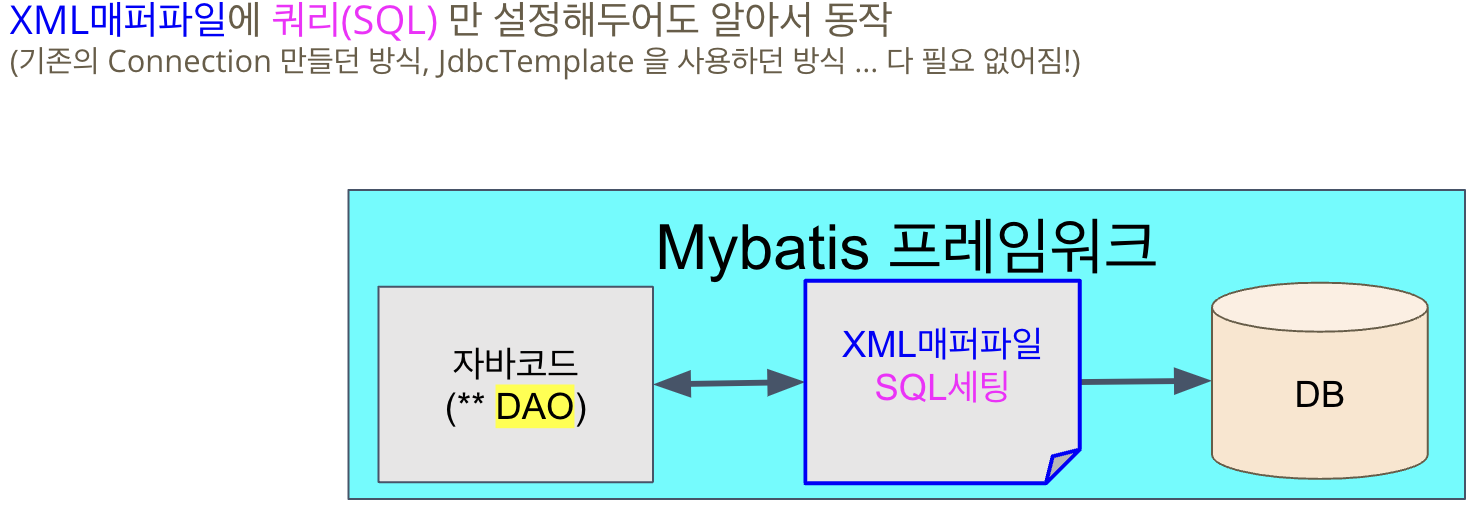
- DB 트랜잭션은 손이 너무 가서 더 편하게 SQL을 다룰 수 있게 하기 위해 등장
- XML 설정파일에 SQL문과 객체를 연결(SQL Mapper)
SQL Mapping
- XML Mapper file 만들면: Mybatis에서 자바 interface를 연결하여 DB와 연결된 구현체를 만듬
- 개발자가 할 일: interface 제공/mapper file 제공
- interface 내 method : SQL setting = 1:1
mysql: database url 반드시 명시해야한다. database url 설정을 주의하자
CRUD(Create / Read / Update / Delete) 이용 게시판 만들기
1. ERD 설계 (데이터 계층)
- 테이블 구조 설계
- 관계 설정
- SQL 스크립트 작성
- Domain(Entity) 클래스 생성
- ERD를 기반으로 만든 테이블과 매핑되는 객체
- 데이터의 구조를 자바 클래스로 표현
public class Post {
    private Long id;
    private String subject;
    private String content;
    // getter, setter...
}
2. Repository(Mapper) 인터페이스
- DB 작업을 위한 메소드 선언
- MyBatis의 경우 mapper.xml과 매핑됨
public interface PostRepository {
    int save(Post post);
    Post findById(Long id);
    // ...
}
3. Mapper XML
- Repository 인터페이스에 선언된 메소드의 실제 SQL 구현
<insert id="save">
    INSERT INTO post(subject, content)
    VALUES(#{subject}, #{content})
</insert>
4. Service 클래스
- 비즈니스 로직 구현
- Repository를 통해 DB 작업 수행
@Service
public class PostService {
    private final PostRepository repository;

    public void write(Post post) {
        repository.save(post);
    }
}
5. Controller 클래스
- 클라이언트 요청 처리
- Service를 통해 비즈니스 로직 수행
@Controller
public class PostController {
    private final PostService service;

    @PostMapping("/write")
    public String write(Post post) {
        service.write(post);
        return "redirect:/list";
    }
}
Junior Backend Developer