🔍 계산기 분석
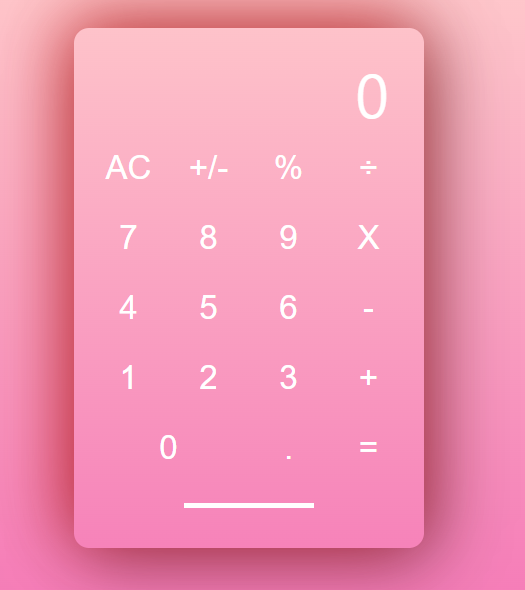
와이어 프레임으로 나누어본 모습
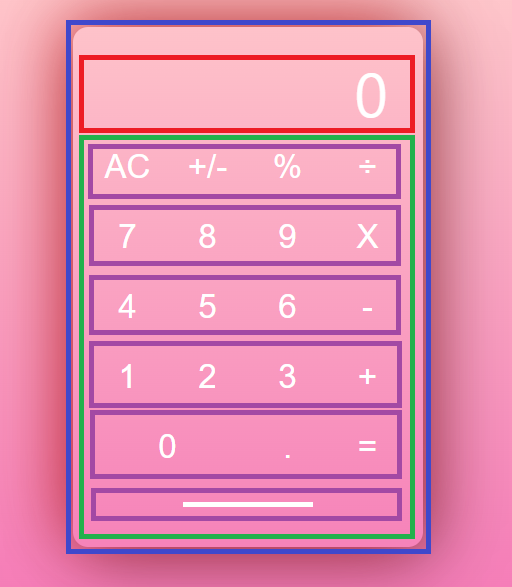
HTML
<body>
    <div class="calculator">
        <nav>
            <p>0</p>
        </nav>
        <main>
            <section class="btn_row">
                <button>AC</button>
                <button>+/-</button>
                <button>%</button>
                <button>÷</button>
            </section>
            <section class="btn_row">
                <button>7</button>
                <button>8</button>
                <button>9</button>
                <button>X</button>
            </section>
            <section class="btn_row">
                <button>4</button>
                <button>5</button>
                <button>6</button>
                <button>-</button>
            </section>
            <section class="btn_row">
                <button>1</button>
                <button>2</button>
                <button>3</button>
                <button>+</button>
            </section>
            <section class="btn_row">
                <button id="zero_btn">0</button>
                <button>.</button>
                <button>=</button>
            </section>
            <section class="bottom_line"></section>
        </main>
    </div>
</body>
CSS
* {
    box-sizing: border-box;
    padding: 0;
    margin: 0;
    color: white;
}

body {
    display: flex;
    justify-content: center;
    align-items: center;
    background: linear-gradient(to bottom, #ffcccc, #f579b7);
    height: 100vh;
}

.calculator {
    width: 350px;
    height: 520px;
    border-radius: 15px;
    box-shadow: -10px -10px 70px #db1010a1, 10px 10px 70px #00000079;
    padding: 5px;
}

nav {
    display: flex;
    flex-direction: row-reverse;
    height: 100px;
    font-size: 60px;
    padding: 20px 30px;
}

main {
    display: flex;
    flex-direction: column;
    align-items: center;
    justify-content: center;
}

section {
    display: flex;
    width: 100%;
    text-align: center;
    justify-content: center;
}

button {
    font-size: 33px;
    border-style: none;
    border-radius: 50%;
    background: none;
    width: 60px;
    height: 60px;
    margin: 5px 10px;
}

#zero_btn {
    flex-grow: 0.8;
    border-radius: 20px;
}

.bottom_line {
    background-color: white;
    border-radius: 5px;
    width: 130px;
    height: 5px;
    margin-top: 20px;
}

정리노트