전 포스팅에서 Oracle에서 jar을 이용해 SQL을 다루었을 때는 main에서 모든 과정을 다루었다.
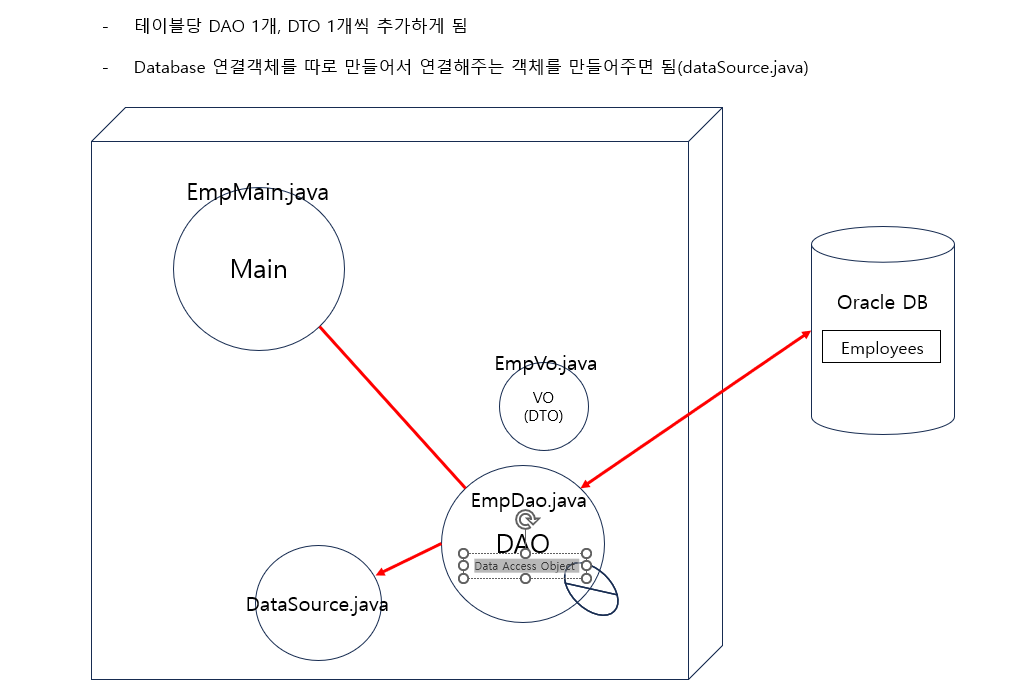
그렇지만 실제 과정에서는 객체와 테이블이 늘어나기 때문에 한 곳에 때려넣으면 스파게티 코드가 되므로 package 내에 파일분리를 통한 정리가 필요하다.
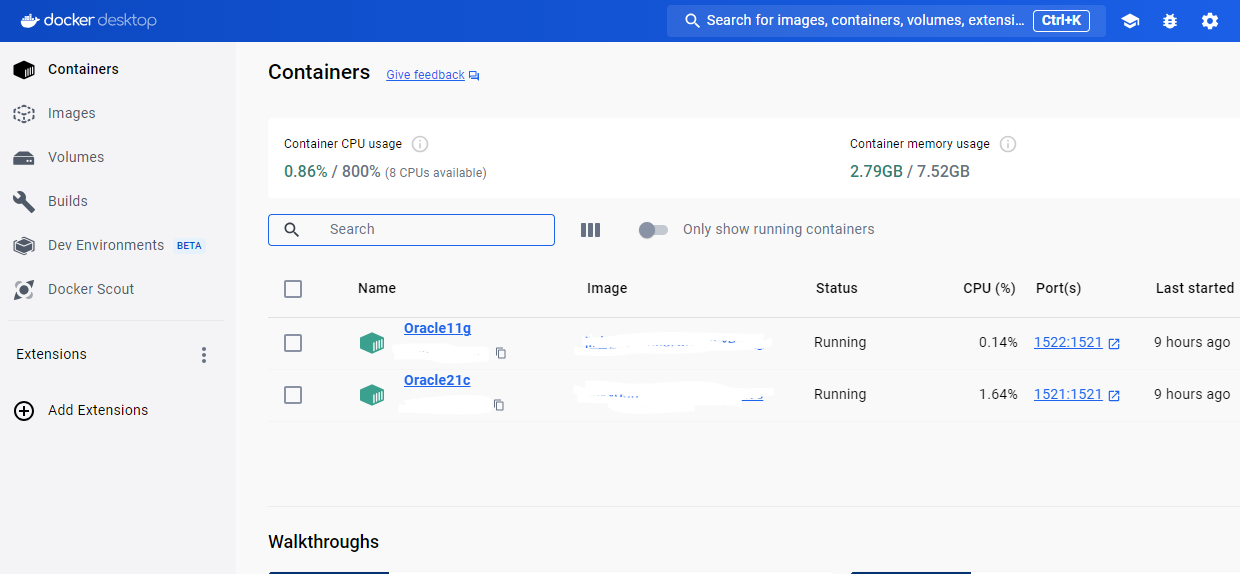
OracleSQLDeveloper 내에서 확인할 때 11g버전과 21c버전을 동시에 보기 위해 Docker 환경에서 빌트시켜 사용했다.
-
작동환경
JDK21, Eclipse-jee-2024-03 win 64bit
Oracle SQL Developer
Docker 사용, Oracle21g
데이터베이스로 Employee, Job History, Department 등 예제 테이블 사용
InsertEmp (EmpDao.java)
PreparedStatement를 사용해서
@Override
	public void insertEmp(EmpVo emp) {
		Connection con = null;
		try {
			con= DataSource.getConnection();
			String sql="insert into employees(employee_id, first_name, last_name, email,"
					+"phone_number, hire_date, job_id, salary, commission_pct, manager_id,"
					+"department_id) values (?,?,?,?,?, sysdate,?,?,?,?,?)";

			PreparedStatement stmt = con.prepareStatement(sql);
			stmt.setInt(1,emp.getEmployeeId());
			stmt.setString(2, emp.getFirstName());
			stmt.setString(3, emp.getLastName());
			stmt.setString(4, emp.getEmail());
			stmt.setString(5, emp.getPhoneNumber());
			stmt.setString(6, emp.getJobId());
			stmt.setDouble(7, emp.getSalary());
			stmt.setDouble(8, emp.getCommissionPct());
			stmt.setInt(9, emp.getManagerId());
			stmt.setInt(10, emp.getDepartmentId());
			stmt.executeUpdate();

		} catch (Exception e) {
			throw new RuntimeException(e); //unchecked exception
		}finally {
			DataSource.closeConncetion(con);
		}
}- 🐛 Bug : getElement(), @Getter가 객체를 인식하지 못하는 경우
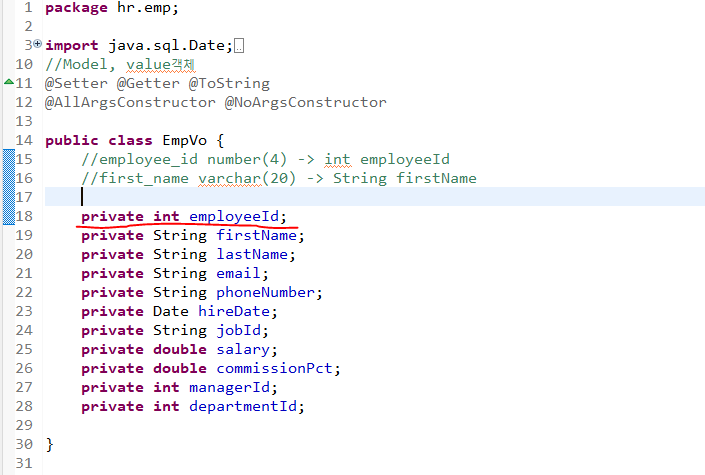
작성시 get객체이름 이 전부 먹히지 않는 경우
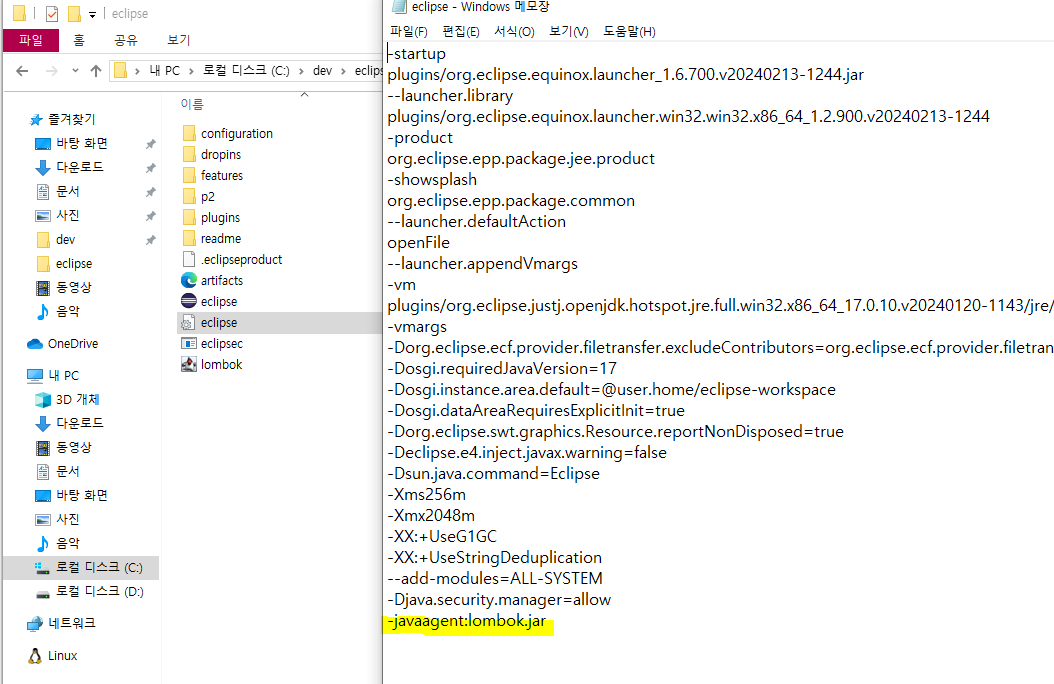
EmpVo.java로 가 파일을 확인해보면 모두 빨간줄로 인식하지 못하는 경우가 있다.
Sol :
그럴경우 이클립스를 종료시키고 이클립스 설치 경로로 가 eclipse파일을 메모장으로 열어 해당 파일에 오타가 없는지 확인한다. (내 경우는 작대기(-) 다음에 공백이 있어서 인식이 안되었다.)
selectEmp(EmpDao.java)
EmpDao.java
@Override
	public EmpVo selectEmp(int employeeId) {
		Connection con = null;
		try {
			con=DataSource.getConnection();
			//select * 찍는건 지양하기. 이후에 테이블의 구조가 변경되어 원치않는 정보가 나올수 있기 때문
			String sql="select employee_id, first_name, last_name, email, phone_number, "
					+"hire_Date, job_id, salary, commission_pct, manager_id, department_id "
					+"from employees where employee_id=?";
			PreparedStatement stmt = con.prepareStatement(sql);
			stmt.setInt(1, employeeId);
			ResultSet rs = stmt.executeQuery();
			if(rs.next()) {
				//조회한 데이터가 있을 경우
				EmpVo emp = new EmpVo();
				emp.setEmployeeId(rs.getInt("employee_id"));
				emp.setFirstName(rs.getString("first_name"));
				emp.setLastName(rs.getString("last_name"));
				emp.setEmail(rs.getString("email"));
				emp.setPhoneNumber(rs.getString("phone_number"));
				emp.setHireDate(rs.getDate("hire_date"));
				emp.setJobId(rs.getString("job_id"));
				emp.setSalary(rs.getDouble("salary"));
				emp.setCommissionPct(rs.getDouble("commission_pct"));
				emp.setManagerId(rs.getInt("manager_id"));
				emp.setDepartmentId(rs.getInt("department_id"));
				return emp;
			}else {
				//조회한 데이터가 없을 경우
				throw new RuntimeException("조회한 사람의 정보가 없습니다.");
			}
		} catch (Exception e) {
			throw new RuntimeException(e); //unchecked exception
		}finally {
			DataSource.closeConncetion(con);
		}
//		return null;
	}
EmpMain.java
System.out.println("고객의 정보를 조회합니다.");
		try {
			EmpVo emp=dao.selectEmp(300);
			System.out.println(emp);
		} catch (RuntimeException e) {
			System.out.println(e.getMessage());
}- 🐛 Bug : 실행시 JOB_ID에 null을 할당할 수 없습니다.
EmpVo emp = new EmpVo(300,"JinKyoung","Heo","HEOJK","010",null,"IT_PROG",7000,0,103,60);실행시 JOB_ID에 null을 할당할 수 없습니다. 라는 오류가 발생함
1. EmpVo 에서 객체 입력 순서가 올바른지 확인하기
2. EmpDao에서 get 잘 받아왔는지 확인하기
→ hire_date는 sysdate로 직접받아오기 때문에 stmt.setString~ 같은 구문이 10개 반복되어야 하는데 hire_date를 getHireDate를 포함하여 10개가 됨(getDepartmentID가 빠짐)Sol :
stmt.setDate(6,emp.getDireDate());를 삭제하고stmt.setInt(10, emp.getDepartmentId()) 추가하여 맞춰줌
selectAllEmps()
List EmpList=new ArrayList<>(); 생성 후 empList.add(emp);
@Override
	public List<EmpVo> selectAllEmps() {
		Connection con = null;
		List<EmpVo> empList=new ArrayList<>();
		try {
			con=DataSource.getConnection();
			String sql="select * from employees";
			PreparedStatement stmt = con.prepareStatement(sql);
			ResultSet rs=stmt.executeQuery();
			while(rs.next()) {
				//rs에서 정보를 조회해서 emp 객체에 저장하고
				EmpVo emp = new EmpVo();
				emp.setEmployeeId(rs.getInt("employee_id"));
				emp.setFirstName(rs.getString("first_name"));
				emp.setLastName(rs.getString("last_name"));
				emp.setEmail(rs.getString("email"));
				emp.setPhoneNumber(rs.getString("phone_number"));
				emp.setHireDate(rs.getDate("hire_date"));
				emp.setJobId(rs.getString("job_id"));
				emp.setSalary(rs.getDouble("salary"));
				emp.setCommissionPct(rs.getDouble("commission_pct"));
				emp.setManagerId(rs.getInt("manager_id"));
				emp.setDepartmentId(rs.getInt("department_id"));
				empList.add(emp); //emp객체를 empList에 add()해야함
			}

		} catch (Exception e) {
			throw new RuntimeException(e); //unchecked exception
		}finally {
			DataSource.closeConncetion(con);
		}
		return empList; //리턴 empList 체크하기
	}
//모든 사원의 정보 조회 테스트
List<EmpVo> empList=dao.selectAllEmps();
**for**(EmpVo emp: empList) {
System.***out***.println(emp);
}deleteEmp
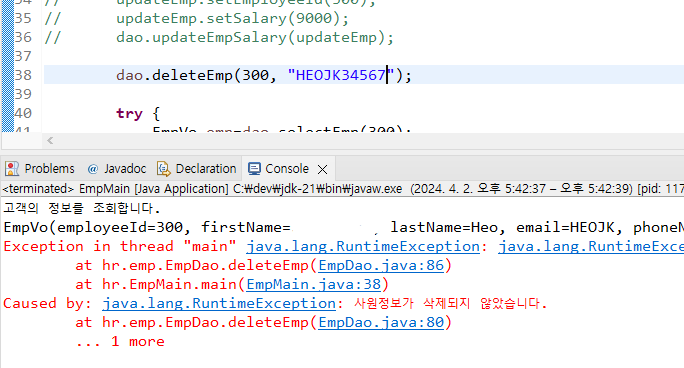
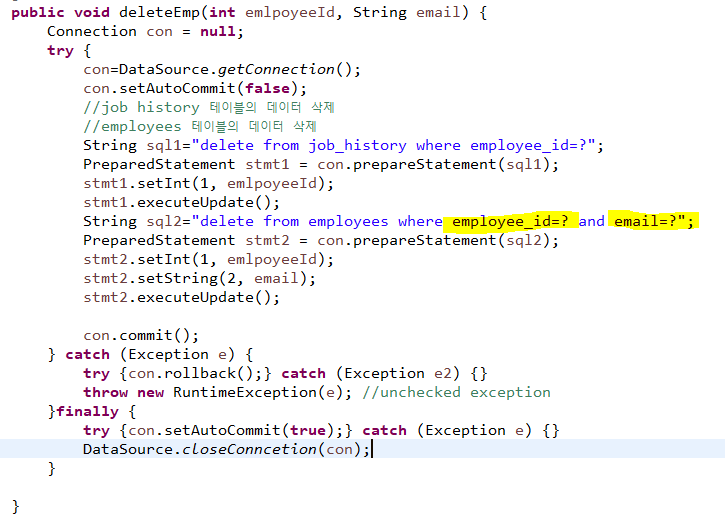
만약 employee_id는 정상적으로 입력되었는데 email이 틀리다면 sql2 구문은 false를 반환해서 아무런 값도 나오지 않게 된다.
실제 시스템에 들어가게 된다면 문제다. 정상적으로 실행되지 않아야하지만 아이디와 이메일이 맞지 않아도 delete구문이 실행이 되게 되니까.
그렇다면 정상적으로 아이디와 이메일이 알맞지 않아 실행이 되지 않은 경우를 어떻게 알 수 있을까?
stmt2.executeUpdate()의 값을 통해 알수 있다.
해당 값이 0이라는 뜻은 정상적으로 실행되었으나 0개가 업데이트가 되었다는 것이다.
그러므로 해당 코드를 stmt2.executeUpdate();뒤에 추가한다.
int deleteCount= stmt2.executeUpdate();
			if(deleteCount == 0) {//delete 구문이 정상적으로 작동하지 않은 경우
				throw new RuntimeException("사원정보가 삭제되지 않았습니다.");
			}
요렇게 추가하면 아이디와 이메일이 매치되지 않을 경우에 예외를 날려주게 된다.