rest service를 만들게 되면, session을 관리해야하는 일들이 종동 발행한다. 물론 redis와 같은 메모리DB을 자주 사용하지만 MongoDB에도 collection에 index를 생성하여 사용가능하다. 이미 프로젝트의 DB가 MongoDB라면 비용을 낮추는데 용이하다.
예제코드
import (
	"context"
	"fmt"
	"go.mongodb.org/mongo-driver/bson"
	"go.mongodb.org/mongo-driver/mongo"
	"go.mongodb.org/mongo-driver/mongo/options"
)

const (
	uri = "<connection string>"
    dbName = "<db name>"
    collName = "<coll name>"
    )
//const uri = "mongodb://localhost:27017"

const ttlDurationSec int32 = 15

func TestCreaetIndex(t *testing.T) {
	// Use the SetServerAPIOptions() method to set the Stable API version to 1
	serverAPI := options.ServerAPI(options.ServerAPIVersion1)
	opts := options.Client().ApplyURI(uri).SetServerAPIOptions(serverAPI)
	// Create a new client and connect to the server
	client, err := mongo.Connect(context.TODO(), opts)
	if err != nil {
		panic(err)
	}
	defer func() {
		if err = client.Disconnect(context.TODO()); err != nil {
			panic(err)
		}
	}()

    coll := client.Database(dbName).Collection(collName)

	index := mongo.IndexModel{
		Keys:    bsonx.Doc{{Key: "createdAt", Value: bsonx.Int32(1)}},
		Options: options.Index().SetExpireAfterSeconds(ttlDurationSec),
	}
	_, err = coll.Indexes().DropAll(context.TODO())
	assert.NoError(t, err, "failed to drop index")

    _, err = coll.Indexes().CreateOne(context.TODO(), index)
	assert.NoError(t, err, "failed to create index")
}


func TestTTL(t *testing.T) {
	// Use the SetServerAPIOptions() method to set the Stable API version to 1
	serverAPI := options.ServerAPI(options.ServerAPIVersion1)
	opts := options.Client().ApplyURI(uri).SetServerAPIOptions(serverAPI)
	// Create a new client and connect to the server
	client, err := mongo.Connect(context.TODO(), opts)
	if err != nil {
		panic(err)
	}
	defer func() {
		if err = client.Disconnect(context.TODO()); err != nil {
			panic(err)
		}
	}()

    coll := client.Database(dbName).Collection(collName)

	type jwtInfo struct {
		Id          interface{} `bson:"_id"`
		AccessToken string      `bson:"accessToken"`
		CreatedAt   time.Time   `bson:"createdAt"` // must be dateType
		ExpireOn    int64       `bson:"expireOn"`
	}

	u := jwtInfo{
		AccessToken: "test0",
		CreatedAt:   time.Now(),
		ExpireOn:    time.Now().Add(time.Duration(ttlDurationSec)).Unix(),
	}
    _, err = coll.InsertOne(context.Background(), u)
	assert.NoError(t, err, "failed to insert")
}
- 참고로 DB Conection이 두개의 Test function에서 코드 중복이 발생하지만, TestCode라 그냥 넘어가요..
mongoDb conection example with golang
데이터가 일정시간이 지난후에 삭제가 되기 위해서는 collection에 index를 먼저 생성하고, 데이터를 넣어야 한다. (추후에 index를 생성해도 삭제가 되지만, 미연에 실수를 방지)
위 예제에서는 TestCreaetIndex -> TestTTL 순으로 실행을 추천한다.
index를 생성시에는 필드명(여기는 "createdAt")을 정확히 적어야하며, SetExpireAfterSeconds option을 명시하여야 한다.
index := mongo.IndexModel{
		Keys:    bsonx.Doc{{Key: "createdAt", Value: bsonx.Int32(1)}},
		Options: options.Index().SetExpireAfterSeconds(ttlDurationSec),
	}
아래와 같이 "creaetAt"이라는 필드에 option을 확인 가능하다.
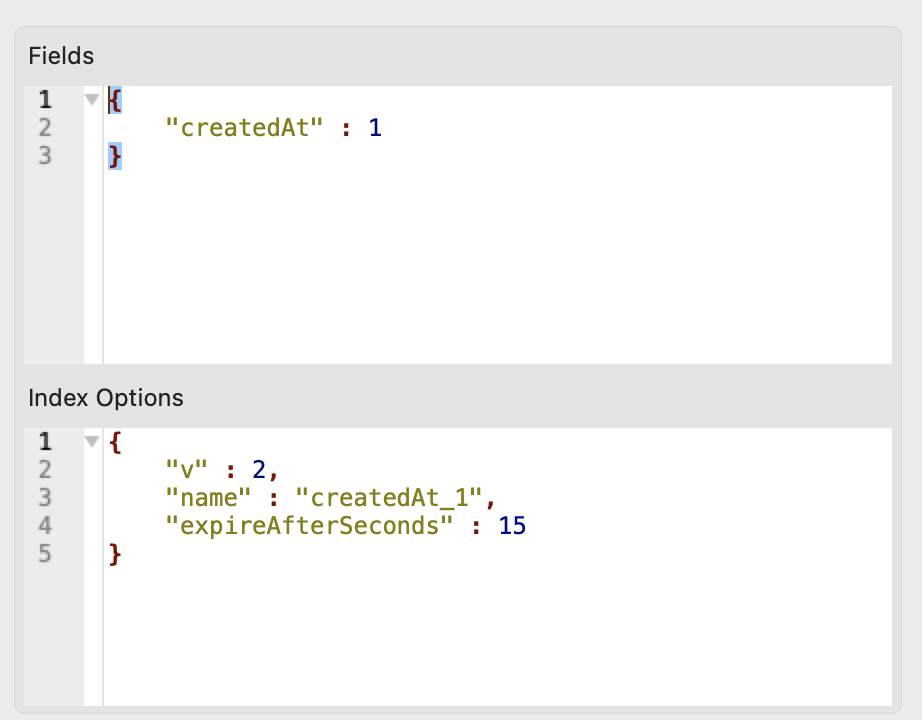
이제 TestTTL function을 실행시켜 해당 collection에 데이터를 넣어보자.
ttlDurationSec에서 15초를 넣었으므로 생성 후 15초 뒤에 데이터가 삭제되는것이 확인 가능하다. 만약 삭제 되지 않는다면 collection의 index를 살펴보자.
더하여 mongoDB에서 TTL 활성화 가능필드는 Date 타입만이 가능하다.
아래에서 "CreatedAt"는 무조건 Date타입이 필수이다, 하지만 개발의 편의를 위한 ExpireOn은 int64로 저장하여 데이터 크기의 낭비를 막는다.
	u := jwtInfo{
		AccessToken: "test0",
		CreatedAt:   time.Now(),
		ExpireOn:    time.Now().Add(time.Duration(ttlDurationSec)).Unix(),
	}
Redis와 비교하였을때(data row마다 TTL을 세팅 가능), mongoDB에서 TTL 타입을 조정하기 위해서는 해당 필드에 있는 index를 제거하고 다시 만들어 줘야한다. 사용하면서 이점이 약간을 불편하였습니다.
index를 삭제하고 다시 만들어 준다.
	_, err = coll.Indexes().DropAll(context.TODO())
	assert.NoError(t, err, "failed to drop index")

    _, err = coll.Indexes().CreateOne(context.TODO(), index)
	assert.NoError(t, err, "failed to create index")
더하여 expire 시간을 확은하는 task가 60초마다 수행함으로, 데이터가 정확한 시간에 삭제 되지 않는다. 0~60의 오차 범위를 가지게 됨으로 정확하게 삭제가 되어야하는곳에서는 사용이 번거롭다.

감사합니다