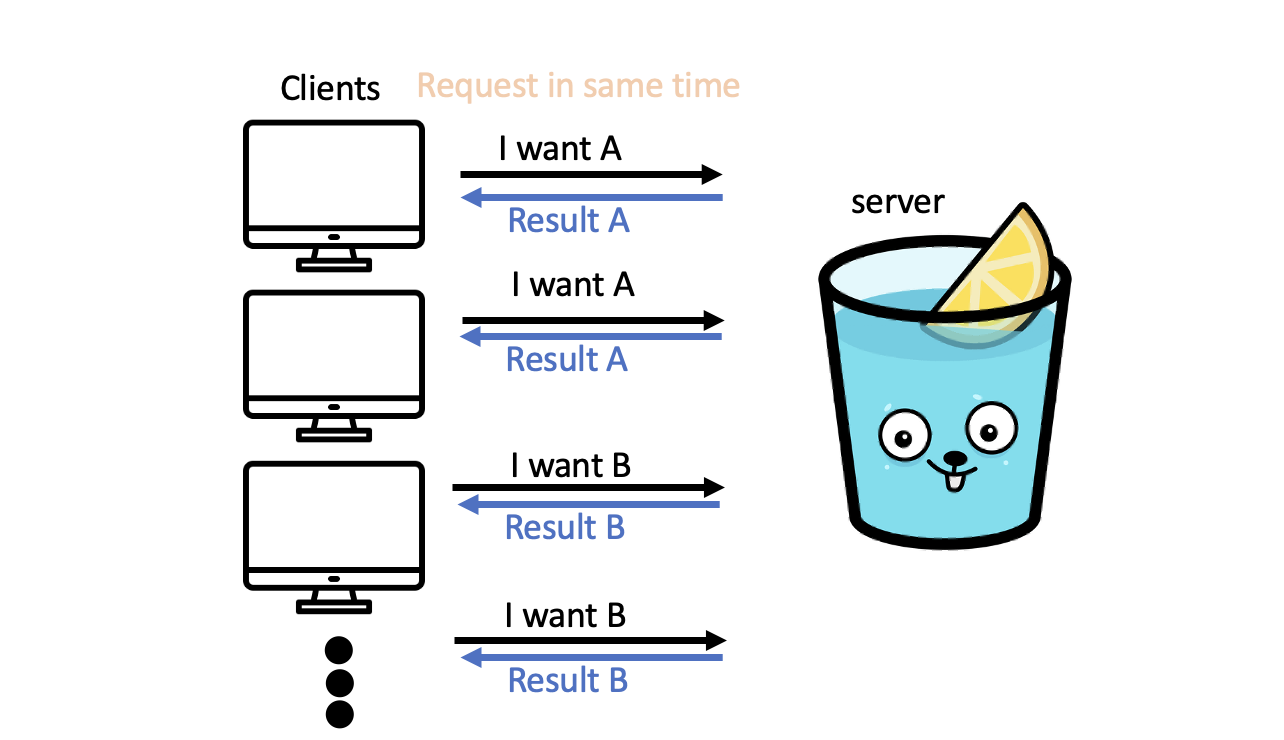
예를들어 web에서 많은 사람들(client)이 동시에 똑같은 패턴의 request를 요청하고 respons 또한 같다고 한다면, 똑같은 Processing을 여러번 계산해야하는 낭비가 발생한다.
이런한 경우 Go Package인 Singleflight를 활용한 코드 최적화를 해결해 보자.
구현
테스트를 위하여 sever.go, client_test.go 파일을 생성 하겠습니다.
server.go에서는 client에서 parameter(여기서는 name)와 /ping을 호출 하기를 기다리고 있습니다.(processingRequest를 처리하는 데에는 1초가 소요된다고 가정)
package main

import (
	"fmt"
	"math/rand"
	"net/http"
	"time"

	"github.com/gin-gonic/gin"
)

func main() {
	r := gin.Default()
	r.GET("/ping", func(c *gin.Context) {
		name := c.Query("name")
		result := processingRequest(name)
		c.JSON(http.StatusOK, gin.H{
			"message": result,
		})
	})
	r.Run()
}

func processingRequest(name string) string {
	time.Sleep(time.Second)
	fmt.Println("called processingRequest function, name is ", name)
	r := rand.New(rand.NewSource(time.Now().UnixNano()))
	return fmt.Sprintf("your request is %v, number is %v ", name, r.Intn(100))
}
client_test.go에서는 10개의 client가 동시에 request를 요청 하도록 하였습니다.(chennel을 이용하여 동시에 호출하도록 하였습니다)
func TestClient(t *testing.T) {
	endpoint := "http://localhost:8080/ping?name=divan"
	totalRequests := 10
	ch := make(chan interface{})
	wg := sync.WaitGroup{}
	for i := 0; i < totalRequests; i++ {
		wg.Add(1)
		go func(i int) {
			defer wg.Done()
			<-ch
			t.Log("time", time.Now(), "response", makeAPICall(endpoint))
		}(i)
	}
	close(ch)
	wg.Wait()
}
이제 sever.go와 client_test.go를 실행시에 생성된 로그는 아래와 같습니다.
server.go의 log에서는 processingRequest function이 10번(client request 횟수) 호출.
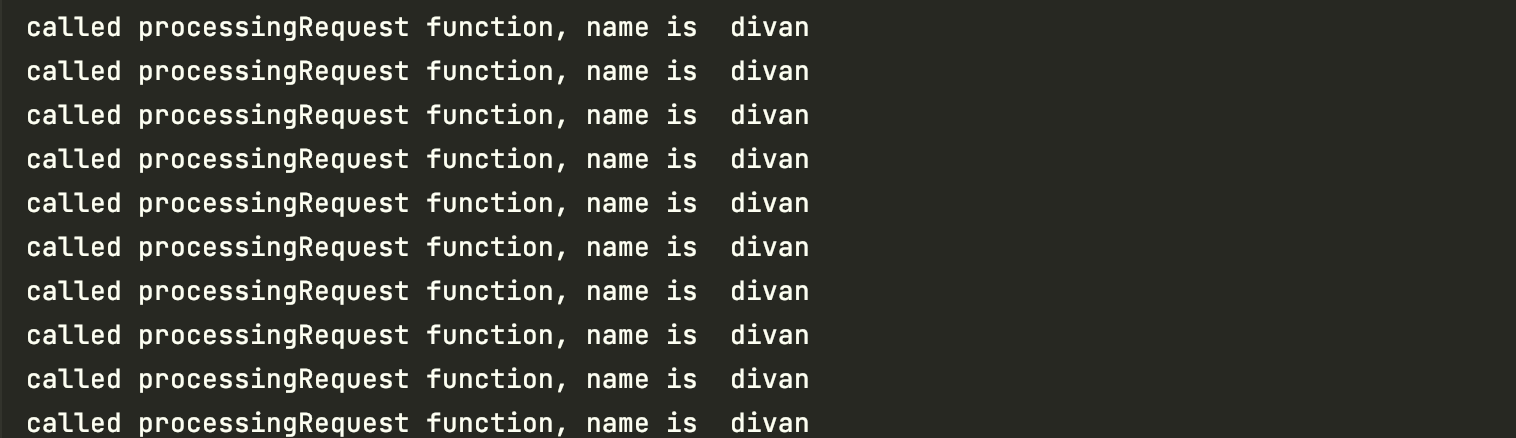
client_test.go에서는 10번의 응답을 받았으며, 서버에서 processingRequest에서 생성되는 number의 값이 각각 다른것을 확인 가능하다.

API가 호출되는 만큼 같은 수행(processingRequest)을 한다.
이제 Singleflight를 활용하여 코드를 수정해 보자.
package main

import (
	"fmt"
	"math/rand"
	"net/http"
	"time"

	"github.com/gin-gonic/gin"
	"golang.org/x/sync/singleflight"
)

func main() {
	r := gin.Default()
	g := singleflight.Group{}
	r.GET("/ping", func(c *gin.Context) {
		name := c.Query("name")
		result, _, _ := g.Do(name, func() (interface{}, error) {
			return processingRequest(name), nil
		})
		c.JSON(http.StatusOK, gin.H{
			"message": result,
		})
	})
	r.Run()
}

func processingRequest(name string) string {
	time.Sleep(time.Second)
	fmt.Println("called processingRequest function, name is ", name)
	r := rand.New(rand.NewSource(time.Now().UnixNano()))
	return fmt.Sprintf("your request is %v, number is %v ", name, r.Intn(100))
}
코드 수정 후 서버를 다시 실행하여 결과를 확인해 보자.


server와 client의 log를 확인해보면, server에서는 processingRequest가 한번만 실행 되고 client는 10번의 결과를 받은것을 확인 가능하다.
singleflight는 어떻게 동작하는가?
- singleflight.Do() funtion은 key와 실행하고자 하는 function을 파라미터로 받습니다.
- key로 map을 생성하고 fn을 실행합니다.
- 같은 key로 do()를 호출하게 된다면, 기존에 실행 함수가 완료되지 않았다면 대기(c.wg.wait()) 합니다.
- 처음에 들어간 함수가 완료되면, 대기 중인 호출도 한 번에 같은 결과 값을 받습니다.
func (g *Group) Do(key string, fn func() (interface{}, error)) (v interface{}, err error, shared bool) {
	g.mu.Lock()
	if g.m == nil {
		g.m = make(map[string]*call)
	}
	if c, ok := g.m[key]; ok {
		c.dups++
		g.mu.Unlock()
		c.wg.Wait()

		if e, ok := c.err.(*panicError); ok {
			panic(e)
		} else if c.err == errGoexit {
			runtime.Goexit()
		}
		return c.val, c.err, true
	}
	c := new(call)
	c.wg.Add(1)
	g.m[key] = c
	g.mu.Unlock()

	g.doCall(c, key, fn)
	return c.val, c.err, c.dups > 0
}
	// use double-defer to distinguish panic from runtime.Goexit,
	// more details see https://golang.org/cl/134395
	defer func() {
		// the given function invoked runtime.Goexit
		if !normalReturn && !recovered {
			c.err = errGoexit
		}

		g.mu.Lock()
		defer g.mu.Unlock()
		c.wg.Done()
		if g.m[key] == c {
			delete(g.m, key)
		}

		if e, ok := c.err.(*panicError); ok {
			// In order to prevent the waiting channels from being blocked forever,
			// needs to ensure that this panic cannot be recovered.
			if len(c.chans) > 0 {
				go panic(e)
				select {} // Keep this goroutine around so that it will appear in the crash dump.
			} else {
				panic(e)
			}
		} else if c.err == errGoexit {
			// Already in the process of goexit, no need to call again
		} else {
			// Normal return
			for _, ch := range c.chans {
				ch <- Result{c.val, c.err, c.dups > 0}
			}
		}
	}()

	func() {
		defer func() {
			if !normalReturn {
				// Ideally, we would wait to take a stack trace until we've determined
				// whether this is a panic or a runtime.Goexit.
				//
				// Unfortunately, the only way we can distinguish the two is to see
				// whether the recover stopped the goroutine from terminating, and by
				// the time we know that, the part of the stack trace relevant to the
				// panic has been discarded.
				if r := recover(); r != nil {
					c.err = newPanicError(r)
				}
			}
		}()

		c.val, c.err = fn()
		normalReturn = true
	}()

	if !normalReturn {
		recovered = true
	}
}
결론
singlefight는 web의 request만의 처리를 위한 package는 아니다. 하지만 DB로부터 data를 읽는것과 같이 시간이 오래걸리는 처리시에 유용하게 사용 가능하다.
singlefight.Do() 내부에서 lock을 하는 부분이 있어, 사용에 있어서 유념해야 한다.

달달하게 배우고 갑니다