2.2.4 컨테이너를 외부에 노출
컨테이너를 외부에 노출
- 컨테이너는 가상 머신과 마찬가지로 가상 IP 주소를 할당 받습니다.
- 기본적으로 도커는 컨테이너에 172.17.0.x의 IP를 순차적으로 할당합니다.
컨테이너 안에서 ifconfig 명령어로 컨테이너의 네트워크 인터페이스 확인!
만약 error
bash ifconfig command not found
발견된다면
google에 "bash ifconfig command not found ubuntu docker"
검색 해서 해결 하시면 될 것입니다.!
apt-get update
apt-get install net-tools
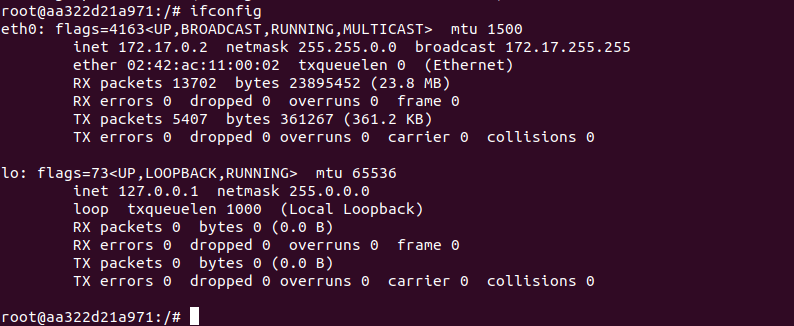
도커의 NAT IP인 172.17.0.2 할당 받은 eth0
로컬 호스트인 lo 인터페이스
외부에 컨테이너 안에 애플리케이션을 노출하기 위해서 eth0의 IP와 포트를
호스트의 IP와 포트에 바인딩해야 한다
sudo docker run -i -t --name mywebserver -p 80:80 ubuntu:18.04
호스트의 80번 포트와 컨테이너의 80번 포트를 연결하는 명령어!
여러개의 포트를 개방하려면
sudo docker run -i -t -p 3306:3306 -p 192.168.0.100:7777:80 ubuntu:18.04
에러....
Status: Downloaded newer image for ubuntu:18.04
docker: Error response from daemon: driver failed programming external connectivity on endpoint crazy_mirzakhani (913508586d6c398eb11ee665e19d89cb1f51c412ba5e2cb4e5fb5cbdf00225dd): Error starting userland proxy: listen tcp4 192.168.0.100:7777: bind: cannot assign requested address.
ERRO[0006] error waiting for container: context canceled
참조
https://www.aladin.co.kr/shop/wproduct.aspx?ItemId=106596706