
오늘 배운 주제
- 계산기 구현 (과제1, 과제2)
오늘 배운 내용
- 과제1 코드
const calculator = document.querySelector('.calculator'); // calculator 엘리먼트와, 그 자식 엘리먼트의 정보를 모두 담고 있습니다.
const buttons = calculator.querySelector('.calculator__buttons'); // calculator__keys 엘리먼트와, 그 자식 엘리먼트의 정보를 모두 담고 있습니다.

const firstOperend = document.querySelector('.calculator__operend--left'); // calculator__operend--left 엘리먼트와, 그 자식 엘리먼트의 정보를 모두 담고 있습니다.
const operator = document.querySelector('.calculator__operator'); // calculator__operator 엘리먼트와, 그 자식 엘리먼트의 정보를 모두 담고 있습니다.
const secondOperend = document.querySelector('.calculator__operend--right'); // calculator__operend--right 엘리먼트와, 그 자식 엘리먼트의 정보를 모두 담고 있습니다.
const calculatedResult = document.querySelector('.calculator__result'); // calculator__result 엘리먼트와, 그 자식 엘리먼트의 정보를 모두 담고 있습니다.

function calculate(n1, operator, n2) {
  let result = 0;
  if (operator === '+') {
    result = Number(n1) + Number(n2);
  }
  if (operator === '-') {
    result = Number(n1) - Number(n2);
  }
  if (operator === '*') {
    result = Number(n1) * Number(n2);
  }
  if (operator === '/') {
    result = Number(n1) / Number(n2);
  }
  return String(result);
}

buttons.addEventListener('click', function (event) {
  // 버튼을 눌렀을 때 작동하는 함수입니다.
  let first = false;
  const target = event.target; // 클릭된 HTML 엘리먼트의 정보가 저장되어 있습니다.
  const action = target.classList[0]; // 클릭된 HTML 엘리먼트에 클레스 정보를 가져옵니다.
  const buttonContent = target.textContent; // 클릭된 HTML 엘리먼트의 텍스트 정보를 가져옵니다.

  if (target.matches('button')) {
    // 클릭된 HTML 엘리먼트가 button이면
    if (action === 'number') {
      // 그리고 버튼의 클레스가 number이면
      // 아래 코드가 작동됩니다.
      if (firstOperend.textContent !== '0') {
        secondOperend.textContent = buttonContent;
      } else {
        firstOperend.textContent = buttonContent;
      }
    }

    if (action === 'operator') {
      operator.textContent = buttonContent;
    }

    if (action === 'decimal') {
      // console.log('소수점 버튼');
    }

    if (action === 'clear') {
      firstOperend.textContent = 0;
      operator.textContent = '+';
      secondOperend.textContent = 0;
      calculatedResult.textContent = 0;
    }

    if (action === 'calculate') {
      calculatedResult.textContent = calculate(firstOperend.textContent, operator.textContent, secondOperend.textContent)
    }
  }
});- 과제2 코드
{...과제1 코드}

const display = document.querySelector('.calculator__display--for-advanced'); // calculator__display 엘리먼트와, 그 자식 엘리먼트의 정보를 모두 담고 있습니다.
let firstNum, operatorForAdvanced, previousKey, previousNum;

buttons.addEventListener('click', function (event) {
  // 버튼을 눌렀을 때 작동하는 함수입니다.

  const target = event.target; // 클릭된 HTML 엘리먼트의 정보가 저장되어 있습니다.
  const action = target.classList[0]; // 클릭된 HTML 엘리먼트에 클레스 정보를 가져옵니다.
  const buttonContent = target.textContent; // 클릭된 HTML 엘리먼트의 텍스트 정보를 가져옵니다.

  if (target.matches('button')) {
    if (action === 'number') {
      if (display.textContent === '0' || display.textContent === '+' || display.textContent === '-' || display.textContent === '*' || display.textContent === '/') {
        display.textContent = buttonContent;
      } else {
        display.textContent = display.textContent + buttonContent;
      }
      firstNum = display.textContent;
      console.log(firstNum);
    }
    if (action === 'operator') {
      display.textContent = display.textContent + buttonContent;
      operatorForAdvanced = buttonContent;
      console.log(operatorForAdvanced);
    }
    if (action === 'decimal') {}
    if (action === 'clear') {
      display.textContent = '0'
    }
    if (action === 'calculate') {
      display.textContent = display.textContent + '=' + eval(display.textContent);
      console.log(display.textContent);
    }
  }
});
오늘의 과제
- 과제1

- 과제2
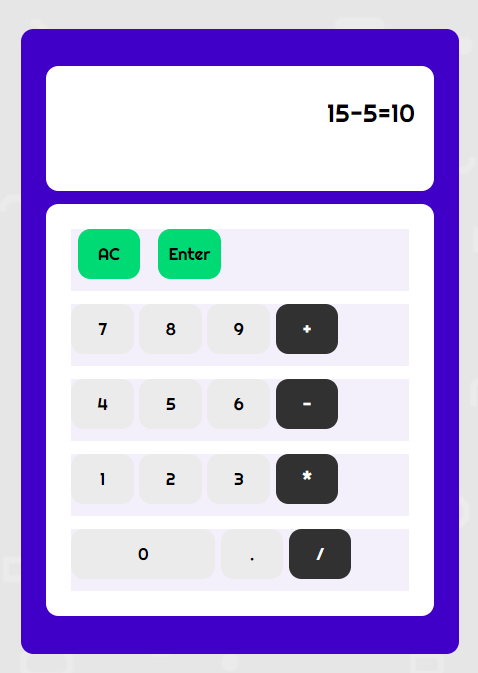
과제1은 쉽게 클리어.
기존의 과제2 구현방식은 15를 누르고 +를 누르고 다시 숫자를 누르면 15가 지워지고 그 자리에 5가 출력되게 해야 하는데 15를 지우고 5를 입력하는게 복잡하다고 생각이 들어서 그냥 처음부터 숫자1,연산자,숫자2,결과값을 한 줄에 나열되게 했다. 5시에 줌으로 코드 리뷰를 했었는데 블로그 작성이 끝나면 레퍼런스를 참고해서 다시 해볼 예정

프론트엔드 개발자 준비 중