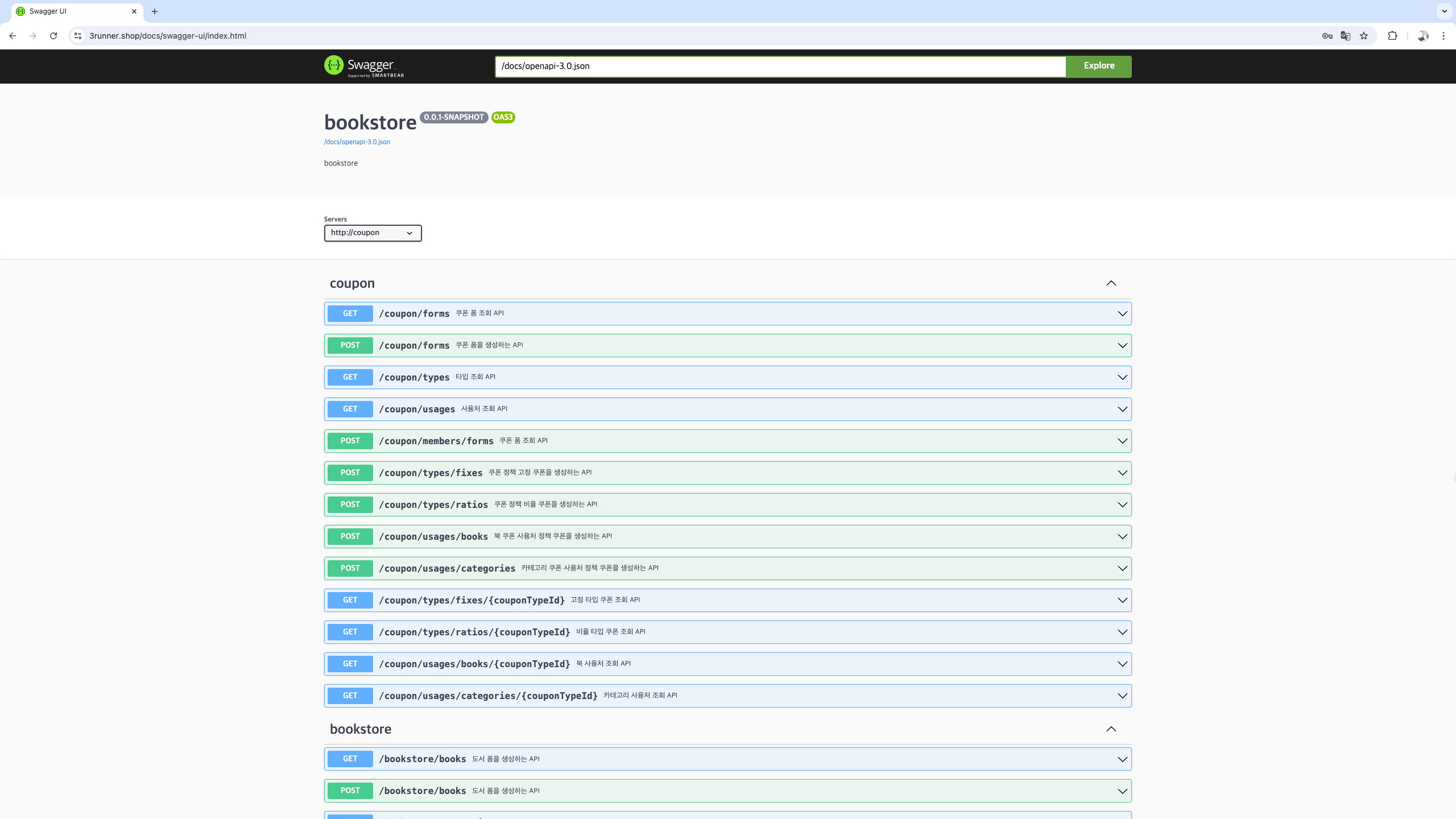
API 명세서
Swagger vs Rest Docs
1. Swager 장단점
장점
- API 를 테스트 해 볼수 있는 화면을 제공한다.
- 적용하기 쉽다.
- API 문서가 자동으로 생긴다
- 어노테이션(annotation)을 통해 문서가 생성되기 때문에 API 현행화가 쉽다
- 화면에서 API를 직접 호출하여 테스트해볼 수 있다
단점
- 프로덕션 코드에 문서화를 위한 코드가 들어간다
- 서버가 실행될 때 문서가 만들어지기 때문에 API 스펙만 분리해서 관리하기 어렵다
- 검증되지 않은 API가 생성될 수 있다
- 제품코드에 어노테이션 추가해야한다.
- 제품코드와 동기화가 안될수 있다.
2. Rest Docs 장단점
장점
- 제품코드에 영향 없다.
- 테스트가 성공해야 문서작성된다.
- 비즈니스 로직에는 API 문서 관련 코드가 없다
- 커스텀이 자유롭다
단점
- 문서가 추가되면 asciido 문서를 일일이 편집해야 한다
- swagger에 있는 API 문서 관련 코드가 없다
- 적용하기 어렵다.
그래서 요즘은 Swagger Ui + Rest Docs 을 같이 사용
서로의 장점을 사용하며 단점을 보안
swagger 을 활용해 직접 테스트 해볼 수 있다.
- 어노테이션을 사용하지 않아도 된다.
- 테스트 코드가 꼼꼼해진다..? -> 검증된 API 만 생성
- ascciidoc으로 만들어진 문서를 합치지 않고 swagger ui 로 통합가능
개념
restdocs + swagger 문서를 제작하는 로직은 아래와 같다.
- 기존처럼 테스트 코드(Rest doc 형태로 만든 테스트)를 통해 docs 문서를 생성
- docs 문서를 OpenAPI3 스펙으로 변환
- 만들어진 OpenAPI3 스펙을 SwaggerUI로 생성
- 생성된 SwaggerUI를 static 패키지에 복사 및 정적리소스로 배포
의존성 추가
<!-- swagger ui dependency -->
        <dependency>
            <groupId>org.springdoc</groupId>
            <artifactId>springdoc-openapi-starter-webmvc-ui</artifactId>
            <version>2.1.0</version>
        </dependency>

        <!-- spring rest docs 생성을 위한 디펜던시 -->
        <dependency>
            <groupId>org.springframework.restdocs</groupId>
            <artifactId>spring-restdocs-mockmvc</artifactId>
            <scope>test</scope>
        </dependency>
        <!-- restdocs spec(openapi spec) 문서를 생성하기 위한 디펜던시 -->
        <dependency>
            <groupId>com.epages</groupId>
            <artifactId>restdocs-api-spec</artifactId>
            <version>0.18.2</version>
            <scope>test</scope>
        </dependency>
        <dependency>
            <groupId>com.epages</groupId>
            <artifactId>restdocs-api-spec-mockmvc</artifactId>
            <version>0.18.2</version>
            <scope>test</scope>
        </dependency>
        <!-- restdocs spec(openapi spec) 문서를 생성하기 위한 디펜던시 -->
html 문서 생성을 위한 플러그인 정의
<plugin>
    <groupId>org.asciidoctor</groupId>
    <artifactId>asciidoctor-maven-plugin</artifactId>
    <version>2.2.1</version>
    <executions>
        <execution>
            <id>generate-docs</id>
            <phase>prepare-package</phase>
            <goals>
                <goal>process-asciidoc</goal>
            </goals>
            <configuration>
                <backend>html</backend>
                <doctype>book</doctype>
                <sourceDirectory>${project.basedir}/src/docs/asciidoc</sourceDirectory>
                <sourceDocumentName>index.adoc</sourceDocumentName>
                <outputDirectory>${project.build.directory}/classes/static/docs</outputDirectory>
            </configuration>
        </execution>
    </executions>
    <dependencies>
        <dependency>
            <groupId>org.springframework.restdocs</groupId>
            <artifactId>spring-restdocs-asciidoctor</artifactId>
            <version>${spring-restdocs.version}</version>
        </dependency>
    </dependencies>
</plugin>
        <!-- restdocs-spec 문서 생성을 위한 플러그인 정의 -->
restdocs-spec 문서 생성을 위한 플러그인 정의
<plugin>
    <groupId>io.github.berkleytechnologyservices</groupId>
    <artifactId>restdocs-spec-maven-plugin</artifactId>
    <version>0.22</version>
    <executions>
        <execution>
            <goals>
                <goal>generate</goal>
            </goals>
            <configuration>
                <specifications>
                    <specification>
                        <type>OPENAPI_V2</type>
                    </specification>
                    <specification>
                        <type>OPENAPI_V3</type>
                        <format>JSON</format>
                    </specification>
                    <specification>
                        <type>POSTMAN_COLLECTION</type>
                        <filename>postman-collection</filename>
                    </specification>
                </specifications>
                <name>${project.artifactId}</name>
                <version>${project.version}</version>
                <host>localhost:8081</host>
                <schemes>
                    <scheme>http</scheme>
                </schemes>
                <snippetsDirectory>
                    ${project.build.directory}/generated-snippets
                </snippetsDirectory>
                <outputDirectory>
                    ${project.build.directory}/classes/static/docs
                </outputDirectory>
            </configuration>
        </execution>
    </executions>
</plugin>
여기서 host 는 나중에 서버 구분을 위해
application.yml 에 추가
springdoc:
  swagger-ui:
    url: /docs/openapi-3.0.json
    path: /docs/swagger
/tager/docs/openapi-3.0.json -> /docs/swagger-ui/index.html 에서 실행가능하도록 함
테스트 코드
이제 기본 설정은 끝났습니다.
Rest Docs 테스트 코드 작성법으로 작성하시면 됩니다.
일단 기초 베이스 테스트 코드를 만들어야 합니다.
베이스 테스트 클래스
@Disabled
@ExtendWith(RestDocumentationExtension.class)
@AutoConfigureMockMvc
@AutoConfigureRestDocs
public abstract class BaseDocumentTest {
	@Autowired
	protected ObjectMapper objectMapper;

	@Autowired
	protected MockMvc mockMvc;

	protected final String snippetPath = "{class-name}/{method-name}";

	@BeforeEach
	void setUp(final WebApplicationContext context, final RestDocumentationContextProvider provider) {
		this.mockMvc = MockMvcBuilders.webAppContextSetup(context)
			.apply(MockMvcRestDocumentation.documentationConfiguration(provider)
				//요청 body 의 payload 를 보기 좋게 출력
				.operationPreprocessors().withRequestDefaults(Preprocessors.prettyPrint())
				.and()
				//응답 body 의 payload 를 보기 좋게 출력
				.operationPreprocessors().withResponseDefaults(Preprocessors.prettyPrint()))
			//테스트 결과를 항상 print
			.alwaysDo(MockMvcResultHandlers.print())
			//한글 깨짐 방지
			.addFilter(new CharacterEncodingFilter("UTF-8", true))
			.build();
	}

	protected String createJson(Object dto) throws JsonProcessingException {
		return objectMapper.writeValueAsString(dto);
	}

	protected Attributes.Attribute attribute(final String key, final String value){
		return new Attributes.Attribute(key,value);
	}
}
베이스 테스트 클래스를 상속 받아서 진행
@WebMvcTest(
	//아래에 테스트 코드를 작성할 controller 클래스 정의
	controllers = {
		BookController.class
	}
)
class BookControllerTest extends BaseDocumentTest {

	@MockBean
	private BookService bookService;
	@MockBean
	private BookImageService bookImageService;
	@MockBean
	private BookTagService bookTagService;
	@MockBean
	private BookCategoryService bookCategoryService;

	@Test
	void createBook() {
	}

	@DisplayName("책 디테일 뷰 가져오기")
	@Test
	void readBook() throws Exception {

		CategoryParentWithChildrenResponse categoryParentWithChildrenResponse1 = CategoryParentWithChildrenResponse.builder()
			.id(1L)
			.name("Test Category1")
			.build();
		CategoryParentWithChildrenResponse categoryParentWithChildrenResponse2 = CategoryParentWithChildrenResponse.builder()
			.id(2L)
			.name("Test Category1")
			.childrenList(List.of(categoryParentWithChildrenResponse1))
			.build();

		ReadBookResponse readBookResponse = ReadBookResponse.builder()
			.id(1L)
			.title("test Title")
			.description("Test description")
			.publishedDate(ZonedDateTime.now())
			.price(10000)
			.quantity(10)
			.sellingPrice(10000)
			.viewCount(777)
			.packing(true)
			.author("Test Author")
			.isbn("1234567890123")
			.publisher("Test Publisher")
			.imagePath("Test Image Path")
			.categoryList(List.of(categoryParentWithChildrenResponse2))
			.tagList(List.of(ReadTagByBookResponse.builder().name("Test tag").build()))
			.build();

		given(bookService.readBookById(anyLong())).willReturn(readBookResponse);

		this.mockMvc.perform(RestDocumentationRequestBuilders.get("/bookstore/books/{bookId}", 1L)
				.accept(MediaType.APPLICATION_JSON)
			)
			.andExpect(status().isOk())
			.andDo(document(snippetPath,
				"아이디 기반 멤버 정보를 조회하는 API",
				pathParameters(
					parameterWithName("bookId").description("책 아이디")
				),
				responseFields(
					fieldWithPath("header.resultCode").type(JsonFieldType.NUMBER).description("결과 코드"),
					fieldWithPath("header.successful").type(JsonFieldType.BOOLEAN).description("성공 여부"),
					fieldWithPath("body.data.id").type(JsonFieldType.NUMBER).description("책 아이디"),
					fieldWithPath("body.data.title").type(JsonFieldType.STRING).description("책 제목"),
					fieldWithPath("body.data.description").type(JsonFieldType.STRING).description("책 설명"),
					fieldWithPath("body.data.publishedDate").type(JsonFieldType.STRING).description("출판 날짜"),
					fieldWithPath("body.data.price").type(JsonFieldType.NUMBER).description("책 가격"),
					fieldWithPath("body.data.quantity").type(JsonFieldType.NUMBER).description("수량"),
					fieldWithPath("body.data.sellingPrice").type(JsonFieldType.NUMBER).description("판매 가격"),
					fieldWithPath("body.data.viewCount").type(JsonFieldType.NUMBER).description("조회수"),
					fieldWithPath("body.data.packing").type(JsonFieldType.BOOLEAN).description("포장 여부"),
					fieldWithPath("body.data.author").type(JsonFieldType.STRING).description("저자"),
					fieldWithPath("body.data.isbn").type(JsonFieldType.STRING).description("ISBN 번호"),
					fieldWithPath("body.data.imagePath").type(JsonFieldType.STRING).description("책의 메인 이미지"),
					fieldWithPath("body.data.publisher").type(JsonFieldType.STRING).description("책의 출판사"),
					fieldWithPath("body.data.categoryList").type(JsonFieldType.ARRAY).description("카테고리 리스트"),
					fieldWithPath("body.data.categoryList[].id").type(JsonFieldType.NUMBER).description("카테고리 아이디"),
					fieldWithPath("body.data.categoryList[].name").type(JsonFieldType.STRING).description("카테고리 이름"),
					fieldWithPath("body.data.categoryList[].childrenList").type(JsonFieldType.ARRAY).description("하위 카테고리 리스트"),
					fieldWithPath("body.data.categoryList[].childrenList[].id").type(JsonFieldType.NUMBER).description("하위 카테고리 아이디"),
					fieldWithPath("body.data.categoryList[].childrenList[].name").type(JsonFieldType.STRING).description("하위 카테고리 이름"),
					fieldWithPath("body.data.categoryList[].childrenList[].childrenList").type(JsonFieldType.NULL).description("더 하위 카테고리 리스트"),
					fieldWithPath("body.data.tagList").type(JsonFieldType.ARRAY).description("태그 리스트"),
					fieldWithPath("body.data.tagList[].name").type(JsonFieldType.STRING).description("태그 이름")
				)
			));
	}
}
참고 fieldWithPath, pathParameters 등 하나도 빠지면 안됨...
테스트 코드를 만들었다면
swagger-ui 를 통해 확인
http://localhost:8081/docs/swagger-ui/index.html
정리
API 명세서로 Rest Doc과 Swagger을 각각 사용할 수 있지만 각자의 장단점들이 있다. 그래서 요즘에는 두개의 장점을 활용하기 위해 같이 사용하기도 한다.
사용하시기전
생각보다 Rest Doc의 Test code가 많고 힘들었습니다..ㅎㅎ 하지만 안정성과 좋은 프로젝트를 위해서라면... 해야겠죠?

백엔드 개발자