Pipeline syntax
CI/CD 파이프라인을 젠킨스에 구현하기 위한 일련의 플러그인들의 집합이자 구성이다.
즉여러 플러그인들을 이 파이프라인에서 용도에 맞게 사용하고 정의함으로써 파이프라인을 통한
서비스가 배포된다.
Section
Section의 구성
- Agent section
- Post section
- State section
- Steps section
Agent Section
Jenkins는 많은 일들을 해야하기에 혼자하기 버겁다
여러 Slave node를 두고 일을 시킬 수 있는데 이처럼 어떤 Jenkins가 일을 하게 할것인지를 지정한다.
노드관리에서 새로 노드를 띄우거나 혹은 Docker 이미지등을 통해서 처리할 수 있다.
Post Section
스테이지가 끝난 이후의 결과에 따라서 후속조치를 취할 수 있다.
EX) success, failure, always, cleanup
EX) 성공시에 성공 이메일, 실패하면 중단 혹은 건너뛰기 등등…
post{
// If Maven was able to run the test, even if some of the test
// failed, record the test results and archive the jar file.
	success {
		echo ‘success’
	}
Stage Section
어떤 일들을 처리할 건지 일련의 stage를 정의한다.
Steps Section
한 스테이지 안에서의 단계로 일련의 스텝을 보여준다.
stages {
	stage(‘prepare’) {
		steps {
			git	url: ‘https://github.com/sk-lim19f/project-board.git',
			branch: ‘master’,
			credentialsId: ‘jenkinsgit’
			sh ‘ls’
			dir (‘./docs’) {
				sh ‘`’
				aws s3 sync. ./ s3://jenkinstest
				‘`’
			}
		}

		post{
		// If Maven was able to run the test, even if some of the test failed,
        // record the test results and archive the jar file.
			success {
				echo ‘success’
			}
		}

				stage(‘Build’) {
					steps {
						echo ‘Building…’
					}
				}
Declaratives
Environment, stage, options, parameters, triggers, when등의 Declarative가 있다.
Environment
어떤 pipeline이나 stage scope 의 환경 변수 설정
environment {
	AWS_ACCESS_KEY_ID = credentials(‘awsAccessKeyId’)
	AWS_SECRET_ACCESS_KEY = credentials(‘awsSecretAccessKey’)
	AWS_DEFAULT_REGION = ‘ap-northeast-2’
	HOME = ‘.’ // Avoid npm root owne`
Parameter
파이프라인 실행 시 파라미터 받음
Triggers
어떤 형태로 트리거 되는가
triggers { // 어떤 주기로 실행 되는가
	pollSCM(‘*/3****’)
}
When
언제 실행되는가
stage(‘Only for production’) {
	when {
		branch ‘production’
		environment name: ‘APP_ENV’, value: ‘prod’
		anyOf {
			environment name: ‘DEPLOY_TO’, value: ‘production’
			environment name: ‘DEPLOY_TO’, value: ‘staging’
		}
	}
}
Steps
- Steps 내부는 여러가지 스텝들로 구성
- 여러 작업들을 실행가능
- 플러그인을 깔면 사용할 수 있는 스텝들이 생겨남
CI/CD 배포환경 예시
# 1

DEV 리소스 환경과 PROD 리소스 환경을 분리하여 배포.
# 2
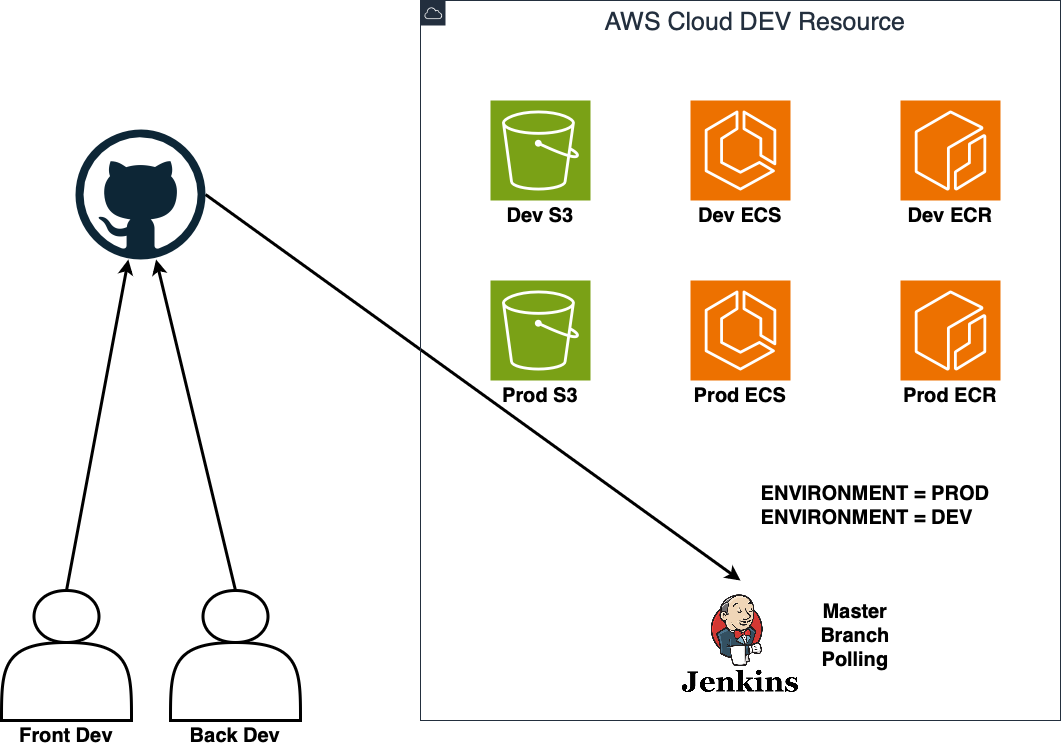
DEV 리소스 환경과 PROD 리소스 환경을 통합하여 배포.
CI/CD 전체 파이프라인
- 개발자가 자신의 PC에서 개발을 진행
- 다른 개발자가 작성한 코드와 차이가 발생하지 않는지 내부 테스트를 진행
- 진행한 내용을 다른 개발자들과 공유하기 위해 git과 같은 SCM에 올린다. -> 흔히 dev 브랜치
- Dev브랜치의 내용을 개발 환경에 배포하기 전에 테스트와 Lint 등 코드 포맷팅을 한다.
- 배포하기 위한 빌드과정을 거친다.
- 코드를 배포한다.
- 테스트를 진행한다.
- 위 모든과정을 DEV, QA, PROD 환경에서 모두 하고 각각에 맞는 환경을 배포한다.
여러 배포 환경의 관리
여러 배포환경의 관리에서 핵심은 인프라를 모듈화 하여 어떤것이 변수인지 잘 설정하고
이를 잘 설계하는 것.
가령 APP_ENV 처럼 현재 배포하고자 하는 것이 무슨 환경인지 설정하고 앱 내에서 사용하는
다양한 변수들을 APP_ENV 에 맞게 잘 가져다 쓰는것이 핵심.
서비스 내부의 변수 뿐만 아니라 클라우드 리소스를 많이 활용해서 개발하는 요즘에는
클라우드 리소스 내에서 인프라별 키관리가 매우 중요해서
AWS System Manager의 Parameter Store 같은 키 관리 서비스를 쓰는것이 좋다.