JSX
const element = <h1>Hello, world!</h1>;이것은 뭔가 JS와 HTML이 섞여있는 느낌이다.
이것은 JavaScript를 확장한 문법인 JSX이다.
React.createElement : JSX코드를 JS코드로 변환
<JSX를 사용한 코드>
const element = (
  <h1 className="greeting">
    Hello, world!
  </h1>
);
<JSX를 사용하지 않은 코드>
const element = React.createElement(
  'h1',
  {className: 'greeting'},
  'Hello, world!'
);
<위 React.createElement의 출력 결과>
const element = {
  type: 'h1',
  props: {
    className: 'greeting',
    children: 'Hello, world!'
  }
};
위와 같이 JS 객체가 생성됨
React는 이 객체들을 읽어서 DOM을 만드는 데 사용함
이 객체들을 element라고 부름
<createElement의 파라미터>
React.createElement(
	type,
    [props],
    [...children]
)type파라미터로는 div, span 등 HTML태그들이 올 수도 있고, React component가 들어갈 수 있음.
props에는 속성들이 들어감.
children에는 자식element가 들어간다고 보면 됨!!
JSX의 장점
- 코드 간결해짐
- 가독성 향상
- 버그를 발견하기 쉬움
<!-- JSX 사용 -->
<div>Hello, {name}</div>

<!-- JSX 사용 안함 -->
React.createElement('div', null, `Hello, ${name}`);- Injection Attacks 방어
const title = response.potentiallyMaliciousInput;

// 이 코드는 안전합니다.
const element = <h1>{title}</h1>;
ReactDOM은 rendering하기 전에 임베딩된 값을 모두 문자열로 바꿈
그러기에 명시적으로 선언되지 않은 값은 괄호 사이에 들어갈 수 없음.
=> XSS(cross-site-scripting) 공격을 방지
React Element
특징
- 불변성
Elements 생성 후에는 children이나 attributes를 바꿀 수 없다.
Element Rendering
<div id="root"></div>이 div태그 안에 React Element들이 렌더링됨.
const element = <h1>안녕, 리액트!</h1>;
ReactDOM.render(element, document.getElementById('root'));
element를 생성하고 생성된 element를 root div에 렌더링하는 코드
component
Function Component
function Welcome(props) {
	return <h1>안녕, {props.name}</h1>
}- state 사용 불가
- Lifecycle에 따른 기능 구현 불가
- Hooks을 사용해 Class Component의 기능을 동일하게 이용가능
Class Component
class Welcome extends React.Component {
	render() {
    	return <h1>안녕, {this.props.name}</h1>;
    }
}- 생성자에서 state를 정의
- setState() 함수를 통해 state 업데이트
- Lifecycle 메서드 제공
Component의 이름
이름은 항상 대문자로 시작해야 한다.
소문자로 시작하는 Component를 DOM 태그로 인식한다.
<HTML div 태그로 인식>
const element = <div />;<Welcome이라는 리액트 Component로 인식>
const element = <Welcome name="인재" />;Component 합성
Component 안에 또 다른 Component를 쓸 수 있다.
function Welcome(props) {
  return <h1>Hello, {props.name}</h1>;
}

function App() {
  return (
    <div>
      <Welcome name="Sara" />
      <Welcome name="Cahal" />
      <Welcome name="Edite" />
    </div>
  );
}
Component 추출
복잡한 화면을 여러 개의 Component로 나눠서 구현 가능!
Component의 재사용성 향상
개발 속도 향상
function Comment(props) {
  return (
    <div className="Comment">
      <div className="UserInfo">
        <img className="Avatar"
          src={props.author.avatarUrl}
          alt={props.author.name}
        />
        <div className="UserInfo-name">
          {props.author.name}
        </div>
      </div>
      <div className="Comment-text">
        {props.text}
      </div>
      <div className="Comment-date">
        {formatDate(props.date)}
      </div>
    </div>
  );
}
위 코드를 추출해 단순하게 만들어보겠다.
<Avatar 추출>
function Avatar(props) {
  return (
    <img className="Avatar"
      src={props.user.avatarUrl}
      alt={props.user.name}
    />
  );
}
<UserInfo 추출>
function UserInfo(props) {
  return (
    <div className="UserInfo">
      <Avatar user={props.user} />
      <div className="UserInfo-name">
        {props.user.name}
      </div>
    </div>
  );
}
이렇게 다 추출하고 나면 Comment가 단순해짐
function Comment(props) {
  return (
    <div className="Comment">
      <UserInfo user={props.author} />
      <div className="Comment-text">
        {props.text}
      </div>
      <div className="Comment-date">
        {formatDate(props.date)}
      </div>
    </div>
  );
}
props
- 프로퍼티
- 상위 컴포넌트가 하위 컴포넌트에 값을 전달할 때 사용(단방향 흐름)
- 수정 불가능(읽기 전용)
- 문자열을 전달할 때는 "", 그 외의 값을 전달할 때는 {} 사용.
State
- 리액트 Component의 변경 가능한 데이터
- 렌더링이나 데이터 흐름에 사용되는 값만 state에 포함시켜야 함.
=> state가 변경될 경우 component가 재렌더링되기 때문에 성능 저하가 일어날 수도 있기 때문에 - JavaScript 객체라고 생각
class LikeButton extends React.Component {
	constructor(props) {
    	super(props);

        this.state = {
        	liked: false
        };
    }
}
class Component의 경우 state를 생성자에서 정의
function Component의 경우에는 useState()라는 Hook을 사용해 정의
- state는 직접 수정할 수 없다.
// state를 직접 수정 (Wrong)
this.state = {
	name: 'Injae'
};

// setState 함수를 통한 수정 (Correct)
this.setState({
	name: 'Injae'
});
Lifecycle
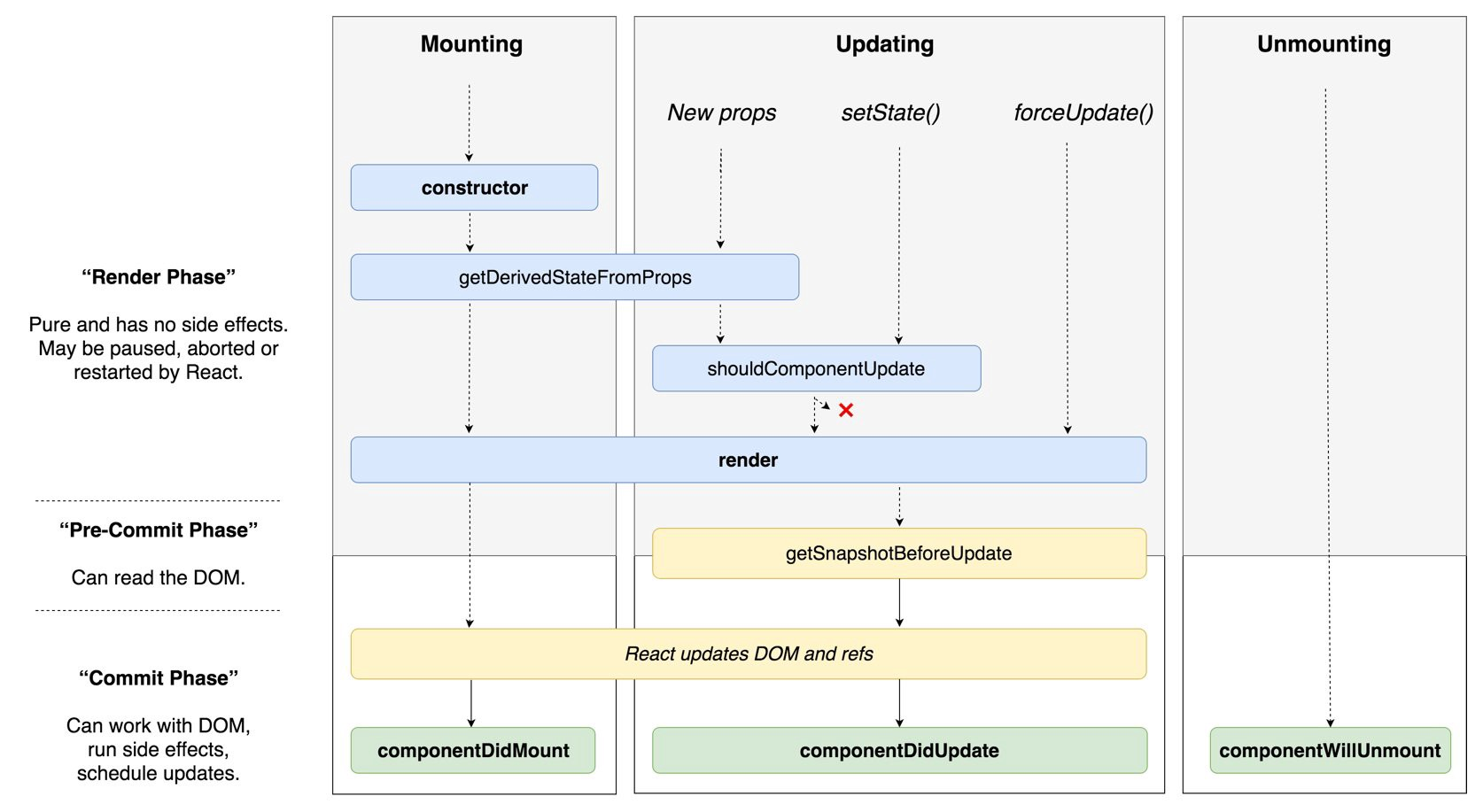
Component가 계속 존재하는 것이 아니라, 시간의 흐름에 따라 생성되고 업데이트 되다가 사라진다.
Hooks
useState()
- state를 사용하기 위한 Hook
import React, { useState } from "react";

function Counter(props) {
	let count = 0;

    return (
    	<div>
        	<p>총 {count}번 클릭했습니다.</p>
            <button onClick={() => count++}>
            	클릭
            </button>
        </div>
    );
}
이처럼 count를 함수의 변수로 사욯하게 되면 버튼 클릭 시 count값을 증가시킬 수는 있지만, 재렌더링이 일어나지 않아 새로운 count값이 화면에 표시되지 않게 된다.
=> state를 사용해서 값이 바뀔 때마다 재렌더링되도록 해야하기에 useState 사용
useState() 사용법
const [변수명, set함수명] = useState(초기값);
<useState() 사용>
import React, { useState } from "react";

function Counter(props) {
	const [count, setCount] = useState(0);

    return (
    	<div>
        	<p>총 {count}번 클릭했습니다.</p>
            <button onClick={() => setCount(count + 1)}>
            	클릭
            </button>
        </div>
    );
}
button이 눌렸을 때 setCount함수를 호출해서 count를 1 증가시킨다. count 값이 변경되면 component값이 재렌더링되면서 화면에 새로운 count값이 표시된다.
useEffect()
- function Component에서 Side effect를 수행하기 위한 Hook
useEffect() 사용법
useEffect(이펙트 함수, 의존성 배열);
Effect function이 mount, unmount 시에 단 한 번씩만 실행 되게
useEffect(이펙트 함수, []);의존성 배열을 생략하면 Component가 업데이트될 때마다 호출됨
import React, { useState, useEffect } from 'react';

function Example() {
  const [count, setCount] = useState(0);

  // componentDidMount, componentDidUpdate와 같은 방식으로
  useEffect(() => {
    // 브라우저 API를 이용하여 문서 title을 업데이트합니다.
    document.title = `You clicked ${count} times`;
  });

  return (
    <div>
      <p>총 {count}번 클릭했습니다.</p>
      <button onClick={() => setCount(count + 1)}>
        클릭
      </button>
    </div>
  );
}