콜랩싱바를 사용하는 방법을 공부했다.
먼저 내 화면이다.
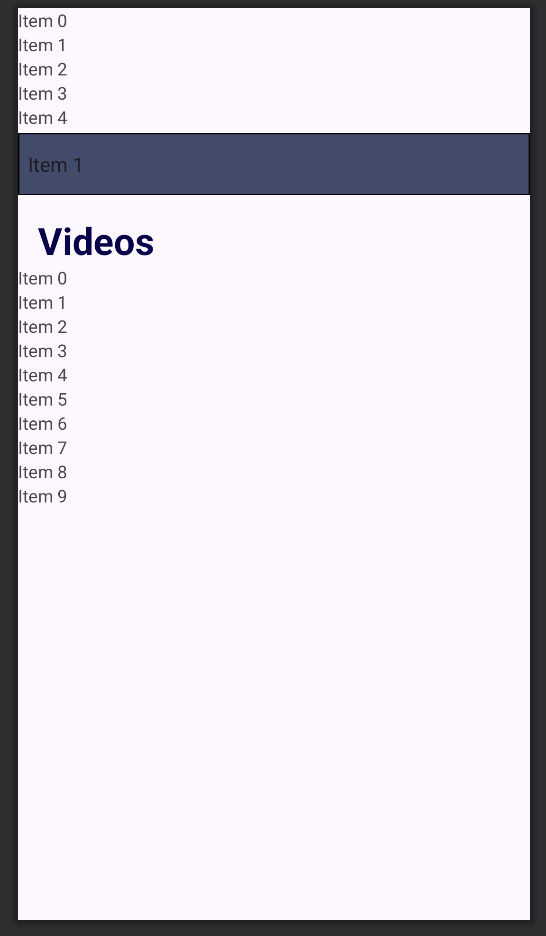
위에서부터 순서대로 RecyclerView-spinner-TextView-RecyclerView가 있다.
나는 콜랩싱바를 spinner로 설정해서 화면을 스크롤해서 내려도 spinner는 Toolbar처럼 상단에 고정되고, 그위에있는 recyclerView는 사라지게 만들려고 한다.
먼저 구조를 보면
<CoordinatorLayout
<AppBarLayout
<CollapsingTollbarLayout
<layout
스크롤시 사라지는 내용, 여기서는 첫번째 리사이클러뷰
</CollapsingTollbarLayout
상단에 고정될내용, 여기서는 Spinner와 그아래 TextView
</AppBarLayout
<마지막 리사이클러뷰
</CoordinatorLayout
한줄로는
CoordinatorLayout - AppBarLayout - CollapsingTollbarLayout - (스크롤시 사라질 내용들) - /CollapsingTollbarLayout - (툴바에 고정될 내용) - /AppBarLayout - 마지막 리사이클러뷰 - /CoordinatorLayout
이렇게 된다.
코드로 보면
<?xml version="1.0" encoding="utf-8"?>
<androidx.constraintlayout.widget.ConstraintLayout xmlns:android="http://schemas.android.com/apk/res/android"
    xmlns:tools="http://schemas.android.com/tools"
    android:layout_width="match_parent"
    android:layout_height="match_parent"
    xmlns:app="http://schemas.android.com/apk/res-auto"
    tools:context=".homefragment.HomeFragment">

    <androidx.coordinatorlayout.widget.CoordinatorLayout
        android:layout_width="match_parent"
        android:layout_height="match_parent"
        app:layout_constraintBottom_toBottomOf="parent"
        app:layout_constraintEnd_toEndOf="parent"
        app:layout_constraintStart_toStartOf="parent"
        app:layout_constraintTop_toTopOf="parent">

        <com.google.android.material.appbar.AppBarLayout
            android:layout_width="match_parent"
            android:layout_height="wrap_content">

            <com.google.android.material.appbar.CollapsingToolbarLayout
                android:layout_width="match_parent"
                android:layout_height="wrap_content"
                app:layout_scrollFlags="scroll">

                <androidx.constraintlayout.widget.ConstraintLayout
                    android:layout_width="match_parent"
                    android:layout_height="wrap_content">

                    <androidx.recyclerview.widget.RecyclerView
                        android:id="@+id/channelNameRecycler"
                        android:layout_width="match_parent"
                        android:layout_height="100dp"
                        app:layout_constraintTop_toTopOf="parent"
                        app:layout_constraintRight_toRightOf="parent"
                        app:layout_constraintLeft_toLeftOf="parent"/>

                </androidx.constraintlayout.widget.ConstraintLayout>

            </com.google.android.material.appbar.CollapsingToolbarLayout>

            <Spinner
                android:id="@+id/spinner"
                android:layout_width="match_parent"
                android:layout_height="50dp"
                android:background="@drawable/spinner_background"
                app:layout_constraintEnd_toEndOf="parent"
                app:layout_constraintStart_toStartOf="parent"
                app:layout_constraintTop_toBottomOf="@+id/channelNameRecycler" />

            <TextView
                android:id="@+id/videoText"
                android:layout_width="wrap_content"
                android:layout_height="wrap_content"
                android:layout_marginStart="16dp"
                android:layout_marginTop="16dp"
                android:text="@string/home_video"
                android:textSize="30sp"
                android:textStyle="bold"
                android:textColor="@color/textColor"
                app:layout_constraintStart_toStartOf="@+id/spinner"
                app:layout_constraintTop_toBottomOf="@+id/spinner" />

        </com.google.android.material.appbar.AppBarLayout>

        <androidx.recyclerview.widget.RecyclerView
            android:id="@+id/videoRecycler"
            app:layout_behavior="com.google.android.material.appbar.AppBarLayout$ScrollingViewBehavior"
            android:layout_width="match_parent"
            android:layout_height="match_parent"
            app:layout_constraintEnd_toEndOf="parent"
            app:layout_constraintStart_toStartOf="parent"
            app:layout_constraintTop_toBottomOf="@+id/videoText" />

    </androidx.coordinatorlayout.widget.CoordinatorLayout>


</androidx.constraintlayout.widget.ConstraintLayout>
이렇게 사용해주면 된다.
콜랩싱바
collapsingbar
상단바고정
툴바고정

이우진