JDBC
JAVA 기반 애플리케이션의 데이터를 데이터베이스에 저장 및 업데이트하거나, 데이터베이스에 저장된 데이터를 JAVA에서 사용할 수 있도록 하는 자바 API
- 자바는 데이터베이스(DB)와 연결해서 데이터 입출력 작업을 할 수 있도록 JDBC 라이브러리 (java.sql 패키지)를 제공함
- JDBC는 데이터베이스 관리시스템(DBMS)의 종류와 상관없이 동일하게 사용할 수 있는 클래스와 인터페이스로 구성
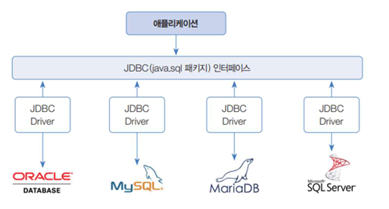
JDBC 동작 흐름

- JDBC는 Java 애플리케이션 내에서 JDBC API를 사용하여 데이터베이스에 접근하는 단순한 구조
- JDBC API를 사용하기 위해서는 JDBC 드라이버를 먼저 로딩한 후 데이터베이스와 연결하게 된다.
JDBC Driver
- JDBC 인터페이스를 구현한 것으로, DBMS마다 별도로 다운로드 받아 사용함
- 데이터베이스와의 통신을 담당하는 인터페이스
- Oracle, MS SQL, MySQL 등과 같은 데이터베이스에 알맞은 JDBC 드라이버를 구현하여 제공
- JDBC 드라이버의 구현체를 이용해서 특정 벤더의 데이터베이스에 접근할 수 있음
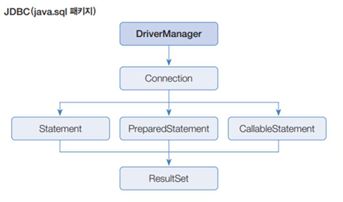
DriverManager 클래스
- JDBC Driver를 관리하며 DB와 연결해서 Connection 구현 객체를 생성
Connection 인터페이스
- Statement, PreparedStatement, CallableStatement 구현 객체를 생성
- 트랜잭션 처리 및 DB 연결을 끊을 때 사용
Statement 인터페이스
- SQL의 DDL, DML을 실행할 때 사용함
- 주로 변경되지 않는 정적 SQL 문을 실행할 때 사용
PreparedStatement
- SQL의 DDL, DML을 실행할 때 사용
- 매개변수화된 SQL문을 써 편리성과 보안성이 유리함
CallableStatement
- DB에 저장된 프로시저와 함수를 호출함
ResultSet
- DB에서 가져온 데이터를 읽음
JDBC API 사용 흐름 (매우 중요)
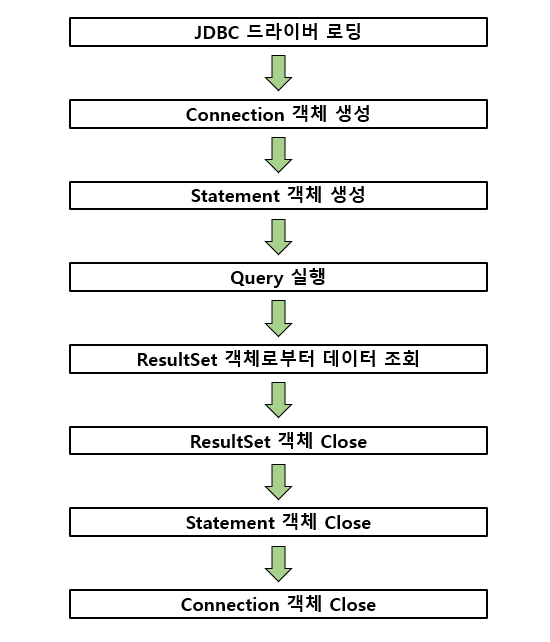
1. JDBC 드라이버 로딩
- 사용하고자 하는 JDBC 드라이버를 로딩함
- DriverManager 클래스를 통해 로딩됨
2. Connection 객체 생성
- JDBC 드라이버가 정상적으로 로딩되면 DriverManager를 통해 데이터베이스와 연결되는 세션(Session)인 Connection 객체를 생성함
3. Statement 객체 생성
- Statement 객체는 작성된 SQL 쿼리문을 실행하기 위한 정적 SQL 쿼리 문자열을 입력으로 가짐
4. Query 실행
- 생성된 Statement 객체를 이용하여 입력한 SQL 쿼리를 실행
5. ResultSet 객체로부터 데이터 조회
- 실행된 SQL 쿼리문에 대한 결과 데이터 셋
6. ResultSet, Statement, Connection 객체들의 Close
- JDBC API를 통해 사용된 객체들은 생성된 객체들을 사용한 순서의 역순으로 Close함
DB 연결
데이터베이스 연결
- 클라이언트 프로그램에서 DB와 연결하려면 해당 DBMS의 JDBC Driver가 필요함
연결에 필요한 4가지 정보
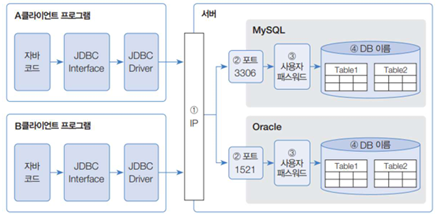
- DBMS가 설치된 컴퓨터의 IP 주소
- DBMS가 허용하는 포트 번호
- 사용자(DB 계정) 및 비밀번호
- 사용하고자 하는 DB 이름
JDBC Driver 설치 및 적용
JDBC Driver 다운로드
- Oracle JDBC 다운로드
https://mvnrepository.com/artifact/com.oracle.database.jdbc/ojdbc8
JDBC Driver 적용
- Package Explorer의 JDBC Driver를 적용하고자 하는 자바 프로젝트를 우클릭
- BuildPath > Configure Build Path
-
자바프로젝트 안에 JDBC Driver가 있을 경우
-> Libraries > Classpath > Add JARs > JDBC Driver가 있는 자바프로젝트에서 가져오기 -
다운로드 받은 JDBC Driver를 가져올 경우
-> Libraries > Classpath > Add External JARs > JDBC Driver가 있는 폴더 내에서 가져오기
DB 연결
- JDBC Driver를 메모리로 로딩하는 것으로 클라이언트 프로그램을 DB와 연결하기 위해 가장 먼저 할 작업
- Class.forName() 메소드를 이용하여 문자열로 주어진 JDBC Driver 클래스를 BuildPath에서 찾고, 메모리로 로딩함
Oracle JDBC Driver 연결
Class.forName("oracle.jdbc.OracleDriver");

DriverManager.getConnection(
	"jdbc:oracle:thin:@localhost:1521/모델명"
    "scott" // 아이디
    "1004" // 비밀번호
);
MariaDB Driver 연결
Class.forName("org.mariadb.jdbc.Driver");

DriverManager.getConnection(
	"jdbc:mariadb://localhost:3306/모델명"
    "scott" // 아이디
    "1004" // 비밀번호
);
예제
package ch20.oracle.sec05;

import java.sql.Connection;
import java.sql.DriverManager;
import java.sql.ResultSet;
import java.sql.SQLException;
import java.sql.Statement;

public class ConnectionExample {
	public static void main(String[] args) {
		Connection conn = null;
		try {
			//JDBC Driver 등록
			//이 파일이 없으면 sql구문 작업 자체가 안됨;

			// Oracle Driver 등록
			Class.forName("oracle.jdbc.OracleDriver");

			// mariaDB Driver 등록
			//Class.forName("org.mariadb.jdbc.Driver");


			//연결하기
			conn = DriverManager.getConnection(
					// 연결 정보를 전달함
					// 로컬호스트 뒤에 oracle DB명을 명시하기
					"jdbc:oracle:thin:@localhost:1521/xe",

					// oracle db를 이용해 다른 사람의 데이터베이스를 불러올 수 있음
					//"jdbc:oracle:thin:@192.168.4.44:1521/xe",

					// mariaDB의 연결 정보를 전달
					//"jdbc:mariadb://localhost:3306/kosa_db",

					// 아이디
					"scott",
					// 비번
					"1004"
					);

			// SQL 구문 생성
			Statement stmt = conn.createStatement();
			// select 구문 실행
			ResultSet rs = stmt.executeQuery("SELECT * FROM accounts");


			// SQL 구문 객체 생성
			Statement insertStmt = conn.createStatement();
			// insert 구문 실행
			insertStmt.execute("INSERT INTO accounts (ano, OWNER, balance) VALUES (lpad(seq_ano.nextval,12,'0'), '이동주', 50000)");

			ResultSet rs1 = stmt.executeQuery("SELECT * FROM accounts");

			while(rs1.next()) {
				// select문 읽어들이기 : 열의 번호
				System.out.println(rs1.getString(1) + " : " + rs1.getString(2) + " : " + rs1.getString(3));
				// select문 읽어들이기 : 컬럼명
				System.out.println(rs1.getString("ANO") + " : " + rs1.getString("owner") + " : " + rs1.getString("balance"));
			}
			rs.close();
			stmt.close();

			System.out.println("연결 성공");
		} catch (ClassNotFoundException e) {
			e.printStackTrace();
		}catch (SQLException e) {
			e.printStackTrace();
		}
		finally {
			if(conn != null) {
				try {
					//연결 끊기
					conn.close();
					System.out.println("연결 끊기");
				} catch (SQLException e) {}
			}
		}
	}
}
값을 입력받아 각각 Insert, Update, Delete 적용시키기
- select문을 출력할 때 : executeQuery() 사용
- insert, update, delete문을 출력할 때 : execute() 사용
package ch20.oracle.sec05;

import java.sql.Connection;
import java.sql.DriverManager;
import java.sql.ResultSet;
import java.sql.SQLException;
import java.sql.Statement;
import java.util.Scanner;

public class BoardConnection {
	static Scanner scanner = new Scanner(System.in);

	public static void main(String[] args) {
		while(true) {
			select(selectMenu());
		}
	}

	private static void list() {
		Connection conn = null;
		try {
			//JDBC Driver 등록
			Class.forName("oracle.jdbc.OracleDriver");
			System.out.println("드라이버 로딩 ");

			// 연결하기 : Oracle JDBC 연결
			conn = DriverManager.getConnection(
					"jdbc:oracle:thin:@localhost:1521/XE",
					// 아이디
					"scott",
					// 비번
					"1004"
					);

			//SQL 구문 객체 생성한다
			Statement stmt = conn.createStatement();

			//select 구문을 실행한다
			// select 구문을 실행할 때에는 executeQuery 메소드 사용
			ResultSet rs = stmt.executeQuery("SELECT * FROM boards");

			// 결과 집합을 하나씩 읽어옴
			while(rs.next()) {
				// 칼럼 이름으로 결과값을 호출함
				System.out.println(rs.getString("bno") + " : " + rs.getString("btitle") + " : " + rs.getString("bcontent")
				 					+ " : " + rs.getString("bwriter")  + " : " + rs.getString("bdate"));
			}
			// 구문 닫기
			rs.close();

			// SQL 구문 종료
			stmt.close();

			System.out.println("연결 성공");
		} catch (ClassNotFoundException e) {
			e.printStackTrace();
		} catch (SQLException e) {
			e.printStackTrace();
		} finally {
			if(conn != null) {
				try {
					//연결 끊기
					conn.close();
					System.out.println("연결 끊기");
				} catch (SQLException e) {}
			}
		}
	}


	private static String selectMenu() {
		System.out.println("1. 게시글목록");
		System.out.println("2. 게시글등록");
		System.out.println("3. 게시글수정");
		System.out.println("4. 게시글삭제");
		System.out.println("5. 종료");
		System.out.print("원하는 작업은 ?");
		return scanner.nextLine();
	}


	private static void select(String select) {
		switch(select) {
		case "1": list(); break;
		case "2": insert(); break;
		case "3": update(); break;
		case "4": delete(); break;
		case "5":
			System.out.println("프로그램 종료");
			System.exit(0);
			break;
		default: System.out.println("입력이 잘못되었습니다");
		}
	}


	private static void insert() {
		Connection conn = null;
		try {
			//JDBC Driver 등록
			Class.forName("oracle.jdbc.OracleDriver");
			System.out.println("드라이버 로딩 ");

//			//연결하기
			conn = DriverManager.getConnection(
					"jdbc:oracle:thin:@localhost:1521/XE",
					"scott",
					"1004"
					);

			//SQL 구문 객체 생성한다
			Statement insertStmt = conn.createStatement();

			String title;
			String content;
			String writer;

			System.out.print("제목 : ");
			title = scanner.nextLine();
			System.out.print("내용 : ");
			content = scanner.nextLine();
			System.out.print("작성자 : ");
			writer = scanner.nextLine();

			//insert 구문 실행
			//insert, update, delete 구문은 execute를 사용하여 구문을 불러옴
			insertStmt.execute(
					"INSERT INTO boards (bno, btitle, bcontent, bwriter, bdate) VALUES (to_number(lpad(SEQ_BNO.nextval,4,'0')), '"
					+ title + "', '" + content + "', '" + writer +"', sysdate)");

			insertStmt.close();

			System.out.println("연결 성공");
		} catch (ClassNotFoundException e) {
			e.printStackTrace();
		} catch (SQLException e) {
			e.printStackTrace();
		} finally {
			if(conn != null) {
				try {
					//연결 끊기
					conn.close();
					System.out.println("연결 끊기");
				} catch (SQLException e) {}
			}
		}
	}


	private static void update() {
		Connection conn = null;
		try {
			//JDBC Driver 등록
			Class.forName("oracle.jdbc.OracleDriver");
			System.out.println("드라이버 로딩 ");

//			//연결하기
			conn = DriverManager.getConnection(
					"jdbc:oracle:thin:@localhost:1521/XE",
					"scott",
					"1004"
					);

			//SQL 구문 객체 생성한다
			Statement updateStmt = conn.createStatement();

			String title;
			String newContent;

			System.out.print("수정할 글 제목 : ");
			title = scanner.nextLine();

			System.out.print("글 내용 수정 : ");
			newContent = scanner.nextLine();

			//update 구문 실행
			//insert, update, delete 구문은 execute를 사용하여 구문을 불러옴
			updateStmt.execute("UPDATE BOARDS"
					+ " SET bcontent = '" + newContent + "',"
					+ "	bdate = sysdate"
					+ " WHERE btitle = '"+ title +"'");

			updateStmt.close();

			System.out.println("연결 성공");
		} catch (ClassNotFoundException e) {
			e.printStackTrace();
		} catch (SQLException e) {
			e.printStackTrace();
		} finally {
			if(conn != null) {
				try {
					//연결 끊기
					conn.close();
					System.out.println("연결 끊기");
				} catch (SQLException e) {}
			}
		}
	}

	private static void delete() {
		Connection conn = null;
		try {
			//JDBC Driver 등록
			Class.forName("oracle.jdbc.OracleDriver");
			System.out.println("드라이버 로딩 ");

//			//연결하기
			conn = DriverManager.getConnection(
					"jdbc:oracle:thin:@localhost:1521/XE",
					"scott",
					"1004"
					);

			//SQL 구문 객체 생성한다
			Statement deleteStmt = conn.createStatement();

			String title;

			System.out.print("삭제할 글 제목 : ");
			title = scanner.nextLine();

			//delete 구문 실행
			//insert, update, delete 구문은 execute를 사용하여 구문을 불러옴
			deleteStmt.execute("delete from boards WHERE btitle = '" + title + "'");

			deleteStmt.close();

			System.out.println("연결 성공");
		} catch (ClassNotFoundException e) {
			e.printStackTrace();
		} catch (SQLException e) {
			e.printStackTrace();
		} finally {
			if(conn != null) {
				try {
					//연결 끊기
					conn.close();
					System.out.println("연결 끊기");
				} catch (SQLException e) {}
			}
		}
	}


}
데이터 저장, 수정, 삭제
- INSERT : 테이블에 새로운 정보를 저장하는 역할을 함
- UPDATE : 테이블 내의 데이터 수정
- DELETE : 테이블 내의 데이터 삭제
위 세 구문의 동작
- PreparedStatement 인터페이스의 prepareStatement() 메소드를 통해 SQL문을 입력
- SQL문의 값을 입력할 부분에 ?로 처리함
- setString() 메소드에 인덱스 번호와 해당 열에 넣을 값을 명시함
- SQL의 INSERT문을 JAVA에 적용하면 다음과 같아짐 (update, delete문도 비슷함)
- execute() / executeUpdate() : SQL문을 실행하여 테이블에 데이터를 저장하는 메소드
- close() : PreparedStatement가 사용했던 메모리 해제 (SQL문 종료)
// SQL 구문 객체 생성
// 입력받을 값에 ?로 처리함
PreparedStatement insertStmt = conn.prepareStatement(
	"insert into 테이블명 (칼럼1, 칼럼2, ..., 칼럼n)
    values (?, ?, ..., ?)");

// insert/update/delete문에 해당 칼럼에 값 집어넣기
insertStmt.setString(인덱스번호 (?의 위치번호),  값);

// SQL문 실행 및 값 저장
insertStmt.excute();

// PreparedStatement가 사용했던 메모리 해제 (SQL문 닫기)
insertStmt.close();
데이터 읽기 (ResultSet)
-
ResultSet : select문에 기술된 컬럼으로 구성된 행(row)의 집합
-
executeQuery() : select문을 호출하는 메소드로, 해당 메소드로 가져온 데이터를 ResultSet에 저장하고 리턴함
-
ResultSet 구조
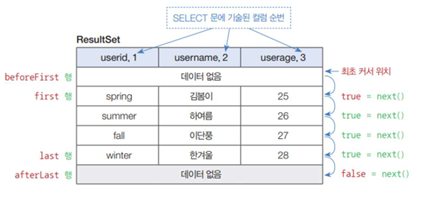
-
ResultSet은 커서가 있는 행의 데이터만 읽기 때문에 첫 행을 읽기 위해서는 next() 메소드로 커서를 이동해야 함!
1개의 데이터 행만 가져올 경우
ResultSet rs = pstmt.executeQuery();

if(rs.next()) {
 // 첫 번째 데이터 행 처리
} else {
 // 이후 데이터 행 처리
}
2개 이상 데이터 행을 가져올 경우
ResultSet rs = pstmt.executeQuery();

while(rs.next()) {
 // 마지막 행까지 이동하면서 데이터 행 처리
}
// 마지막 행 다음으로 커서를 이동했을 경우
데이터 행 읽기
- 커서가 있는 데이터 행에서 각 컬럼의 값은 Getter 메소드로 읽음
- SELECT문에 연산식이나 함수 호출이 포함되어 있다면 컬럼 이름 대신에 컬럼 순번으로 읽어야 함
컬럼 이름으로 읽기
String 칼럼명1 = rs.getString("칼럼명1");
String 칼럼명2 = rs.getString("칼럼명2");
int 칼럼명3 = rs.getInt("칼럼명3");
칼럼 순번으로 읽기
String 칼럼명1 = rs.getString(1);
String 칼럼명2 = rs.getString(2);
int 칼럼명3 = rs.getInt(3);
정보 읽기
- prepareStatement() 메소드 : 사용자 정보를 가져오는 SELECT문에 해당 메소드로부터 PreparedStatement를 얻고 ?에 값을 지정함
- executeQuery() 메소드 : SELECT문을 실행해서 ResultSet을 얻음
- next() 메소드 : true 리턴 시 데이터 행을 User 객체에 저장하고 출력함
프로시저와 함수
- Oracle DB에 저장되는 PL/SQL 프로그램
- 클라이언트 프로그램에서 매개값과 함께 프로시저 또는 함수를 호출하면 DB 내부에서 SQL 문을 실행하고, 실행 결과를 클라이언트 프로그램으로 돌려줌
- JDBC에서 프로시저와 함수를 호출 시 CallableStatement를 사용
- 프로시저와 함수의 매개변수화된 호출문을 작성하고 Connection의 prepareCall() 메소드로부터 CallableStatement 객체를 사용함
저장 프로시저
- 일련의 쿼리를 마치 하나의 함수처럼 실행하기 위한 쿼리문들의 집합
- 일련의 작업을 처리한 절차, 리턴값이 없거나 많을 수도 있음
- 서버에서 실행되기 때문에 속도가 빠름
일반 쿼리문 / 저장프로시저 작동 방식 차이
-
일반 쿼리문
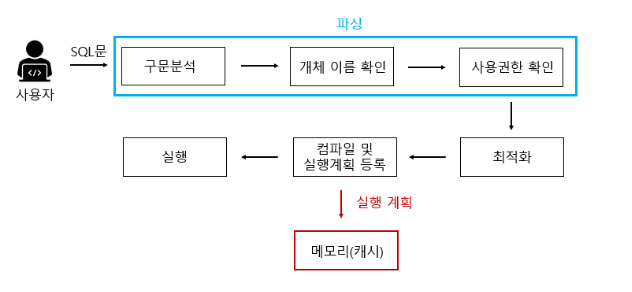
-
저장 프로시저
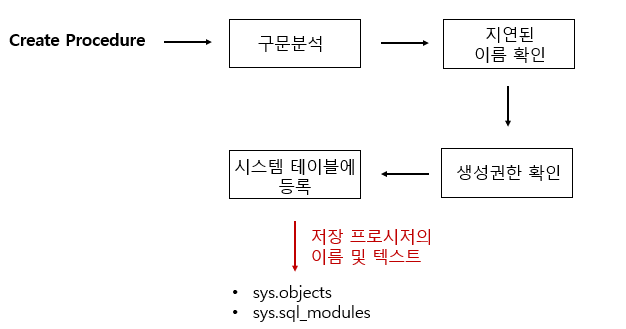
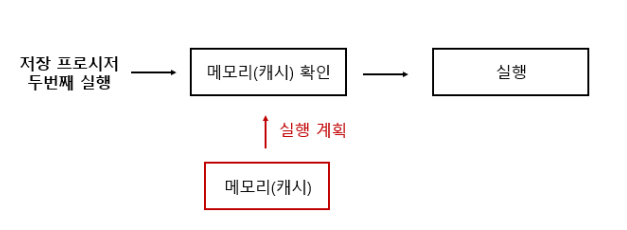
저장프로시저 실행
처음 저장 프로시저 실행
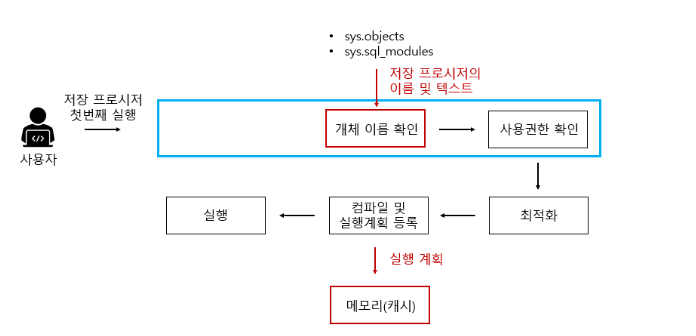
두 번째 이상 프로시저 실행시
저장 프로시저 장점
- SQL Server의 성능을 향상
- 유지보수 및 재활용 측면에서 좋다
- 보안을 강화함
- 네트워크 부하를 줄일 수 있음
프로시저 호출
- IN 매개변수는 호출 시 필요한 매개값으로 사용
- OUT 매개변수는 리턴값으로 사용
- 매개변수화된 호출문을 작성하고 CallableStatement를 얻음
- ?의 값을 지정하고 리턴 타입을 지정함
- 프로시저를 실행하고 리턴값을 얻음

끄작끄작