$> git config user.name # 현재 설정된 사용자 이름 확인
$> git config --global user.name "github 이름" # github 고유 이름
$> git config --global user.email "your_email@example.com"
Github SSH key 생성
= 자동인증..?
ssh-keygen -t ed25519 -C "your_email@example.com"지갑 만들 때 ecdsa 알고리즘 사용함
타원곡선 알고리즘?
or
ssh-keygen -t rsa -b 4096 -C "your_email@example.com"rsa 암호화 알고리즘? 유명하다고 함...
==> 공개키&개인키가 나옴
github에 공개키 등록, 개인키는 내 로컬에 가지고 있다가 인증함.
- 키 위치 지정할 때 폴더 + 이름까지 포함해서 적어줘야함
ex). /mnt/e/github(폴더)/id_ed25519(이름)
기본 설정대로 하면 나온대로 해도 될듯..
key 연동
본인 계정 > setting > SSH and GPG Keys
New로 생성 들어가서
본인 키 ( cd & ls로 파일 찾아가서 cat으로 열어서 확인함) 복붙해서 입력
이름을 알아서 보기 좋게 설정
repository
저장소라고 하던데.. 더 알아봐야할 것 같다
- Add README
READMEs can be used as longer descriptions. About READMEs
Off - Add .gitignore
.gitignore tells git which files not to track. About ignoring files
둘 다 VScode에서 hardhat 설정할 때 있었으므로 생략한다고 함..
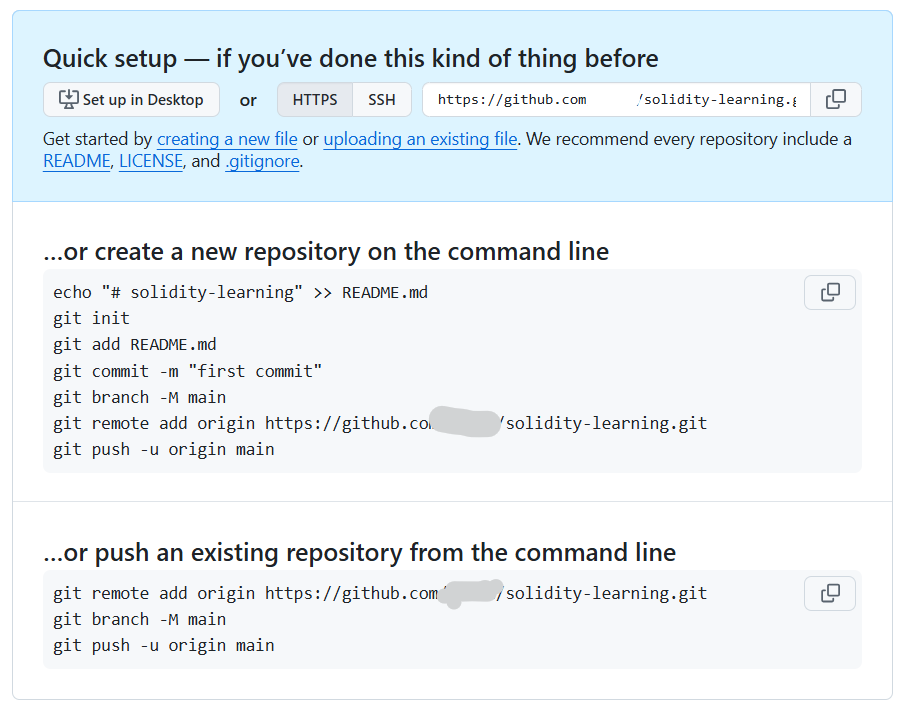
git - VScode 연동
git init하면 연결된 것들은 초록색으로 변한다는데
나는 바로 안변했음...
git status도 해봤는데 안변했음..
(중간에 권한 문제있어서 git config --global --add safe.directory /mnt/e/blockchain_programming_2025/hardhat-test (=폴더위치) 해줌)
그래서 껐다 켜봄 (VScode를)
그러고도 안변해서 그냥
git add .치려고 하니까
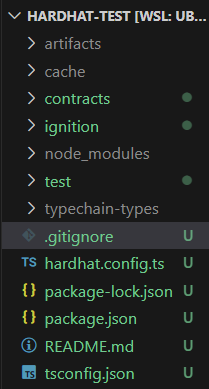
이렇게 변했고
저 코드 치니까 U가 A로 변한...다는데 안변한다...ㅎㅎ
로컬에서 git 원격으로 올리는 과정
/mnt/e/J/blockc/hardhat-test master ?9 ──────────────── 08:00:30 PM ─╮
❯ git add .                                                         ─╯


/mnt/e/J/blockc/hardhat-test master +9 ──────────────── 08:04:56 PM ─╮
❯ git status                                                        ─╯
On branch master

No commits yet

Changes to be committed:
  (use "git rm --cached <file>..." to unstage)
        new file:   .gitignore
        new file:   README.md
        new file:   contracts/Lock.sol
        new file:   hardhat.config.ts
        new file:   ignition/modules/Lock.ts
        new file:   package-lock.json
        new file:   package.json
        new file:   test/Lock.ts
        new file:   tsconfig.json


/mnt/e/J/blockc/hardhat-test master +9 ──────────────── 08:05:13 PM ─╮
❯ git commit -m "initialization"                                    ─╯
[master (root-commit) e9012ec] initialization
 9 files changed, 8214 insertions(+)
 create mode 100644 .gitignore
 create mode 100644 README.md
 create mode 100644 contracts/Lock.sol
 create mode 100644 hardhat.config.ts
 create mode 100644 ignition/modules/Lock.ts
 create mode 100644 package-lock.json
 create mode 100644 package.json
 create mode 100644 test/Lock.ts
 create mode 100644 tsconfig.json


/mnt/e/J/blockc/hardhat-test master ─────────────────── 08:06:16 PM ─╮
❯ git remote add origin https://github.com/(=계정이름)/(=repository이름)


/mnt/e/J/blockc/hardhat-test master ─────────────────── 08:07:03 PM ─╮
❯ git remote -v                                                     ─╯
origin  https://github.com/jiu0u/solidity-learning.git (fetch)
origin  https://github.com/jiu0u/solidity-learning.git (push)


/mnt/e/J/blockc/hardhat-test master
❯ git push origin master                            ─╯
Enumerating objects: 15, done.
Counting objects: 100% (15/15), done.
Delta compression using up to 4 threads
Compressing objects: 100% (11/11), done.
Writing objects: 100% (15/15), 67.15 KiB | 254.00 KiB/s, done.
Total 15 (delta 0), reused 0 (delta 0)
To https://github.com/jiu0u/solidity-learning.git
 * [new branch]      master -> master

 // 선생님은 main으로 하시던데, 보니까 나는 기본이 master길래 master로 함
잘 올라갔다
내 github에 있는 저장소 가면 올라가 있고,
commit보면 아까 쓴 initialization commit이 있고
들어가보면 변경사항 (지금은 처음이니까 전부 추가된 흔적) 이 보임

배운 내용 정리&기록, 스크랩