fastlane 적용 이유
이번에 [Haram]이라는 학생 편의 앱을 개발하게되면서 CI/CD를 적용하고싶어 fastlane을 이용하여 앱 스토어에 올리기까지 일련의 과정을 손쉽게 하고자 함
fastlane 프로젝트 디렉터리에 설치
fastlane init-> 물론 fastlane이 없는 경우 설치 이후 사용

[fastlane init]명령어 이후 다음과 같은 화면이 뜨는데 4번을 눌러도 무관
-> 2번과 3번에 대한 부분도 lane을 통해 설정가능하기 걱정말기
fastlane AppFile 설정
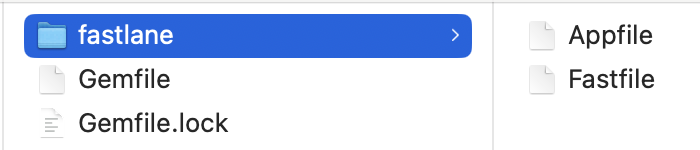
fastlane을 통해 다음과 같은 파일을 받아옴
fastlane/Appfile에 들어감
app_identifier("자신의 앱 identifier") # The bundle identifier of your app
apple_id("자신의 애플 아이디") # Your Apple email address
앱에 대한 번들 identifier를 작성
애플 아이디는 추후 팀원과 함께 사용할 수 있기때문에 .env를 이용하여 ENV["APPLE_ID"]로 접근
fastlane Fastfile 설정
testflight에 업로드해보기
desc "build app and upload to testflight"
  lane :beta do
    get_certificates
    get_provisioning_profile
    increment_build_number(
        build_number: latest_testflight_build_number + 1
    )
    build_app(
      configuration: "Debug"
    )
    upload_to_testflight
    slack(
      message: "Testflight 배포 성공",
      slack_url: "https://hooks.slack.com/자신의 채널 훅스 링크"
    )
  end
lane :beta -> 해당 lane을 사용하고싶다면 fastlane beta 입력
get_certificates -> 인증서를 가져옴
get_provisioning_profile -> 프로필을 가져옴
increment_build_number(build_number:) -> 어떤 빌드번호로 올릴지
build_app(configuration: ) -> 어떤 configuration으로 빌드할지
slack() -> 웹훅을 이용해 슬랙에 성공/실패 여부 메세지를 보냄
웹훅URL사이트: https://my.slack.com/services/new/incoming-webhook/
실제 앱 스토어에 배포하기
desc "build app and release to App Store."
  lane :release do |options|
    if options[:v]
      get_certificates
      get_provisioning_profile
      increment_build_number(
        build_number: latest_testflight_build_number + 1
      )
      build_app(
        configuration: "Release"
      )
      upload_to_app_store(
        app_version: options[:v],
        submit_for_review: true,
        force: true,
        automatic_release: true,
        skip_screenshots: true,
        skip_metadata: false
      )
      slack(
        message: "AppStore 배포에 성공했습니다!",
        slack_url: "https://hooks.slack.com/자신의 채널 훅스 링크"
      )
    end
if options[:v] -> 해당 lane에 옵션으로 버전을 넣을 경우에만 진행
fastlane release v:0.0.0
fastlane 기능설명 사이트: https://docs.fastlane.tools/actions/
메타데이터와 스크린샷
- TestFlight에 올리는것과 실제 앱을 배포할때의 큰 차이점은 메타데이터와 스크린샷을 올리냐이다
메타데이터란 ?
- 앱을 배포하기 이전에 App Store Connect에 작성하는 앱에 대한 정보들
스크린샷이란 ?
- 앱을 배포할때에 App Store에 앱에 대한 화면정보들
fastlane에서 메타데이터와 스크린샷 다루기
fastlane deliver init

* 수동으로 App Store Connect의 메타데이터를 가져올 때
fastlane deliver download_metadata

* 수동으로 App Store Connect의 스크린샷을 가져올 때
fastlane deliver download_screenshots-
맨 처음에 앱에 대한 메타데이터와 스크린샷을 작성할때에 보통 스크린샷은 변하는 경우가 없기 때문에 skip_screenshots: true로 하는 경우가 대다수
-
메타데이터같은 경우 올리는 버전에 따라서 달라지는 경우가 있기에 false
환경변수 이용하기
-
보통 코드를 GitHub와 같은 곳에 올리게될때에 내가 숨기고자 하는 값을 환경변수로 적용가능
-
fastlane에서 제공하는 .env를 이용하여 AppFile에 작성되는 숨기고싶은 값을 지정가능
-
.gitignore를 이용해서 숨기는것과는 좀 다른게 다양한 사람과 함께 fastlane을 이용한 CI/CD를 제공하고싶은 경우에 AppFile, FastFile과 같은 파일은 올리되 환경변수를 로컬에서 따로 관리하기위함이다