@RequestMapping(value="/commentWriteAction.aws", method=RequestMethod.POST)
	public JSONObject commentWriteAction(
			CommentVo cv,
			HttpServletRequest request
			) throws Exception{

		JSONObject js = new JSONObject();

		String cip = userIp.getUserIp(request);// getUserIp() 메서드를 통해 클라이언트의 IP 주소를 가져옴
		cv.setCip(cip);  // cv에 IP를 설정

		int value = commentService.commentInsert(cv);
		js.put("value", value);

		return js;
	}
1. CommentController에서 commentWriteAction메서드 만들기
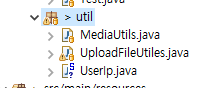
package com.myaws.myapp.util;

import java.net.InetAddress;

import javax.servlet.http.HttpServletRequest;

import org.springframework.stereotype.Component;

@Component
public class UserIp {


	// 서버 ip 추출하는 메소드
			public String getUserIp(HttpServletRequest request) throws Exception {

				String ip = null;
			     //  HttpServletRequest request =
			     // ((ServletRequestAttributes)RequestContextHolder.currentRequestAttributes()).getRequest();

				ip = request.getHeader("X-Forwarded-For");

			    if (ip == null || ip.length() == 0 || "unknown".equalsIgnoreCase(ip)) {
			         ip = request.getHeader("Proxy-Client-IP");
			    	}
			    if (ip == null || ip.length() == 0 || "unknown".equalsIgnoreCase(ip)) {
			         ip = request.getHeader("WL-Proxy-Client-IP");
			         }
			    if (ip == null || ip.length() == 0 || "unknown".equalsIgnoreCase(ip)) {
			    	ip = request.getHeader("HTTP_CLIENT_IP");
			        }
			    if (ip == null || ip.length() == 0 || "unknown".equalsIgnoreCase(ip)) {
			    	ip = request.getHeader("HTTP_X_FORWARDED_FOR");
			        }
			    if (ip == null || ip.length() == 0 || "unknown".equalsIgnoreCase(ip)) {
			    	ip = request.getHeader("X-Real-IP");
			        }
			    if (ip == null || ip.length() == 0 || "unknown".equalsIgnoreCase(ip)) {
			    	ip = request.getHeader("X-RealIP");
			    	}
			    if (ip == null || ip.length() == 0 || "unknown".equalsIgnoreCase(ip)) {
			            ip = request.getHeader("REMOTE_ADDR");
			        }
			        if (ip == null || ip.length() == 0 || "unknown".equalsIgnoreCase(ip)) {
			            ip = request.getRemoteAddr();
			        }

			        if(ip.equals("0:0:0:0:0:0:0:1") || ip.equals("127.0.0.1")) {
			        	InetAddress address = InetAddress.getLocalHost();
			        	ip = address.getHostAddress();
			        }
					return ip;
				}
}
2. ip를 가져와야 하는데, Board에서도 쓰고 Comment에서도 쓰기 때문에 중복이된다. 그래서 utill 패키지에서 클래스를 하나 생성해서 그곳에 메서드를 넣어준다. 상단에는 @Component를 넣기
	@Autowired(required = false)
	private UserIp userIp;
2-1. 보드, 코멘트 컨트롤러 두 곳 상단에 모두 UserIP를 주입시켜준다. 앞으로 ip를 쓸 때는 userIp.getUserIp(request); 이렇게 앞에 userIp로 쓰면된다.
public int commentInsert(CommentVo cv);
3. CommentService가서 insert 메서드 만들기 댓글을 추가하는 기능이다.
	@Override
	public int commentInsert(CommentVo cv) {

		int value = cm.commentInsert(cv);

		return value;
}- impl에 가서 메서드 구현하기.
public int commentInsert(CommentVo cv);
4.CommentMapper가서 같은 메서드 만들어주기
<insert id="commentInsert" parameterType="cv">
insert into comment(csubject,ccontents,cwriter,bidx,midx,cip)
values(null,#{ccontents},#{cwriter},#{bidx},#{midx},#{cip})
</insert>- CommentMapper.xml가서 쿼리 작성하기
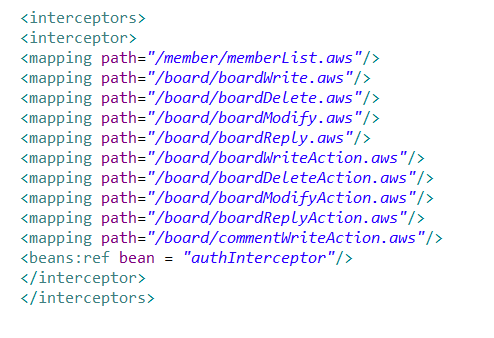
댓글을 쓰기 위해선 로그인을 해야하기 때문에 servlet-context.xml에 로그인 해야하는 경로를 추가해준다.