데이터베이스
정의
데이터베이스
: 체계적으로 구조화한 데이터의 집합 또는 그 데이터를 저장하는 공간
: 여러 사용자나 응용 프로그램이 공유하고 동시에 접근 가능한 데이터의 집합이라고 정의하기도 한다
: 데이터의 저장 공간 자체를 의미하기도 한다
DBMS
: 데이터베이스를 관리, 운영하는 소프트웨어다
: 사용자나 응용 프로그램은 DBMS가 관리하는 데이 터에 동시에 접속하여 데이터를 공유한다
https://db-engines.com/en/ranking
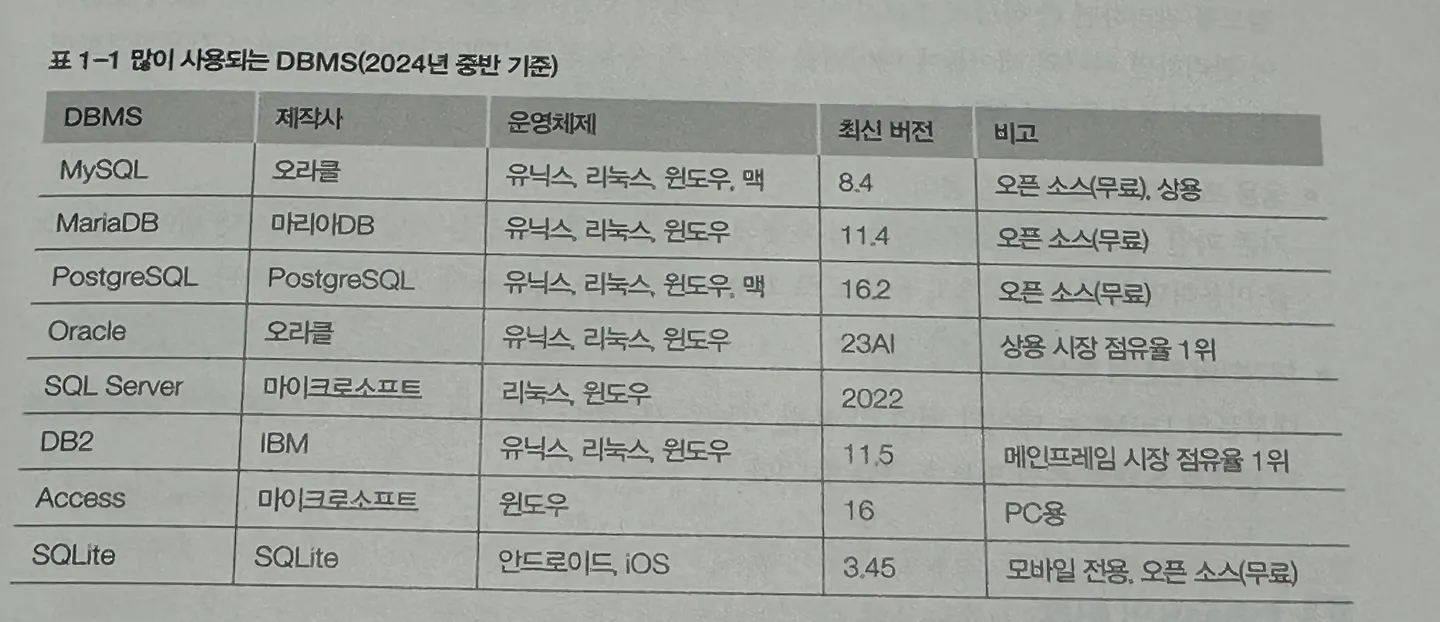
특징
- 데이터의 무결성(integrity) : 데이터는 오류 없이 정확해야 함 → 무결성을 지키기 위해 데이터베이스는 제약 조건(constraint)을 따른다
- 데이터의 독립성 : 데이터베이스의 크기나 저장소가 변경되어도 기존 응용 프로그램에 영향을 미치지 않는다 : 데이터베이스와 응용 프로그램은 독립적으로 동작한다
- 보안 : 접근 권한이 있는 사용자만이 접근 가능 : 같은 데이터에 접근하더라도 사용자의 계정에 따라 권한이 각기 다름
- 데이터 중복 최소화 : 동일한 데이터가 여러 곳에 중복 저장되는 것을 방지한다 : 데이터베이스를 통해 데이터를 통합 관리하여 중복을 최소화한다
- 응용 프로그램 개발 및 수정 용이 :
- 데이터의 안전성 향상
DBMS의 분류
- 계층형 DBMS
- 망형 DBMS
- 관계형 DBMS
- 1969 에드거 F. 코드
- 테이블을 기본 단위로 사용
- 모든 데이터는 테이블에 저장
- 데이터의 관계를 기본키와 외래키를 통해 연결, join 기능으로 데이터를 조합 가능
SQL의 개요
SQL
: 관계형 데이터베이스에서 사용되는 언어
: 데이터베이스를 조작하는 언어이므로 일반적인 프로그래밍 언어와는 다른 특성을 지님
일반 프로그래밍 언어(파이썬, 자바, C++) vs. SQL
일반 프로그래밍 언어(파이썬, 자바, C++)
- 컴퓨터에게 “어떻게” 할 것인지 단계별로 명령하는
- 절차적 언어
SQL
- 데이터베이스에게 “무엇을” 원하는지만 말하는
- 선언적 언어
SQL 특성
- DBMS 제작 회사와 독립적 : 모든 DBMS 회사에 표준 SQL 이 공개되어 각 회사는 이 표준에 맞춰 DBMS 를 개발함 → SQL 은 대부분의 DBMS 제품에서 공통적으로 호환된다
- 다른 시스템으로의 이식성이 좋음 : 서버용, 개인용, 휴대용 장비 등 운영되는 DBMS마다 상호 호환성이 뛰어나다
- 표준이 계속 발전한다
- 대화식 언어 : 바로 질의하고 결과를 얻는 대화식 언어 : 기존 프로그래밍 언어는 프로그램 작성, 컴파일 및 디버깅, 실행 과정을 거쳐야만 그 결과를 확인할 수 있는 것과 다름
- 클라이언트/서버 구조 지원
MySQL
: 오라클이 제공하는 오픈 소스 DBMS 소프트웨어
# MySQL 설치
**$ sudo yum install -y mysql-server**

# 부팅 후에도 자동 시작되고, 지금도 시작되도록 설정
**$ sudo systemctl enable mysqld --now**
Created symlink /etc/systemd/system/multi-user.target.wants/mysqld.service → /usr/lib/systemd/system/mysqld.service.
**$ sudo systemctl status mysqld**
● mysqld.service - MySQL 8.0 database server
     Loaded: loaded (/usr/lib/systemd/system/mysqld.service; enabled; prese>
     Active: **active (running)** since Mon 2025-09-08 02:35:24 UTC; 35s ago
    Process: 5724 ExecStartPre=/usr/libexec/mysql-check-socket (code=exited>
    Process: 5746 ExecStartPre=/usr/libexec/mysql-prepare-db-dir mysqld.ser>
   Main PID: 5820 (mysqld)
     Status: "Server is operational"
      Tasks: 38 (limit: 12211)
     Memory: 468.2M
        CPU: 7.379s
     CGroup: /system.slice/mysqld.service
             └─5820 /usr/libexec/mysqld --basedir=/usr
# 계정 생성
**$ sudo mysql_secure_installation**
...
Press y|Y for Yes, any other key for No: n
Please set the password for root here.
New password:
Re-enter new password:
...
Remove anonymous users? (Press y|Y for Yes, any other key for No) : y
Success.
...
Remove test database and access to it? (Press y|Y for Yes, any other key for No) : y
- Dropping test database...
Success.
...
Reload privilege tables now? (Press y|Y for Yes, any other key for No) : y
Success.
All done!# root 사용자로 비밀번호를 이용해 접속
# sudo mysql -p 와 같은 효과
**$ mysql -u root -p**
Enter password:
Welcome to the MySQL monitor. Commands end with ; or \g.
Your MySQL connection id is 10
Server version: 8.0.41 Source distribution
Copyright (c) 2000, 2025, Oracle and/or its affiliates.
Oracle is a registered trademark of Oracle Corporation and/or its
affiliates. Other names may be trademarks of their respective
owners.
Type 'help;' or '\h' for help. Type '\c' to clear the current input statement.
**mysql>**# 데이터베이스 생성
**mysql> CREATE DATABASE test;**
Query OK, 1 row affected (0.01 sec)
# 새로운 사용자 생성
# %: 모든 호스트에서 접속 가능
# 계정 및 비밀번호 모두 test
**mysql> CREATE USER 'test'@'%' IDENTIFIED BY 'test';**
Query OK, 0 rows affected (0.03 sec)
# 사용자에게 권한 부여
# 모든 데이터베이스의 모든 테이블에 대한 권한을 가짐
**mysql> GRANT ALL PRIVILEGES ON *.* TO 'test'@'%';**
Query OK, 0 rows affected (0.03 sec)
# 잘 생성되었는지 확인
**mysql> SELECT user, host FROM mysql.user;**
+------------------+-----------+
| user | host |
+------------------+-----------+
**| test | % |**
| mysql.infoschema | localhost |
| mysql.session | localhost |
| mysql.sys | localhost |
| root | localhost |
+------------------+-----------+
5 rows in set (0.00 sec)
**mysql> SHOW DATABASES;**
+--------------------+
| Database           |
+--------------------+
| information_schema |
| mysql              |
| performance_schema |
| sys                |
| test               |
+--------------------+
5 rows in set (0.00 sec)

# test 데이터베이스 사용
**mysql> USE test;**
Database changed

# 해당 데이터베이스에 테이블 생성
**mysql> CREATE TABLE rapa (
    -> id INT PRIMARY KEY,
    -> name VARCHAR(50) NOT NULL,
    -> email VARCHAR(100) NOT NULL
    -> );**
Query OK, 0 rows affected (0.02 sec)

****# 만든 테이블에 뭐가 있는지 확인
**mysql> SELECT * FROM rapa;**
Empty set (0.01 sec)
# 포트 방화벽 규칙에 MySQL 포트 추가
**$ sudo firewall-cmd --add-port=3306/tcp --permanent**
success
# 정상적으로 추가됐음을 확인
**$ sudo firewall-cmd --list-ports**
3306/tcp데이터베이스 모델링
정보 시스템 구축의 개요
정보 시스템 구축 5단계
- 분석
- 설계
- 구현
- 시험
- 유지, 보수
데이터베이스 모델링과 필수 용어
데이터베이스 모델링
: 현실 세계에 사용되는 데이터를 MySQL에 어떻게 옮겨놓을지 결정하는 과정
- 데이터 : 테이블에 저장된 하나하나의 단편적인 정보
- 테이블 : 데이터를 입력하기 위해 표 형태로 만든 것
- 데이터베이스 : 테이블이 저장되는 저장소로, 원통 모양으로 표현
- DBMS : Database Management System : 데이터베이스를 관리하는 시스템 또는 소프트웨어
- 열(필드) : 각 테이블을 열로 구성
- 열 이름 : 각 열을 구분하기 위한 이름
- 데이터 형식 : 열의 데이터 형식
- 행(레코드) : 실질적인 데이터
- 기본키(주키) : 각 행을 구분하는 유일한 열
- 외래키 : 두 테이블의 관계를 맺어주는 키
- SQL(구조화된 질의 언어)
데이터베이스 구축
데이터베이스 구축 절차 요약
- 데이터베이스 생성
- 테이블 생성
- 데이터 입력
- 데이터 조회 및 활용
데이터베이스 인덱스? 책갈피
-
DBeaver 설치
-
데이터베이스에 연결

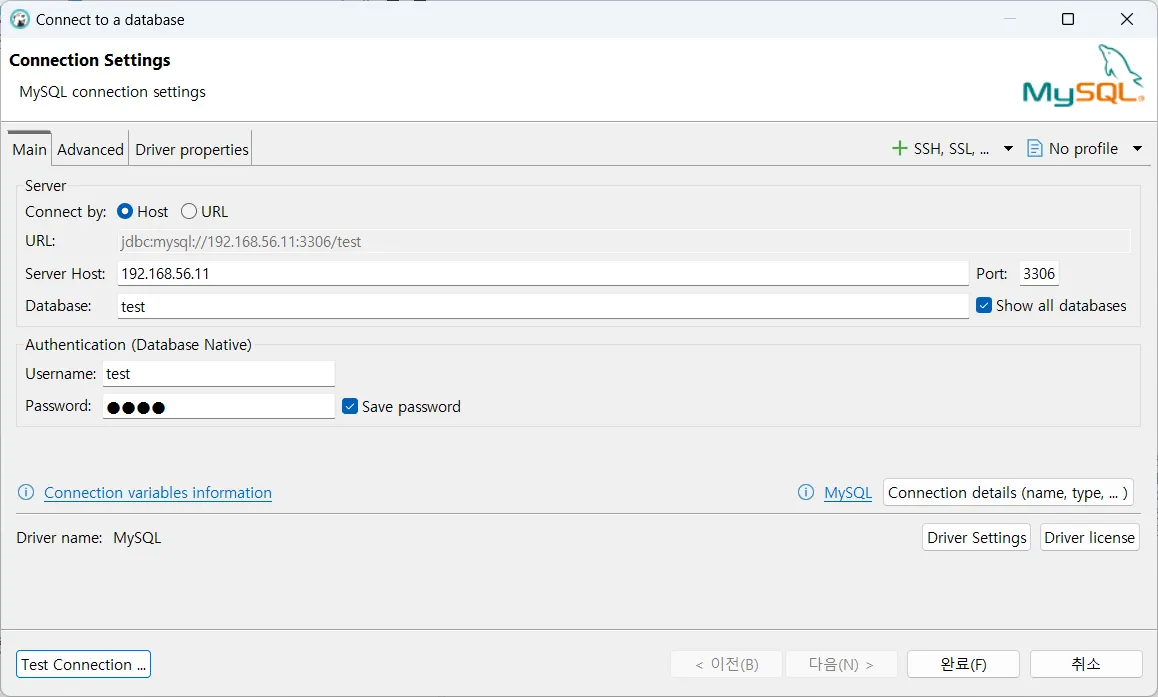
-
설정 두 개 변경
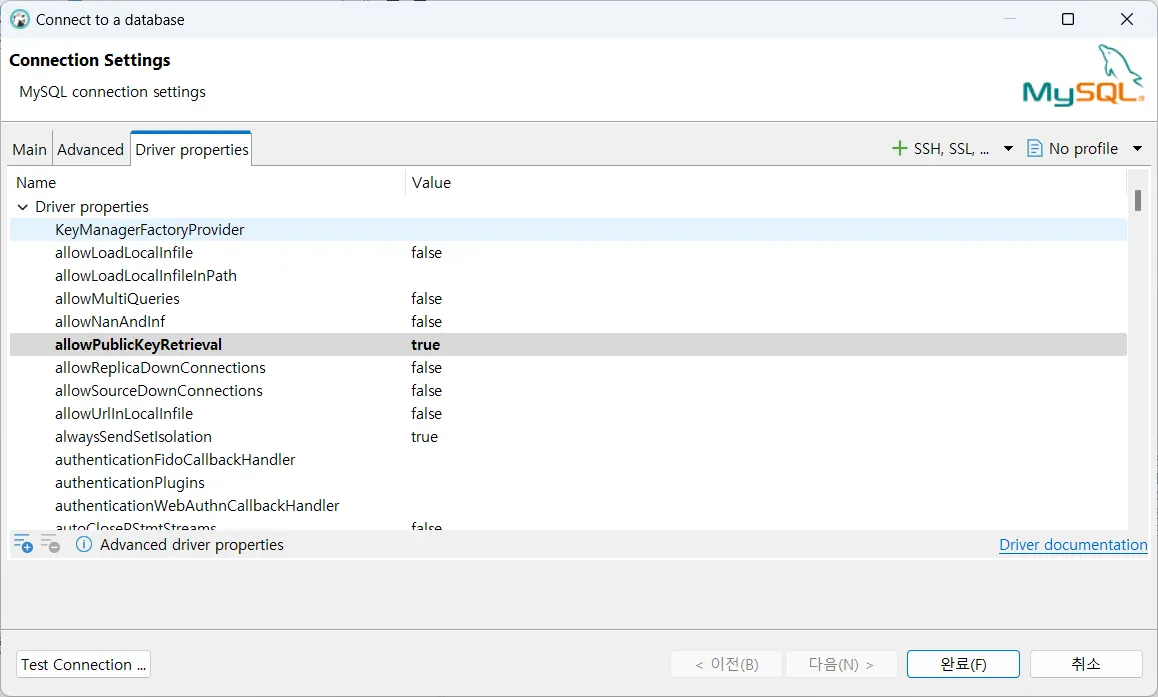
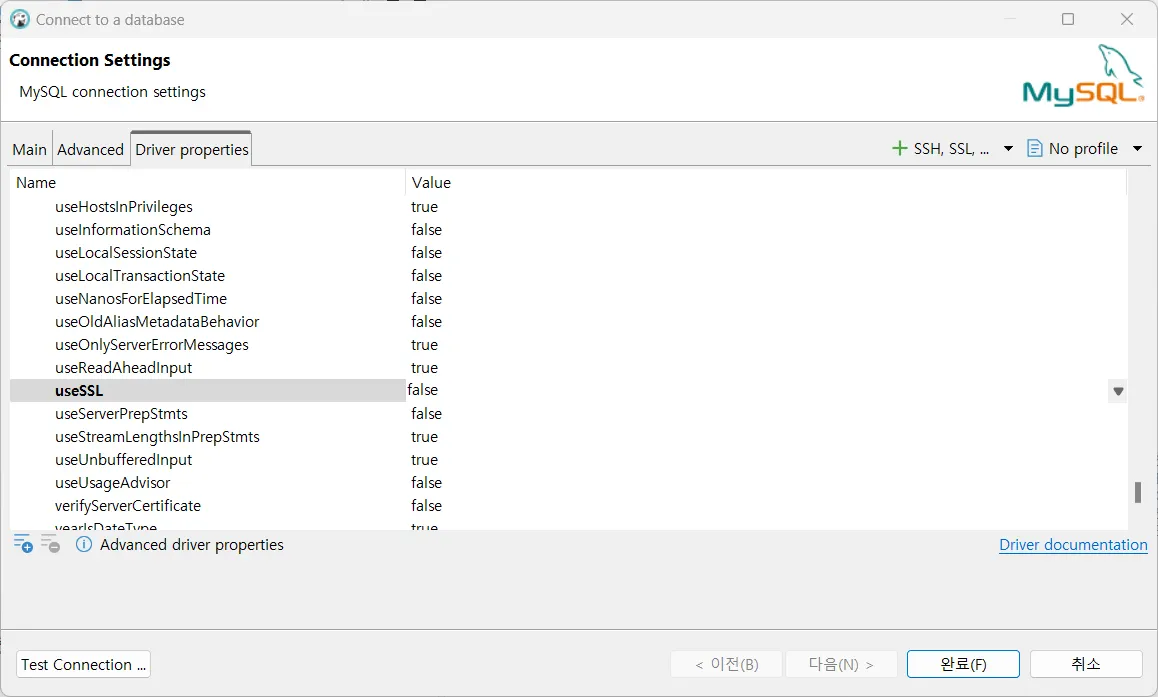
-
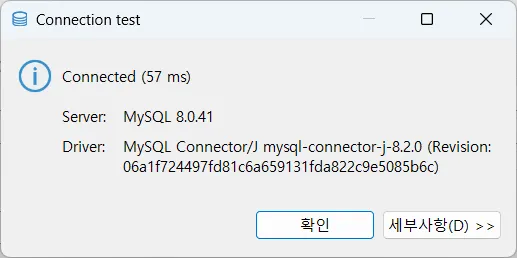
Test Connection
-
설치파일 옮기기(scp 사용, 호스트 → ssh 서버)
**PS C:\Users\DS 14\Downloads\source\각종설치파일> ls** 디렉터리: C:\Users\DS 14\Downloads\source\각종설치파일 Mode LastWriteTime Length Name ---- ------------- ------ ---- **d----- 2025-09-08 오후 2:39 employees** ... # 디렉토리에 있는 모든 파일을 옮기기 위해 재귀적 옵션 -r 사용 **PS C:\Users\DS 14\Downloads\source\각종설치파일> scp -r employees vagrant@192.168.56.11:~/** vagrant@192.168.56.11's password: ._employees.sql 100% 161 78.6KB/s 00:00 ._employees_partitioned2.sql 100% 161 157.2KB/s 00:00 ._load_departments.dump 100% 161 157.2KB/s 00:00 ._load_dept_manager.dump 100% 161 157.2KB/s 00:00 ._load_employees.dump 100% 161 157.2KB/s 00:00 ._load_salaries.dump 100% 161 157.2KB/s 00:00 ._load_titles.dump 100% 161 0.2KB/s 00:00 ._README 100% 161 0.2KB/s 00:00 Changelog 100% 752 734.4KB/s 00:00 employees.sql 100% 3864 3.7MB/s 00:00 employees_partitioned.sql 100% 5660 5.4MB/s 00:00 employees_partitioned2.sql 100% 6460 6.2MB/s 00:00 employees_partitioned3.sql 100% 7624 2.4MB/s 00:00 load_departments.dump 100% 241 117.7KB/s 00:00 load_dept_emp.dump 100% 13MB 73.7MB/s 00:00 load_dept_manager.dump 100% 1043 509.3KB/s 00:00 load_employees.dump 100% 17MB 66.7MB/s 00:00 load_salaries.dump 100% 110MB 54.9MB/s 00:02 load_titles.dump 100% 20MB 64.6MB/s 00:00 objects.sql 100% 3889 3.7MB/s 00:00 README 100% 2211 2.1MB/s 00:00 test_employees_md5.sql 100% 4455 4.3MB/s 00:00 test_employees_sha.sql 100% 4450 4.2MB/s 00:00 # 성공적으로 옮겨졌음을 확인 가능 **[vagrant@user01 ~]$ ls** test web **[vagrant@user01 ~]$ ls** employees test web **[vagrant@user01 ~]$ cd employees** **[vagrant@user01 employees]$ ls** Changelog load_departments.dump load_titles.dump employees_partitioned2.sql load_dept_emp.dump objects.sql employees_partitioned3.sql load_dept_manager.dump README employees_partitioned.sql load_employees.dump test_employees_md5.sql employees.sql load_salaries.dump test_employees_sha.sql -
샘플 데이터베이스 mysql로 가져오기
**mysql> SHOW DATABASES;**
+--------------------+
| Database           |
+--------------------+
| information_schema |
| mysql              |
| performance_schema |
| sys                |
| test               |
+--------------------+
5 rows in set (0.00 sec)

# 샘플 데이터베이스 가져오기
**mysql> source employees.sql**
Query OK, 0 rows affected, 1 warning (0.03 sec)

Query OK, 1 row affected (0.00 sec)

Database changed
+-----------------------------+
| INFO                        |
+-----------------------------+
| CREATING DATABASE STRUCTURE |
+-----------------------------+
1 row in set (0.00 sec)
...
Query OK, 7671 rows affected (0.40 sec)
Records: 7671  Duplicates: 0  Warnings: 0

# 샘플 데이터베이스 잘 가져와졌음을 확인
**mysql> SHOW DATABASES;**
+--------------------+
| Database           |
+--------------------+
**| employees          |**
| information_schema |
| mysql              |
| performance_schema |
| sys                |
| test               |
+--------------------+
6 rows in set (0.01 sec)

# 해당 데이터베이스 사용
**mysql> USE employees;**
Database changed

# 테이블 목록 확인
**mysql> SHOW TABLES;**
+---------------------+
| Tables_in_employees |
+---------------------+
| departments         |
| dept_emp            |
| dept_manager        |
| employees           |
| salaries            |
| titles              |
+---------------------+
6 rows in set (0.01 sec)

# 직원들의 수 확인
**mysql> SELECT COUNT(*) FROM employees;**
+----------+
| COUNT(*) |
+----------+
|   300024 |
+----------+
1 row in set (0.08 sec)
데이터베이스 모델링의 이해
요구 분석과 시스템 설계의 중요성
데이터베이스 모델링의 개요
- 데이터베이스 모델링은 건축 설계도 작성과 유사한 작업
- 데이터베이스의 성공적인 설계를 위해 많은 학습과 실무 경험 필요
- 좋은 설계는 데이터베이스의 성능과 효율성을 결정
데이터베이스 모델링의 절차(3단계)
- 개념적 모델링
- 논리적 모델링
- 물리적 모델링
데이터 검색과 그루핑
SELECT
USE
SELECT … FROM
SQL 작성 시 주의 사항
- 순서는 반드시 지켜야 함
- SELECT → FROM → WHERE
- 세미콜론으로 끝내야 함
- 대소문자 구별 x
- 문자열을 따옴표로 감싸야 함

새싹 개발자