참고) 모던 자바스크립트 Deep Dive
38.3 HTML 파싱과 DOM 생성
666p) DOM : 응답받은 HTML 문서를 파싱하여 브라우저가 이해할 수 있는 자료구조
DOM (Document Object Model)
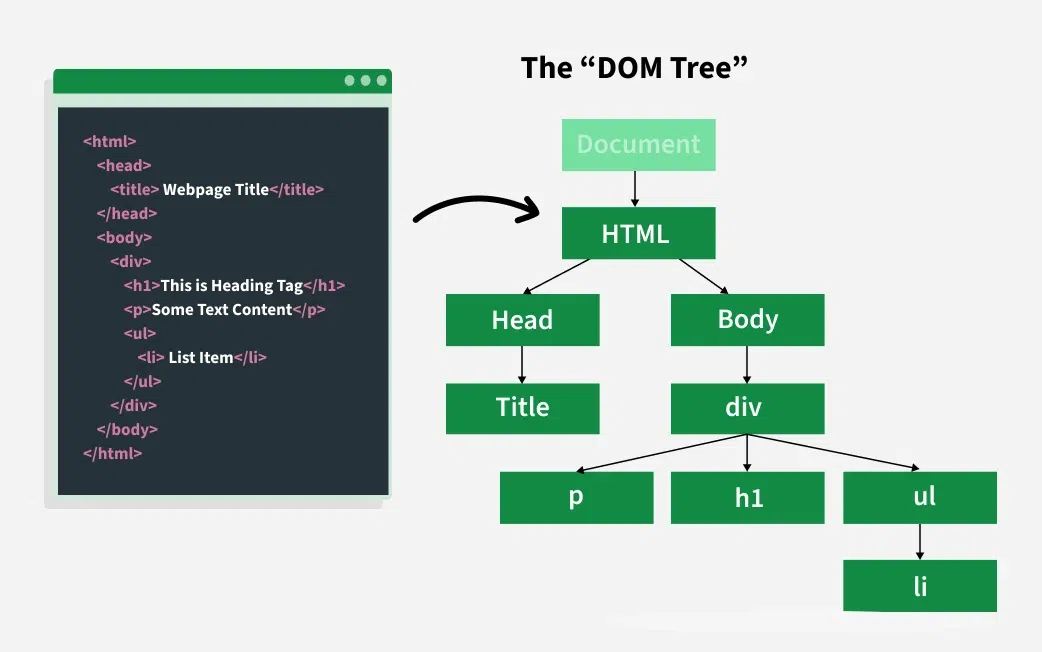
바이트 | -> | 문자 | -> | 토큰 | -> | 노드 | -> | DOM |
|---|---|---|---|---|---|---|---|---|
| 바이트(2진수)로 응답 | 인코딩 방식(charset attribute) | 응답헤더에 담겨 응답됨 | 분해 | 문법적 의미를 갖는 최소 단위(토큰) | 객체 변환 | 토큰 내용에 따라 | DOM의 기본 요소 | HTML 파싱 결과물 |
- CSSOM도 동일하게 생성
Render Tree
DOM + CSSOM
JS 파싱
JS에서는 DOM API를 이용해 DOM을 동적으로 조작 가능
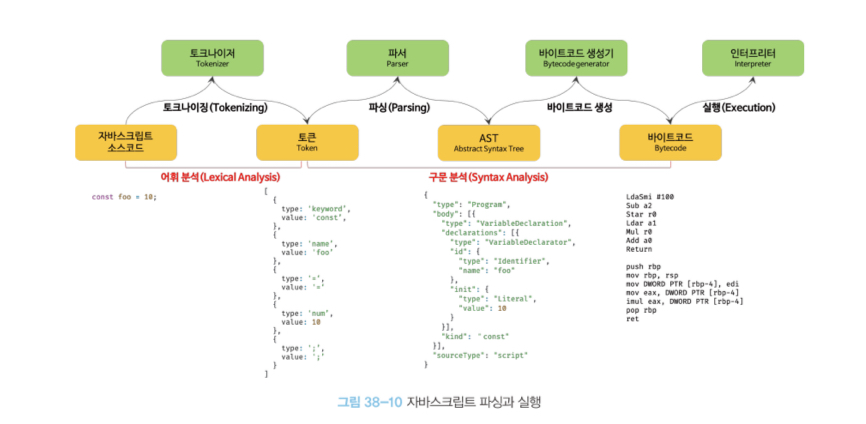
- AST (Abstract Syntax Tree)
: 토큰에 문법적 의미와 구조를 반영한 트리 구조의 자료구조
39. DOM
677p)
브라우저 렌더링 엔진 : HTML 문서 파싱 => DOM 생성
- 계층적 구조, 정보 표현
- 제어하는 API (property & method 제공)
노드
<div class = "greeting">Hello</div>
위의 예시에서
document : 문서 노드 -> one & only
div : 시작 태그, 요소 노드
class="greeting" : attribute 노드
- class : attribute 이름
- greeting : attribute 값
Hello : content, 텍스트 노드
/div : 종료 태그
DOM = 노드 객체들로 구성된 tree 자료구조 = DOM tree
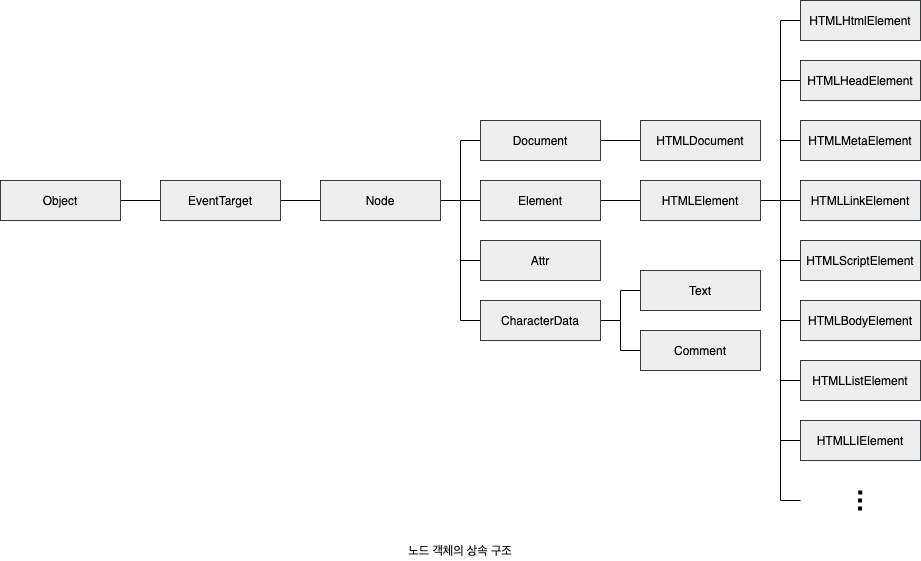
모든 노드 객체는 Object, EventTarget, Node 인터페이스를 상속
=> 부모의 모든 prototype의 property & method 상속받아 사용
- Object : 객체
- EventTarget : 이벤트 발생 객체
- Node : 트리 자료구조의 노드 객체
- Element : 웹문서의 요소 표현 객체
- HTMLElement : 웹문서의 요소 중 HTML
- HTMLInputElement : HTML 요소중 input 요소
(F12 -> Elements -> Properties)
=> 노드 타입에 따라 필요한 기능을 프로퍼티&메서드 집합인 DOM API로 제공
- HTML 구조나 내용 또는 스타일을 동적으로 조작
요소 노드 취득 (선택)
Document.getElementById() : id값이 인자인 요소 노드에 접근
id : HTML 문서 내에서 유일한 값
-> 여러 값을 가질 수 없다
=> getElementById -> 1개의 요소 노드만을 반환
html 요소가 없는 경우) null
id값과 동일한 이름의 전역변수가 암묵적으로 선언, 해당 노드 객체 할당
foo === document.getElementById('foo') //truefoo를 이미 사용중이라면 재할당 x
Document.getElementsByTagName() : tag를 찾아 모든 요소 노드 반환
Element's' => HTMLCollection 객체 (여러 요소 노드 객체) 리턴
- HTMLCollection : 배열, iterable
- 노드 객체 상태 변화를 실시간으로 반영하는 DOM 컬렉션 객체- live object -> for문 사용 주의 (실시간으로 배열 길이 달라질 수 있음)
- 역방향 순회로 회피 / while문 사용
- 배열 변환 순회(forEach, map, filter, reduce 사용)
html 요소가 없는 경우) 빈 HTMLCollection
Document.getElementsByClassName() : class를 찾아 모든 요소 노드 반환
인자로 여러 클래스 입력 가능
const $elems = document.getElementsByClassName('fruit');
[...$elems].forEach(elem => {elem.style.color = 'red'; });
Document.querySelector() : css선택자를 만족하는 하나의 요소 노드 반환
const $elems = document.querySelector('.banana');.banana를 만족하는 요소 노드가 여러 개인 경우 : 첫 번째요소만 반환
존재하지 않는 경우 : null
css 선택자 문법이 틀린 경우 : DOMException error 발생
Document.querySelectorAll() : css 선택자 만족하는 모든 요소 노드 반환
DOM collection object인 NodeList 객체 리턴
- 유사 배열 객체, iterable
- 실시간 노드 객체 상태 반영 x
- NodeList.prototype.forEach === Array.prototype.forEach (item, entries, keys, values)
- non-live object
- childNodes property가 반환하는 nodeList객체는 실시간으로 반영
const $elems = document.querySelectorAll('ul > li');
// ul의 자식 li를 모두 탐색해 리턴
Element.prototype.matches() : css 선택자를 통해 특정 노드를 취득할 수 있는 지 확인
const $apple = document.querySelector('.apple');
console.log($apple.matches('#fruits > li.apple'));- 이벤트
위임사용시 유용
DOM 조작 (변경)
714p) DOM 조작에 의해 새 노드가 추가/ 삭제되면 reflow & repaint 발생
innerHTML
- setter : tag 파싱해서 인식
- getter : tag 문자열 그대로 출력
document.getElementById('foo').innerHTML;: 요소 노드의 HTML 마크업을 취득/ 변경
=> foo의 content영역을 그 자체로 문자열로 인식 (HTML 태그 파싱 x)
textContent
- setter : 요소 안의 텍스트 내용 변경
style
element.style.property = 'value'css 스타일 변경
classList
.add ('className')
.remove ('className')
요소 추가
document.createElement('tagName')
새로운 요소 생성
parentElement.append(newElement) : 만든 요소를 부모 요소의 마지막 자식으로 추가
// 새로운 댓글 div를 생성
const newCommentDiv = document.createElement('div');
newCommentDiv.classList.add('comment');
newCommentDiv.innerHTML = '<b>new_user</b> <span>새로운 댓글입니다!</span>';

// commentList div를 선택해서 그 안에 새로운 댓글을 추가
const commentList = document.querySelector('.commentList');
commentList.append(newCommentDiv);
Document.createTextNode(text)
: 텍스트 노드 생성 리턴
- 홀로 존재하는 상태
Node.prototype.appendChild(childNode)
: childNode에게 appendChild를 호출한 노드의 마지막 자식으로 추가
$li.appendChild(textNode);-> 기존 DOM에는 추가되지 않음
$li.appendChild(document.createTextNode('Banana'));
$li.textContent = 'Banana';
두 코드는 같은 코드 (위와 아래) => li와 "Banana" 노드를 연결
$fruits.appendChild($li);=> ul 자식 노드로 li-Banana를 추가 (DOM 변경 -> 리페인트)