✨ SweetAlert2란?
자바스크립트로 웹 프로그래밍 시 Alert 함수를 사용하는데,
Alert는 사용자에게 알림을 주고자 할 때 사용하는 컴포넌트이다.
자바스크립트의 alert는 다음과 같이 아주 기본적인 Browser UI를 제공한다.
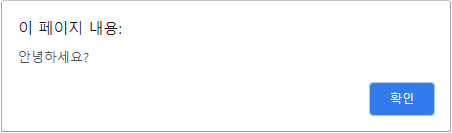
css를 입힌 Alert을 사용하고 싶을 때, SweetAlert2 라이브러리를 사용하여 기존의 alert 창보다 다양한 색감과 디자인을 입힐 수 있다.
먼저 SweetAlert2를 사용하기 위해 npm install을 해주자.
$ npm install sweetalert2✏️ SweetAlert2 특징
import React from "react";
import { Component } from "react";
import Swal from "sweetalert2";

function Sweetalert2Basic (){

    useEffect(() => {
    	Swal.fire('1.SweetAlert').then(result => {
        alert('2. result.value : '+result.value)})
    }, [])

}
export default Sweetalert2Basic;- Swal은 비동기적인 코드 라이브러리이다.
Swal.fire('1.SweetAlert')
alert('2.alert()')
이렇게 쓰게 되면, sweetAlert2 보다 alert가 먼저 동작하게 되는데, sweetalert2는 비동기적으로 동작하여 Swal.fire() 함수를 실행시켜 놓고 완료 여부에 관계없이 그냥 alert를 동작시키게 된다.
📌 vs alert()
확인버튼을 누르지 않으면 다음 동작으로 넘어가지 않기 때문에 alert 확인을 누르지 않으면 Swal.fire을 동작시키지 않는다.
Swal.fire('1. SweetAlert').then(result => {alert('2. result.value : '+result.value)})Promise의 then 함수를 사용하여 Swal.fire 함수의 result가 반환된다는 조건 하에 alert 함수를 실행시킨다.
Swal.fire() 함수 알림창에서 OK 버튼을 누르게 되면 result 값이 true로 반환된다.
* Promise란?
- 비동기적 함수를 동기적으로 사용할 수 있음
- then은 이전 함수가 완전히 완료가 되었을 경우 실행된다.
🔥 SweetAlert 사용
1. Position
- positionflag - 알림창 위치 설정
saveAlert = (flag, positionflag, e) => {
	Swal.fire({
    	position: positionflag,
        icon: 'success',
        title: flag+'되었습니다.',
        showConfirmButton: false,
        timer: 1500
    })
}
Position 메서드 파라미터 설명
📁 Position : positionflag( 알림창 위치 설정 )
ㄴ top : 중앙 상단
ㄴ top-start : 좌측 상단
ㄴ top-end : 우측 상단
ㄴ center : 정중앙
ㄴ center-start : 중앙 좌측
ㄴ center-end : 중앙 우측
ㄴ bottom : 중앙 하단
ㄴ bottom-start : 좌측 하단
ㄴ bottom-end : 우측 하단
ㄴ title : 출력 메시지
ㄴ showConfirmButton : 확인 버튼(x 버튼) 출력 여부
ㄴ timer : alert가 떠있는 시간
2. Confirm
- 사용자의 실수로 데이터 삭제 전 실제 삭제 작업을 실행하기 전 다시 한 번 확인하는 알림창
deleteAlert= () => {
	Swal.fire({
    	title: '삭제하시겠습니까?',
        icon: 'question',
        showCancelButton: true,
        confirmButtonColor: '#48088A',
        confirmButtonText: '예',
        cancelButtonText: '아니오',
    }).then((result) => {
    	if (result.isConfirmed) {
        	var info = new Promise( (resolve, reject) => {
            	var data = userId; // user Id 정보 가져오기
            	resolve(axios.delete(data));
            });
            info.then(function(val) {
            	Swal.fire({
                	position: 'center',
                    icon: 'success',
                    title: '삭제가 완료되었습니다.',
                    text: 'It has been deleted',
                    showConfirmButton: true,
                }).then((result) => {
                	if(result.isConfirmed) {
                    	 if (_url !== (undefined || null)) {
                            window.location.href = _url
                        } else {
                            window.location.reload()
                        }
                    }
                }).catch(function(reason) {console.log('fail-'+reason)})
            })
        }
    })
}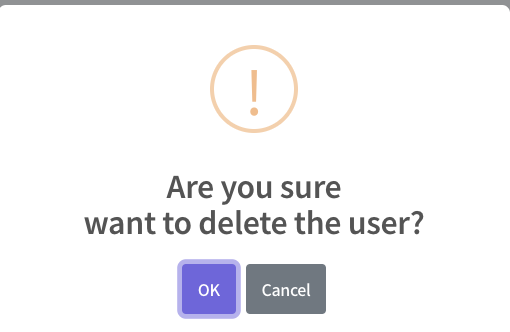
다음과 같이 삭제 전 Alert 창이 예쁘게 바뀐 걸 확인할 수 있다.
