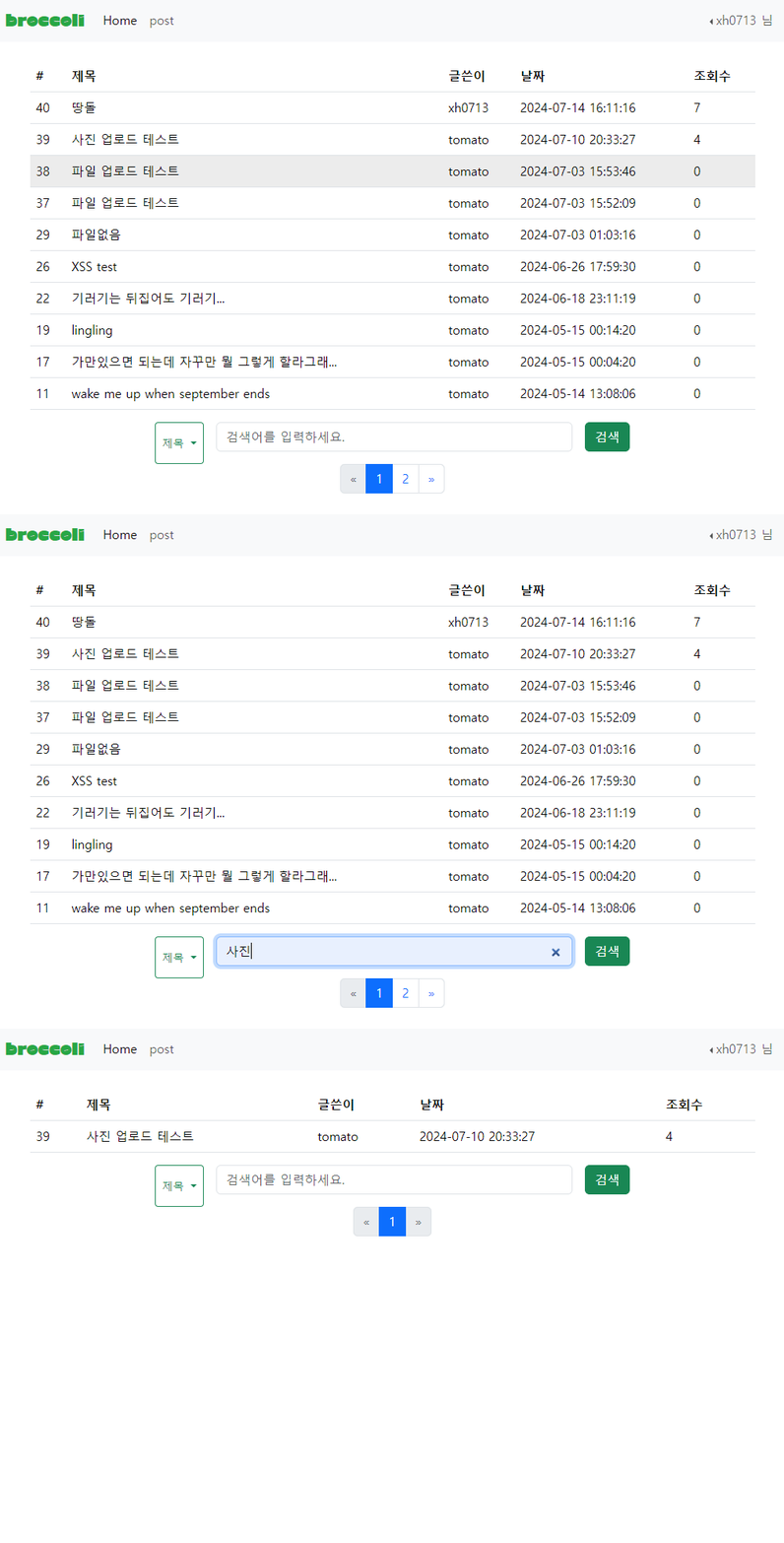
게시판 검색기능을 구현해보자. list.php 를 수정하고 list_search.php 를 생성할 것이다.
list.php
✔ 게시글 검색창
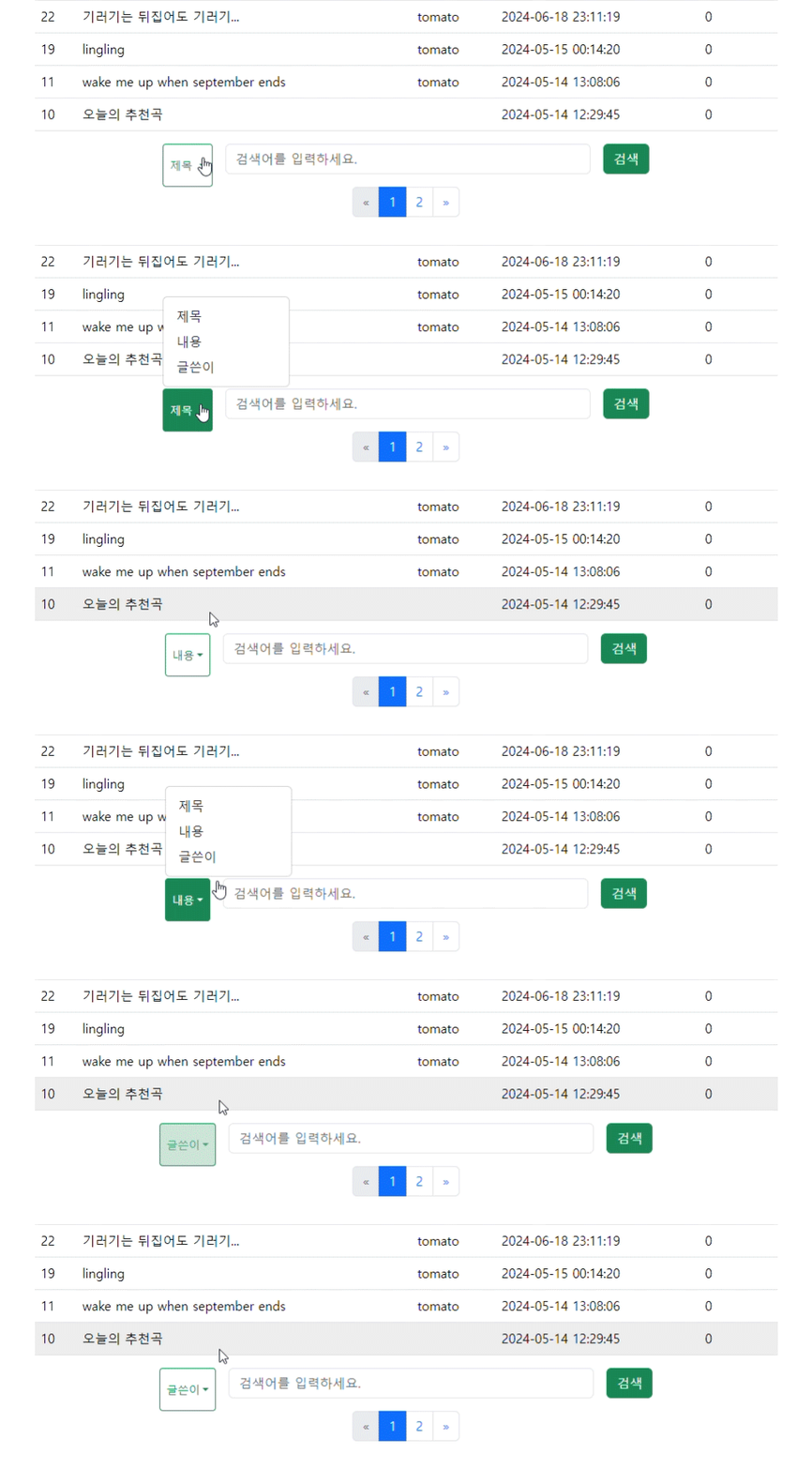
게시글 검색창을 만들어 list.php 에 추가한다.
<!-- 게시글 검색 -->
<form class="row g-3 justify-content-center" action="list_search.php" method="GET">
    <div class="btn-group col-auto">
        <button type="button" class="btn btn-sm btn-outline-success dropdown-toggle" data-bs-toggle="dropdown" aria-expanded="false" id="dropdownMenuButton">
            제목
        </button>
        <input type="hidden" id="search_by" name="search_by" value="title">
        <ul class="dropdown-menu">
            <li><a class="dropdown-item" href="#" onclick="setSearchBy('title')">제목</a></li>
            <li><a class="dropdown-item" href="#" onclick="setSearchBy('content')">내용</a></li>
            <li><a class="dropdown-item" href="#" onclick="setSearchBy('id')">글쓴이</a></li>
        </ul>
    </div>
    <div class="col-auto col-sm-6">
        <label for="inputPassword2" class="visually-hidden">search</label>
        <input type="search" class="form-control" id="inputPassword2" placeholder="검색어를 입력하세요." name="query">
    </div>
    <div class="col-auto">
        <button type="submit" class="btn btn-primary mb-3 btn btn-success">검색</button>
    </div>
</form>
Form을 만들어 제출하면 list_search.php 로 이동된다.
드롭다운에서 제목 / 글쓴이 / 내용을 클릭하면 버튼에 똑같이 나오게 하기위해 onclick 속성에 setSearchBy을 추가해주었다. 스크립트로 버튼을 누를때마다 바꿔주는 기능을 만들자.
<script>
    function setSearchBy(value) {
        document.getElementById('search_by').value = value;
        var button = document.getElementById('dropdownMenuButton');
        var text = value === 'title' ? '제목' : value === 'content' ? '내용' : '글쓴이';
        button.textContent = text;
    }
</script>
드롭다운에서 제목 / 글쓴이 / 내용을 클릭하면 해당 값을 버튼 textContent로 바꾼다.
📌 삼항연산자
주로 짧은 if문을 간결하게 표현하고싶을 때 사용한다.조건문 ? 참일 경우 표현식 : 거짓일 경우 표현식
위의 코드에서 삼항연산자를 if문을 표현하면 다음과 같다.
var text;

if (value === 'title') {
    text = '제목';
} else if (value === 'content') {
    text = '내용';
} else {
    text = '글쓴이';
}

button.textContent = text;
✔ 페이징 네비게이션
// 현재 페이지 번호 가져오기 (기본값은 1)
$page = isset($_GET['page']) ? (int)$_GET['page'] : 1;
$limit = 10; // 한 페이지에 표시할 게시글 수
$offset = ($page - 1) * $limit; // 데이터 가져올 시작위치

// 게시글 총 개수 구하기
$total_sql = "SELECT COUNT(*) as total FROM post_table";
$total_result = mq($total_sql);
$total_row = $total_result->fetch_assoc();
$total_posts = $total_row['total'];

// 페이지 수 계산
$total_pages = ceil($total_posts / $limit);

// 현재 페이지의 게시글 가져오기
$sql = mq("SELECT * FROM post_table ORDER BY idx DESC LIMIT $offset, $limit");offset으로 가져올 데이터의 시작위치를 지정해준다.
첫번째 페이지(page = 1)에서 offset 은 0, 즉 0번째 인덱스 부터 10개의 게시글을 가져온다.
똑같이 두번째 페이지(page = 2)에서 offset 은 1, 10번째 인덱스부터 10개의 게시글을 가져온다.
📌 ceil 함수
소수점 이하를 반올림하여 정수로 변환한다.
<nav aria-label="Page navigation example">
<ul class="pagination justify-content-center">
<li class="page-item <?= $page <= 1 ? 'disabled' : '' ?>">
<a class="page-link" href="?page=<?= $page - 1 ?>" aria-label="Previous">
<span aria-hidden="true">«</span>
</a>
</li>
<?php for ($i = 1; $i <= $total_pages; $i++): ?>
<li class="page-item <?= $i == $page ? 'active' : '' ?>">
<a class="page-link" href="?page=<?= $i ?>"><?= $i ?></a>
</li>
<?php endfor; ?>
<li class="page-item <?= $page >= $total_pages ? 'disabled' : '' ?>">
<a class="page-link" href="?page=<?= $page + 1 ?>" aria-label="Next">
<span aria-hidden="true">»</span>
</a>
</li>
</ul>
</nav>
</main>list_search.php
✔ SQLi 방어 화이트 리스트
// SQLi 방어 화이트 리스트
$search =$_GET['search_by'];
if ($search === 'title' || $search=== 'content' || $search==='id'){

} else {
  echo "<script>alert('비정상적인 접근입니다.');
  history.back();
  </script>";
};
order by 절에서는 prepared Statement 사용이 불가능하니 화이트 리스트로 필터링하자.
가져온 값이 title,content,id 가 아니면 접근이 불가능하다.
✔ 정렬 및 검색
// 검색 쿼리 및 필터 설정
$query = isset($_GET['query']) ? $_GET['query'] : '';
$search_by = isset($_GET['search_by']) ? $_GET['search_by'] : 'title';


function sort_search($conn, $query, $search_by) {
    if ($query == '') { //query 값이 없으면 정렬
        $sql_sort = "SELECT * FROM post_table ORDER BY $search_by DESC";
        $stmt_sort = $conn->prepare($sql_sort);
        $stmt_sort->execute();
        $result = $stmt_sort->get_result();

    } else { //query 값이 있으면 검색
        $sql_search = "SELECT * FROM post_table WHERE $search_by LIKE ? ORDER BY idx DESC LIMIT ?, ?";
        $stmt_search = $conn->prepare($sql_search);
        $search_query = "%" . $query . "%";
        $stmt_search->bind_param("s", $search_query);

        // SQL 문 실행
        $stmt_search->execute();
        $result = $stmt_search->get_result();
    }

    return $result;
}
query 값이 없으면 선택한 변수로 정렬, 값이 있으면 그 값을 검색한다.
idx도 필터링 해줘야한다...
나머지는 list.php 와 동일하다.
전체코드
💻 list.php
<?php require("nVtop.php");
require("post_DB_conn.php");?>
<?php
function mq($sql)
{
global $conn;
return $conn->query($sql);
}
// 현재 페이지 번호 가져오기 (기본값은 1)
$page = isset($_GET['page']) ? (int)$_GET['page'] : 1;
$limit = 10; // 한 페이지에 표시할 게시글 수
$offset = ($page - 1) * $limit;
// 게시글 총 개수 구하기
$total_sql = "SELECT COUNT(*) as total FROM post_table";
$total_result = mq($total_sql);
$total_row = $total_result->fetch_assoc();
$total_posts = $total_row['total'];
// 페이지 수 계산
$total_pages = ceil($total_posts / $limit);
// 현재 페이지의 게시글 가져오기
$sql = mq("SELECT * FROM post_table ORDER BY idx DESC LIMIT $offset, $limit");
?>
<main class="container">
<table class="table table-hover">
<thead>
<tr>
<th scope="col">#</th>
<th scope="col">제목</th>
<th scope="col">글쓴이</th>
<th scope="col">날짜</th>
<th scope="col">조회수</th>
</tr>
</thead>
<tbody>
<?php
while ($board = $sql->fetch_array()) {
$title = $board["title"];
if (strlen($title) > 30) {
$title = str_replace($board["title"], mb_substr($board["title"], 0, 30, "utf-8") . "...", $board["title"]);
}
?>
<tr>
<td><?php echo $board['idx']; ?></td>
<td><a href="read.php?idx=<?php echo $board["idx"];?>" class="text-reset text-decoration-none">
<?php echo htmlspecialchars($title); ?></a></td>
<td><?php echo htmlspecialchars($board['id']); ?></td>
<td><?php echo $board['date']; ?></td>
<td><?php echo $board['views']; ?></td>
</tr>
<?php } ?>
</tbody>
</table>
<!-- 게시글 검색 -->
<form class="row g-3 justify-content-center" action="list_search.php" method="GET">
<div class="btn-group col-auto">
<button type="button" class="btn btn-sm btn-outline-success dropdown-toggle" data-bs-toggle="dropdown" aria-expanded="false" id="dropdownMenuButton">
제목
</button>
<input type="hidden" id="search_by" name="search_by" value="title">
<ul class="dropdown-menu">
<li><a class="dropdown-item" href="#" onclick="setSearchBy('title')">제목</a></li>
<li><a class="dropdown-item" href="#" onclick="setSearchBy('content')">내용</a></li>
<li><a class="dropdown-item" href="#" onclick="setSearchBy('id')">글쓴이</a></li>
</ul>
</div>
<div class="col-auto col-sm-6">
<label for="inputPassword2" class="visually-hidden">search</label>
<input type="search" class="form-control" id="inputPassword2" placeholder="검색어를 입력하세요." name="query">
</div>
<div class="col-auto">
<button type="submit" class="btn btn-primary mb-3 btn btn-success">검색</button>
</div>
</form>
<!-- 페이징 네비게이션 -->
<nav aria-label="Page navigation example">
<ul class="pagination justify-content-center">
<li class="page-item <?= $page <= 1 ? 'disabled' : '' ?>">
<a class="page-link" href="?page=<?= $page - 1 ?>" aria-label="Previous">
<span aria-hidden="true">«</span>
</a>
</li>
<?php for ($i = 1; $i <= $total_pages; $i++): ?>
<li class="page-item <?= $i == $page ? 'active' : '' ?>">
<a class="page-link" href="?page=<?= $i ?>"><?= $i ?></a>
</li>
<?php endfor; ?>
<li class="page-item <?= $page >= $total_pages ? 'disabled' : '' ?>">
<a class="page-link" href="?page=<?= $page + 1 ?>" aria-label="Next">
<span aria-hidden="true">»</span>
</a>
</li>
</ul>
</nav>
</main>
<script>
function setSearchBy(value) {
document.getElementById('search_by').value = value;
var button = document.getElementById('dropdownMenuButton');
var text = value === 'title' ? '제목' : value === 'content' ? '내용' : '글쓴이';
button.textContent = text;
}
</script>
<?php require("nVbottom.php"); ?>
💻 list_search.php
<?php require('post_DB_conn.php'); ?>
<?php require('nVtop.php'); ?>
<?php
// 현재 페이지 번호 가져오기 (기본값은 1)
$page = isset($_GET['page']) ? (int)$_GET['page'] : 1;
$limit = 10; // 한 페이지에 표시할 게시글 수
$offset = ($page - 1) * $limit;
// SQLi 방어 화이트 리스트
$search =$_GET['search_by'];
if ($search === 'title' || $search=== 'content' || $search==='id'){
} else {
echo "<script>alert('비정상적인 접근입니다.');
history.back();
</script>";
};
// 검색 쿼리 및 필터 설정
$query = isset($_GET['query']) ? $_GET['query'] : '';
$search_by = isset($_GET['search_by']) ? $_GET['search_by'] : 'title';
function sort_search($conn, $query, $search_by) {
if ($query == '') { //query 값이 없으면 정렬
$sql_sort = "SELECT * FROM post_table ORDER BY $search_by DESC";
$stmt_sort = $conn->prepare($sql_sort);
$stmt_sort->execute();
$result = $stmt_sort->get_result();
} else { //query 값이 있으면 검색
$sql_search = "SELECT * FROM post_table WHERE $search_by LIKE ? ORDER BY idx DESC LIMIT ?, ?";
$stmt_search = $conn->prepare($sql_search);
$search_query = "%" . $query . "%";
$stmt_search->bind_param("s", $search_query);
// SQL 문 실행
$stmt_search->execute();
$result = $stmt_search->get_result();
}
return $result;
}
// 총 게시글 수 구하기
$total_sql = "SELECT COUNT(*) as total FROM post_table WHERE $search_by LIKE ?";
$total_stmt = $conn->prepare($total_sql);
$total_stmt->bind_param("s", $search_query);
$total_stmt->execute();
$total_result = $total_stmt->get_result();
$total_row = $total_result->fetch_assoc();
$total_posts = $total_row['total'];
// 페이지 수 계산
$total_pages = ceil($total_posts / $limit);
// 게시글 가져오기
$result = sort_search($conn, $query, $search_by, $offset, $limit);
?>
<main class="container">
<table class="table table-hover">
<thead>
<tr>
<th scope="col">#</th>
<th scope="col">제목</th>
<th scope="col">글쓴이</th>
<th scope="col">날짜</th>
<th scope="col">조회수</th>
</tr>
</thead>
<tbody>
<?php while ($board = $result->fetch_assoc()):
$title = $board["title"];
if (strlen($title) > 30) {
$title = mb_substr($title, 0, 30, "utf-8") . "...";
}
?>
<tr>
<td><?php echo $board['idx']; ?></td>
<td><a href="read.php?idx=<?php echo $board["idx"]; ?>" class="text-reset text-decoration-none"><?php echo htmlspecialchars($title); ?></a></td>
<td><?php echo htmlspecialchars($board['id']); ?></td>
<td><?php echo $board['date']; ?></td>
<td><?php echo $board['views']; ?></td>
</tr>
<?php endwhile; ?>
</tbody>
</table>
<!-- 게시글 검색 -->
<form class="row g-3 justify-content-center" action="list_search.php" method="GET">
<div class="btn-group col-auto">
<button type="button" class="btn btn-sm btn-outline-success dropdown-toggle" data-bs-toggle="dropdown" aria-expanded="false" id="dropdownMenuButton">
제목
</button>
<input type="hidden" id="search_by" name="search_by" value="title">
<ul class="dropdown-menu">
<li><a class="dropdown-item" href="#" onclick="setSearchBy('title')">제목</a></li>
<li><a class="dropdown-item" href="#" onclick="setSearchBy('content')">내용</a></li>
<li><a class="dropdown-item" href="#" onclick="setSearchBy('id')">글쓴이</a></li>
</ul>
</div>
<div class="col-auto col-sm-6">
<label for="inputPassword2" class="visually-hidden">search</label>
<input type="search" class="form-control" id="inputPassword2" placeholder="검색어를 입력하세요." name="query">
</div>
<div class="col-auto">
<button type="submit" class="btn btn-primary mb-3 btn btn-success">검색</button>
</div>
</form>
<!-- 페이징 네비게이션 -->
<nav aria-label="Page navigation example">
<ul class="pagination justify-content-center">
<li class="page-item <?= $page <= 1 ? 'disabled' : '' ?>">
<a class="page-link" href="?query=<?= urlencode($query) ?>&search_by=<?= urlencode($search_by) ?>&page=<?= $page - 1 ?>" aria-label="Previous">
<span aria-hidden="true">«</span>
</a>
</li>
<?php for ($i = 1; $i <= $total_pages; $i++): ?>
<li class="page-item <?= $i == $page ? 'active' : '' ?>">
<a class="page-link" href="?query=<?= urlencode($query) ?>&search_by=<?= urlencode($search_by) ?>&page=<?= $i ?>"><?= $i ?></a>
</li>
<?php endfor; ?>
<li class="page-item <?= $page >= $total_pages ? 'disabled' : '' ?>">
<a class="page-link" href="?query=<?= urlencode($query) ?>&search_by=<?= urlencode($search_by) ?>&page=<?= $page + 1 ?>" aria-label="Next">
<span aria-hidden="true">»</span>
</a>
</li>
</ul>
</nav>
</main>
<script>
function setSearchBy(value) {
document.getElementById('search_by').value = value;
var button = document.getElementById('dropdownMenuButton');
var text = value === 'title' ? '제목' : value === 'content' ? '내용' : '글쓴이';
button.textContent = text;
}
</script>
<?php require("nVbottom.php"); ?>