⭐ Instagram 게시물 구현
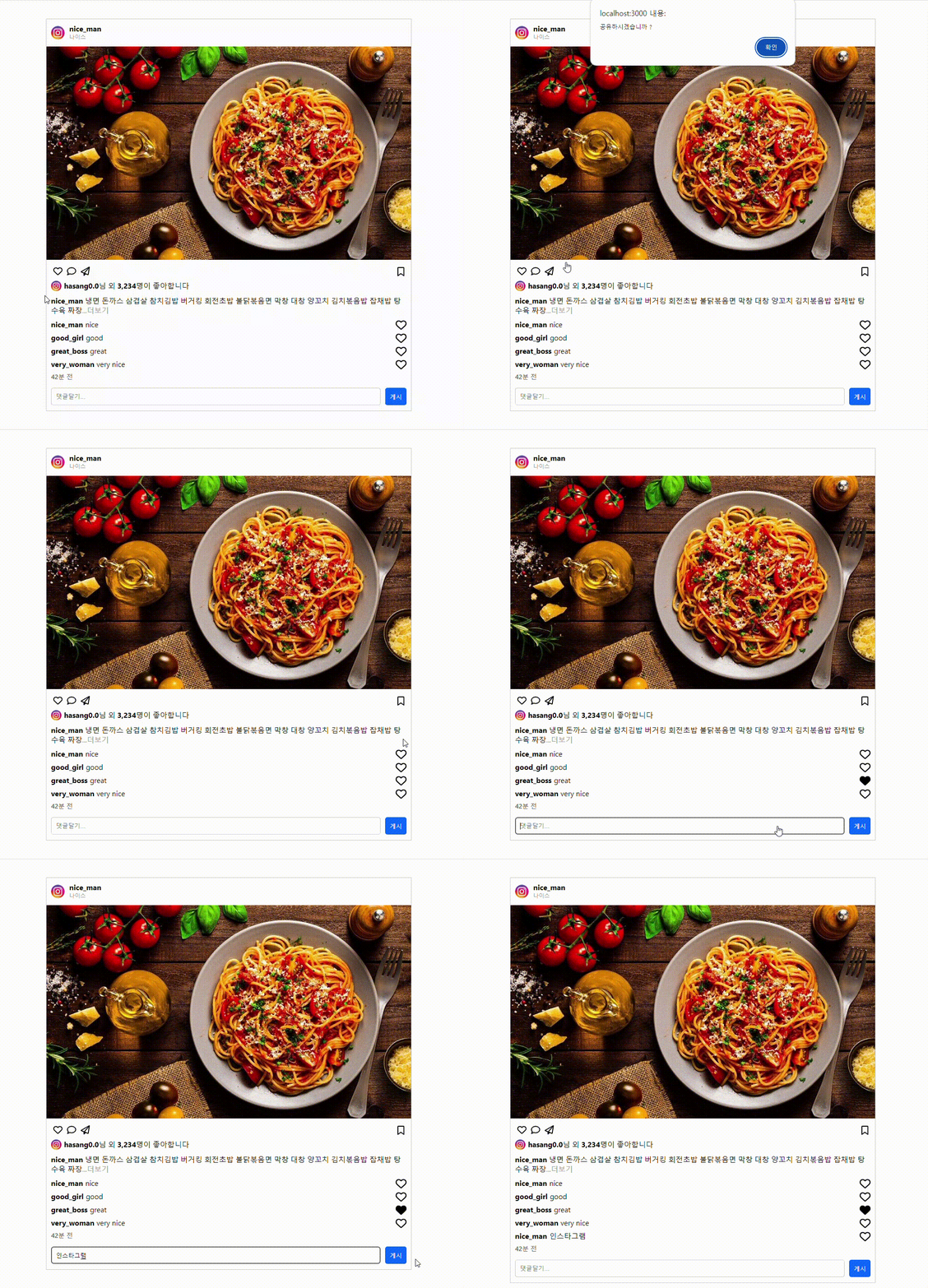
📌 전체코드
// 기존데이터 파일

const data = [
  {
    id: 1,
    userId: "nice_man",
    comment: "nice",
  },
  {
    id: 2,
    userId: "good_girl",
    comment: "good",
  },
  {
    id: 3,
    userId: "great_boss",
    comment: "great",
  },
  {
    id: 4,
    userId: "very_woman",
    comment: "very nice",
  },
];

export default data;
//App.jsx
import Navbar from "./components/Navbar";
import Feed from "./components/Feed";
import CommentList from "./components/CommentList";
function App() {
return (
<AppBox>
<Navbar />
<Feed />
<CommentList />
</AppBox>
);
}
export default App;//Navbar.jsx
import styled from "styled-components";
import profileImg from "../images/profile.jpg";
const Navbar = () => {
return (
<Container>
<Prople /> //프로필 이미지
<h4>
nice_man
<InstaName>나이스</InstaName>
</h4>
</Container>
);
};
export default Navbar;//Feed.jsx
import pastaImg from "../images/pasta.jpg";
import { FontAwesomeIcon } from "@fortawesome/react-fontawesome";
import profileImg from "../images/profile.jpg";
import {
faComment,
faPaperPlane,
faBookmark,
faHeart,
} from "@fortawesome/free-regular-svg-icons";
import { faHeart as faSolidHeart } from "@fortawesome/free-solid-svg-icons";
import { faBookmark as faSolidBookmark } from "@fortawesome/free-solid-svg-icons";
import styled from "styled-components";
import { useState } from "react";
const Feed = () => {
const [heart, setHeart] = useState(faHeart);
const [bookmark, setBookmark] = useState(faBookmark);
const onClickHeart = () => {
//좋아요 버튼
setHeart(heart === faHeart ? faSolidHeart : faHeart);
};
const onclickPaperPlane = () => {
//공유 버튼
alert("공유하시겠습니까 ?");
};
const onClickBoomark = () => {
//북마크 버튼
setBookmark(bookmark === faBookmark ? faSolidBookmark : faBookmark);
};
return (
<div>
<img src={pastaImg} alt="파스타 배너" style={{ backgroundSize: "50%" }} />
<IconBox>
<IconBoxLeft>
<IconBtn>
<FontAwesomeIcon
className="buttons"
icon={heart}
size="xl"
onClick={onClickHeart}
/>
</IconBtn>
<IconBtn>
<FontAwesomeIcon className="buttons" icon={faComment} size="xl" />
</IconBtn>
<IconBtn>
<FontAwesomeIcon
className="buttons"
icon={faPaperPlane}
size="xl"
onClick={onclickPaperPlane}
/>
</IconBtn>
</IconBoxLeft>
<IconBoxRight>
<IconBtn>
<FontAwesomeIcon
className="buttons"
icon={bookmark}
size="xl"
onClick={onClickBoomark}
/>
</IconBtn>
</IconBoxRight>
</IconBox>
<Heart>
<HeartImg src={profileImg} alt="사진" width="3%" />
<span>
<b>hasang0.0</b>님 외 <b>3,234</b>명이 좋아합니다
</span>
</Heart>
</div>
);
};
export default Feed;//CommentList.jsx
import data from "../data";
import styled from "styled-components";
import { useState, useRef } from "react";
import Comment from "./Comment";
const CommentList = () => {
const [idData, setIdData] = useState(data);
const [commentValue, setCommenValue] = useState("");
const idRef = useRef(5);
//댓글기능
const onCreate = (comment) => {
const newComment = [
{
id: idRef.current++, //추가될 때마다 id값 1씩 증가
userId: "nice_man",
comment: comment,
},
];
setIdData([...idData, ...newComment]);
};
const onChangeComment = (e) => {
setCommenValue(e.target.value);
};
const onsubmit = () => {
setCommenValue("");
onCreate(commentValue);
};
const onKeyDownComment = (e) => {
if (e.key === "Enter") {
onsubmit();
}
};
return (
<Container>
<SubHeading>
<b>nice_man</b> 냉면 돈까스 삼겹살 참치김밥 버거킹 회전초밥 불닭볶음면
막창 대창 양꼬치 김치볶음밥 잡채밥 탕수육 짜장
<TxtGray>...더보기</TxtGray>
</SubHeading>
{idData.map((data) => (
<Comment data={data} key={data.id} />
))}
<TxtDarkGray>42분 전</TxtDarkGray>
<CommentBox>
<CommentInput
type="text"
placeholder="댓글달기..."
value={commentValue}
onChange={onChangeComment}
onKeyDown={onKeyDownComment}
/>
<PostBtn onClick={onsubmit}>게시</PostBtn>
</CommentBox>
</Container>
);
};
export default CommentList;//Comment.jsx
import styled from "styled-components";
import { FontAwesomeIcon } from "@fortawesome/react-fontawesome";
import { faHeart } from "@fortawesome/free-regular-svg-icons";
import { faHeart as faSolidHeart } from "@fortawesome/free-solid-svg-icons";
import { useState } from "react";
const Comment = ({ data }) => {
const [like, setLike] = useState(false);
const onClickUser = () => {
setLike(like === false ? true : false);
};
return (
<Text>
<CommentText>
<b>{data.userId}</b>
<span>{data.comment}</span>
</CommentText>
<div>
<FontAwesomeIcon
className="buttons"
icon={like === false ? faHeart : faSolidHeart}
size="xl"
onClick={onClickUser}
/>
</div>
</Text>
);
};
export default Comment;폰트어썸을 사용해서 아이콘을 사용했는데 설치할 게 조금 많다고 느껴졌다. 터미널에 입력해서 설치를 다 해야지만 위에있는 코드에 아이콘이 잘 렌더링 되는 것을 확인 할 수 있다.
<폰트어썸 설치>
- npm i @fortawesome/fontawesome-svg-core
- npm i @fortawesome/free-solid-svg-icons @fortawesome/free-regular-svg-icons @fortawesome/free-brands-svg-icons
- npm i @fortawesome/react-fontawesome
⚠️ 문제 해결1
- 댓글기능 추가하는 방법이 아직 익숙하지 않아서 처음에는 아래처럼 코드를 작성했다.
   const onClickCommet = () => {
     let commentCopy = [...text];
     commentCopy = [...text, ...commentValue];
     setCommenValue(commentCopy);
   };
이 코드처럼 작성하게 되면 문제점이 뭐냐면 console.log로 출력했을 때 내가 적은 데이터가 잘 나오지만 기존데이터는 배열안에 있는 객체이다. 새로운 데이터를 객체로 만들어서 저장하지 않으면 당연히 객체가 깨지게? 나타날 수 밖에 없다. 그래서 댓글이 추가가 잘 안 됐었던 것이다. 앞으로는 타입을 잘 보고 해야될 것 같다. 수정된 코드는 CommentList.jsx 파일에서 주석으로 달아놓은 댓글기능 부분에 있다.
⚠️ 문제 해결2
{idData.map((data) => (
   <Text key={data.id}>
      <CommentText>
        <b>{data.userId}</b>
        <span>{data.comment}</span>
      </CommentText>
      <div>
        <FontAwesomeIcon
          className="buttons"
          icon={like === false ? faHeart : faSolidHeart}
          size="xl"
          onClick={onClickUser}
        />
      </div>
    </Text>
))}
다른 부분은 생략하고 이 코드만 보자면 댓글에 있는 좋아요 버튼 4개를 렌더링 하기 위해서 map을 사용하여 반복생성을 했다. 이렇게 했을 때 문제점이 뭐였냐면 state에 보관을 일일이 해줘야 된다는 단점이 있다. 여기까지만 생각해도 문제를 해결할 수 있었는데 나는 state를 한 개만 만들어놓고 버튼이 왜 다같이 눌리는 거야 하면서 계속 해맸었다... 이 점을 보완하기 위해서 Comment 컴포넌트 하나를 만들고, map으로 돌린 다음에 컴포넌트 안에서 state를 만들었다. 그렇게 되면 일일이 만들지 않아도 반복생성되기 때문에 정말 편리한 것 같다. 수정된 코드는 CommentList와 Comment파일에서 확인할 수 있다.
추가적으로 이해가 필요했던 부분
 const [like, setLike] = useState(false); //초기값 false

 const onClickUser = () => { //버튼을 클릭했을 때
   setLike(like === false ? true : false);
   // false라면 true로 true라면 false로 !
 };

<FontAwesomeIcon
  className="buttons"
  icon={like === false ? faHeart : faSolidHeart}
//아이콘의 like의 값이 false라면 빈하트 true라면 채워진 하트
  size="xl"
  onClick={onClickUser}
/>
아이콘부터 살펴보자면 저건 그냥 요소일 뿐이다. 자꾸만 onClick 기능이랑 헷갈려서 false일 때 채워진 하트 보여주세요!! 라고 실행해서 브라우저에서 확인했을 때 채워진 하트로 먼저 렌더링이 됐었다.. 즉 false일 때 아이콘은 빈 하트로 남아있어야 내가 버튼을 클릭했을 때 like가 true로 잘 변하고, 그때 채워진 하트로 바뀔 수 있다.
!true는 절대 toggle기능이 아니다 .. 이건 그냥 false일 뿐 !!
!false 이것도 마찬가지이다. 절대 toggle기능이 아니다 ..!! 이건 그냥 true이다.
그런데 만약에 state의 기본 값이 false일 경우 setState(!state) 이렇게 작성하면 초기값이 false이기 때문에 true로 바뀌어서 아이콘 부분에서 채워진 하트로 바뀌는 걸 확인 할 수 있다. 다른 방법으로는 setState(state === false ? true : false) 이렇게 작성해줄 수도 있다 !!
