오류 내용
DetailPage.jsx:33 Uncaught TypeError: Cannot read properties of undefined (reading 'find')DetailPage.jsx:33 Uncatched TypeError: 정의되지 않은 속성을 읽을 수 없습니다('찾기' 읽기)
chunk-6BKLQ22S.js?v=873e3293:14032 The above error occurred in the <DetailPage> component:위의 오류는 DetailPage 구성 요소에서 발생했습니다:
오류 원인
//DetailPage.jsx

 const [speciesData, setSpeciesData] = useState([]);


useEffect(() => {
  const detailgetData = async () => {
    try {
      const speciesRes = await instance.get(mainRes.data.species.url);
      setSpeciesData(speciesRes.data);
    } catch (err) {
      console.error(`error ${err}`);
    }
  };

  detailgetData();
}, []);

const koreanName =
  speciesData?.names?.find(pokemonName => pokemonName.language.name === 'ko'
  )?.name || '이름을 불러오는 중 ...';

----------------------------------------
//오류코드
//API 요청 완료 전 접근 (API 요청은 비동기적으로 처리됨)
const koreanName = speciesData.names.find(
	(pokemonName) => pokemonName.language.name === "ko"
).name;speciesData는 포켓몬의 한국어 이름 데이터를 관리하기 위해 초기값을 빈 배열로 설정했다.
<API 요청 완료 전 접근>
API 요청이 비동기적으로 처리되기 때문에, 요청이 완료되기 전에 speciesData.names에 접근하려고 하면, names가 정의되지 않아 오류가 발생한다. 이럴 경우 speciesData는 빈 배열이므로 speciesData.names는 undefined가 되서 오류가 발생했던 것이다.
또한 speciesData가 배열이 아닌 경우에 만약 API 요청에 실패하거나 응답이 내 예상과 다르다면 speciesData는 배열이 아니고 기존의 데이터인 객체일 수 있다. 이 경우에는 객체이기 때문에 find 메서드를 사용할 수 없다. 오류가 발생한 것일수도 있다.
오류 해결
const koreanName =
  speciesData?.names?.find(pokemonName => pokemonName.language.name === 'ko'
  )?.name || '이름을 불러오는 중 ...';
옵셔널 체이닝(?.)을 사용하여 speciesData와 names의 속성 값을 확인하고, find 메서드를 통해 한국어 이름(ko)을 찾는다. 해당 이름이 없을 경우 기본값으로 '이름을 불러오는 중 ...'을 반환하는 방식으로 문제를 해결했다. 이렇게 하면 데이터가 준비되지 않았을 때 발생할 수 있는 오류를 방지할 수 있다."
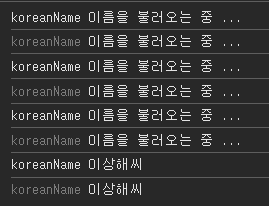 콘솔로 확인해봤을 때도 이름이 나오는 것을 확인해봤다 !!
