이 글은 java 언어로 배우는 디자인 패턴 입문을 읽고 작성한 글입니다.1. Iterator 패턴
- 반복자(iterator) 패턴은 집합 내부를 보여주지 않으면서 집합 요소를 순차적으로 접근하는 패턴이다.
- 행위 패턴의 종류다.
2. 패턴의 구조
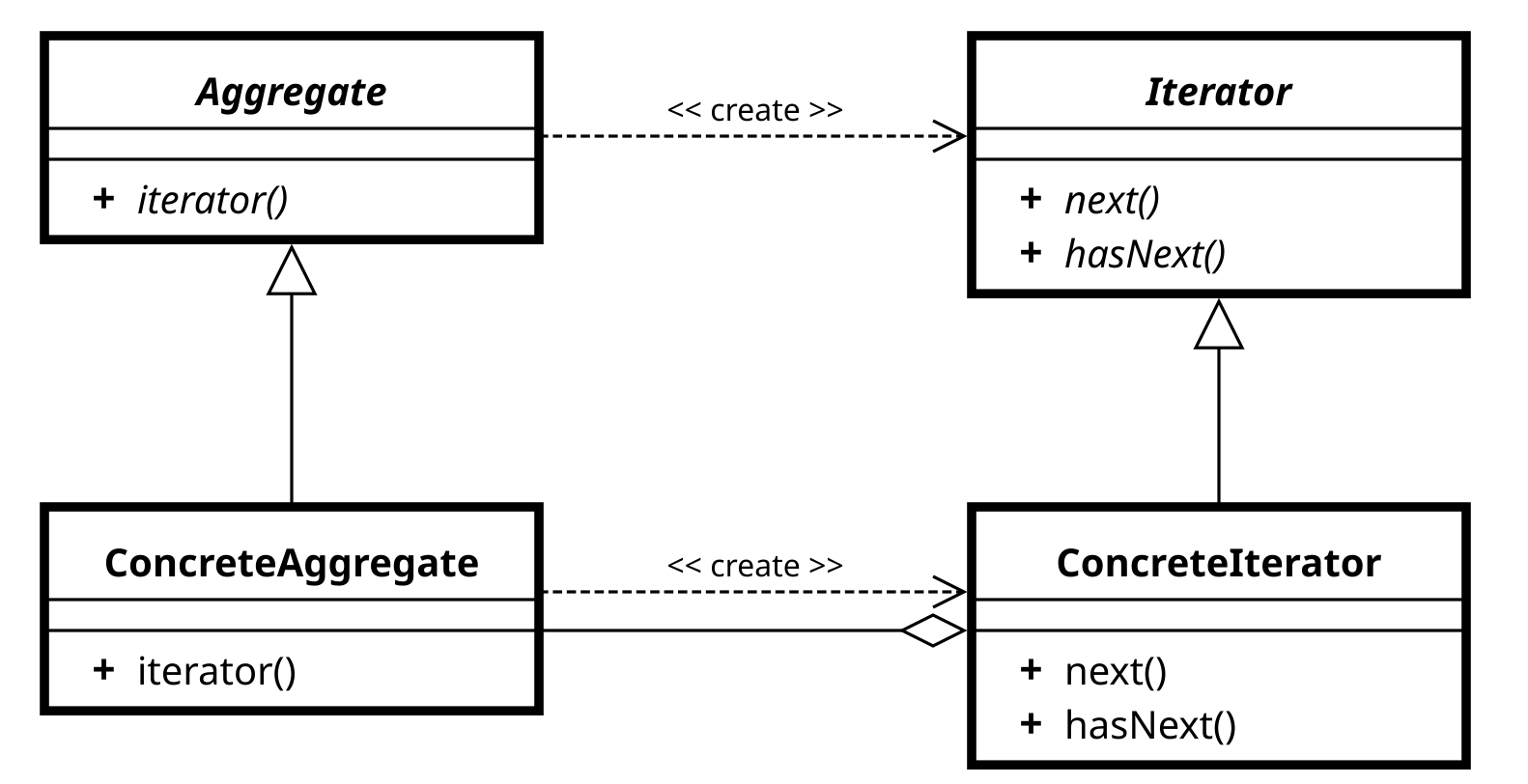
- Iterator(반복자)
- 요소를 순서대로 접근하는 인터페이스를 정의한다.
- 주로 hasNext(), next() 메서드를 포함한다. - ConcreteIterator(구체적인 반복자)
- Iterator를 구현하여 실제로 데이터를 순회하는 역할을 한다.
- 현재 위치, 끝 지점 등의 정보를 내부에 유지한다. - Aggregate(집합체)
- Iterator 객체를 생성하는 인터페이스다.
- 데이터의 집합체로서 iterator() 메서드를 제공 다. - ConcreteAggregate(구체적인 집합체)
- Aggregate를 구현하여 실제 데이터 저장소로 동작한다.
- 예: List, Set, Map 등이 이에 해당한다.
Iterable< T >
- java.lang패키지에 Iterable 인터페이스로 선언되어 있다.
- 구현클래스는 데이터를 모아둔 집합이 된다.
- T는 데이터의 타입을 지정한다.
public interface Iterable<T> {
	Iterator<T> iterator();
}- Iterable 인터페이스는 iterator라는 메서드가 선언되어 있다. 이 메서드는 집합체의 iterator를 만들기 위한 메서드다.
Iterator< E >
-
java.util패키지에 Iterator 인터페이스로 선언되어 있다.
-
Iterator는 집합체의 요소를 순회하며 처리를 반복하게 해주는 인터페이스다.
-
E는 데이터 집합의 타입을 의미한다.
public interface Iterator<E> {
	boolean hasNext();
    E next();
}
Main
-
hasNext(): 컬랙션을 순회하면서 다음 요소가 있는지 판단해주는 메서드
-
next(): 다음 요소를 가져오는 메서드로, 다음요소를 가져오면 그 다음 요소를 가져올 준비까지 한다.
3. 예제
- Book 인스턴스들을 모아둔 집합체인 BookShelf를 순차적으로 순회하는 프로그램을 만들어 보자.
Book
- 우선 Book 인스턴스를 만들기 위한 클래스를 만들어야 한다.
public class Book{
	private String name;
    public Book(String name){
    	this.name = name;
    }
    public String getName(){
    	return name;
    }
}
BookShelf
-
Book클래스에서 만든 인스턴스들을 담기위한 클래스다.
-
iterator()메서드는 BookShelfIterator클래스의 인스턴스를 만들어주는 메서드다.
public class BookShelf implement Iterable<BooK>{
	private Book[] books;
    private int last = 0;
    public BookShelf(int maxSize) {
        books = new Book[maxSize];
    }

    public Book getBookAt(int index){
        return books[index];
    }

    public void appendBook(Book book){
        books[last] = book;
        last++;
    }

    public int getLength(){
        return last;
    }

    @Override
    public Iterator<Book> iterator(){
        return new BookShelfIterator(this);
    }

}
BookShelfIterator
- Iterator를 구체화 하는 클래스다.
public class BookShelfIterator implements Iterator<Book> {
    private BookShelf bookShelf;
    private int index;

    public BookShelfIterator(BookShelf bookShelf) {
        this.bookShelf = bookShelf;
    }

    @Override
    public boolean hasNext() {
        if(index<bookShelf.getLength()){
            return true;
        }
        else return false;
    }

    @Override
    public Book next(){
        if(!hasNext()){
            throw new NoSuchElementException();
        }
        Book book = bookShelf.getBookAt(index++);
        return book;
    }
}
Main
package iteratorTest.book;

import java.util.Iterator;

public class Main {
    public static void main(String[] args) {
        BookShelf bookShelf = new BookShelf(10);
        bookShelf.appendBook(new Book("Computer Network"));
        bookShelf.appendBook(new Book("Operating System"));
        bookShelf.appendBook(new Book("Oriented Programming"));
        bookShelf.appendBook(new Book("C Programming"));

        Iterator<Book> it = bookShelf.iterator();
        while(it.hasNext()) {
            Book book = it.next();
            System.out.println(book.getName());
        }
        System.out.println();

        for(Book book : bookShelf){
            System.out.println(book.getName());
        }
        System.out.println();

    }
}
4. Iterator 패턴을 사용하는 이유
- 구현과 분리하여 반복가능하다.
- 자료구조에 따라서 어떤 순서로 순회할지 정해줄 수 있다.
Tree 자료구조를 사용하면 전위,중위,후위 탐색이나 bfs, dfs 등이 될 수 있다.

안녕하세요!