
CSS 특징
- 기본 스타일 시트는 웹 브라우저에 기본으로 내장된 스타일 시트 의미
- 적용 우선순위는 같은 패그에 스타일 속성이 중복으로 작성됐을 때, 어느 속성을 적용할지 결정하는 기준(개별성 규칙의 점수)
- 상속은 부모 요소의 속성을 자식의 요소가 물려받는 것
- CSS에는 px,em,rem,%,vw,vh와 같은 다양한 단위 존재
- 색상 표기법에는 키워드 표기법과 RGB 표기법, HEX 표기법 있음
텍스트 속성
| 속성명 | 설명 |
|---|---|
| font-family | 글꼴을 지정 |
| font-size | 텍스트 크기 지정 |
| font-weight | 텍스트 굵기 지정 |
| font-style | 글꼴 스타일 지정 |
| font-variant | 영문 소문자를 크기가 작은 대문자로 변경 |
| color | 텍스트 색상 지정 |
| text-align | 텍스트 정렬 지정 |
| text-decoration | 텍스트 꾸밈 지정 |
| letter-spacing | 자간 지정 |
| line-height | 행간 지정 |
박스 모델
모든 태그가 사각형 모양으로 구성되었다는 개념
| 영역 | 속성 |
|---|---|
| margin | margin, margin-top, margin-right, margin-bottom, margin-left |
| border | border, border-top, border-right, border-bottom, border-left |
| padding | padding, padding-top, padding-right, padding-bottom, padding-left |
| content | width, height |
배경 속성
| 속성 | 설명 |
|---|---|
| background-color | 배경색을 지정 |
| background-image | 배경에 이미지 삽입 |
| background-repeat | 배경 이미지의 반복 여부 지정 |
| background-size | 배경 이미지의 크기 지정 |
| background-position | 배경 이미지의 위치 지정 |
| background-attachment | 배경 이미지를 스크롤할 때의 모습을 결정 |
| background | 모든 배경 속성을 한번에 사용할 수 있는 단축키 |
위치 속성
요소를 기본 흐름에서 벗어나 원하는 곳에 배치하기 위한 속성
| 속성 | 속성 값 |
|---|---|
| position | static, relative, absolute, fixed, sticky |
| float | none,left,right |
| clear | left, right, both |
전환 효과 속성
| 속성 | 설명 |
|---|---|
| transition-property | 전환 효과의 대상 속성명을 값으로 지정 |
| transition-duration | 전환 효과가 진행되는 시간 지정 |
| transition-delay | 전환 효과가 지연되는 시간 지정 |
| transition-timing-function | 전환 효과 속도 지정 |
| transition | 모든 전환 효과 속성을 한번에 지정할 수 있는 단축 속성 |
애니메이션 속성
| 속성 | 설명 |
|---|---|
| @keyframes | 애니메이션의 전체 속성을 정의 |
| animation-name | 애니메이션을 지정할 키 프레임명 지정 |
| animation-duration | 애니메이션의 지속 시간 지정 |
| animation-delay | 애니메이션의 지연 시간 지정 |
| animation-fill-mode | 애니메이션 실행 전과 종료 후의 상태 지정 |
| animation-iterator-count | 애니메이션의 반복 횟수 지정 |
| animation-play-state | 애니메이션의 진행/정지 상태 정의 |
| animation-direction | 애니메이션의 진행 방향 지정 |
| animation-timing-function | 애니메이션의 속도 지정 |
| animation | 모든 애니메이션 관련 속성 지정 |
변형 효과 속성
transform 속성을 사용하며 속성값에 변형 효과를 나타내는 함수 지정
| 함수 | 설명 |
|---|---|
| translate(x,y) | 요소를 현재 위치에서 x,y만큼 이동 |
| translateX(n) | 요소를 현재 위치에서 n만큼 x축으로 이동 |
| translateX(n) | 요소를 현재 위치에서 n만큼 y축으로 이동 |
| scale(x,y) | 요소를 x,y만큼 확대 or 축소 |
| scaleX(n) | 요소 n만큼 x축으로 확대 또는 축소 |
| scaleY(n) | 요소를 n만큼 y축으로 확대 또는 축소 |
| skew(xdeg, ydeg) | 요소를 x축과 y축으로 xdeg, ydeg(각도)만큼 기울임 |
| skewX(deg) | 요소를 deg 만큼 x축 방향으로 기울임 |
| skewY(deg) | 요소를 주어진 deg 만큼 y축 방향으로 기울임 |
| rotate(deg) | 요소를 Deg 만큼 회전 |
변경 효과의 기준점을 변경할 때는 transform-origin 속성 사용
코드 예시
<!DOCTYPE html>
<html lang="ko">
<head>
    <meta charset="UTF-8">
    <meta http-equiv="X-UA-Compatible" content="IE=edge">
    <meta name="viewport" content="width=device-width, initial-scale=1.0">
    <title> postit</title>
    <style>
        @import url('https://fonts.googleapis.com/css2?family=Nanum+Pen+Script&display=swap');
        *{
            margin : 0;
            padding : 0;
            box-sizing: border-box;
        }
        #postit {
            width:350px;
            height:350px;
            padding:18px;
            background-color:#ff9;
            transform:rotate(10deg);
            text-align:center;
            font-family:"Nanum Pen Script", cursive;
            position:relative;
            margin:100px;
        }
        #postit h1{
            font-size : 44px;
            margin-bottom : 20px;
        }
        p{
            font-size : 25px;
            margin-bottom : 20px;
        }
    </style>
</head>
<body>
    <div id = "postit">
        <h1>To 남편</h1>
        <p > 여보! 오늘 급하게 먼저 출근해야 해서<br> 인사도 못하고 먼저 나가요~</p>
        <p> 아침 굶지 말고 냉장고에 있는 반찬 <br> 전자레인지에 데워서 챙겨 먹고 나가요~!</p>
        <p> 그럼 오늘 하루도 힘내고 이따 저녁에 봐요~ <br> 화이팅~!</p>
    </div>
</body>
<!DOCTYPE html>
<html lang="ko">
<head>
    <meta charset="UTF-8">
    <meta http-equiv="X-UA-Compatible" content="IE=edge">
    <meta name="viewport" content="width=device-width, initial-scale=1.0">
    <title> login</title>
    <link rel="stylesheet" href="https://cdnjs.cloudflare.com/ajax/libs/font-awesome/6.2.1/css/all.min.css"
    integrity="sha512-MV7K8+y+gLIBoVD59lQIYicR65iaqukzvf/nwasF0nqhPay5w/9lJmVM2hMDcnK1OnMGCdVK+iQrJ7lzPJQd1w=="
    crossorigin="anonymous" referrerpolicy="no-referrer">
    <link rel="stylesheet" href="style.css">
</head>
<body>
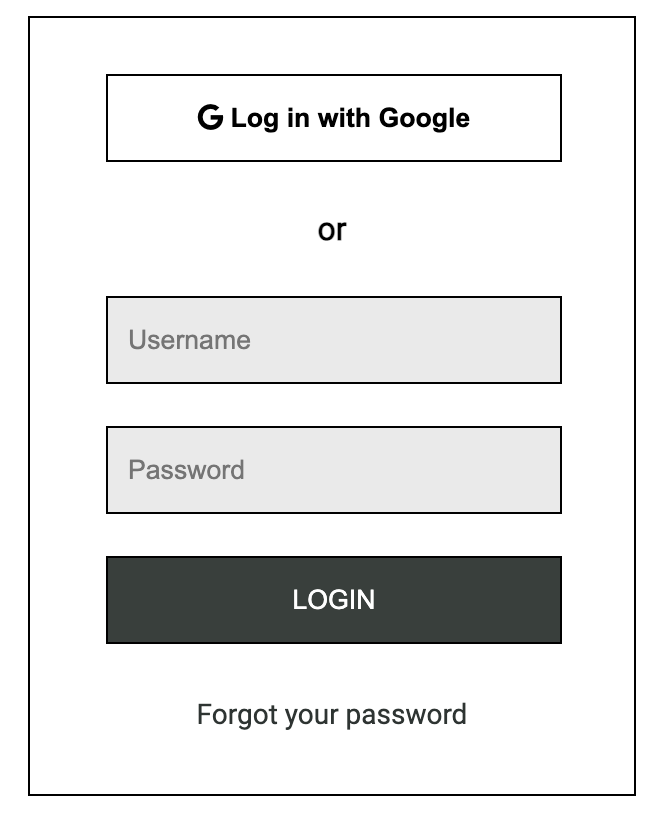
    <form action="#" id="loginform">
        <fieldset>
            <legend> 로그인</legend>
            <button type="button">
                <i class="fa-brands fa-google"></i>
                Log in with Google
            </button>
        </fieldset>

        <p>or</p>

        <fieldset>
            <legend>일반 로그인</legend>
            <label for="username">
                <input type="text" id="username" name="username" placeholder="Username" >
            </label>
            <label for="password">
                <input type="password" id="password" name="password" placeholder="Password" >
            </label>
        </fieldset>

        <fieldset>
            <legend>로그인 버튼</legend>
            <button type="submit">
                LOGIN
            </button>
        </fieldset>
        <a href = "#">Forgot your password</a>
    </form>
</body>
</html>
@import url('https://fonts.googleapis.com/css2?family=Roboto&display=swap');
*{
margin:0;
padding:0;
box-sizing:border-box;
}
body{
font-family:"Roboto", sans-serif;
}
#loginform{
height : 390px;
width : 304px;
border : 1px solid black;
padding:28px 38px;
margin:100px auto;
}
#loginform fieldset{
border:none;
}
#loginform fieldset legend{
position : absolute;
top : -99999px;
}
#loginform button{
height:44px;
width:228px;
border:1px solid #000;
background-color:white;
font-weight : bold;
}
#loginform > fieldset + p {
margin:24px 0;
font-size:16px;
font-weight:bold;
text-align:center;
}
#loginform input{
width:228px;
height:44px;
border:1px solid #000;
padding: 0 10px;
margin-bottom:21px;
background-color: #eaeaea;
}
#loginform button[type="submit"]{
background-color:#373f3c ;
color:white;
margin-bottom:27px;
font-weight: normal;
}
#loginform a{
text-decoration: none;
color: #2c3432;
font-size:14px;
text-align:center;
display:block;
}
<!DOCTYPE html>
<html lang="ko">
<head>
    <meta charset="UTF-8">
    <meta http-equiv="X-UA-Compatible" content="IE=edge">
    <meta name="viewport" content="width=device-width, initial-scale=1.0">
    <title> wiki</title>
    <link rel="stylesheet" href="style.css">
</head>
<body>
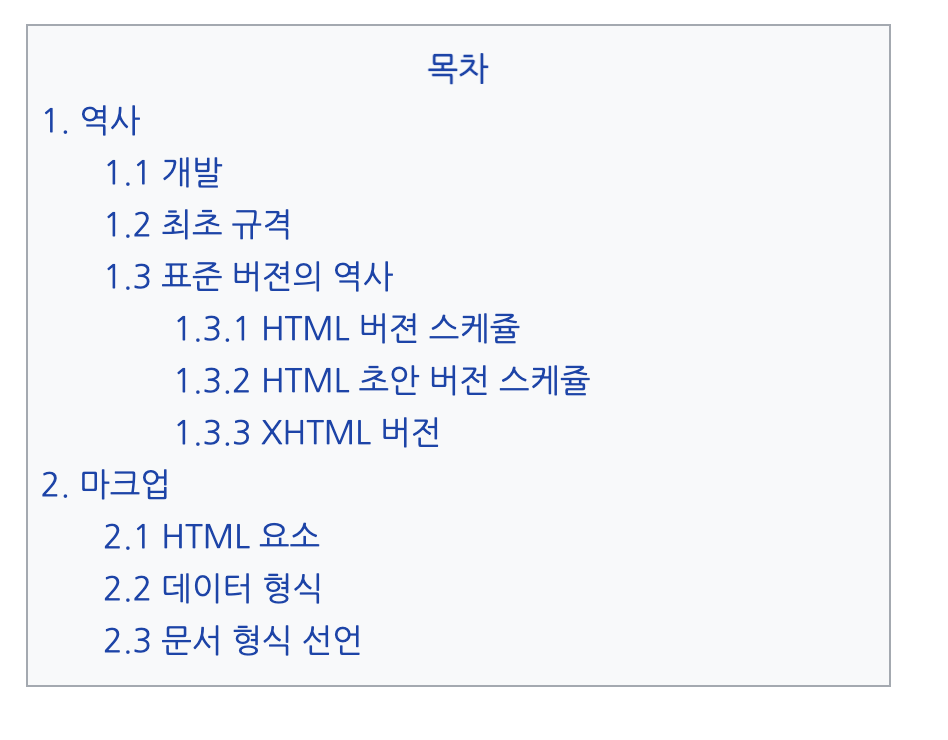
    <div id = "container">
        <h1> 목차 </h1>
        <ol>
            <li>
                1. 역사
                <ol>
                    <li> 1.1 개발</li>
                    <li> 1.2 최초 규격</li>
                    <li>
                        1.3 표준 버젼의 역사
                        <ol>
                            <li>1.3.1 HTML 버젼 스케쥴</li>
                            <li>1.3.2 HTML 초안 버전 스케쥴</li>
                            <li>1.3.3 XHTML 버전</li>
                        </ol>
                    </li>
                </ol>
            </li>
            <li>
                2. 마크업
                <ol>
                    <li>2.1 HTML 요소</li>
                    <li>2.2 데이터 형식</li>
                    <li>2.3 문서 형식 선언</li>
                </ol>
            </li>
        </ol>
    </div>

</body>
</html>
@import url('https://fonts.googleapis.com/css2?family=Nanum+Gothic&display=swap');
*{
box-sizing: border-box;
padding : 0px;
margin : 0px;
}
body{
font-family: 'Nanum Gothic', sans-serif;
font-size:13px;
color:#0645AD;
line-height: 1.6;
}
#container{
height : 265px;
width : 346px;
padding: 6px 5px 12px;
border : 1px solid #a2a9b1;
background-color: #F8F9FA;
margin : 20px auto;
}
#container h1{
font-size:13px;
text-align:center;
}
#container ol{
list-style:none;
text-align: left;
}
#container ol ol{
margin-left:25px;
}
#container ol ol ol{
margin-left:28px;
}

Journey for Backend Developer