노드 선택하기
속성으로 노드 선택
JS로 웹 브라우저에 표시되는 HTML 문서를 조작하려면
-> 문서 객체 모델을 조작해야함
-> 이는 window 객체의 document 객체를 사용해 조작 가능
위 경우 가장 먼저 해야 할일은 document 객체로 조작하려고 하는 문서 객체 모델의 노드를 선택해야 함
-> js로는 주로 요소 노드를 선택해서 조작
-> Document 객체는 트리를 탐색하면서 원하는 노드를 선택할 수 있는 속성
노드 탐색 속성에는 모든 노드를 탐색할 수 있는 속성과 요소 노드만 탐색할 수 있는 속성으로 구분 가능
모든 노드 탐색
parentNode: 부모 노드를 반환childNode: 모든 자식 노드를 반환firstChild: 첫 번째 자식 노드를 반환lastChild: 마지막 자식 노드를 반환previousSibling: 이전 형제 노드를 반환nextSibling: 다음 형제 노드를 반환
요소 노드 탐색
parentElement: 부모 요소 노드를 반환children: 자식 요소 노드 반환firstElementChild: 첫 번째 자식 요소 노드 반환lastElementChild: 마지막 자식 요소 노드 반환previousElementSibling: 이전 요소 노드 반환nextElementSibling: 다음 요소 노드 반환
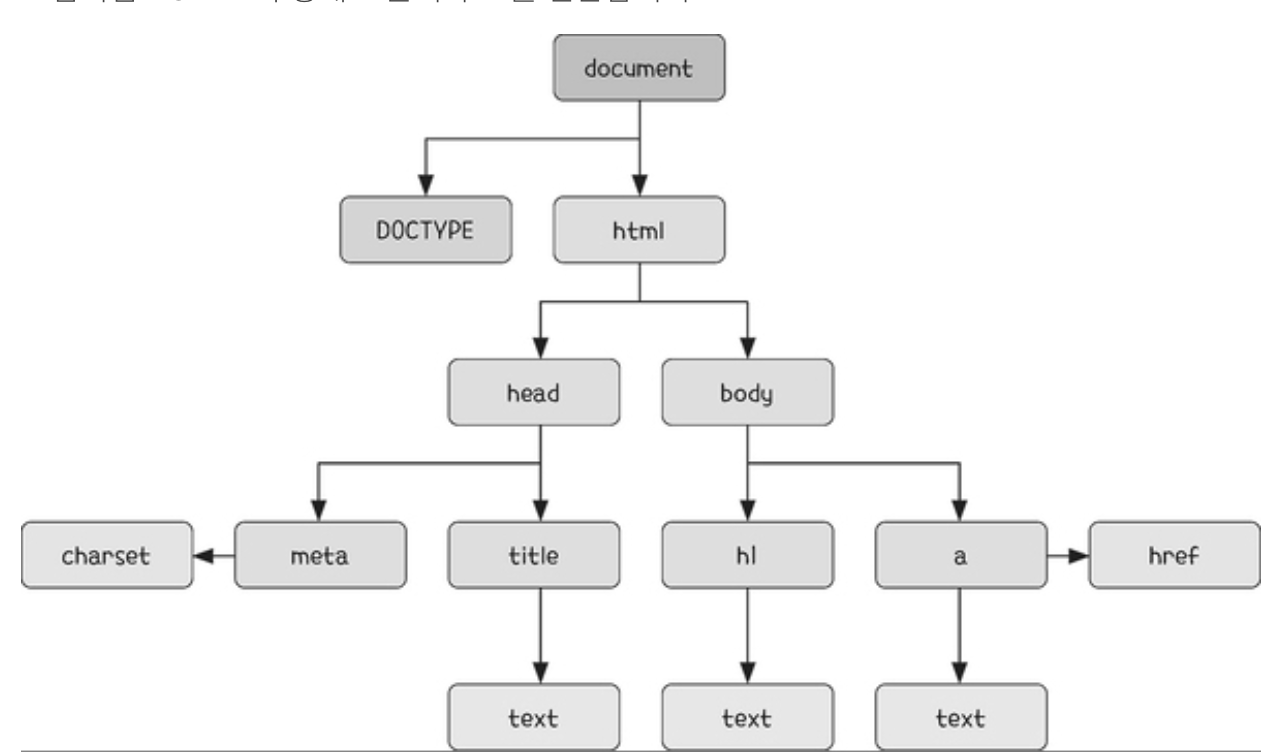
위 DOM을 기준으로 document 객체로 접근할 수 있는 html 노드로 이동하는 경우
document.firstChild // 이는 <DOCTYPE html>
document.firstElementChild; // html
연속으로도 사용 가능
document.childNodes[1].firstElementChild.firstElementChild.nextElementSibling;메서드로 노드 선택
DOM 트리가 복잡할수록 속성으로 노드를 선택하는 것은 어려움
-> 일반적으로 요소 노드를 바로 선택할 수 있는 메서드를 이용한 노드 선택 방법과 조합해서 사용
1. 속성값과 태그명 사용하기 - get 메서드
document 객체에는 노드를 선택할 수 있는 여러 메서드가 포함되어 있음
| 메서드 형식 | 설명 |
|---|---|
| getElementById() | id 속성값과 일치하는 요소 노드 1개 선택 |
| getElementsByClassName() | class 속성값과 일치하는 요소 노드 모두 선택 |
| getElementsByTagName(<태그 명>) | 태그명과 일치하는 요소 노드 모두 선택 |
ex)
<body>
	<h1 id="title">title</h1>
    <p class="text">text-1</p>
    <p class="text">text-2</p>
    <script>
    	// id 속성값이 title인 요소 노드 1개 선택하기
        const el = document.getElementById("title");
        console.log(el);

        // class 속성값이 text인 요소 노드 모두 선택
        const classE1 = document.getElementsByClassName("text");
        console.log(classE1);

        // p 태그에 해당하는 요소 노드 모두 선택
        const tagE1s = document.getElementsByTagName("p");
        console.log(tagE1s);
    </script>
</body>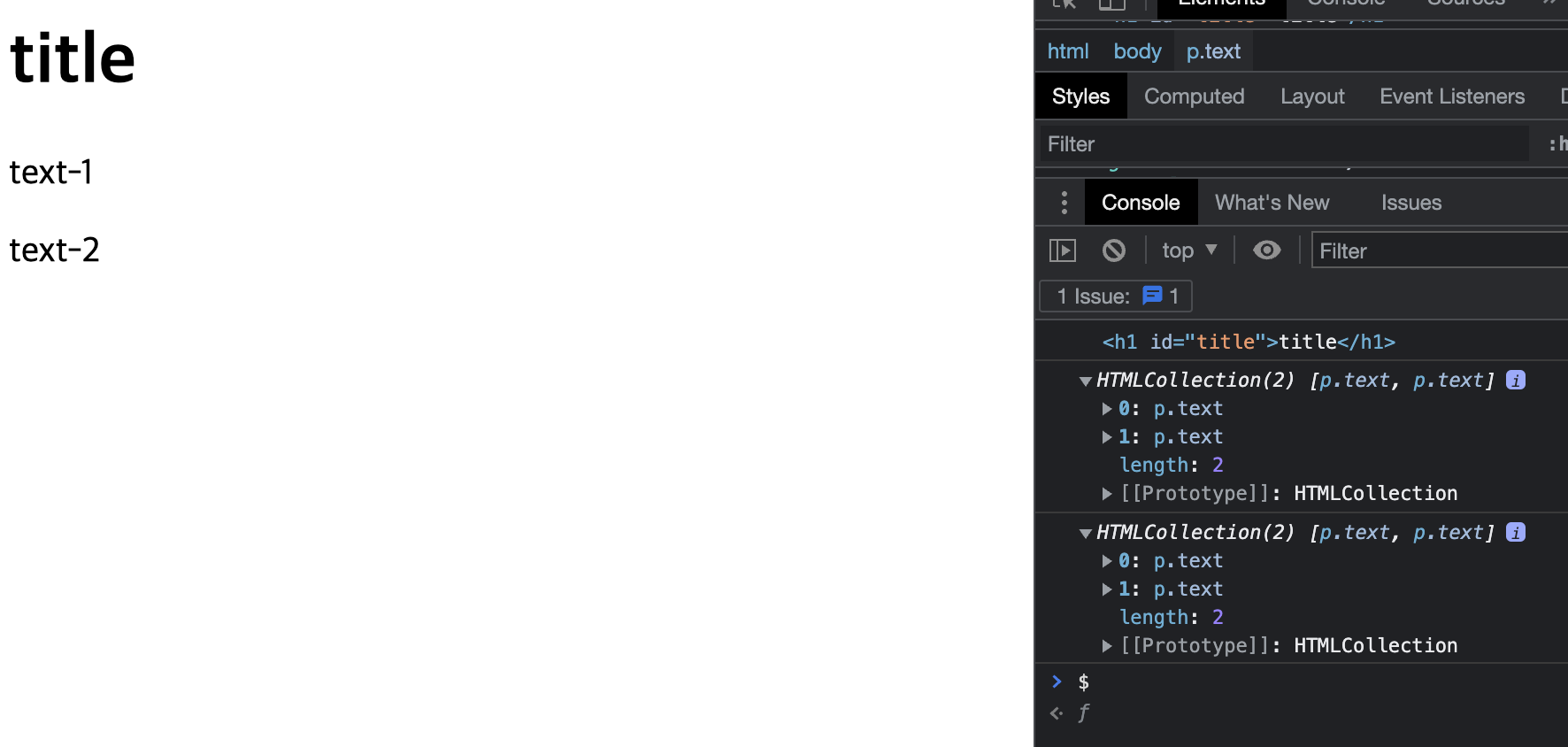
getElementById와 다르게 getElementsByClassName, getElementsByTagName는 요소 1개가 아닌, HTMLCollection 객체로 여러 요소를 한꺼번에 선택
-> HTMLCollection 객체는 유사 배열이라서 인덱스로 요소에 하나씩 접근 또한 가능
<script>
	const classE1 = document.getElementsByClassName("text");
    console.log(classE1[0]);
    console.log(classE2[1]);

    const tagE1s = document.getElementsByTagName("p");
    console.log(tagE1s[0]);
    console.log(tagE1s[1]);
</script>
2. CSS 선택자 사용하기 (query method)
document 객체의 메서드 중에는 매개변수로 CSS 선택자를 전달받아 노드로 선택하는 메서드 존재
| 메서드 형식 | 설명 |
|---|---|
| querySelector(< CSS 선택자 >) | 매개 변수로 넘어오는 CSS 선택자에 해당하는 노드를 1개 선택 |
| querySelectorAll(< CSS 선택자 >) | 매개변수로 넘어오는 CSS 선택자에 해당하는 노드를 모두 선택 |
<body>
	<div class="box-1">
    	<p class="text"> text-1 </p>
        <p class="text"> text-2 </p>
    </div>
    <div class="box-2">
    	<p class="text"> text-3 </p>
        <p class="text"> text-4 </p>
    </div>
</body>
box-1 노드를 선택할려는 경우
<script>
	const el = document.querySelector(.box-1);
</script>
box-1 요소 하위에 있는 p 태그 가져오기
<script>
	const e1 = document.getElementsByClassName("box-1")[0].children;
    console.log(e1);
</script>
const e1 = document.querySelectorAll(".box-1 .text")
console.log(e1);get 메서드와 다르게 query 메서드는 NodeList 반환