
1476. Subrectangle Queries
문제
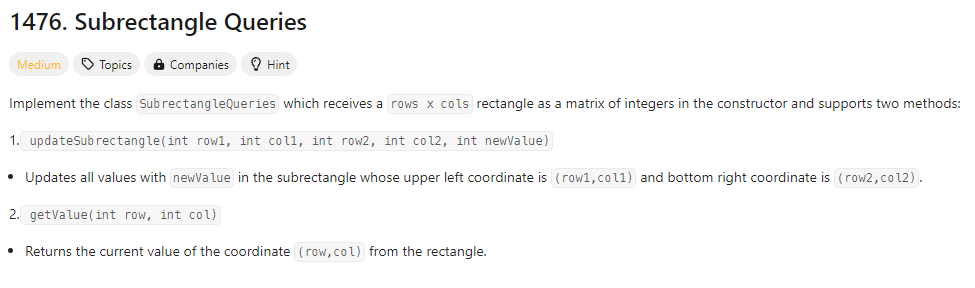
LeetCode는 영문으로 되어 있기에 문제 해석하기에 조금 힘들었다. 물론 번역 키고 하면 괜찮긴하다. 이 문제의 핵심은 배열을 생성자로 만들어 그 하나의 배열로 문제를 푸는 문제인 것 같았다.
예시1
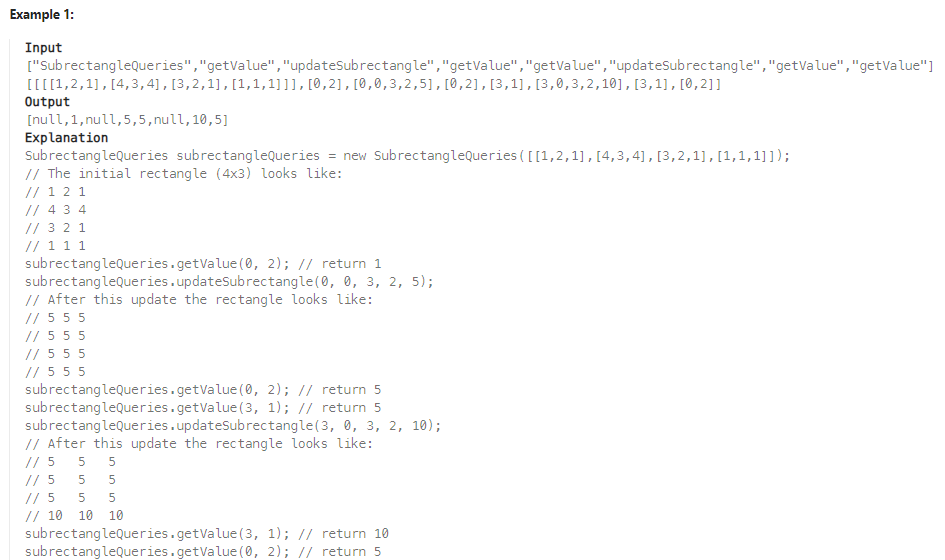
기본적으로 'SubrectangleQueries'가 초기에 생성이 되고, 'getValue'를 통해 해당 좌표의 값을 가져와 return 한다. 그리고 'updateSubrectangle' 는 해당 존재하는 배열에서 row1, col1, row2, col2 값을 받아 newValue 값으로 부분적인 수정을 이어간다. 이 설명을 보고 예시2를 확인하면 이해가 잘 될 것이다. (역시 문제보단 예시를 보는게 더 잘 이해가 간다)
예시2
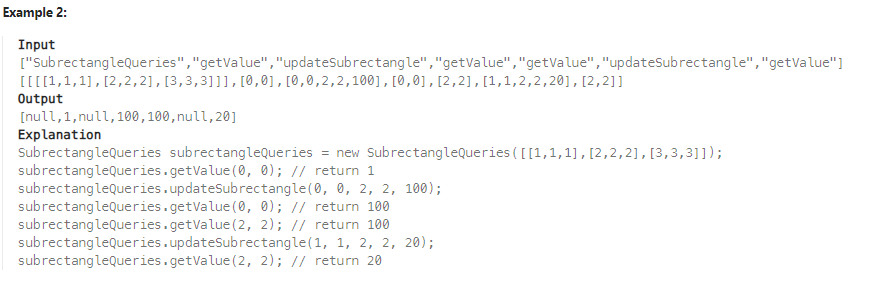
예시1의 설명을 보고 빗대면 될 것 같다.
코드
class SubrectangleQueries {

    int[][] rectangle;

    public SubrectangleQueries(int[][] rectangle) {
        this.rectangle = rectangle;
    }

    public void updateSubrectangle(int row1, int col1, int row2, int col2, int newValue) {
        for (int i = row1; i <= row2; i++) {
            for (int j = col1; j <= col2; j++) {
                rectangle[i][j] = newValue;
            }
        }
    }

    public int getValue(int row, int col) {
        int matrix = rectangle[row][col];
        return matrix;
    }
}
코드는 비교적 간단하다. 외부에서 입력한 rectangle의 값을 생성자를 통해 치환시켜 주었고 'updateSubrectangle' 부분에서 입력받은 좌표 두 값과 새로운 값을 입력받아 부분적으로 수정을 이어가는 코드를 생성했다. 그리고 'getValue' 부분은 해당 좌표의 값을 반환했다.
tmi
import java.util.ArrayList;
import java.util.Scanner;

public class no1476 {
    public static Scanner sc;
    public static String s;
    public static void main(String[] args) {
        sc = new Scanner(System.in);
        SubrectangleQueries sub = null;
        ArrayList<String> arrayList = new ArrayList<>();
        while(true) {
            s = sc.next();
            if (s.equals("")) break;
            else {
                if (s.equals("SublectangleQueries")) {
                    int x = sc.nextInt();
                    int y = sc.nextInt();
                    int[][] array = new int[x][y];
                    for (int i = 0; i < x; i++) {
                        for (int j = 0; j < y; j++) {
                            array[i][j] = sc.nextInt();
                        }
                    }
                    sub = new SubrectangleQueries(array);
                    arrayList.add("null");
                } else if (s.equals("getValue")) {
                    int num1 = sc.nextInt();
                    int num2 = sc.nextInt();
                    assert sub != null;
                    int tmp = sub.getValue(num1, num2);
                    System.out.println(tmp);
                } else if (s.equals("updateSubrectangle")) {
                    int row1 = sc.nextInt();
                    int col1 = sc.nextInt();
                    int row2 = sc.nextInt();
                    int col2 = sc.nextInt();
                    int newValue = sc.nextInt();
                    assert sub != null;
                    sub.updateSubrectangle(row1, col1, row2, col2, newValue);
                }
            }
        }
    }

    static class SubrectangleQueries {
        int[][] rectangle;
        public SubrectangleQueries(int[][] rectangle) {
            this.rectangle = rectangle;
        }

        public void updateSubrectangle(int row1, int col1, int row2, int col2, int newValue) {
            for (int i = row1; i < row2; i++) {
                for (int j = col1; j < col2; j++) {
                    rectangle[i][j] = newValue;
                }
            }
        }

        public int getValue(int row, int col) {
            int matrix = rectangle[row][col];
            return matrix;
        }
    }
}
나는 개발환경에서 내 코드를 입력 후 테스트를 하는 것을 좋아해 진행해봤지만, 문제 핵심 부분보다 오히려 main 부분에서 굉장히 귀찮음을 많이 느꼈다...

📲 @bu_kwon_2 / 💻 dnu05043.log / ⌨ Back-end / 🦁 LikeLion