Security_Principal
이번 프로젝트 하면서 아직 익숙하지 않은 나에겐 여러 가지를 공부할 필요가 있지만, 오늘 프로젝트 진행하며 Principal에 대한 기능을 알게 되었으며 기억에 더 남기 위해 정리한다.
UsernamePasswordAuthenticationToken
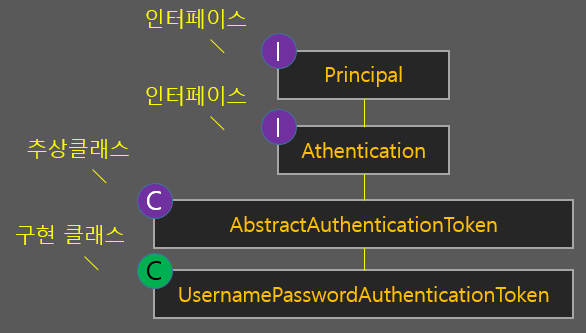
Authentication 인터페이스를 구현한 클래스로, 결국 위 구조에서 우리가 인증이 완료된 후 최종적으로 스프링 security에게 전달해주는 구현체다. 클래스 상속 구조는 아래와 같다.
이 구현의 최상위 인터페이스는 Principal이다. 이 말은 즉, 결국 컨트롤러나 JSP의 태그 라이브러리 등 하나의 세션에서 가져다 쓸 수 있는 Principal이나 Authentication 객체는 서로 다른게 아닌 우리가 Provider를 커스터마이징하며 리턴시킨 객체와 동일하다는 것.
다만 자동 로그인 사용할 땐 RememberMeAuthenticationToken 타입의 객체가 반환된다. 하지만 이 클래스 또한 Authentication을 구현하였으므로 기본적인 사용법이나 구조는 거의 비슷하다.
UsernamePasswordAuthenticationToken 생성자
로그인 인증 후 사용자 정보를 세션 등 따로 보관해두지 않았다면, 우리가 꺼내쓸 수 있는 개체는 결국 이 구현 클래스 밖에 없다고 한다.
가장 기본적인 구조로 ID와 권한만 필요하다면 충분히 아래와 같은 코드로 작성해도 상관이 없으나 만약 다른 정보들을 UserDetails에 넣어 전달했다면 사용할 수가 없다 한다. 물론 따로 세션에 저장해서 사용하면 가능, 컨트롤러에서 자동으로 전달 받는다거나 하는 지원을 받을 수 없고 설계 구조를 이해하고 쓰는 것과 이해하지 못하고 쓰는 것은 차이가 있음
public UsernamePasswordAuthenticationToken
    (Object principal, Object credentials,
    Collection<? extends GrantedAuthority> authorities) {
        super(authorities);
        this.principal = principal;
        this.credentials = credentials;
        super.setAuthenticated(true); // must use super, as we override
    }

    	// String userId를 넣어준 경우
	Authentication newAuth = new UsernamePasswordAuthenticationToken(
				userId, null, userDetails.getAuthorities());
따라서 UserDetails 객체를 생성자로 제공해주는게 좋음. Object 타입이기 때문에 별도의 VO 객체를 사용해도 무방하다만, 이왕 이미 잘 만들어져 있는 인터페이스를 활용하는 것이 가장 안정적을 듯 하다.
Object Credentials 파라미터도 필요하면 객체를 넣을 수 있지만 아직 쓸 일이 없어서 Null로 처리, 로직 상 인증 관련 객체가 하나 더 담길 일이 있으면 사용해주면 될 듯함.
// userDetails 객체를 넣어줌
	Authentication newAuth = new UsernamePasswordAuthenticationToken(
				userDetails, null, userDetails.getAuthorities());
Principal 객체
컨트롤러의 처리기 메소드에서 자동 파라미터로 주입받을 수 있는 타입 중 하나. 다만 가장 구현체의 최상위 인터페이스이기 때문에 이 타입으로 받으면 사용할만한 메소드가 getName() 정도밖에 없다. 그냥 ID 정보만 가져다 사용할 수 있다고 보면 된다.
/* 메인 페이지 */
	@RequestMapping("/")
	public String main(Principal principal) {

		if (principal != null) {
			System.out.println("타입정보 : " + principal.getClass());
			System.out.println("ID정보 : " + principal.getName());
		}
		return "main";
	}
Authentication 객체
UsernamePasswordAuthenticationToken 구현체 및 세션 정보를 보관하는 객체에서 필요한 정보를 뽑아내는 메소드를 가지고 있다. 따라서 실제로 인증 정보를 사용하기 위해 사용되는 객체 타입이 바로 Authentication 이라고 보면 된다.
-
Object getPrincipal() : 첫 번째 생성자로 주입한 객체 반환
-
Object getCredentials() : 두 번째 생성자로 주입한 객체 반환
-
Collection<? extends GrantedAuthority> getAuthorities() : 세 번째 생성자인 권한 리스트 객체 반환
-
Object getDetails() : 세션정보를 가진 WebAuthenticationDetails 객체 반환
getDetails()의 경우도 타입이 Object로 되어 있는 것으로 보아 커스터마이징 할 경우를 고려한 것 같다.
/* 메인 페이지 */
	@RequestMapping("/")
	public String main(Authentication authentication) {

		if (authentication != null) {
			System.out.println("타입정보 : " + authentication.getClass());

			// 세션 정보 객체 반환
			WebAuthenticationDetails web = (WebAuthenticationDetails)authentication.getDetails();
			System.out.println("세션ID : " + web.getSessionId());
			System.out.println("접속IP : " + web.getRemoteAddress());

			// UsernamePasswordAuthenticationToken에 넣었던 UserDetails 객체 반환
			UserDetails userVO = (UserDetails) authentication.getPrincipal();
			System.out.println("ID정보 : " + userVO.getUsername());
		}

		return "main";
	}