오늘의 강의 내용
* 네이버게임 상단 부분 카피캣
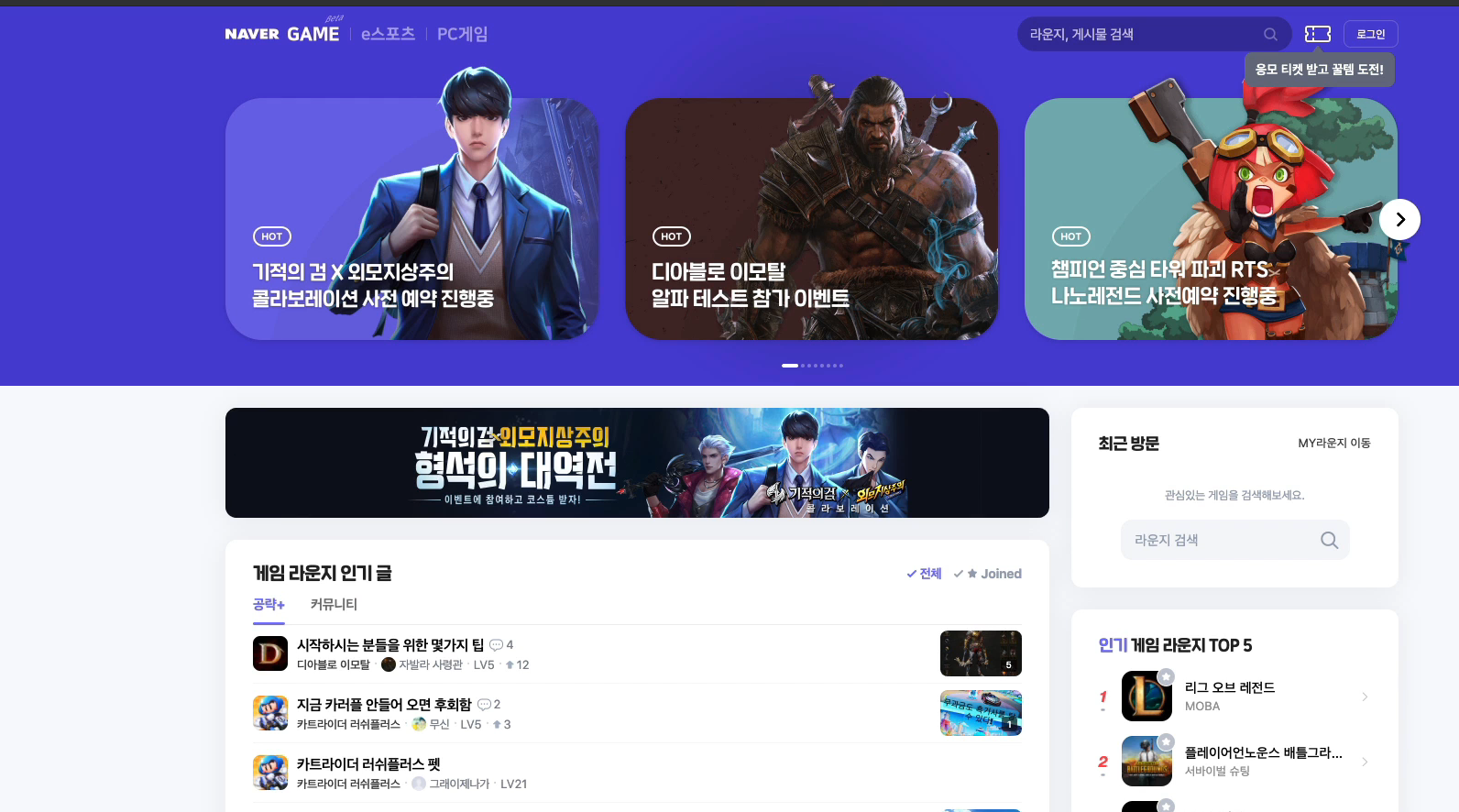
카피캣 영역인 네이버게임 상단모습
.png)
네이버게임 상단 부분 카피캣 완료한 모습
<!-- game.html언어 -->
<!DOCTYPE html>
<html>
<head>
	<meta charset="utf-8">
	<title>네이버</title>

	<link rel="stylesheet" type="text/css" href="css/style.css">
</head>
<body id="game_body">

	<header id="game_header">
		<div class="game_container">

			<nav class="game_flex_between">
				<div class="left game_flex_start">
					<h1>
						<a href="#">GAME</a>
					</h1>

					<ul class="game_flex_start">
						<li><a href="#">e스포츠</a></li>
						<li><a href="#">PC게임</a></li>
					</ul>
				</div>

				<div class="right game_flex_end">
					<div class="search_wrap game_flex_start">
						<input type="text" placeholder="라운드, 게시물 검색">
						<button type="button" class="btn_search"></button>
					</div>

					<div class="ticket_wrap">
						<a href="#" class="btn_ticket"></a>
						<p class="bubble_msg">응모 티켓 받고 꿀템 도전!</p>
					</div>

					<a href="#" class="btn_login">로그인</a>
				</div>
			</nav>


			<div class="game_events_wrap game_flex_between">
				<div class="event_wrap one">
					<div class="event_title_wrap">
						<span>HOT</span>
						<h2>
							디아블로 이모탈<br>
							알파 테스트 참가 이벤트
						</h2>
					</div>
				</div>

				<div class="event_wrap two">
					<div class="event_title_wrap">
						<span>HOT</span>
						<h2>
							디아블로 이모탈<br>
							알파 테스트 참가 이벤트
						</h2>
					</div>
				</div>

				<div class="event_wrap three">
					<div class="event_title_wrap">
						<span>HOT</span>
						<h2>
							디아블로 이모탈<br>
							알파 테스트 참가 이벤트
						</h2>
					</div>
				</div>
			</div>

		</div>
	</header>


	<main role="main" id="game_main">

		<div class="game_container game_flex_between">

			<div class="left">

			</div>


			<div class="right">

			</div>

		</div>

	</main>

</body>
</html>

<!-- style.css언어 -->
/* GAME */
.game_container {
	width: 1280px;
	margin: 0 auto;
}

.game_flex_between {
	display: flex;
	flex-wrap: wrap;
	justify-content: space-between;
	align-items: center;
}

.game_flex_start {
	display: flex;
	flex-wrap: wrap;
	justify-content: flex-start;
	align-items: center;
}

.game_flex_end {
	display: flex;
	flex-wrap: wrap;
	justify-content: flex-end;
	align-items: center;
}

.game_flex_center {
	display: flex;
	flex-wrap: wrap;
	justify-content: center;
	align-items: center;
}

.game_shadow {
	box-shadow: 0 2px 30px 0 rgb(0, 0, 0 / 6%);
}

.game_p_30 {
	padding: 30px;
}

.font_17 {
	font-size: 17px;
}

.font_19 {
	font-size: 19px;
}

.font-400 {
	font-weight: 400;
}


#game_body {
	background-color: #f8f9fd;
}

#game_header {
	width: 100%;
	background-color: #4e41db;
}

#game_header nav {
	height: 60px;
}

#game_header nav .left {

}

#game_header nav .left h1 {
	font-size: 20px;
}

#game_header nav .left h1 a {
	color: #ffffff;
}

#game_header nav .left ul {

}

#game_header nav .left ul li {

}

#game_header nav .left ul li a {
	color: #9da5b6;
	font-size: 18px;
}

#game_header nav .left ul li a:before {
	display: inline-block;
	content: '';
	width: 1px;
	height: 14px;
	border-radius: 0.5px;
	background-color: #9da5b6;

	margin: 0 12px;
}


#game_header nav .right {

}

#game_header nav .right .search_wrap {
	width: 300px;
	border-radius: 20px;
	background-color: rgba(0, 0, 0, 0.28);
	overflow: hidden;
}

#game_header nav .right .search_wrap input {
	width: calc(100% - 38px);
	height: 38px;
	background-color: transparent;
	padding: 10px 12px 9px 14px;
	border: none;

	color: #ffffff;
	font-size: 15px;
}

#game_header nav .right .search_wrap input:focus {
	outline: none;
}

#game_header nav .right .search_wrap button {
	width: 38px;
	height: 38px;
	background-color: transparent;
	border: none;
}

#game_header nav .right .ticket_wrap {
	position: relative;
	width: 40px;
	height: 40px;
	margin-left: 10px;
}

#game_header nav .right .ticket_wrap .btn_ticket {
	display: block;
	width: 40px;
	height: 40px;
	border: solid 1px #ffffff;
}

#game_header nav .right .ticket_wrap .bubble_msg {
	position: absolute;
	/*width: 165px;*/
	background-color: #697183;
	border-radius: 8px;

	padding: 10px 12px;
	top: 50px;
	left: 50%;
	transform: translateX(-50%);

	font-size: 14px;
	color: #ffffff;
	font-weight: 600;
	white-space: nowrap;

	z-index: 100;
}

#game_header nav .right .btn_login {
	width: 60px;
	border: solid 1px hsla(0, 0%, 80%, 0.3);
	border-radius: 8px;

	padding: 7px 0 6px;
	margin-left: 10px;

	font-size: 12px;
	color: #ffffff;
	text-align: center;
}

#game_header .game_events_wrap {
	padding: 80px 0;
}

#game_header .game_events_wrap .event_wrap {
	position: relative;
	width: 407px;
	height: 264px;
	border-radius: 40px;

	top: 0;
	transition: top linear 0.45s;
}

#game_header .game_events_wrap .event_wrap:hover {
	top: -20px;
}

#game_header .game_events_wrap .event_wrap.one {
	background-color: rgb(112, 104, 236);
}

#game_header .game_events_wrap .event_wrap.two {
	background-color: rgb(69, 39, 39);
}

#game_header .game_events_wrap .event_wrap.three {
	background-color: rgb(112, 177, 181);
}

#game_header .game_events_wrap .event_wrap .event_title_wrap {
	position: absolute;

	left: 30px;
	bottom: 30px;

	color: #ffffff;
}

#game_header .game_events_wrap .event_wrap .event_title_wrap span {
	display: inline-block;
	border: solid 2px #ffffff;
	border-radius: 10px;

	padding: 4px 8px 2px;

	font-size: 12px;
	font-weight: 600;

	text-align: center;

	margin-bottom: 15px;
}

#game_header .game_events_wrap .event_wrap .event_title_wrap h2 {
	font-size: 20px;
}


#game_main .game_container {
	align-items: stretch;
}

#game_main .left {
	width: 900px;
	height: 2000px;
	background-color: yellow;
}

#game_main .right {
	width: 358px;
	height: 2000px;
	background-color: gray;
}-
css in js : javascript 를 이용하여 css 를 적용시키는 방법
-
javascript 를 이용하여 css 를 적용시킬때 도와주는 도구들이 많은데 그 도구들을 활용하여 디자인을 적용하는 순간 도구들에서 랜덤하게 숫자와 알파벳 조합으로 class명을 완성시켜준다.
-
디자이너에게 제작해야할 디자인 소스를 받았고, 각각의 디자인에 대해서 공통적인 요소들이 있을때, 그 공통적인 요소들을 class화 시킬수도있다.
-
display: none 특정 오브젝트를 화면에서 가릴때 사용
강의를 끝난후 소감
공통요소의 class화를 유연하게 사용하는법을 좀더 폭넓게 사용해봐야 겠다는 생각이 들었다.
힘든점, 문제점
이번 강의에서는 크게 힘든점은 없었던것 같다.
개선방안
class화 쓰는것을 반복, 연습해봐야겠다.

i will be the best