
1. 디렉토리 구조
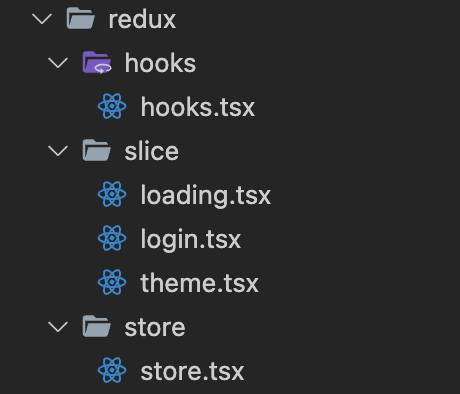
2. Redux toolkit(with TypeScript)의 구조
1) Store
-
store는 javascirpt 환경과 동일하게 작성하고, state와 dispatch 타입을 store에서 추론해서 export 한다.
-
RootState와AppDispatch는 Hooks에서 사용될 Dispatch와 Selector에서 사용할 타입이다.
// store.tsx

import { configureStore } from "@reduxjs/toolkit";
import loadingSlice from "../slice/loading";

const store = configureStore({
  reducer: {
    loadingReducer: loadingSlice.reducer,
  },
});

// state 타입 추론
export type RootState = ReturnType<typeof store.getState>;
// dispatch 타입 추론
export type AppDispatch = typeof store.dispatch;
export default store;
2) Hooks
-
useSelector는 컴포넌트에서 데이터를 불러오기 위해 사용하고,useDisPatch는 action을 dispatch하기 위해 사용한다. -
RootState와AppDispatch타입을 각 컴포넌트에서 import해서 사용할 수도 있지만 이런 타입화 과정을 모든 컴포넌트에 적용하는 것보다hooks.tsx라는 별도의 파일을 만들어 pre-typed된 버전을 만들어주는 것이 편하다.
import { useDispatch, useSelector } from "react-redux";
import type { TypedUseSelectorHook } from "react-redux";
import type { RootState, AppDispatch } from "../store/store";

export const useAppDispatch: () => AppDispatch = useDispatch;
export const useAppSelector: TypedUseSelectorHook<RootState> = useSelector;
1) useAppDispatch
- 함수 스스로 타입을 string, 매개변수 a는 number라고 추론하는 것이다. 즉, (x) => String(x) 함수는 x의 타입을 number로 return 값을 string으로 해야한다는 것이다.
const x : (a:number) => string = (x) => String(x)
const x : (a:number) => string- 이렇게 설정하는 이유는 useDispatch는 기본적으로 thunks에 대해서 알지 못한다. 그렇기 때문에 thunk middleware를 사용하는 비동기 처리가 필요할 때 매번 AppDispatch를 import하지 않고 사용하기 위함이다.
2) useAppSelector
- useSelector에 state 타입을 지정해주지 않으면 사용할 때마다 아래와 같이 매번 지정해주어야 한다.
const loadingState = useSelector((state : RootState) => state.loadingReducer.isLoading);- 하지만 미리 설정해둔다면 따로 state의 타입을 지정할 필요가 없어진다.
const loadingState = useAppSelector((state) => state.loadingReducer.isLoading);3) Slice
- 초기 상태값에 대한 type 정의를 포함한 상태 slice 파일을 만든다. 만든 초기 상태값을 createSlice에 포함시키면 각 reducer 케이스 별로 state의 type을 알아서 추론한다.
import { createSlice } from "@reduxjs/toolkit";

interface LoadingState {
  isLoading: boolean;
}

const initialLoadingState: LoadingState = { isLoading: true };

const loadingSlice = createSlice({
  name: "loading",
  initialState: initialLoadingState,
  reducers: {
    fulfilled(state) {
      state.isLoading = false;
    },
    pending(state) {
      state.isLoading = true;
    },
  },
});

export const { fulfilled, pending } = loadingSlice.actions;
export default loadingSlice;- action들은 리덕스 툴킷의
PayloadAction<T>타입을 사용해야한다. 여기서 사용된 제네릭 타입은 action.payload 인자로 사용된다.
increaseByFive(state, action: PayloadAction < number >) {
  state.countNum = state.countNum + action.payload;
},
4) Component
- 상태가 필요한 컴포넌트에서 설정한 typed hook인
useAppSelector,useAppDispatch을 import 한다.
import { fulfilled, pending } from "../../redux/slice/loading";
import { useAppDispatch, useAppSelector } from "../../redux/hooks/hooks";

const dispatch = useAppDispatch();
const loadingState = useAppSelector((state) => state.loadingReducer.isLoading);

const getDiaryData = async () => {
  try {
    const res = await BASE_API.get(`/diary`);
    dispatch(fulfilled());  // 요청이 성공하면 loading을 false로 바꿈
    setDiaryData(res.data);
  } catch (err) {
    dispatch(pending());  // 요청이 실패하면 loading을 true로 바꿈
    console.error(err);
  }
};
useEffect(() => {
  getDiaryData();
}, []);
FE Developer