1. install 및 디렉토리 구조
npm install redux
npm install react-redux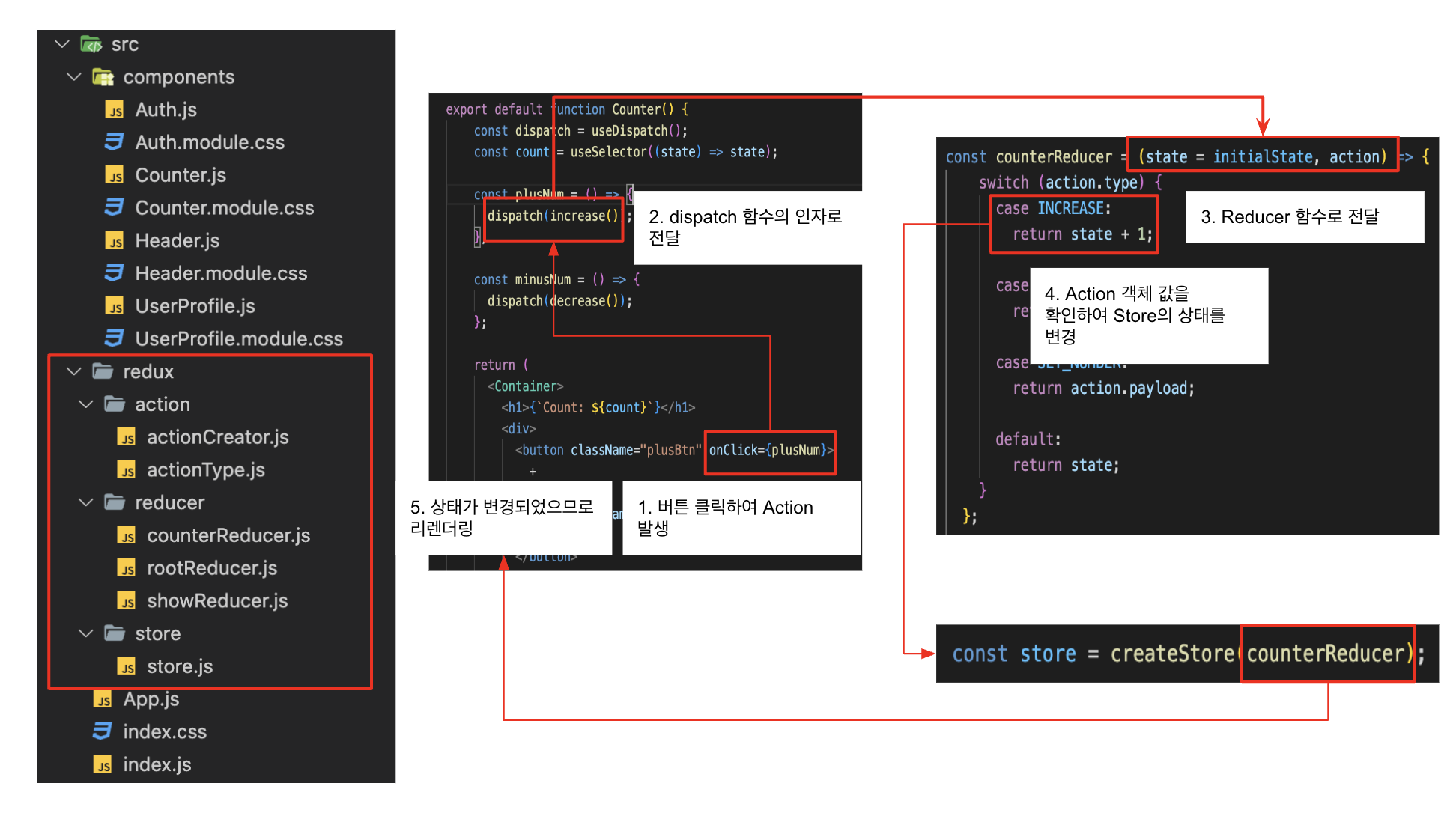
2. Redux의 구조
1) Store
-
Store는 상태가 관리되는 오직 하나뿐인 저장소의 역할을 하며, Redux 앱의state가 저장되어 있는 공간이다. -
아래와 같이
createStore메서드를 통해store를 만들어 준 후,createStore에 인자로Reducer함수를 전달해준다.
// store.js

// redux에서 createStore를 불러온다.
import { legacy_createStore as createStore } from 'redux'
// store 생성 시점에서는 아직 reducer를 만들기 전이니 reducer를 만든 후
// reducer 이름을 createStore 인자에 넣어준다.
import { rootReducer } from '../reducer/rootReducer';

export const store = createStore(rootReducer);- 생성한
store를index.js에 import하고,Provider를 불러온다. 불러온Provider를 전역 상태 저장소store를 사용할 컴포넌트인 App 컴포넌트를 감싸준 후props로 변수store를 전달해준다.
// index.js

import React from 'react';
import ReactDOM from 'react-dom/client';
import './index.css';
import App from './App';
// store를 불러온다.
import { store } from './redux/store/store';
// react-redux에서 Provider를 불러온다.
import store from './redux/store/store';

const root = ReactDOM.createRoot(document.getElementById('root'));
root.render(
  <React.StrictMode>
    // App을 Provider로 감싸준 후 props로 store를 전달한다.
    <Provider store={store}>
      <App />
    </Provider>
  </React.StrictMode>
);
2) Reducer
-
Reducer는 Dispatch에게서 전달받은
Action객체의type값에 따라서 상태를 변경시키는 함수다. -
Reducer는 순수함수여야 한다. 외부 요인으로 인해 기대한 값이 아닌 엉뚱한 값으로 상태가 변경되는 일이 없어야하기 때문이다.
-
Reducer함수 첫번째 인자에는 기존
state가 들어오며, 첫번째 인자에는default value를 꼭 설정해주어야 한다. 왜냐하면 Redux는 초기 상태를 만들 때 Reducer를 한번 호출하며, 이 시점에는state가undefined상태이므로 이로 인한 오류가 발생할 수 있다. -
두번째 인자에는
action객체가 들어온다.action객체에서 정의한type에 따라 새로운state를 리턴하며, 새로운state는 전역 변수 저장소Store에 저장된다.
// rootReducer.js

import { combineReducers } from "redux";
import { counterReducer } from "./counterReducer";
import { showReducer } from "./showReducer";

export const rootReducer = combineReducers({
  counterReducer,
  showReducer
});
combineReducers
- 여러 개의
Reducer를 사용하는 경우, Redux의combineReducers메서드를 사용해서 하나의Reducer로 합칠 수 있다.import { combineReducers } from 'redux'; const rootReducer = combineReducers({ counterReducer, anyReducer, ... });
// countReducer.js

import { INCREASE_ONE, DECREASE_ONE, INCREASE_FIVE } from "../action/actionType";

const initialState = 0;

export const counterReducer = (state = { counter: initialState }, action) => {
  if (action.type === INCREASE_ONE) {
    return {
      counter: state.counter + 1
    };
  } else if (action.type === INCREASE_FIVE) {
    return {
      counter: state.counter + action.payload
    }
  } else if (action.type === DECREASE_ONE) {
    return {
      counter: state.counter - 1
    };
  } else {
    return state;
  }
};
import { TOGGLE } from "../action/actionType";
const initialState = false;
export const showReducer = (state = { show: initialState }, action) => {
if (action.type === TOGGLE) {
return {
showCounter: !state.showCounter
};
} else {
return state;
}
};객체를 리턴하는 이유
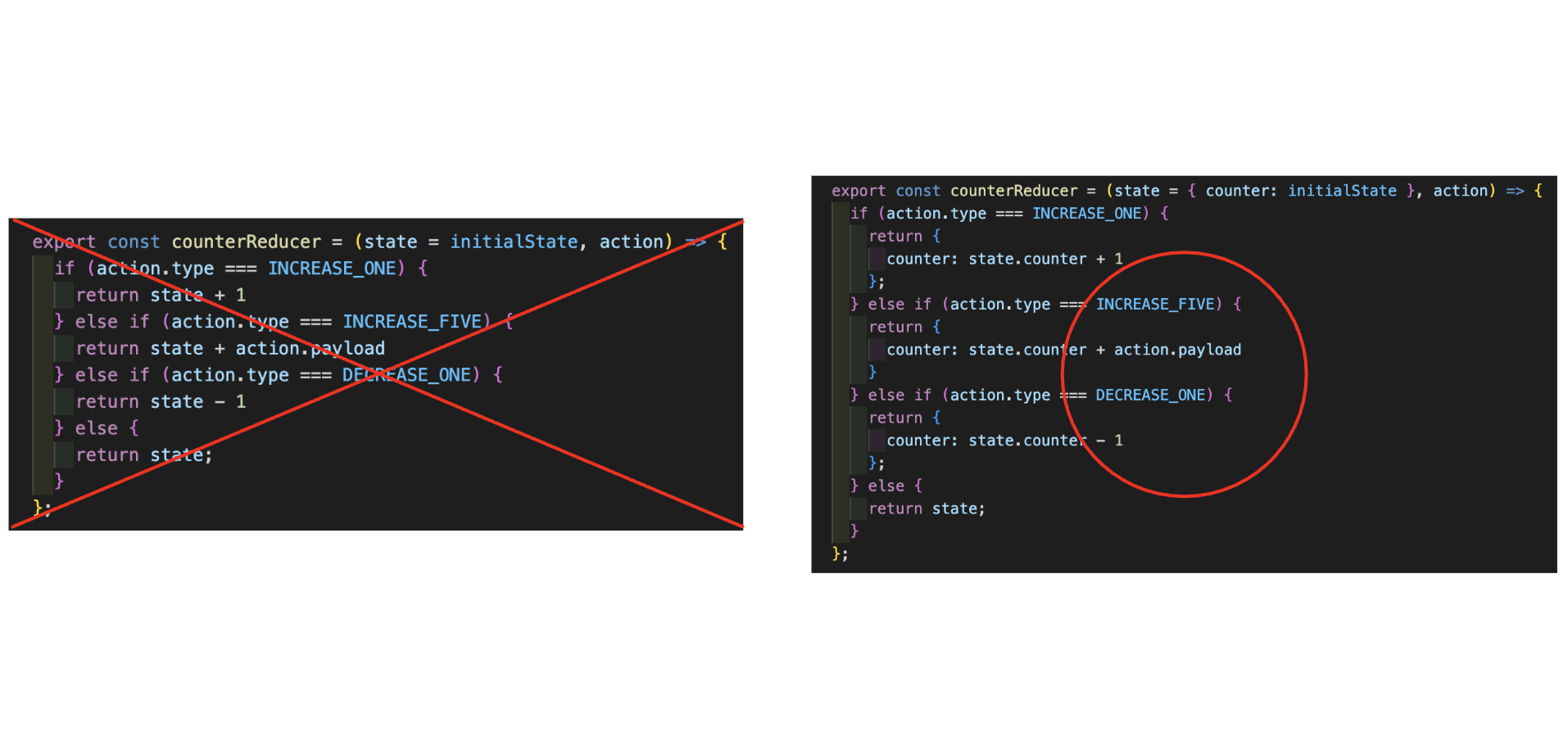
- argument로 받은 state에 직접 접근하여 값을 변경시켜도 작동은 정상적으로 되는 것처럼 보인다. 하지만 state에 직접 접근하여 그 값을 바꾸는 것이 아닌 새로운 state 객체를 반환하여 항상 새로운 값을 재정의하는 이유는 절대 기존의 state를 변경해서는 안 되기 때문이다.
3) Action
-
Action은 어떻게 state를 변경할지 정의해놓은객체이며,Action객체는Dispatch함수를 통해Reducer함수 두번째 인자로 전달된다. -
Action은 dispatch를 통해 reducer 함수로 보내지며 기존의 state를 기반으로 새로운 state를 생성한다.
-
type은 해당Action객체가 어떤 동작을 하는지 명시해주는 역할을 하기 때문에 필수로 지정을 해 주어야 한다. -
Action은 대문자와 Snake Case로 작성한다. 여기에 필요에 따라payload를 작성해 구체적인 값을 전달한다.
// actionType.js

export const INCREASE_ONE = "INCREASE_ONE";
export const DECREASE_ONE = "DECREASE_ONE";
export const INCREASE_FIVE = "INCREASE_FIVE";

export const TOGGLE = "TOGGLE";
// actionCreator.js
import { INCREASE_ONE, DECREASE_ONE, INCREASE_FIVE, TOGGLE } from "../action/actionType";
export const increaseByOne = () => {
return {
type: INCREASE_ONE,
};
};
export const increaseByFive = () => {
return {
type: INCREASE_FIVE,
payload: 5
};
};
export const decreaseByOne = () => {
return {
type: DECREASE_ONE,
};
};
export const toggle = () => {
return {
type: TOGGLE,
};
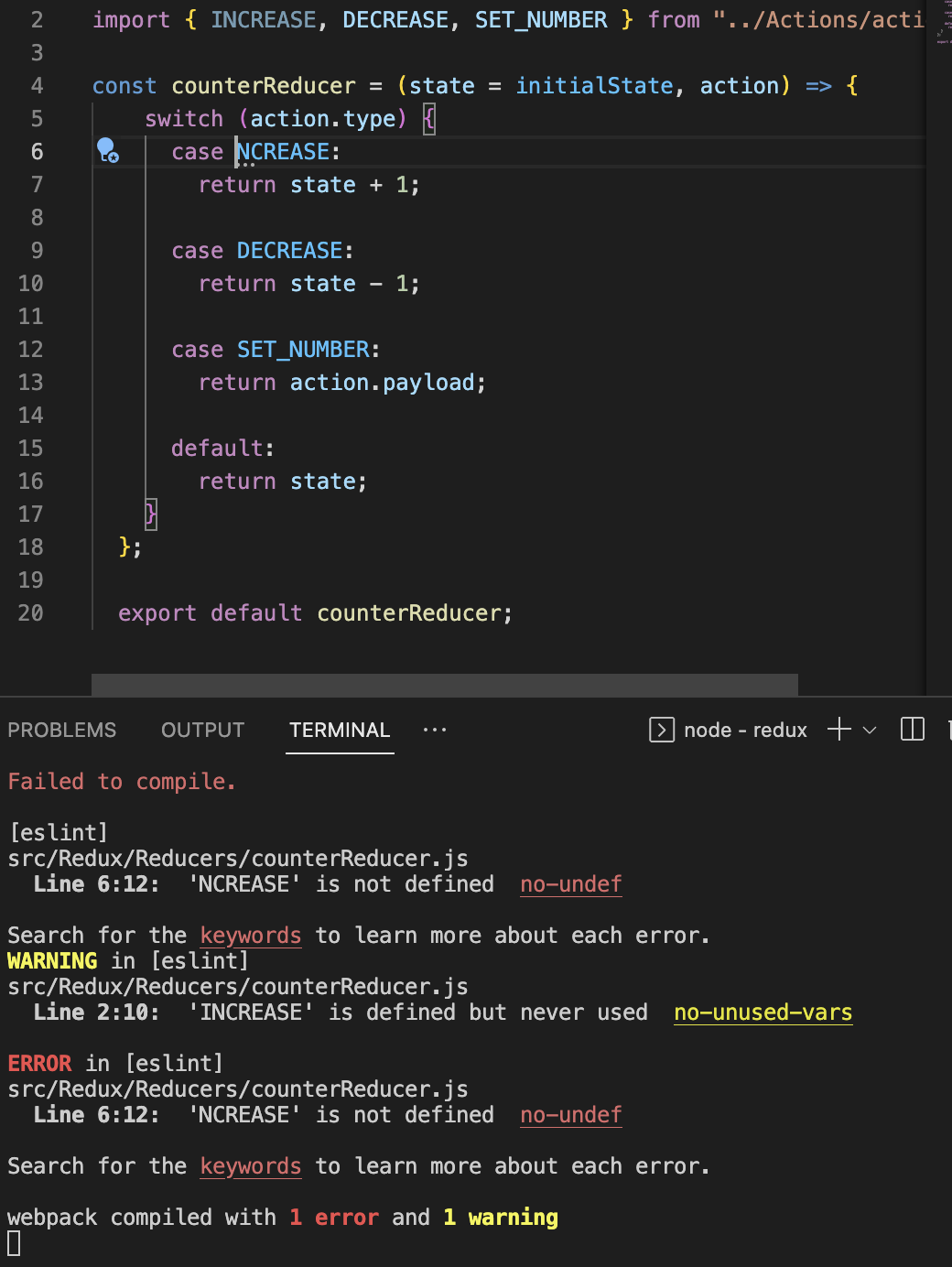
};Action type을 별도의 '문자열 상수'로 정의하는 이유
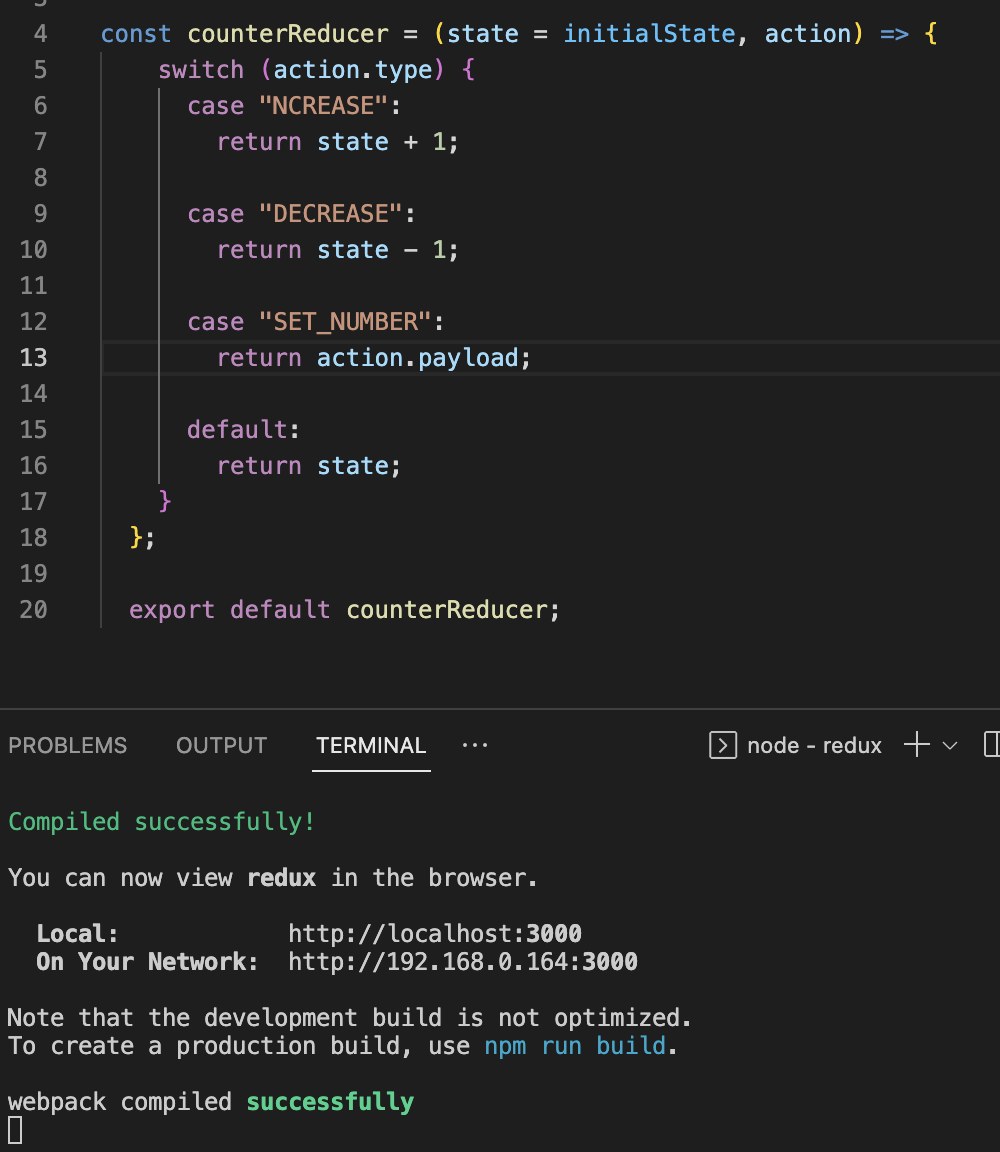
type에 문자열을 직접 쓰고 오타를 낸 후 저장해도 에러가 발생하지 않아 디버깅에 어려움이 있기 때문이다.
- 별도의 문자열 상수로 정의하지 않고 type에 바로 작성한 경우, 첫 번째 케이스인 "INCREASE"에서 "I"가 빠졌는데도 저장 시 에러가 발생하지 않는다.
- 별도의 문자열 상수로 정의할 경우 변수명이 틀리면 바로 에러가 발생한다.
4) Dispatch
-
Dispatch는 Reducer로
Action을 전달해주는 함수이며, 전달인자로Action객체가 전달된다. -
Action객체를 전달받은 Dispatch 함수는Reducer를 호출한다. -
Dispatch 함수에는 Redux Hooks인
useDispatch()메서드를 사용한다.useDispatch()메서드는 이벤트 핸들러 안에 사용하며, Action 객체를 Reducer로 전달해 주는 Dispatch 함수를 반환하는 메서드다.
// Couter.js

import { useDispatch, useSelector } from 'react-redux';
import { increaseByOne, increaseByFive, decreaseByOne, toggle } from '../redux/action/actionCreator';

function Counter() {
  const dispatch = useDispatch();
  const counter = useSelector((state) => state.counterReducer.counter);
  const show = useSelector((state) => state.showReducer.showCounter);

  const incrementHandler = () => {
    dispatch(increaseByOne());
  }

  const increaseHandler = () => {
    dispatch(increaseByFive());
  }

  const decrementHandler = () => {
    dispatch(decreaseByOne());
  }

  const toggleCounterHandler = () => {
    dispatch(toggle());
  };

  return (
    <main className={classes.counter}>
      <h1>Redux Counter</h1>
      {show ? <div className={classes.value}>{counter}</div> : null}
      <div>
        <button onClick={incrementHandler}>+1</button>
        <button onClick={increaseHandler}>+5</button>
        <button onClick={decrementHandler}>-1</button>
      </div>
      <button onClick={toggleCounterHandler}>Toggle Counter</button>
    </main>
  );
};

export default Counter;
// 액션 생성자(Action Creator)를 사용하는 경우
dispatch(increase());
dispatch(setNumber(5));

// Action 객체를 직접 작성하는 경우
dispatch({ type: 'INCREASE' });
dispatch({ type: 'SET_NUMBER', payload: 5 });
4-1. useDispatch()
- Dispatch 함수에는 Redux Hooks인
useDispatch()메서드를 사용한다.useDispatch()메서드는 이벤트 핸들러 안에 사용하며, Action 객체를 Reducer로 전달해 주는 Dispatch 함수를 반환하는 메서드다.
import { useDispatch } from 'react-redux'

const dispatch = useDispatch()
dispatch( increase() )
console.log(counter) // 2

dispatch( setNumber(5) )
console.log(counter) // 5
4-2. useSelector()
-
useSelector()는 컴포넌트와state를 연결하여 Redux의state에 접근할 수 있게 해주는 메서드이다. -
useSeletor()를 통해 state가 필요한 컴포넌트에서 전역 변수 저장소store에 저장된state를 쉽게 불러올 수 있다. -
useDispatch()와useSelector()는 상태가 필요한 컴포넌트에서 사용한다.
import { useSelector } from 'react-redux'

const counter = useSelector(state => state)
console.log(counter) // 1