
Try 1. [Google Drive ➡️ colab] gdown 이용해서 다운로드
def file_download(file_id, output_name):
  if os.path.exists(output_name):
    print(f"이미 해당 파일이 존재합니다. file name: {output_name}")
    return
  url = f'https://drive.google.com/uc?id={file_id}'
  output = output_name
  gdown.download(url, output, quiet=False)
  print(f"파일 다운로드 완료 output: {output}")


def unzip_file(zip_path, extract_dir):
  if os.path.exists(extract_dir):
    print(f"이미 해당 폴더가 존재합니다. dir: {extract_dir}")
    return
  if not os.path.exists(zip_path):
    print(f"zip 파일이 존재하지 않습니다. zip file path: {zip_path}")
    return
  if not os.path.exists(extract_dir):
    os.makedirs(extract_dir)
    print(f"폴더가 생성되었습니다. dir: {extract_dir}")
  with zipfile.ZipFile(zip_path, 'r') as zip_ref:
    zip_ref.extractall(extract_dir)
    print(f"파일이 {extract_dir}에 해제되었습니다.")


def delete_path(path):
    if os.path.exists(path):
        try:
            if os.path.isdir(path):
                shutil.rmtree(path)
                print(f"폴더가 삭제되었습니다. dir: {path}")
            else:
                os.remove(path)
                print(f"파일이 삭제되었습니다. file: {path}")
        except Exception as e:
            print(f"삭제에 실패했습니다. path: {path}")
            print(e)
    else:
        print(f"존재하지 않는 경로입니다. path: {path}")
google drive 공유해서 id 추출해서 resources 변수에 map으로 저장
resources = {
    'T_PRINT_LABEL': '1Qk1XpKEN4lZ4p4rvlWd8Oc4I6CPi7wao',
    'T_PRINT_ORIGIN': '1dlwaex7VknT3yLUvxj7X-92kV_A269gU',
    'V_PRINT_LABEL': '1C7VNOVZGoxprPdjqLJnOeb_NWtc0H2rW',
    'V_PRINT_ORIGIN': '1S-BY2yrXy04DRjk_RqM1FjD6hUk9fpes'
}

def make_zip_file_name(label):
    return f"{label.lower()}.zip"

def make_unzip_file_name(label):
    return f"{label.lower()}"
resources에 등록된 id 일괄 다운로드
for resource in resources.keys():
    file_id = resources[resource]
    zip_name = make_zip_file_name(resource)
    unzip_name = make_unzip_file_name(resource)
    if not os.path.exists(unzip_name):
      file_download(file_id, zip_name) # Google Drive -> Colab 데이터 다운로드
      unzip_file(zip_name,unzip_name) # 압축 풀기
    if os.path.exists(zip_name):
      delete_path(zip_name)  # 기존 zip 폴더 삭제
output
Access denied with the following error:
파일 다운로드 완료 output: t_print_origin.zip
zip 파일이 존재하지 않습니다. zip file path: t_print_origin.zip

 	Too many users have viewed or downloaded this file recently. Please
	try accessing the file again later. If the file you are trying to
	access is particularly large or is shared with many people, it may
	take up to 24 hours to be able to view or download the file. If you
	still can't access a file after 24 hours, contact your domain
	administrator.

You may still be able to access the file from the browser:

	 https://drive.google.com/uc?id=1dlwaex7VknT3yLUvxj7X-92kV_A269gU
테스트 해본다고 여러번 실행하다가 첫번째 resource 파일 다운로드 할때 Access Denied 에러가 뜸.
여러가지 시도(gdown version downgrade..., 구글 드라이브에 파일 다시 올리기...) 중 downgrade 해도 해결되지 않아서 구글 드라이브에 파일 다시 올리기로 결정..!

다시 올려서 공유 id 변경되니깐 아주 잘 됨
코드 대충 다 짰으니깐, 테스트 하느라 다운 limit 초과할 일은 없을 듯 하다.
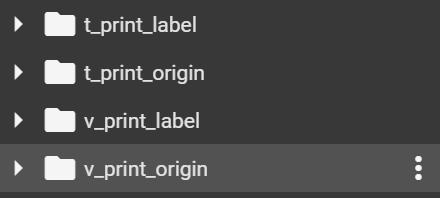
우선 준비 완료 🙆♂️
사실 다운로드 limit 이슈가 조금 🫅받아서
다른 방법들도 고민해봤는데,
-
로컬에 있는 파일을 끌어다가 저장하기 ⁉️ 매번 이렇게?? 좀 비효율적(귀찮)이다. 시도 해봤지만 대용량 파일이 잘 안올라가진다.
-
google에서 지원하는 google drive mount 이용하기⁉️ 대량의 이미지 파일을 관리하는데 무리가 있을지도? 잘 이용하다가 중간에 뻑나면 더 🫅받을지도..
-
API 이용해서 다운로드 하기 🆗 시도해보기로 함
Try 2. AI 허브 오픈 API 사용 [실패]
설치
#python
# 공공드라이브 API 다운로드
!curl -o "aihubshell" https://api.aihub.or.kr/api/aihubshell.do
권한설정
#python
!chmod +x aihubshell
편하게 명령어 실행
#python
!cp aihubshell /usr/bin
환경변수 등록
터미널 열어서 실행
bash
/content# export AIHUB_ID=smurp7@naver.com
/content# export AIHUB_PW='{aihub_pw}'
/content# env|grep AIHUB
자료 다운로드
python에서는 이상하게 환경변수를 못 읽어 오는 것 같다...? 왜이러지 ??
bash
/content# aihubshell -mode d -datasetkey 91 -filekey 37240
output

아.. 😬
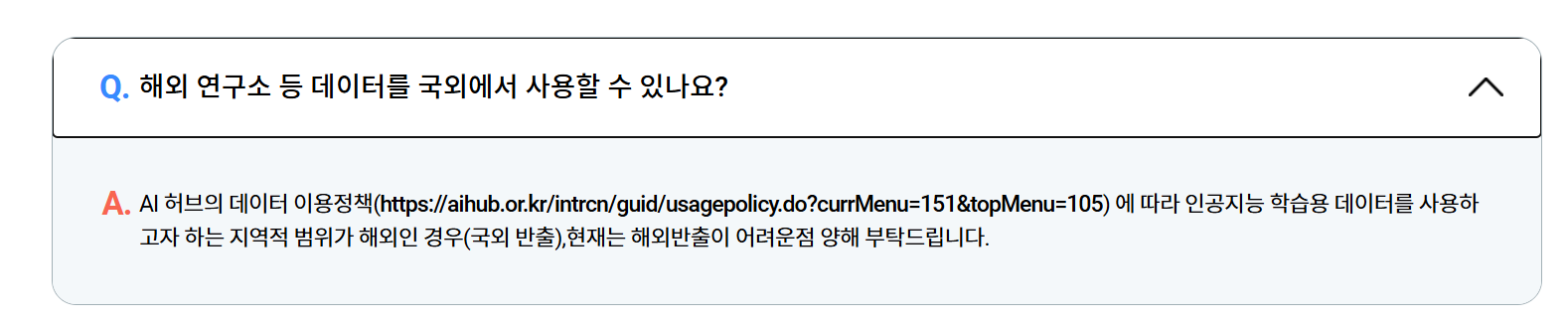
공공데이터라서 국내만.... colab은 해외.. 아..

Hi, I am Lucy. Welcome to Moon in the Room. 🌝