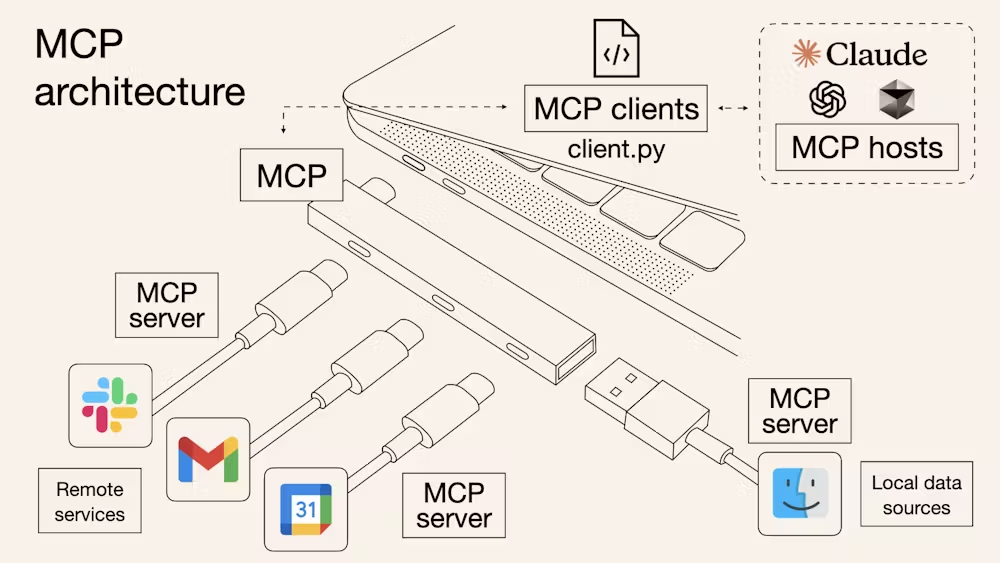
최종장, AUTH
MCP-UI를 하나의 웹앱처럼 만들었다. 그럼 보통의 웹앱에서 적용되는 여러 네트워크 관련 보안을 신경써줘야 한다. CORS나 OAuth 등 인증 관련하여 MCP-UI를 좀 더 탄탄하게 만들어보자
Metadata Discovery
그럼 클라이언트가 MCP 서버에 연결하려고 할 때를 생각해보자. MCP서버는 클라이언트에게 인증 토큰을 어디서 받아야 하는지를 알려줘야 한다. 그 과정을 플로우로 먼저 살펴보자
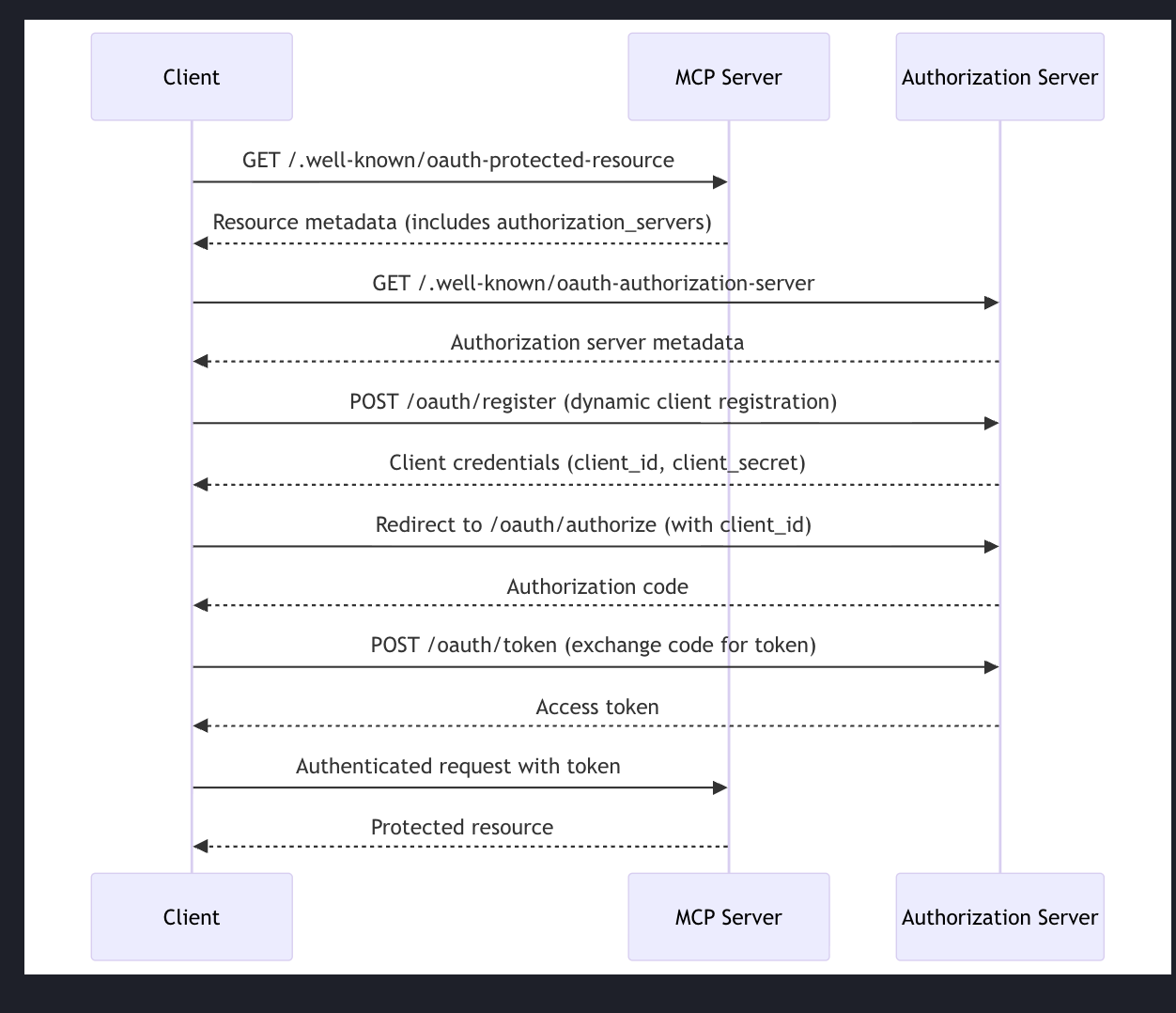
사용자가 설정을 마쳤거나 MCP 서버에 연결하겠다고 결정하면, 인증이 필요한지 여부를 판단해야 한다.
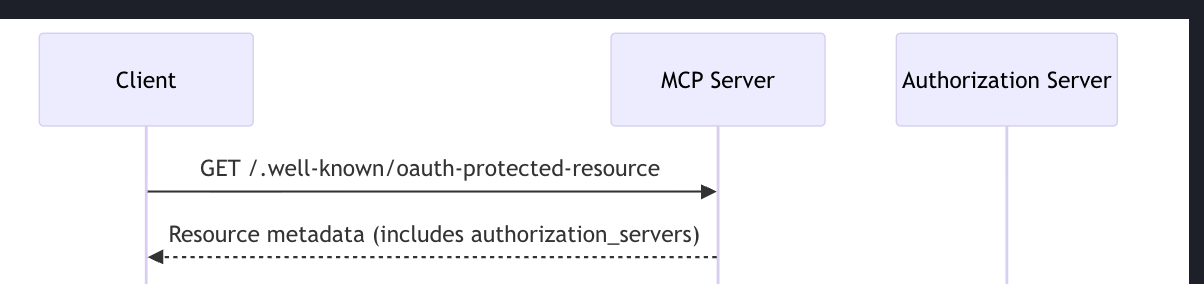
CORS 설정이 제대로 되어 있다면 MCP 서버는 리소스 메타데이터를 포함해서 응답한다. 그 메타데이터에는 인증 서버의 URL인 인증 서버 정보가 들어있다.
인증 서버란 사용자가 누구냐에 따라 로그인 처리, 액세스 토큰 처리 같은 일을 담당하는 서버가 따로 있는데 그걸 지칭한다. 그리고 우리가 리소스 서버라고 부르는 것이 여기서는 MCP 서버다. 기본적으로 액세스 토큰을 받아들이고 백엔드 서버랑 통신한다.
클라이언트는 기본적으로 리소스 서버만 알고 있다. 그래서 먼저 리소스 서버에게 리소스 서버에 대한 메타 정보를 요청해야 한다.
MCP에서는 동적 클라이언트 등록이 중요한 구성 요소이기 때문에 이러한 인증 플로우를 거친다.
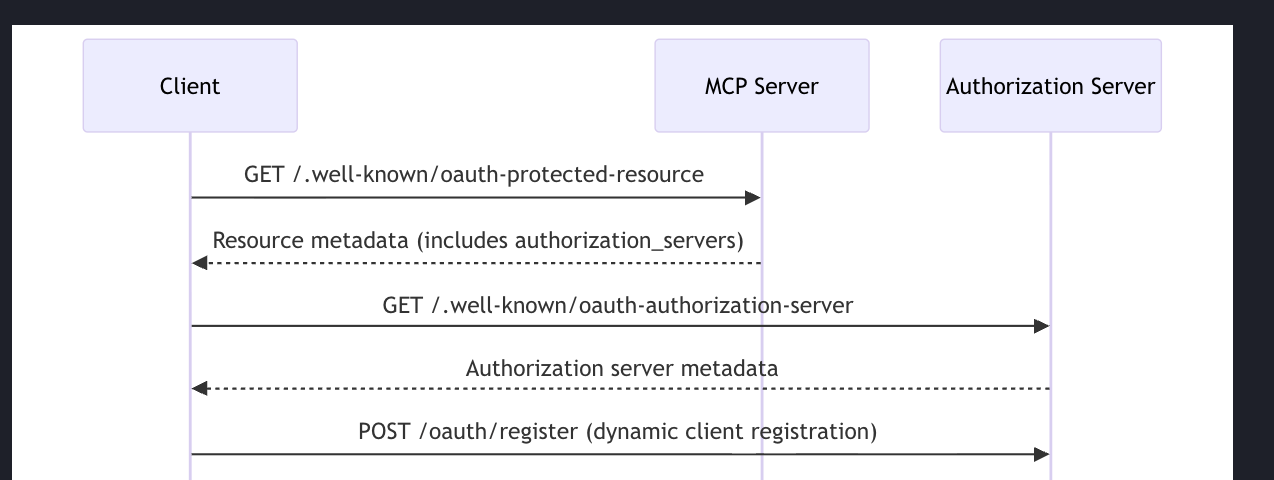
그리고 클라이언트가 인증 서버에게 인증 서버의 메타 데이터를 요청하게 된다.
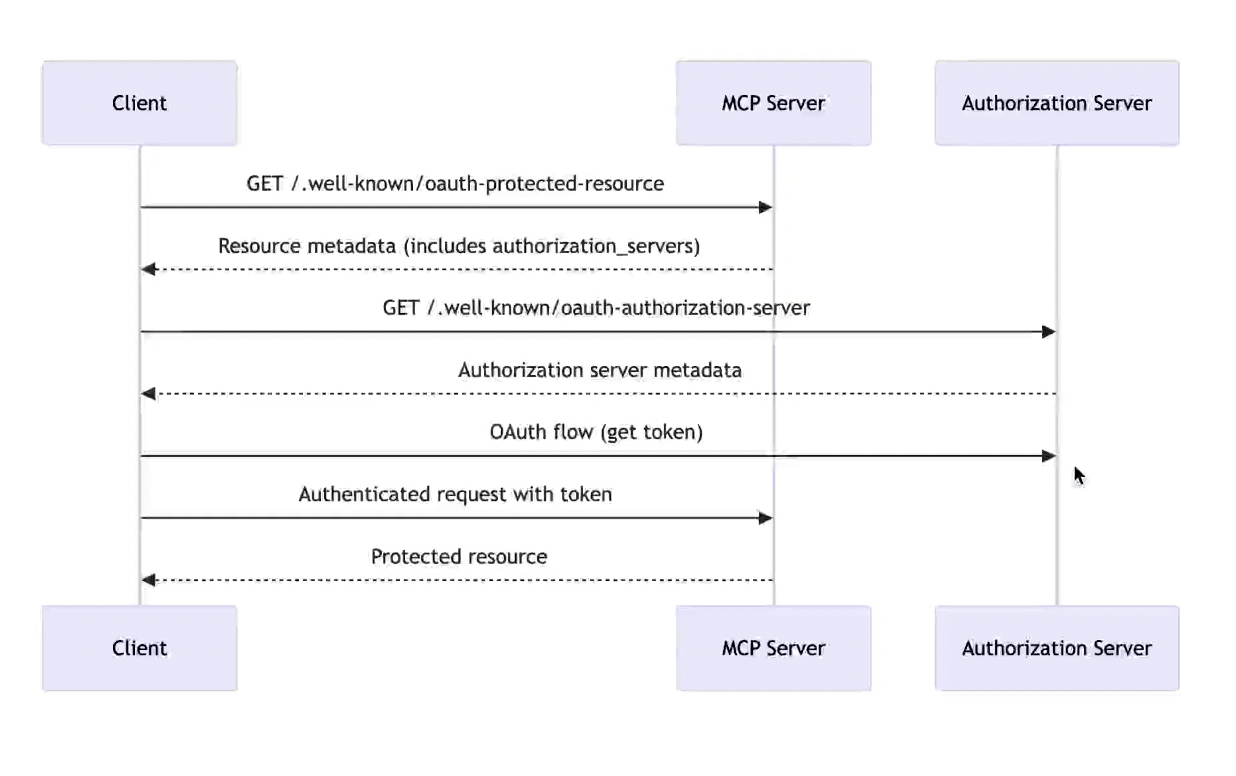
그 응답이 돌아오면, OAuth 플로우를 수행해서 토큰을 얻는다. 그러면 인증 서버로 넘어가고, 보통 사용자는 그 서버에 이미 로그인되어 있을 테니, 해당 페이지가 열리고 거기서 인증 플로우를 보게 된다(구글 OAuth와 같은)
AUTH 예제에서는 인증 서버를 미리 구현된 인증 서버를 사용하고 리소스 서버가 인증 서버 위치를 알려주는 것만 구현하는 것을 목표로 한다!
CORS
MCP 서버는 사용자가 항상 다른 웹앱 또는 데스크톱 앱(VS Code, 커서 등) 에서 접근한다는 전제라서, 요청이 구조적으로 전부 cross-origin이 된다.
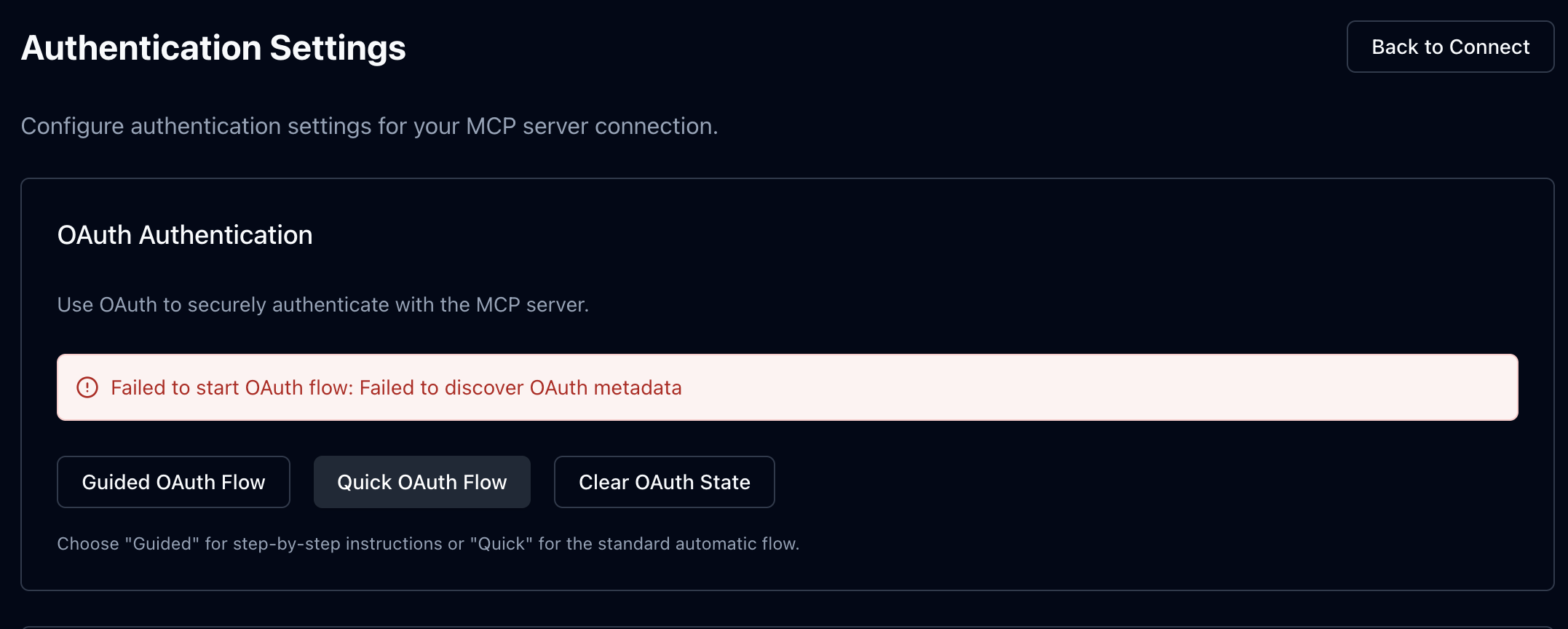
MPC 인스펙터에서 OAuth를 요청해보면

access-control-allow-origin 헤더가 없는 상태로 설정되어 모든 요청이 차단되었다. MCP 서버에 헤더를 추가해보자
// mcp/index.ts
export class MyMCP extends McpAgent<Env> {
	db!: DBClient
	server = new McpServer(...)
    // ...
    async init() {
		this.db = getClient()
		//...
	}
}

// 아래 부분을 변경한다.
export default {
	fetch: async (request, env, ctx) => {
		const url = new URL(request.url)

		if (url.pathname === '/mcp') {
			const mcp = MyMCP.serve('/mcp', {
				binding: 'MY_MCP_OBJECT',
			})
			return mcp.fetch(request, env, ctx)
		}

		if (url.pathname === '/healthcheck') {
			return new Response('OK', { status: 200 })
		}

		return new Response('Not found', { status: 404 })
	},
} satisfies MyMcpExportedHandlerwithCors라는 HOC를 만들어서 fetch 부분을 래핑할 것이다.
// ./withCors
export function withCors<Props>({
	getCorsHeaders,
	handler,
}: {
	getCorsHeaders(
		request: Request,
	): Record<string, string> | Headers | null | undefined
	handler: EpicMeExportedHandler<Props>['fetch']
}): EpicMeExportedHandler<Props>['fetch'] {
	return async (request, env, ctx) => {
		const corsHeaders = getCorsHeaders(request)
		if (!corsHeaders) {
			return handler(request, env, ctx)
		}

		// Handle CORS preflight requests
		if (request.method === 'OPTIONS') {
			const headers = mergeHeaders(corsHeaders, {
				'Access-Control-Max-Age': '86400',
			})

			return new Response(null, { status: 204, headers })
		}

		// Call the original handler
		const response = await handler(request, env, ctx)

		// Add CORS headers to ALL responses, including early returns
		const newHeaders = mergeHeaders(response.headers, corsHeaders)

		return new Response(response.body, {
			status: response.status,
			statusText: response.statusText,
			headers: newHeaders,
		})
	}
}withCors는 getCorsHeaders가 반환한 CORS 헤더가 있으면, OPTIONS 프리플라이트 요청을 먼저 처리하고, 실제 핸들러의 모든 응답에 자동으로 CORS 헤더를 추가해주는 래퍼 함수다.
이제 withCors에getCORSHeader를 래핑하자
//...
fetch: withCors({
		getCorsHeaders: (request) => {
			if (request.url.includes('/.well-known')) {
				return {
					'Access-Control-Allow-Origin': '*',
					'Access-Control-Allow-Methods': 'GET, HEAD, OPTIONS',
					'Access-Control-Allow-Headers': 'mcp-protocol-version',
				}
			}
		},
		handler: async (request, env, ctx) => {...}),
   })
이제 다시 인스펙터에서 요청을 보내보면

CORS는 사라지고 404가 나온다.
Auth Server Metadata
인스펙터에서 OAuth 요청을 할 떄, 네트워크르 살펴보면
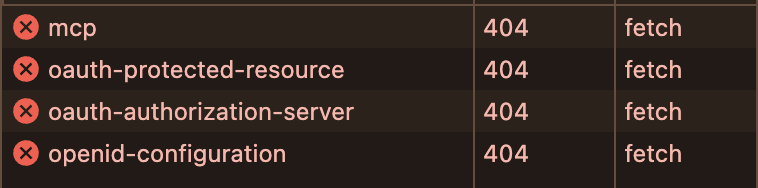
이렇게 4개의 요청이 간다는 걸 확인할 수 있다. 이는 클라이언트가 서버의 정체를 탐색하는 과정이다.
well-known/oauth-protected-resource/mcp에 보면서 이 서버는 Resource Server 인지 요청하고
실패하면 .well-known/oauth-authorization-server 이 서버가 혹시 Authorization Server인지 요청하고
그래도 안 되면 OpenID까지 시도하게 된다. 문제는 MCP 서버는 원래 Authorization Server가 아니라는 것이다. MCP 서버는 Resource Server이지만 현실의 클라이언트는 MCP 서버를 Authorization Server라고 오인하고 접근하는 경우가 많다.
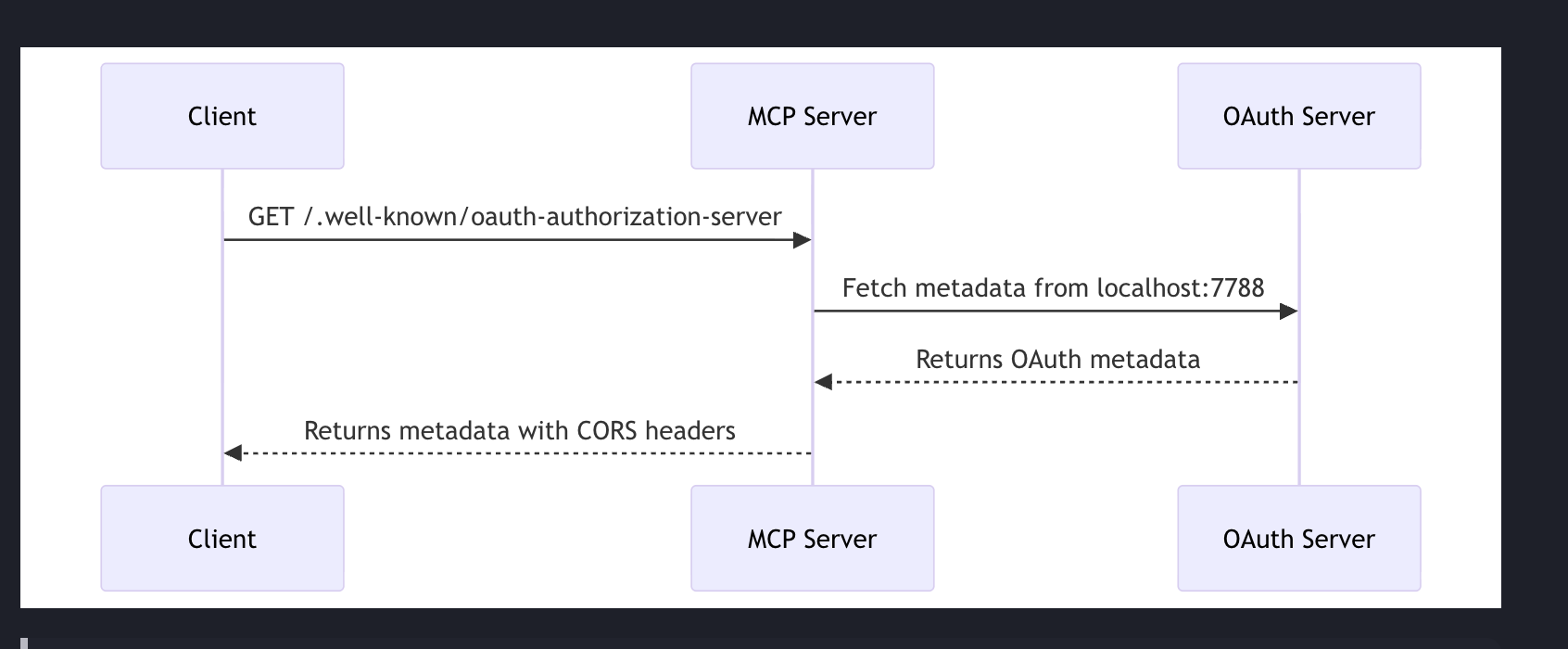
이때 이 엔드포인트가 없으면 이 서버는 OAuth를 지원 안 한다고 판단하고 연결을 끊는다. 즉, 정상적인 MCP 서버인데도 클라이언트가 먼저 포기해버리는 문제가 생긴다.
그래서 그래서 MCP 서버는 .well-known/oauth-authorization-server로 요청을 받으면 실제 Authorization Server(여기서는 만들어준 localhost:7788)로 프록시해서 그 결과를 그대로 돌려줘야 한다.
// ./mcp/index.ts
	handler: async (request, env, ctx) => {
			const url = new URL(request.url)

			if (url.pathname === '/.well-known/oauth-authorization-server') {
				return handleOAuthAuthorizationServerRequest()
			}

			if (url.pathname === '/mcp') {
				//...
			}
    }
handler에 '/.well-known/oauth-authorization-server'로 온 요청을 handleOAuthAuthorizationServerRequest 로 보낸다.
// auth/handleOAuthAuthorizationServerRequest.ts

export async function handleOAuthAuthorizationServerRequest() {

    // authorization server의 새 URL을 만듦
    // http://localhost:7788는 원래 인증 서버 URL
	const metadataUrl = new URL(
		'/.well-known/oauth-authorization-server',
		'http://localhost:7788',
	)

	const response = await fetch(metadataUrl.toString())
	const data = await response.json()

	return Response.json(data)
}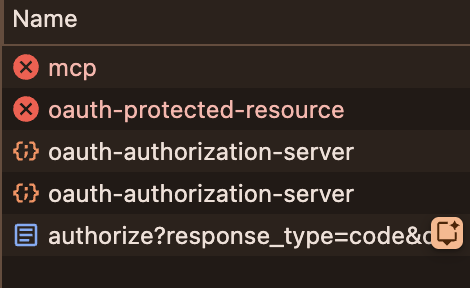
fallback으로 실패 시 넘어가다가 oauth-authorization-server로 프록시가 잘 되었다.
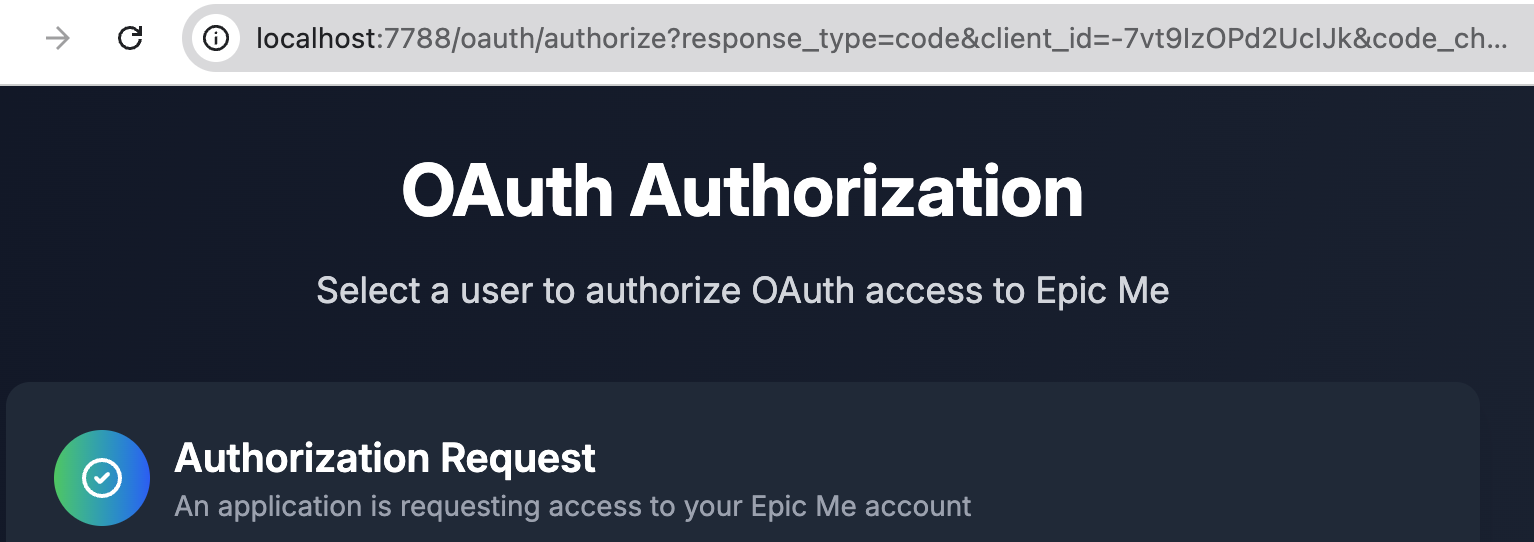
localhost:7788 간이 OAuth 서버로 넘어왔다.
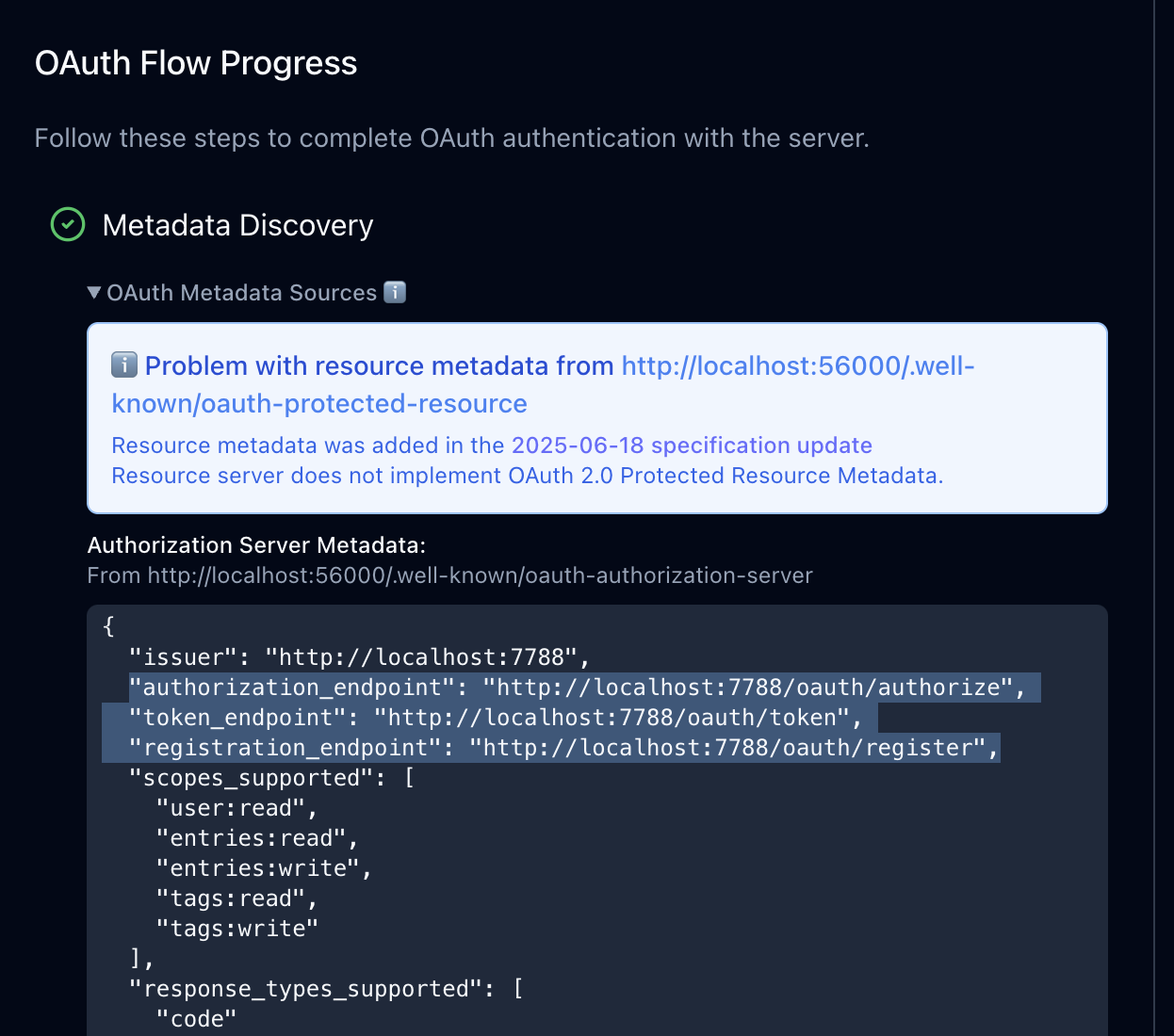
이제 서버로 받은 메타 데이터를 통해 클라이언트는 어디로 Auth 요청해야할지 알게 되었다.
Protected Resource Metadata
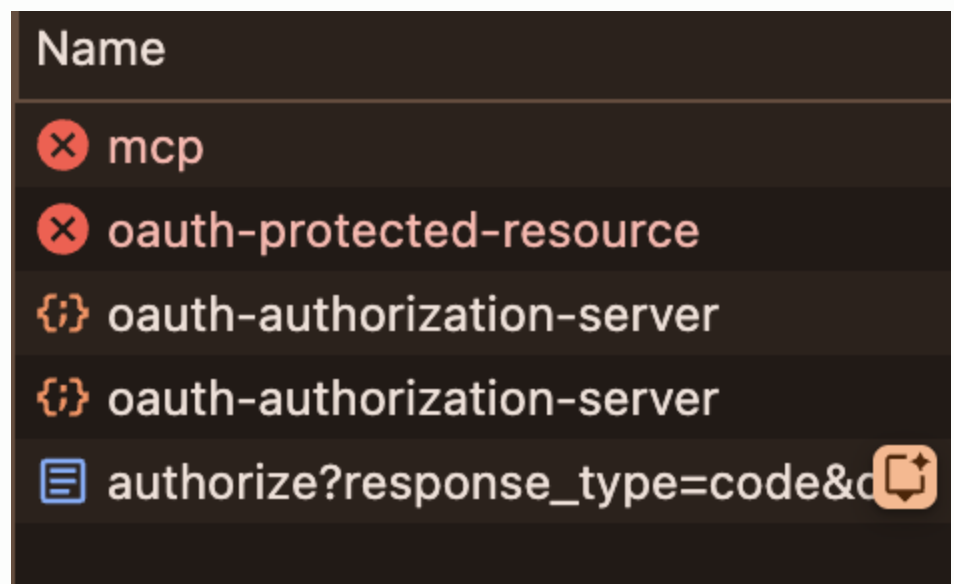
OAuth 연결을 잘 되었지만, oauth-protected-resource가 여전히 404다.
인스펙터에선 상관없지만 진짜 클라이언트들(VS Code, nanobot.ai 등)은 표준대로만 동작하기에 이 부분을 수정해줘야 한다.
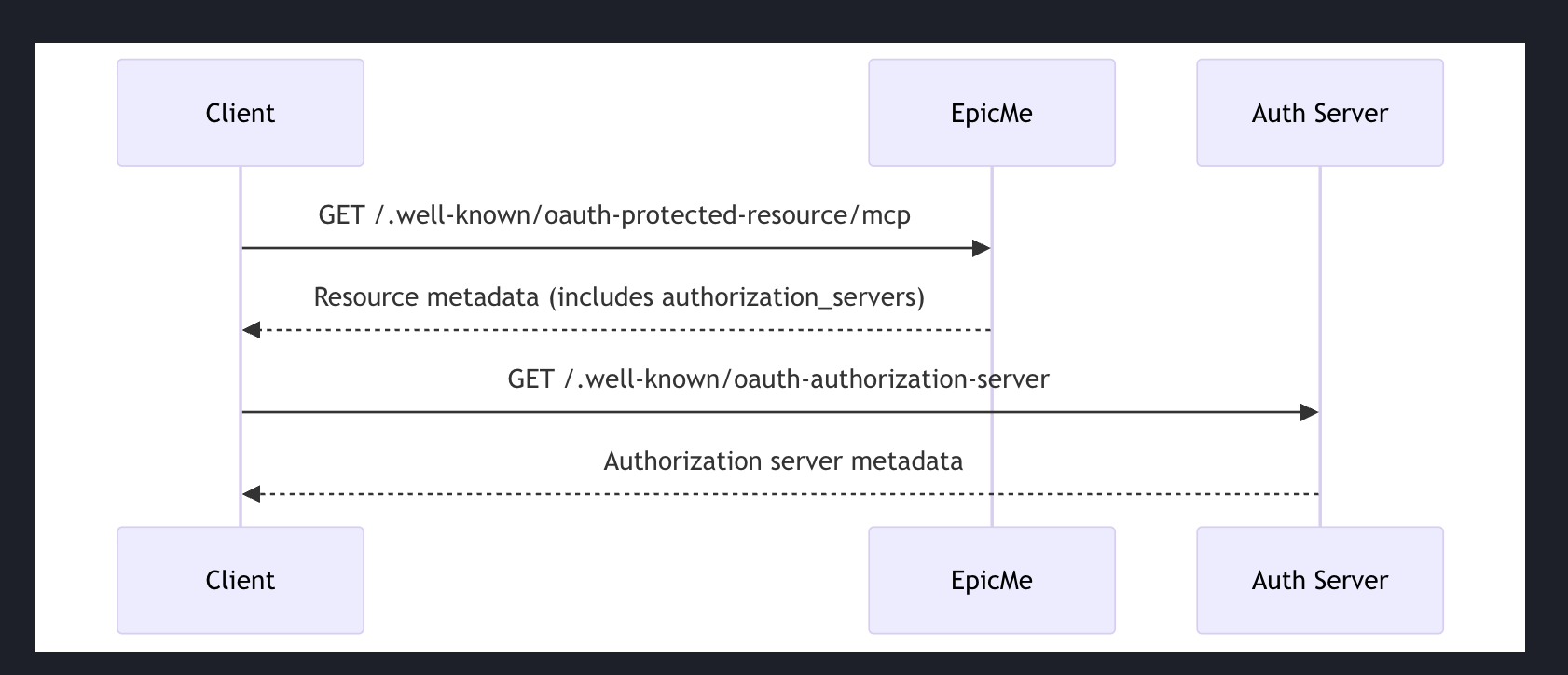
보통의 클라이언트들은
/.well-known/oauth-protected-resource/mcp을 호출해서
authorization_servers(로그인하러 갈 곳)을 알아낸다
거기로 가서 /.well-known/oauth-authorization-server 호출해서 authorize/token endpoint 알아내는 OAuth 플로우를 진행 한다.
즉, 1번이 없으면 연결 자체가 실패할 수도 있다.
// mcp/index.ts

//..
handler: async (request, env, ctx) => {
			const url = new URL(request.url)


			if (url.pathname === '/.well-known/oauth-authorization-server') {
				return handleOAuthAuthorizationServerRequest()
			}

			if (url.pathname === '/.well-known/oauth-protected-resource/mcp') {
				return handleOAuthProtectedResourceRequest(request)
			}
	}
//...'/.well-known/oauth-protected-resource/mcp'으 경우 리퀘스트를 handleOAuthProtectedResourceRequest로 넘긴다
// ./handleOAuthProtectedResourceRequest.ts

export async function handleOAuthProtectedResourceRequest(request: Request) {
	const resourceServerUrl = new URL('/mcp', request.url)

	return Response.json({
		resource: resourceServerUrl.toString(),
		authorization_servers: [AUTH_SERVER_URL],
	})
}
handleOAuthProtectedResourceRequest는 인증 서버 메타 데이터를 리터하면서 클라이언트에게 여기가 아니라 인증 서버로 요청해라 라고 알려준다.
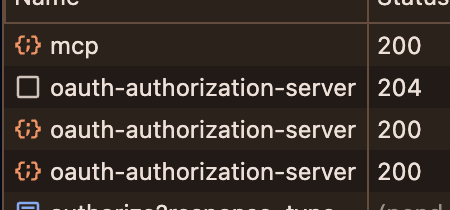
이제 클라이언트는 404 없이 제대로 URL을 찾아간다!
