15일차
~15.3 댓글 조회하기(종이책 p.427~445)
15장 댓글 컨트롤러와 서비스 만들기
15.1 댓글 REST API의 개요
이 장에서는 댓글 REST 컨트롤러, 서비스, DTO를 만들어 댓글 CRUD를 위한 REST API를 완성한다.
- REST 컨트롤러: 댓글 REST API를 위한 컨트롤러로 서비스와 협업, 클라이언트 요청을 받아 응답하며 뷰(view)가 아닌 데이터 반환
- 서비스: REST 컨트롤러와 리파지터리 사이에서 비즈니스 로직, 즉 처리 흐름을 담당하며 예외 상황이 발생했을 때 @Transactional로 변경된 데이터 롤백
- DTO: 사용자에게 보여 줄 댓글 정보를 담은 것, 단순히 클라이언트와 서버 간에 댓글 JSON 데이터 전송
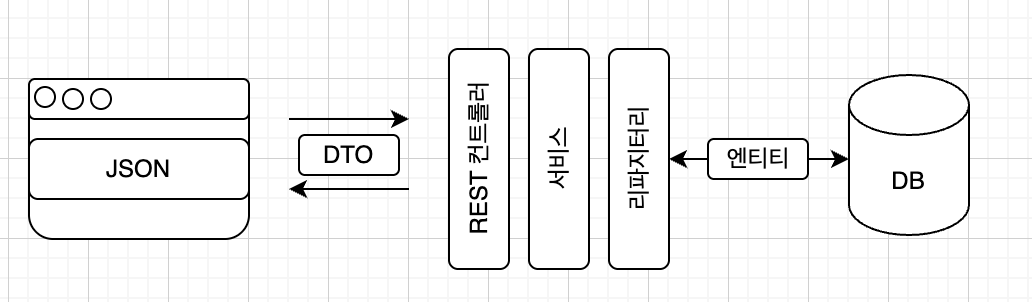
댓글 CRUD를 하려면 REST API 주소가 필요하다. 여기서는 다음과 같이 설정한다.
- GET: /articles/articleId/comments
- POST: /articles/articleId/comments
- PATCH: /comments/id
- DELETE: /comments/id
15.2 댓글 컨트롤러와 서비스 틀 만들기
댓글 REST API를 구현하기 위해 api 패키지에 REST 컨트롤러를 만든다.
- api 패키지에 CommentApiController라는 클래스를 만든다.
- 이 클래스를 REST 컨트롤러로 선언한다. (@RestController)
- 컨트롤러가 서비스와 협업할 수 있도록 commentService 객체를 주입한다.
	@RestController
    public class CommentApiController {
    	@Autowired
    	private CommentService commentService;
}- service 패키지에 CommentService라는 클래스를 생성한다.
- 이 클래스를 서비스로 선언한다. (@Service)
- 서비스와 함께 협업할 리파지터리, 즉 댓글 리파지터리와 게시글 리파지터리 객체를 주입한다.
    @Service
    public class CommentService {
    	@Autowired
    	private CommentRepository commentRepository;
    	@Autowired
    	private ArticleRepository articleRepository;
    }
이제 컨트롤러가 처리할 기능을 하나씩 구현해 본다. (댓글 조회, 생성, 수정, 삭제)
15.3 댓글 조회하기
댓글을 조회할 때 REST API 주소는 /articles/articleId/comments 이다. 이 주소로 댓글 조회 요청을 보내고 응답을 받도록 한다.
- CommentApiController에 comments()라는 메서드를 만든다.
- @GetMapping()으로 댓글 조회 요청을 받는다.
- 매개변수로 @GetMapping의 articleId를 받아온다.
- 메서드의 반환형은
ResponseEntity<List<CommentDto>>로 정의한다. DB에서 조회한 댓글 엔티티 목록은List<Comment>이지만, 엔티티를 DTO로 변환하면List<CommentDto>가 되기 때문이다. 응답 코드도 같이 보내기 위해 ResponseEntity 클래스를 활용한다. - 서비스에 댓글 조회를 위임하기 위해 CommentService의 comments(articleId) 메서드를 호출한다. 반환받은 값은
List<CommentDto>타입의 dtos라는 변수에 저장한다. - 12장에서는 REST 컨트롤러를 만들 때 메서드의 반환값을 성공하는 경우와 실패하는 경우로 나눠 삼항 연산자로 작성했지만, 실제 개발에서는 예외 처리(exception handling) 방식을 선호한다. 여기서는 댓글 조회에 실패할 경우 스프링 부트가 예외 처리를 한다고 가정하고, 댓글 조회에 성공하는 경우만 응답으로 보낸다.
    @GetMapping(”/api/articles/{articleId}/comments”)
    public ResponseEntity<List<CommentDto>> comments(@PathVariable Long articleId) {
    	List<CommentDto> dtos = commentService.comments(articleId);
    	return ResponseEntity.status(HttpStatus.OK).body(dtos);
}- CommentDto 클래스가 존재하지 않기 때문에 오류가 난다. 에러를 해결하기 위해 dto 패키지에 CommentDto 클래스를 생성한다.
- CommentDto는 Comment(댓글 엔티티)를 담을 그릇이므로, Comment의 구조와 같이 필드를 선언한다.
    @AllArgsConstructor
    @NoArgsConstructor
    @Getter
    @ToString
    public class CommentDto {
    	private Long id;
    	private Long articleId;
    	private String nickname;
    	private String body;
}- CommentService에 comments() 메서드를 만든다.
- CommentRepository의 findByArticleId(articleId) 메서드를 호출해 댓글을 조회한다.
- 반복문을 활용해 엔티티를 DTO로 변환한다.
- 마지막으로 dtos를 반환한다.
    public List<CommentDto> comments(Long articleId) {
    	List<Comment> comments = commentRepository.findByArticleId(articleId);
    	List<CommentDto> dtos = new ArrayList<CommentDto>();
    	for (int i = 0; i < comments.size(); i++) {
    		Comment c = comments.get(i);
    		CommentDto dto = CommentDto.createCommentDto(c);
    		dtos.add(dto);
    	}
    	return dtos;
}- CommentDto에 createCommentDto() 메서드를 만든다.
    public static CommentDto createCommentDto(Comment comment) {
    	return new CommentDto(
    		comment.getId(), // 댓글 엔티티의 id
    		comment.getArticle().getId(), // 댓글 엔티티가 속한 부모 게시글의 id
    		comment.getNickname(), // 댓글 엔티티의 nickname
    		comment.getBody() // 댓글 엔티티의 body
    	);
    }
서버를 실행한 후 Talend API Tester 에서 GET 메서드를 http://localhost:8080/api/articles/4/comments URL로 보내면 성공 응답이 오는 것을 확인할 수 있다.
코드 개선
방금 만들었던 서비스 코드의 for문을 스트림(stream) 문법으로 개선해본다.
public List<CommentDto> comments(Long articleId) {
	return commentRepository.findByArticleId(articleId) // 댓글 엔티티 목록 조회
      	.stream() // 댓글 엔티티 목록을 스트림으로 변환
		.map(comment → CommentDto.createCommentDto(comment)) // 엔티티를 DTO로 매핑
		.collect(Collectors.toList()); // 스트림을 리스트로 변환
}- 스트림을 사용하면 자바의 컬랙션(Collection), 즉 리스트와 해시맵 등의 데이터 묶음을 요소별로 순차적으로 조작하는데 용이하다.