EKS에서는 파드가 AWS 리소스에 접근할 때, 워커 노드의 IAM Role이 사용된다. 이 경우, 노드에 부여된 권한이 모든 파드에 동일하게 적용되므로, 특정 파드만 제한된 권한이 필요하더라도 모든 파드가 과도한 권한을 가지게 되어 보안적으로 취약해진다.
이를 해결하기 위해 과거에는 IAM Role for Service Account(IRSA) 방식을 활용하여, 파드 단위로 IAM Role을 매핑하는 구조를 사용했다. 이 경우 OIDC 제공자 설정, IAM 정책과 Role 생성, ServiceAccount와의 연결 등 초기 설정이 복잡하고 운영 관리가 번거롭다.
EKS는 이를 개선하기 위해 Add On에서 Pod Identity 기능을 제공한다. 이 기능을 사용하면 파드가 직접 AWS IAM Role을 할당받아 사용할 수 있으며, OIDC 설정이나 복잡한 사전 작업 없이 간단히 파드 단위 권한 제어가 가능하다.
따라서 최소 권한 원칙을 쉽게 적용할 수 있고, 운영자는 복잡한 IRSA 구성을 줄이고 파드 권한 관리를 단순화할 수 있다.
IRSA이란?
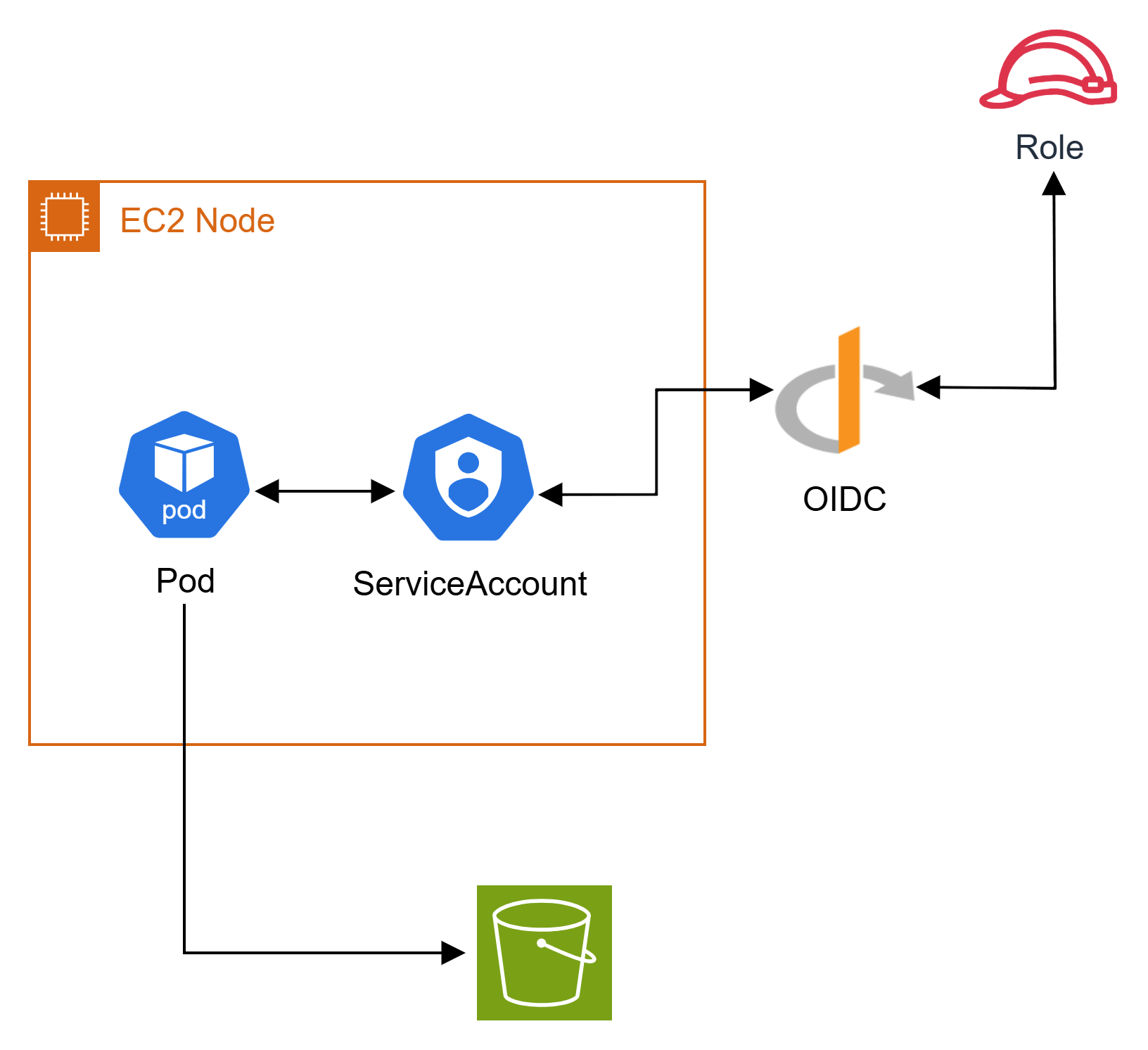
IAM Roles for Service Accounts(IRSA) 는 EKS에서 파드 단위로 IAM Role을 부여하기 위해 도입된 방식이다.
동작 순서
- Pod에서 AWS SDK를 사용하여 S3 접근 시 JWT와 IAM Role ARN정보를 STS에게 전달
- 정보를 받은 STS는 IAM에게 임시 자격 증명 요청
- IAM은 IAM OIDC Provider와 통신하고, Pod에 할당된 ServiceAccount에 IAM Role 정보와 JWT 확인 후에 IAM에 응답
- IAM은 STS에게 권한 부여
- STS는 Pod의 AWS SDK에게 임시 자격 증명 전달
- Pod의 AWS SDK는 AWS S3의 리스트를 가져옴
Pod Identity란?
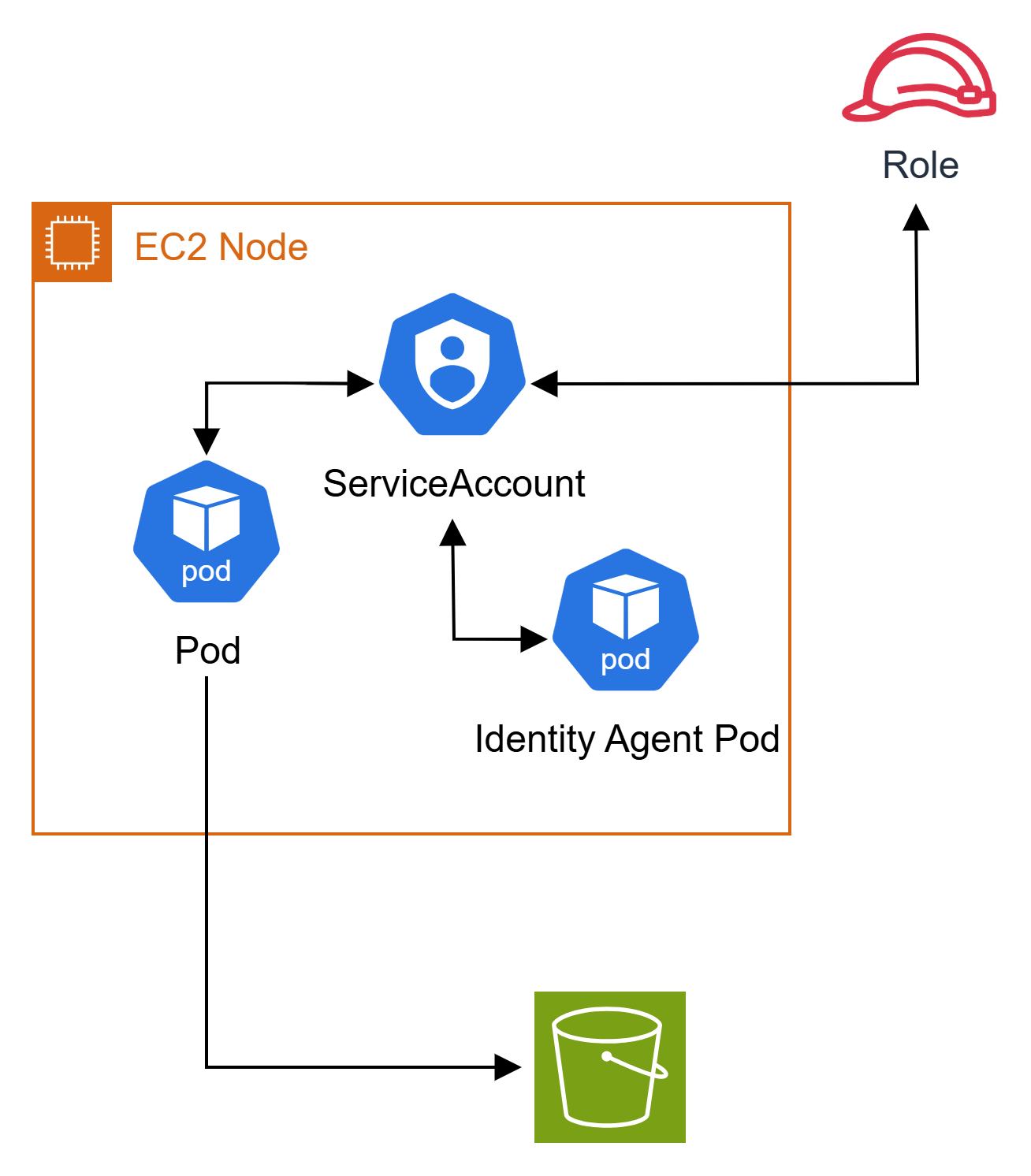
Pod Identity는 IRSA의 복잡성을 줄이고, 더 단순하게 파드 단위 IAM Role 부여를 가능하게 하는 EKS의 새로운 기능이다.
동작 순서
- Pod에서 AWS SDK를 사용하여 S3 접근 시 IAM Role ARN 정보를 Pod Identity Agent에게 전달
- Pod Identity Agent는 STS에게 해당 Role에 대한 임시 자격 증명 발급
- STS는 IAM에게 요청한 Role의 권한 부여 여부를 확인
- IAM은 Role 할당이 정상임을 확인하고 STS에게 응답
- STS는 Pod Identity Agent를 통해 Pod의 AWS SDK에게 임시 자격 증명 전달
- Pod의 AWS SDK는 AWS S3의 리스트를 가져옴
제한사항
Pod Identity도 사용하기 전 몇가지 제한 사항 및 조건이 있다. 자세한 사항은 EKS Pod Identity 액세스 링크를 참고하면 된다.
클러스터 및 노드 조건
- EKS 클러스터는 Kubernetes 버전 1.24 이상이어야 하며, 해당 플랫폼 버전도 이상이어야 한다.
- 워커 노드는 Linux 기반 EC2 인스턴스여야 하며, Fargate, Windows 노드, AWS Outposts, EKS Anywhere, 또는 EC2에 설치한 자체 Kubernetes 클러스터 등은 지원되지 않는다.
Agent 필수 조건
- 노드 역할에는 에이전트가 EKS Auth API에서
AssumeRoleForPodIdentity작업을 수행할 수 있는 권한이 있어야 한다. AmazonEKSWorkerNodePolicy 관리형 정책을 사용하거나 아래 권한을 직접 추가해야 한다.
{
    "Version": "2012-10-17",
    "Statement": [
        {
            "Effect": "Allow",
            "Action": [
                "eks-auth:AssumeRoleForPodIdentity"
            ],
            "Resource": "*"
        }
    ]
}
Agent 구성
- Pod Identity Agent는 반드시 DaemonSet으로 구성되어 모든 노드에 배포되어야 하며, hostNetwork 모드로 동작하여
169.254.170.23(IPv4) 및[fd00:ec2::23](IPv6) 링크 로컬 주소에서 포트 80과 2703을 사용한다. 만약, 클러스터에서 IPv6가 비활성화되어 있다면, Pod Identity Agent에서도 IPv6를 비활성화해야 한다.
IAM 역할 및 연관
- EKS 클러스터당 최대 5,000개의 Pod Identity Association (서비스 어카운트와 IAM 역할 간 매핑)이 지원된다.
- 하나의 서비스 어카운트당 하나의 IAM 역할만 연동할 수 있다. 이후 역할을 변경하려면 Pod Identity Association을 수정해야 한다.
- Pod Identity Agent는 해당 역할을 sts:AssumeRoleForPodIdentity API를 사용해 인증하며, IAM 역할의 신뢰 정책(trust policy)에는
Service: "pods.eks.amazonaws.com"이 포함되어야 한다.
EKS 설정

EKS > 추가 기능 > 추가 기능가져오기
EKS 대시보드에서 Add-ons에서 추가 기능을 가져와서 필요한 기능을 사용할 수 있다.
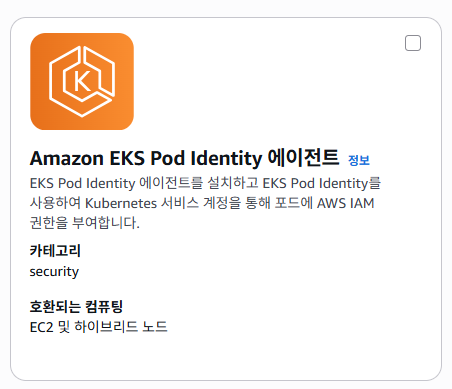
Amazon EKS Pod Identity Agent를 선택한다. (Pod Identity를 사용하기 위해선 Agent가 설치되어야 한다.)
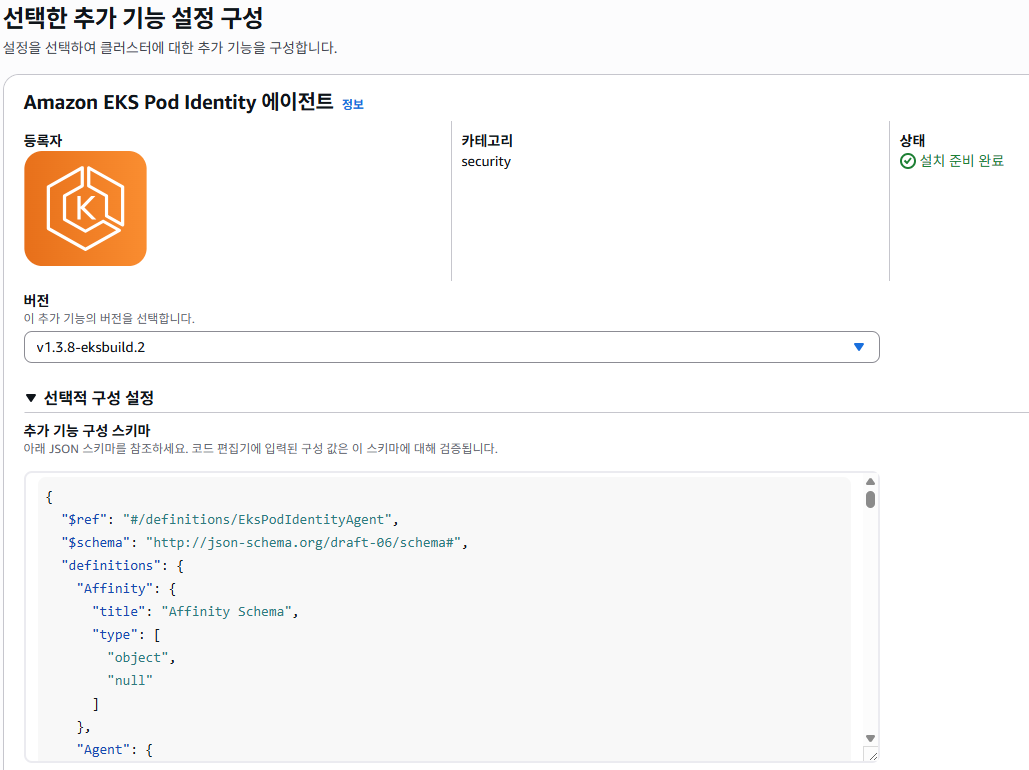
설치할 버전과 Agent에 대한 추가 설정(configuration schema)을 진행하며, configure값은 기본값으로 진행한다.
Addon 생성이 완료 되었다면, DaemonSet이 배포된다.
또한, describe 명령어로 파드 확인 시 EKS Pod Identity Agent는 노드의 hostNetwork를 사용하고 노드의 링크-로컬 주소에 있는 포트 80 및 포트 2703을 사용한다.
# 배포 확인
kubectl get pod -n kube-system | grep eks-pod-identity
eks-pod-identity-agent-6d8n8   1/1     Running   0          26s
eks-pod-identity-agent-mrhtp   1/1     Running   0          26s
eks-pod-identity-agent-szqw2   1/1     Running   0          36s

# describe를 통한 파드 정보 확인 (일부 정보 생략)
kubectl describe pod eks-pod-identity-agent-6d8n8 -n kube-system
Name:                 eks-pod-identity-agent-6d8n8
Namespace:            kube-system
Node:                 ip-172-16-16-160.ap-northeast-2.compute.internal/172.16.16.160
Annotations:          eks.amazonaws.com/skip-containers: eks-pod-identity-agent,eks-pod-identity-agent-init
Status:               Running
IP:                   172.16.16.160
IPs:
  IP:           172.16.16.160
Controlled By:  DaemonSet/eks-pod-identity-agent
Containers:
  eks-pod-identity-agent:
    Container ID:  containerd://7d6a7b50f2a107b3616d024db1a21ead932fd49bcff889f5f6f90dba012870b1
    Image:         602401143452.dkr.ecr.ap-northeast-2.amazonaws.com/eks/eks-pod-identity-agent:v0.1.31
    Image ID:      602401143452.dkr.ecr.ap-northeast-2.amazonaws.com/eks/eks-pod-identity-agent@sha256:be073df2248026d7239b11c556270af83e3cc028595ae67990f449201e4dc3ee
    Ports:         80/TCP, 2703/TCP
    Host Ports:    80/TCP, 2703/TCP
IAM 설정
EKS Pod Identity Addon 설치가 정상적으로 완료되었으니, Pod Identity를 사용할 IAM 역할을 생성한다. 여기서 중요한 점은 신뢰 관계를 Pod로 설정해야 한다.
# Trust Relationship
{
	"Version": "2012-10-17",
	"Statement": [
		{
			"Sid": "Statement1",
			"Effect": "Allow",
			"Principal": {
			    "Service": "pods.eks.amazonaws.com"
			},
			"Action": [
			    "sts:AssumeRole",
			    "sts:TagSession"
			]
		}
	]
}

# Pod1에 부여한 Policy
{
    "Version": "2012-10-17",
    "Statement": [
        {
            "Sid": "VisualEditor0",
            "Effect": "Allow",
            "Action": [
                "s3:Describe*",
                "s3:Get*",
                "s3:List*"
            ],
            "Resource": [
                "arn:aws:s3:::dsshin-pod-bucket1",
                "arn:aws:s3:::dsshin-pod-bucket1/*"
            ]
        },
        {
            "Sid": "VisualEditor1",
            "Effect": "Allow",
            "Action": [
                "s3:ListAllMyBuckets"
            ],
            "Resource": "*"
        }
    ]
}

# Pod2에 부여한 Policy
{
    "Version": "2012-10-17",
    "Statement": [
        {
            "Sid": "VisualEditor0",
            "Effect": "Allow",
            "Action": [
                "s3:Describe*",
                "s3:Get*",
                "s3:List*"
            ],
            "Resource": [
                "arn:aws:s3:::dsshin-pod-bucket2",
                "arn:aws:s3:::dsshin-pod-bucket2/*"
            ]
        },
        {
            "Sid": "VisualEditor1",
            "Effect": "Allow",
            "Action": [
                "s3:ListAllMyBuckets"
            ],
            "Resource": "*"
        }
    ]
}

# Pod3에 부여한 Policy
AmazonS3ReadOnlyAccess
위와 같이 설정을 진행하며 권한은 각 파드에 필요한 권한만 부여하였다.
Deployment, ServiceAccount 생성
작성자는 아래와 같은 yaml을 통해 실습을 진행하였다.
아래 yaml에서 정의된 이미지 중 sdscello/awscli:latest 사용 시 이슈가 발생하므로, 아래의 이슈 사항을 참고하면 된다.
# sa-pod{1~3}.yaml
apiVersion: v1
kind: ServiceAccount
metadata:
  name: pod{1~3}-sa
  namespace: default

# deploy-pod{1~3}.yaml
apiVersion: apps/v1
kind: Deployment
metadata:
  name: dsshin-pod{1~3}
spec:
  replicas: 1
  selector:
    matchLabels:
      app: dsshin-pod{1~3}
  template:
    metadata:
      labels:
        app: dsshin-pod{1~3}
    spec:
      serviceAccountName: pod{1~3}-sa
      containers:
      - name: dsshin-pod{1~3}
        image: sdscello/awscli:latest # 이슈 있는 이미지
        ports:
         - containerPort: 80
이슈 없는 이미지를 사용하고 싶다면 amazon/aws-cli:latest를 권장한다.
테스트
1. Pod1에서 버킷1,2 접근 테스트
첫 번째 테스트는 Pod에서 부여된 권한으로 각 버킷에 접근하는 테스트를 진행하였다.
root@dsshin-pod1-685994b5b-sv748:/# aws sts get-caller-identity
{
    "UserId": "AROAQXUIXVPBPW7BA7PCU:eks-test-eks-dsshin-pod-39c3e1f5-1af3-4e76-a47a-95ab9007bfdf",
    "Account": "<Account>",
    "Arn": "arn:aws:sts::<Account>:assumed-role/role-dsshin-pod1/eks-test-eks-dsshin-pod-39c3e1f5-1af3-4e76-a47a-95ab9007bfdf"
}
root@dsshin-pod1-685994b5b-sv748:/# aws s3 ls
2025-09-03 08:53:00 dsshin-pod-bucket1
2025-09-03 08:53:10 dsshin-pod-bucket2
root@dsshin-pod1-685994b5b-sv748:/# aws s3 ls s3://dsshin-pod-bucket1
2025-09-04 01:55:51       2184 User.txt
root@dsshin-pod1-685994b5b-sv748:/# aws s3 ls s3://dsshin-pod-bucket2

An error occurred (AccessDenied) when calling the ListObjectsV2 operation: User: arn:aws:sts::<Account>:assumed-role/role-dsshin-pod1/eks-test-eks-dsshin-pod-39c3e1f5-1af3-4e76-a47a-95ab9007bfdf is not authorized to perform: s3:ListBucket on resource: "arn:aws:s3:::dsshin-pod-bucket2" because no identity-based policy allows the s3:ListBucket action
캡처

2. Pod2에서 버킷1,2 접근 테스트
두 번째 테스트는 Pod에서 부여된 권한으로 각 버킷에 접근하는 테스트를 진행하였다.
root@dsshin-pod2-55db9bcbf8-q8vfv:/# aws sts get-caller-identity
{
    "UserId": "AROAQXUIXVPBI4NAJSBZB:eks-test-eks-dsshin-pod-304089d7-69a3-4871-9e01-7496954feb8f",
    "Account": "<Account>",
    "Arn": "arn:aws:sts::<Account>:assumed-role/role-dsshin-pod2/eks-test-eks-dsshin-pod-304089d7-69a3-4871-9e01-7496954feb8f"
}
root@dsshin-pod2-55db9bcbf8-q8vfv:/# aws s3 ls
2025-09-03 08:53:00 dsshin-pod-bucket1
2025-09-03 08:53:10 dsshin-pod-bucket2
root@dsshin-pod2-55db9bcbf8-q8vfv:/# aws s3 ls s3://dsshin-pod-bucket2
2025-09-04 01:56:00       2586 CreateHandler.txt
root@dsshin-pod2-55db9bcbf8-q8vfv:/# aws s3 ls s3://dsshin-pod-bucket1

An error occurred (AccessDenied) when calling the ListObjectsV2 operation: User: arn:aws:sts::<Account>:assumed-role/role-dsshin-pod2/eks-test-eks-dsshin-pod-304089d7-69a3-4871-9e01-7496954feb8f is not authorized to perform: s3:ListBucket on resource: "arn:aws:s3:::dsshin-pod-bucket1" because no identity-based policy allows the s3:ListBucket action
캡처

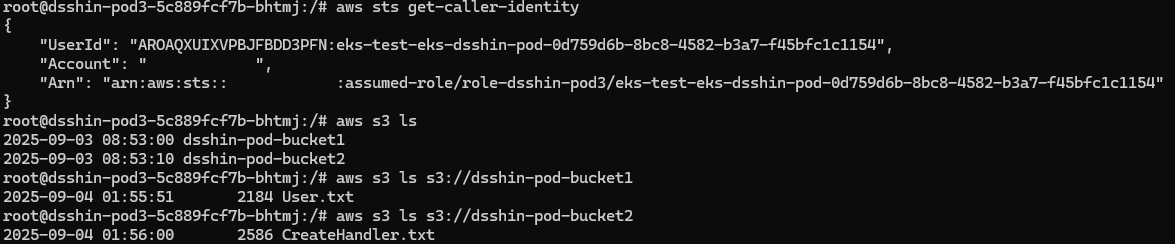
3. Pod3에서 버킷1,2 접근 테스트
세 번째 테스트는 Pod에서 부여된 권한(S3readonly)으로 각 버킷에 접근하는 테스트를 진행하였다.
root@dsshin-pod3-5c889fcf7b-bhtmj:/# aws sts get-caller-identity
{
    "UserId": "AROAQXUIXVPBJFBDD3PFN:eks-test-eks-dsshin-pod-0d759d6b-8bc8-4582-b3a7-f45bfc1c1154",
    "Account": "<Account>",
    "Arn": "arn:aws:sts::<Account>:assumed-role/role-dsshin-pod3/eks-test-eks-dsshin-pod-0d759d6b-8bc8-4582-b3a7-f45bfc1c1154"
}
root@dsshin-pod3-5c889fcf7b-bhtmj:/# aws s3 ls
2025-09-03 08:53:00 dsshin-pod-bucket1
2025-09-03 08:53:10 dsshin-pod-bucket2
root@dsshin-pod3-5c889fcf7b-bhtmj:/# aws s3 ls s3://dsshin-pod-bucket1
2025-09-04 01:55:51       2184 User.txt
root@dsshin-pod3-5c889fcf7b-bhtmj:/# aws s3 ls s3://dsshin-pod-bucket2
2025-09-04 01:56:00       2586 CreateHandler.txt
캡처
4. Pod4에서 버킷1,2 접근 테스트
마지막 테스트는 Service Account를 사용하지 않고, Node의 Role을 사용한 테스트를 진행하였다.
Node IAM Role 에는 따로 S3에 대한 권한은 부여하지 않은 상태이다.
root@dsshin-pod4-9d588864d-wnkdm:/# aws sts get-caller-identity
{
    "UserId": "AROAQXUIXVPBI3T4SMZYA:i-084a07be6369991ac",
    "Account": "<Account>",
    "Arn": "arn:aws:sts::<Account>:assumed-role/test-eks-nodegroup-role/i-084a07be6369991ac"
}
root@dsshin-pod4-9d588864d-wnkdm:/# aws s3 ls

An error occurred (AccessDenied) when calling the ListBuckets operation: User: arn:aws:sts::<Account>:assumed-role/test-eks-nodegroup-role/i-084a07be6369991ac is not authorized to perform: s3:ListAllMyBuckets because no identity-based policy allows the s3:ListAllMyBuckets action
캡처

이슈 정리
만약 아래와 같이 EKS 클러스터의 파드에서 AWS CLI 및 Boto3에 대해 지원되지 않는 컨테이너가 있다면 awscli 패키지의 버전을 체크해보자. awscli v1의 특정 버전 아래라면 사용이 불가할 수 있다.
파드의 컨테이너는 EKS Pod Identity Agent에서 IAM 역할을 수임하는 것을 지원하는 AWS SDK 버전을 사용해야 하며, AWS SDK에 대해 다음과 같은 버전 또는 이후 버전을 사용해야 한다.
참고 링크 : AWS SDK와 함께 Pod Identity 사용
# sts 사용 시 이슈 발생
root@dsshin-pod2-55db9bcbf8-q8vfv:/# aws sts get-caller-identity

Unsupported host '169.254.170.23'.  Can only retrieve metadata from these hosts: 169.254.170.2, localhost, 127.0.0.1

# AWS CLI Version 확인
root@dsshin-pod2-55db9bcbf8-q8vfv:/# aws --version
aws-cli/1.16.238 Python/3.4.3 Linux/5.10.240-238.959.amzn2.x86_64 botocore/1.12.228
이슈 관련 링크 : EKS 클러스터 내부의 AWS CLI 및 Boto3에 대해 지원되지 않는 호스트
마무리
EKS에서 Pod Identity를 활용하면 파드가 AWS 리소스에 접근할 때 노드 단위 IAM Role 공유로 인한 과도한 권한 문제를 해소하고, 필요한 파드만 필요한 권한을 가질 수 있도록 제어할 수 있다. 이를 통해 보안성을 강화하면서도 IRSA 대비 단순한 구성으로 운영 복잡성을 줄일 수 있다.
Pod Identity는 EKS 환경에서 최소 권한 보안 원칙을 보다 쉽게 적용할 수 있는 핵심 기능이라고 할 수 있다.