GNS 구축
1. Virtual Box
1.1 ubuntu 22.04.03
-
IP: 10.0.2.15
-
id: master, pw: 123456
-
open ssh server 설치
2. GNS
2.1. 네트워크 환경
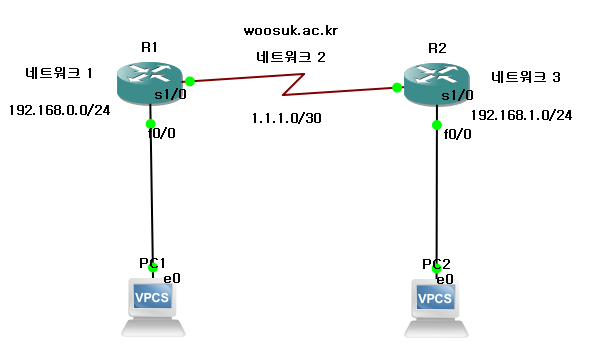
2.2. Router 설정
- 명령어 정리
show ?									# 물음표 붙이면 명령어 옵션 확인 가능
show running-config						# Router 현재 상태 확인 -> 명령어 종료: q
config t								# 설정 console로 변경

1. interface R1 설정
# ethernet
interface fastEthernet 0/0				# interface fa0/0 설정 console
ip address 192.168.0.254 255.255.255.0	# ip, subnet 설정
no shutdown								# 전원 on
# serial
interface Serial 1/0					# interface se1/0 설정 console
ip address 1.1.1.1 255.255.255.252		# ip, subnet 설정
no shutdown								# 전원 on
w										# 지금까지 설정 저장

2. interface R2 설정
# ethernet
interface fastEthernet 0/0				# interface fa0/0 설정 console
ip address 192.168.1.254 255.255.255.0	# ip, subnet 설정
no shutdown

# serial
interface Serial 1/0					# interface se1/0 설정 console
ip address 1.1.1.2 255.255.255.252		# ip, subnet 설정
no shutdown
w										# 지금까지 설정 저장

3. R1 routing 명령어
ip route 192.168.1.0 255.255.255.0 1.1.1.2
# 요청 받은 네트워크 대역대, 요청 받은 네트워크 서브넷, 요청 받은 대역대 라우터 아이피

# 4. router 설정 매크로
config t
interface fastEthernet 0/0
ip address 192.168.0.254 255.255.255.0
no shutdown
exit
interface Serial 1/0
ip address 1.1.1.1 255.255.255.252
no shutdown
exit
ip route 192.168.1.0 255.255.255.0 1.1.1.2
exit
w
show ip interface brief
show ip route
💡 serial subnet이 /30(255.255.255.252)인 이유
2.3 PC 설정
- 아래 명령어로 PC1,2 ip, subnet, gateway 설정
ip address ip/subnet gateway

ex) ip address 192.168.0.1/24 192.168.1.254
동글동글