4주차 개발목표
1. Flask 프레임워크를 활용해서 API를 만들 수 있다.
2. 간단한 프로젝트 2개를 해보면서 전반적인 프론트엔드, 백엔드의 흐름을 이해한다.
Flask 란?
-
Micro Web Framework
- Micro : 가벼운 기능 제공, 가볍게 배우고, 가볍게 사용할 수 있고, 확장성 또한 넓다.
-
간단한 웹 사이트, 혹은 간단한 API 서버를 만드는 데에 특화된 Python
Web Framework이다. -
요즘에는 클라우드 컴퓨팅의 발달로 Docker, Kubernetes 와 접목해서 소규모 컨테이너 단위로 기능 별 개발 후 한번에 배포하는 방식, 혹은 배포 후 기능 추가하는 식으로 자주 사용하고 있다.
장점
- 가볍게 배울 수 있다.
- Python, HTML+CSS+JS만 할 줄 알면 금방 배운다.
- 가볍게 사용할 수 있다.
- 코드 몇 줄이면 끝난다.
- 가볍게 배포할 수 있다.
- virtualenv에 Flask 깔고 배포하는 끝
단점
- django에 비해 자유도는 높으나 제공해주는 기능이 적다.
- 복잡한 어플을 만들려고 할 때 해야할 것 들이 많다.
사용해보기
기본 코드
from flask import Flask
app = Flask(__name__)  # Flask 객체 생성

@app.route('/')
def index():
    return '<h1>Hello World!</h1>'

if __name__ == "__main__":  # 모듈이 실행 됨을 알림
    app.run(debug=True, port=5000)  # 서버 실행, 파라미터로 debug 여부, port 설정 가능
처음 pyCharm - Flask 프로젝트를 생성하면 위와 같은 코드를 제공한다.
'/' URL을 입력 받으면 핸들러에서 index 메서드를 잡아주고 HTML 문서를 반환한다.
거의 4~5줄로 서버를 만들었다. Spring과 비교하면 확실히 파일 수, 코드 길이 어노테이션 등 코드 양에서 차이가 보인다.
GET 방식
//js
$.ajax({
    type: "GET",
    url: "/test?title_give=봄날은간다",
    data: {},
    success: function(response){
       console.log(response)
    }
  })

//python
@app.route('/test', methods=['GET'])
def test_get():
   title_receive = request.args.get('title_give')
   print(title_receive)
   return jsonify({'result':'success', 'msg': '이 요청은 GET!'})
request.args는 URL 파라미터의 값을 key, value 쌍으로 가지고 있는 딕셔너리다. request.args.get('title_give') 를 통해 key(title_give)의 value(봄날은간다)를 얻을 수 있다.
- jsonify를 통해 Front-end에 json형태의 데이터를 넘겨준다. RESTful 통신 방식에 사용된다.
- html 파일을 열고 싶으면 render_template('파일 주소')로 열어 준다.
POST 방식
//js
$.ajax({
    type: "POST",
    url: "/test",
    data: { title_give:'봄날은간다' },
    success: function(response){
       console.log(response)
    }
  })


//Flask
@app.route('/test', methods=['POST'])
def test_post():
   title_receive = request.form['title_give']
   print(title_receive)
return jsonify({'result':'success', 'msg': '이 요청은 POST!'})- 프론트에서 data 딕셔너리에 키, 값으로 데이터를 묶어 보내면 Flask 에서 request.form['title_give'] 으로 받을 수 있다.
활용
-
3주차에 배운 mongoDB와 활용하여 간단한 CRUD 어플리케이션을 만들 수 있다.
-
mongoDB 에 저장된 데이터

-
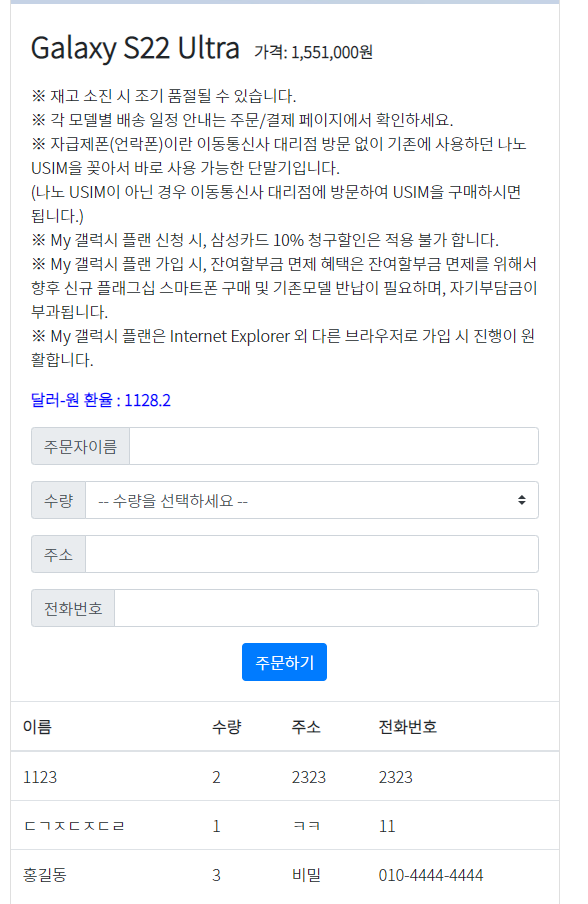
DB에서 데이터를 불러와 페이지에 표시
# 주문 하기(POST) API
@app.route('/order', methods=['POST'])
def save_order():
    name_receive = request.form['name_give']
    amount_receive = request.form['amount_give']
    address_receive = request.form['address_give']
    number_receive = request.form['number_give']

    doc = {
        'name': name_receive,
        'amount': amount_receive,
        'address': address_receive,
        'number': number_receive
    }

    print(doc)
    db.orders.insert_one(doc)

    return jsonify({'msg': '주문 완료'})
// 프론트 - POST
function postOrder() {
let name = $('#username').val()
let amount = $('#inputGroupSelect01').val()
let address = $('#address').val()
let number = $('#p_number').val()
$.ajax({
type: "POST",
url: "/order",
data: {
name_give: name,
amount_give: amount,
address_give: address,
number_give: number
},
success: function (response) {
alert(response["msg"]);
window.location.reload();
}
})
}# 주문 목록 보기(Read) API
@app.route('/order', methods=['GET'])
def view_orders():
datas = list(db.orders.find({}, {'_id': False}))
return jsonify({'data': datas})// 프론트 - GET
function getOrders() {
$.ajax({
type: "GET",
url: "/order",
data: {},
success: function (response) {
let data = response['data']
console.log(data)
for (let i = 0; i < data.length; i++) {
let name = data[i]['name']
let amount = data[i]['amount']
let address = data[i]['address']
let number = data[i]['number']
let temp_html = `
<tr>
<td>${name}</td>
<td>${amount}</td>
<td>${address}</td>
<td>${number}</td>
</tr>`
$('#orders-box').append(temp_html)
}
}
})
}
Dare mighty things!