
VPC
- 3tier 구조란 아래와 같다.
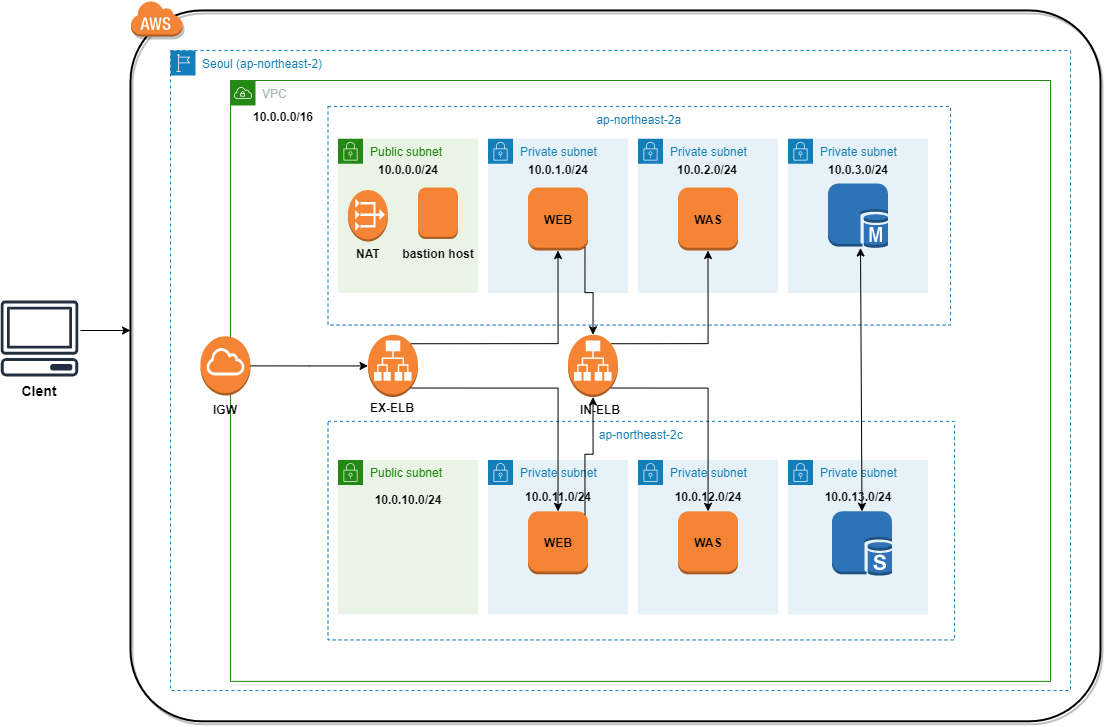
- 위 구조를 테라폼, 모듈을가지고 손쉽게 만들어 볼수있다.
모듈로 간단히 만들어보고 그 구조를 하나씩 확인해본다.
Module
module "vpc" {
    source  = "terraform-aws-modules/vpc/aws"
    version = "3.14.4"

    name       = "glen-test-vpc"
    cidr       = "10.10.0.0/16"
    azs        = ["ap-northeast-2a", "ap-northeast-2c"]

    public_subnets   = ["10.10.100.0/24", "10.10.101.0/24"]
    private_subnets  = ["10.10.110.0/24", "10.10.111.0/24"]
    database_subnets = ["10.10.200.0/24", "10.10.201.0/24"]

    enable_nat_gateway = true

}- 생성 결과
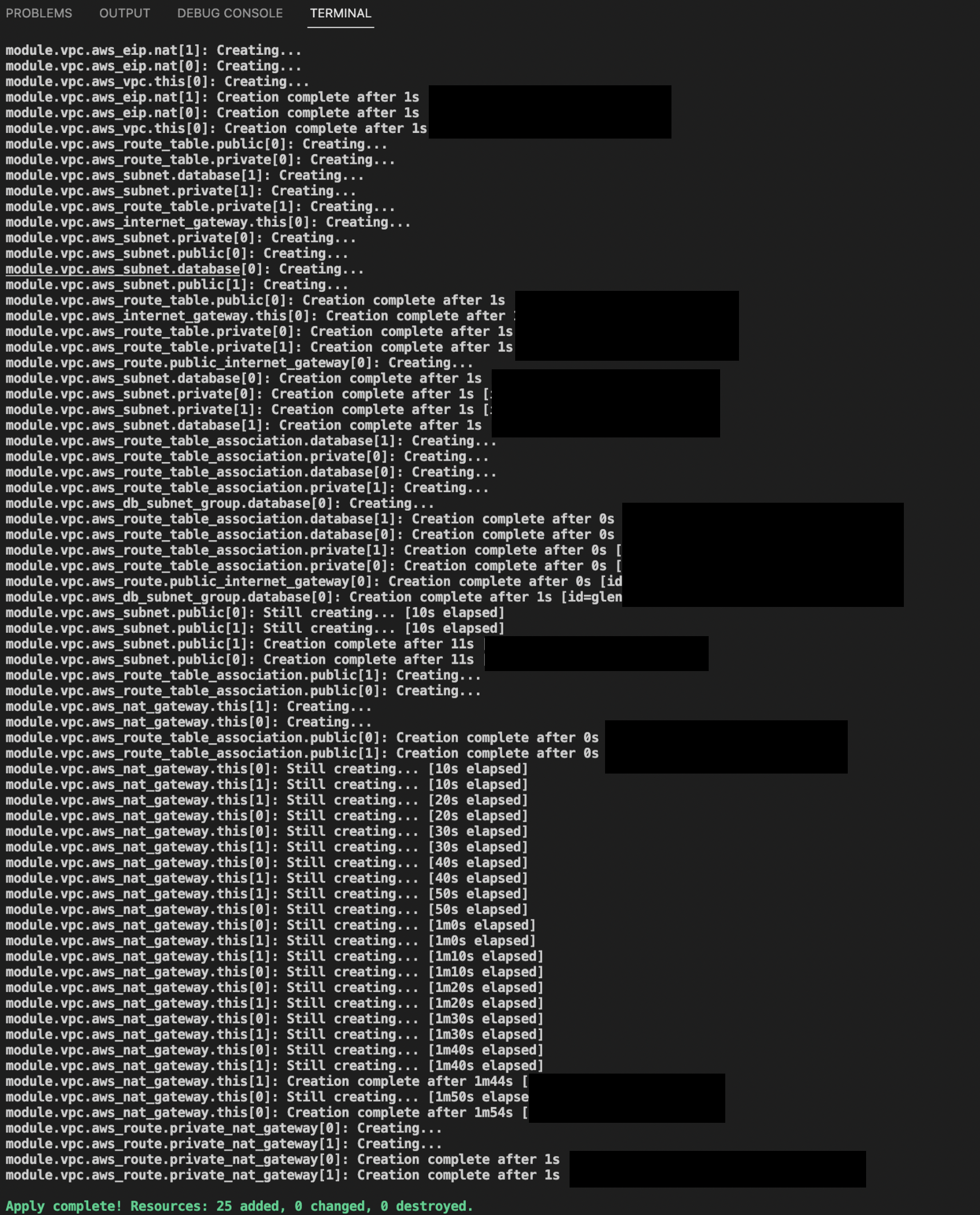
VPC
- cidr만 가지고 생성됨
- 나머지는 variable 디폴트 값
resource "aws_vpc" "this" {
  count = local.create_vpc ? 1 : 0

  cidr_block                       = var.cidr
  instance_tenancy                 = var.instance_tenancy
  enable_dns_hostnames             = var.enable_dns_hostnames
  enable_dns_support               = var.enable_dns_support
  enable_classiclink               = null # https://github.com/hashicorp/terraform/issues/31730
  enable_classiclink_dns_support   = null # https://github.com/hashicorp/terraform/issues/31730
  assign_generated_ipv6_cidr_block = var.enable_ipv6

  tags = merge(
    { "Name" = var.name },
    var.tags,
    var.vpc_tags,
  )
}
NAT EIP
- nat_gateway는 인터넷게이트웨이가 연결되지 않은 인스턴스들에 대해 인터넷을 연결해주는 역할.
- eip(탄력적 ip주소)를 만들어줘야한다.
- single_nat_gateway값을 true로 주지 않았기 때문에 nat gateway 개수인 2개 생성.
resource "aws_eip" "nat" {
  count = local.create_vpc && var.enable_nat_gateway && false == var.reuse_nat_ips ? local.nat_gateway_count : 0

  vpc = true

  tags = merge(
    {
      "Name" = format(
        "${var.name}-%s",
        element(var.azs, var.single_nat_gateway ? 0 : count.index),
      )
    },
    var.tags,
    var.nat_eip_tags,
  )
}
Route Table
- public은 서브넷이 있다면 1개로 생성
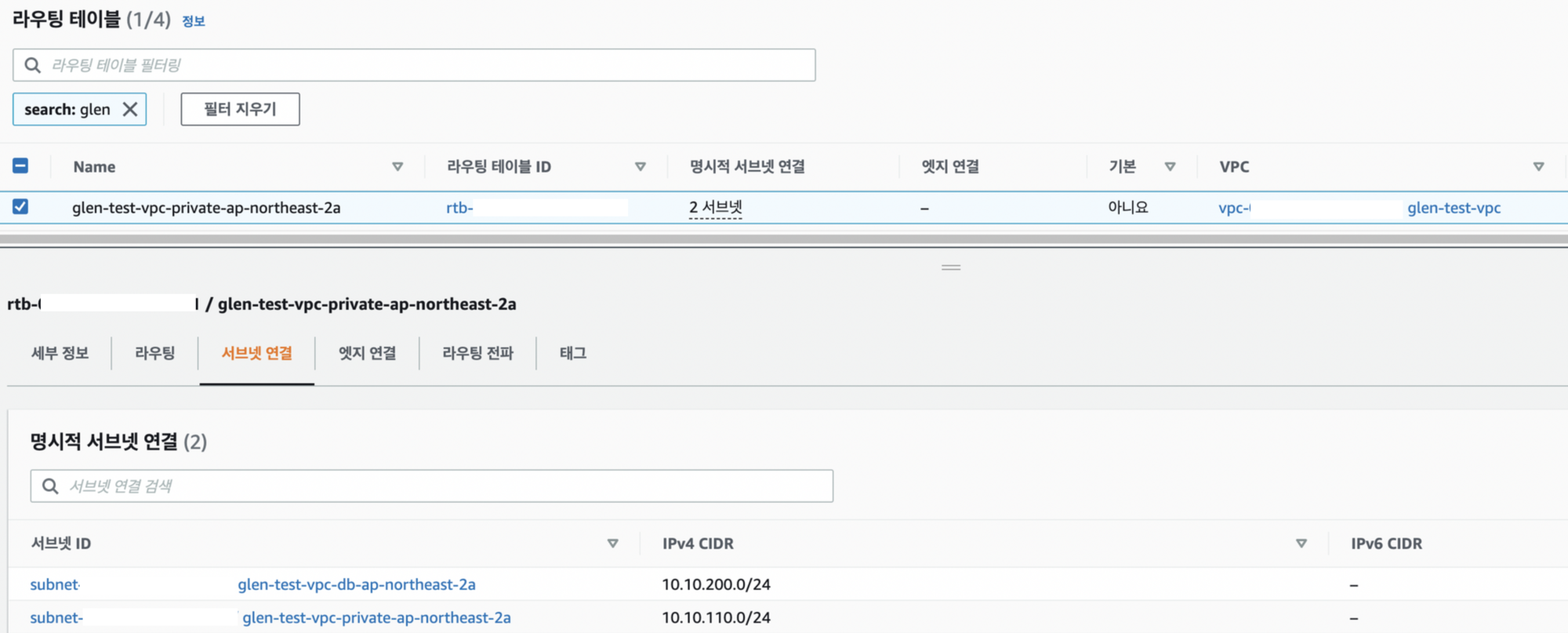
- private는 nat gateway개수로 지정 - 2개
resource "aws_route_table" "public" {
  count = local.create_vpc && length(var.public_subnets) > 0 ? 1 : 0

  vpc_id = local.vpc_id

  tags = merge(
    { "Name" = "${var.name}-${var.public_subnet_suffix}" },
    var.tags,
    var.public_route_table_tags,
  )
}

resource "aws_route_table" "private" {
  count = local.create_vpc && local.max_subnet_length > 0 ? local.nat_gateway_count : 0

  vpc_id = local.vpc_id

  tags = merge(
    {
      "Name" = var.single_nat_gateway ? "${var.name}-${var.private_subnet_suffix}" : format(
        "${var.name}-${var.private_subnet_suffix}-%s",
        element(var.azs, count.index),
      )
    },
    var.tags,
    var.private_route_table_tags,
  )
}- 2a private 라우팅테이블 확인
Subnet
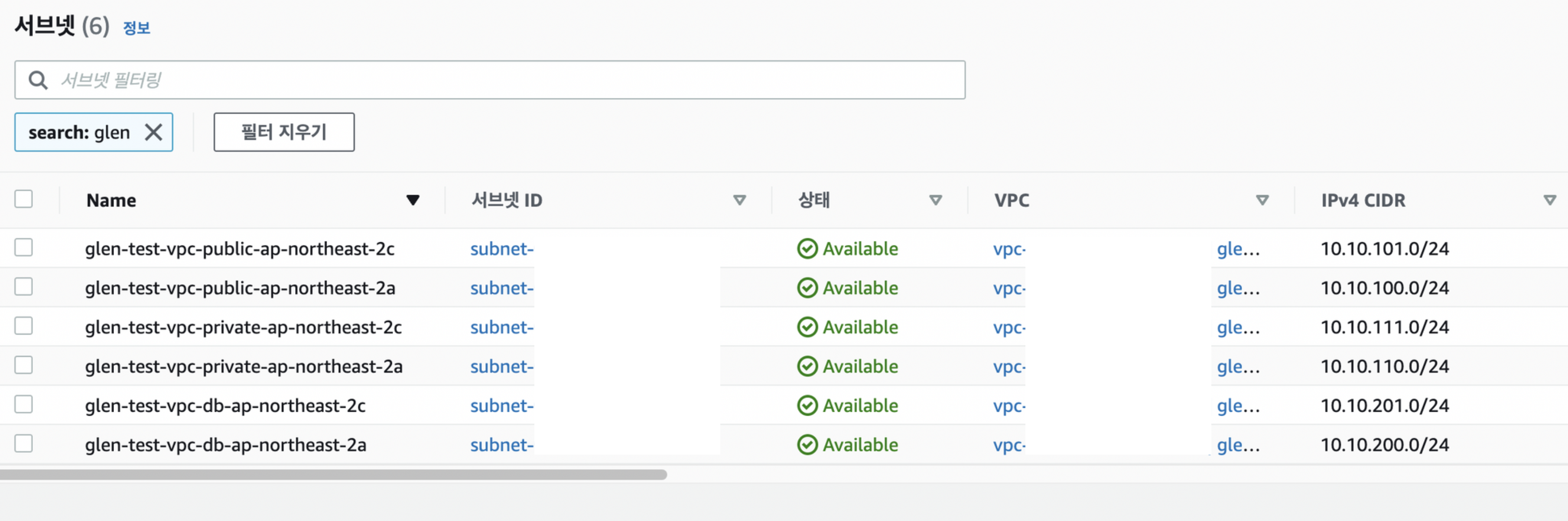
- 모듈에 설정된 대역으로 생성됨
- public 2개, private 2개, DB 2개 (private)
Internet_gateway
- vpc가 생성되고 public subnet 개수가 0보다 크면 1개 생성
resource "aws_internet_gateway" "this" {
  count = local.create_vpc && var.create_igw && length(var.public_subnets) > 0 ? 1 : 0

  vpc_id = local.vpc_id

  tags = merge(
    { "Name" = var.name },
    var.tags,
    var.igw_tags,
  )
}
Route_table_association - private
- 앞서 만든 subnet과 route_table을 연결해주는 역할
- 같은 availability_zone 끼리 묶는다
resource "aws_route_table_association" "private" {
  count = local.create_vpc && length(var.private_subnets) > 0 ? length(var.private_subnets) : 0

  subnet_id = element(aws_subnet.private[*].id, count.index)
  route_table_id = element(
    aws_route_table.private[*].id,
    var.single_nat_gateway ? 0 : count.index,
  )
}
route_table_association - public
- 만들어놓은 public subnet 두개를 하나의 route table에 연결
resource "aws_route_table_association" "public" {
  count = local.create_vpc && length(var.public_subnets) > 0 ? length(var.public_subnets) : 0

  subnet_id      = element(aws_subnet.public[*].id, count.index)
  route_table_id = aws_route_table.public[0].id
}
db_subnet_group
- db 용으로 생성해놓은 private 서브넷을 RDS의 서브넷그룹으로 지정한다.
RDS에 서브넷그룹을 설정해야된다는건 이번에 처음 알게됨
resource "aws_db_subnet_group" "database" {
  count = local.create_vpc && length(var.database_subnets) > 0 && var.create_database_subnet_group ? 1 : 0

  name        = lower(coalesce(var.database_subnet_group_name, var.name))
  description = "Database subnet group for ${var.name}"
  subnet_ids  = aws_subnet.database[*].id

  tags = merge(
    {
      "Name" = lower(coalesce(var.database_subnet_group_name, var.name))
    },
    var.tags,
    var.database_subnet_group_tags,
  )
}
NAT_gateway
- 앞서 만든 eip를 설정해주고 위치는 public subnet으로 지정
- single_nat_gateway값은 false이기 때문에 az에 각각 생성(a,c)
resource "aws_nat_gateway" "this" {
  count = local.create_vpc && var.enable_nat_gateway ? local.nat_gateway_count : 0

  allocation_id = element(
    local.nat_gateway_ips,
    var.single_nat_gateway ? 0 : count.index,
  )
  subnet_id = element(
    aws_subnet.public[*].id,
    var.single_nat_gateway ? 0 : count.index,
  )

  tags = merge(
    {
      "Name" = format(
        "${var.name}-%s",
        element(var.azs, var.single_nat_gateway ? 0 : count.index),
      )
    },
    var.tags,
    var.nat_gateway_tags,
  )

  depends_on = [aws_internet_gateway.this]
}
private_nat_gateway
- private route table과 nat gateway를 서로 연결
resource "aws_route" "private_nat_gateway" {
  count = local.create_vpc && var.enable_nat_gateway ? local.nat_gateway_count : 0

  route_table_id         = element(aws_route_table.private[*].id, count.index)
  destination_cidr_block = var.nat_gateway_destination_cidr_block
  nat_gateway_id         = element(aws_nat_gateway.this[*].id, count.index)

  timeouts {
    create = "5m"
  }
}
Security Group
- 인스턴스에 대한 트래픽 제어를 담당
- stateless
- 인바운드만 열어주면 됨
Module
- terraform registry에서 참고
module "security-group" {
    source  = "terraform-aws-modules/security-group/aws"
    version = "4.13.0"

    name        = "glen_bastion_sg"
    description = "Security group for public bastion host"
    vpc_id      = module.vpc.vpc_id

    ingress_with_cidr_blocks = [
        {
            from_port   = 10022
            to_port     = 10022
            protocol    = "tcp"
            description = "glen_bastion_ssh"
            cidr_blocks = "0.0.0.0/0"
        },
        {
            from_port   = 22
            to_port     = 22
            protocol    = "tcp"
            description = "default_ssh"
            cidr_blocks = "0.0.0.0/0"
        },
		{
		    cidr_blocks = "0.0.0.0/0"
		    description = "ICMP"
		    from_port   = -1
		    protocol    = "icmp"
		    to_port     = -1
		}
    ]
}
security group name prefix
- securit group 생성시 입력한 name값으로 prefix 지정해줌
- var.use_name_prefix이 default로 true
resource "aws_security_group" "this_name_prefix" {
  count = local.create && var.create_sg && var.use_name_prefix ? 1 : 0

  name_prefix            = "${var.name}-"
  description            = var.description
  vpc_id                 = var.vpc_id
  revoke_rules_on_delete = var.revoke_rules_on_delete

  tags = merge(
    {
      "Name" = format("%s", var.name)
    },
    var.tags,
  )

  lifecycle {
    create_before_destroy = true
  }

  timeouts {
    create = var.create_timeout
    delete = var.delete_timeout
  }
}
security group rule
- module에서 설정한 값으로 인바운드 규칙 생성
resource "aws_security_group_rule" "ingress_with_cidr_blocks" {
  count = local.create ? length(var.ingress_with_cidr_blocks) : 0

  security_group_id = local.this_sg_id
  type              = "ingress"

  cidr_blocks = split(
    ",",
    lookup(
      var.ingress_with_cidr_blocks[count.index],
      "cidr_blocks",
      join(",", var.ingress_cidr_blocks),
    ),
  )
  prefix_list_ids = var.ingress_prefix_list_ids
  description = lookup(
    var.ingress_with_cidr_blocks[count.index],
    "description",
    "Ingress Rule",
  )

  from_port = lookup(
    var.ingress_with_cidr_blocks[count.index],
    "from_port",
    var.rules[lookup(var.ingress_with_cidr_blocks[count.index], "rule", "_")][0],
  )
  to_port = lookup(
    var.ingress_with_cidr_blocks[count.index],
    "to_port",
    var.rules[lookup(var.ingress_with_cidr_blocks[count.index], "rule", "_")][1],
  )
  protocol = lookup(
    var.ingress_with_cidr_blocks[count.index],
    "protocol",
    var.rules[lookup(var.ingress_with_cidr_blocks[count.index], "rule", "_")][2],
  )
}
ec2 instance
module
- ec2 생성시 sg를 넣어줘야한다.
- 이때 vpc_security_group_ids 값은 리스트로 넘겨줘야함
- key_name은 해당 ec2에 ssh 연결하기 위한 키 세팅
- 미리 aws에 키페어 생성 해놓고 해당 이름 지정
module "ec2_instance" {
    source  = "terraform-aws-modules/ec2-instance/aws"
    version = "4.1.4"

    name = "glen_bastion-instance"

    ami                    = "ami-0e4a9ad2eb120e054"
    instance_type          = "t2.micro"
    monitoring             = true
    key_name               = "glen_keypair_bastion"
    vpc_security_group_ids = [
        module.security-group.security_group_id
    ]
    subnet_id              = module.vpc.public_subnets[0]

tags = {
        Name = "glen_bastion_host1"
    }
}
SSH 접속
- 회사 내부에선 22가 막혀있음
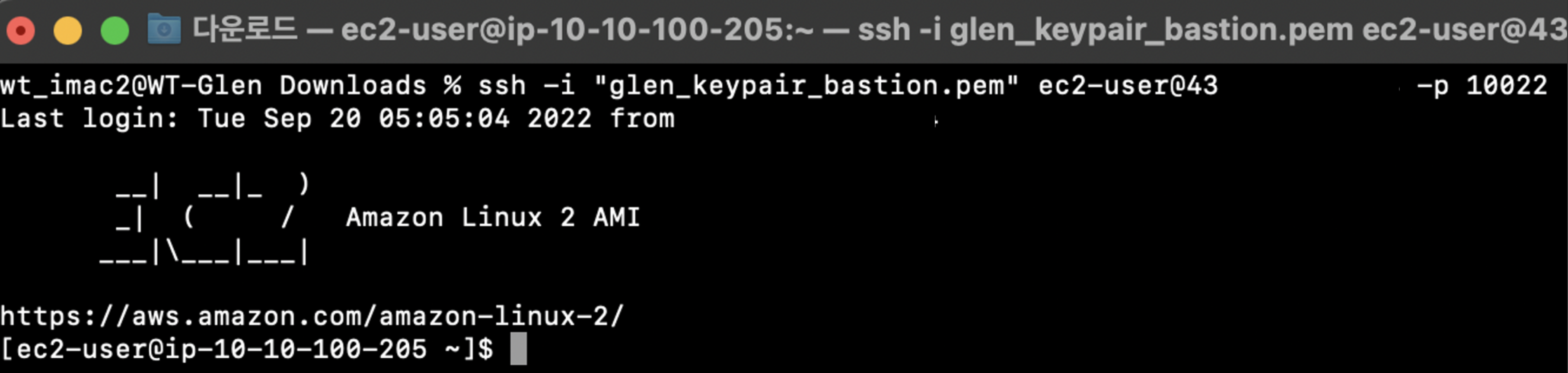
- 콘솔에서 제공해주는 걸로 접속
- /etc/ssh/sshd_config 파일에서 10022 포트 추가
- sg도 10022 추가되어있어야 함
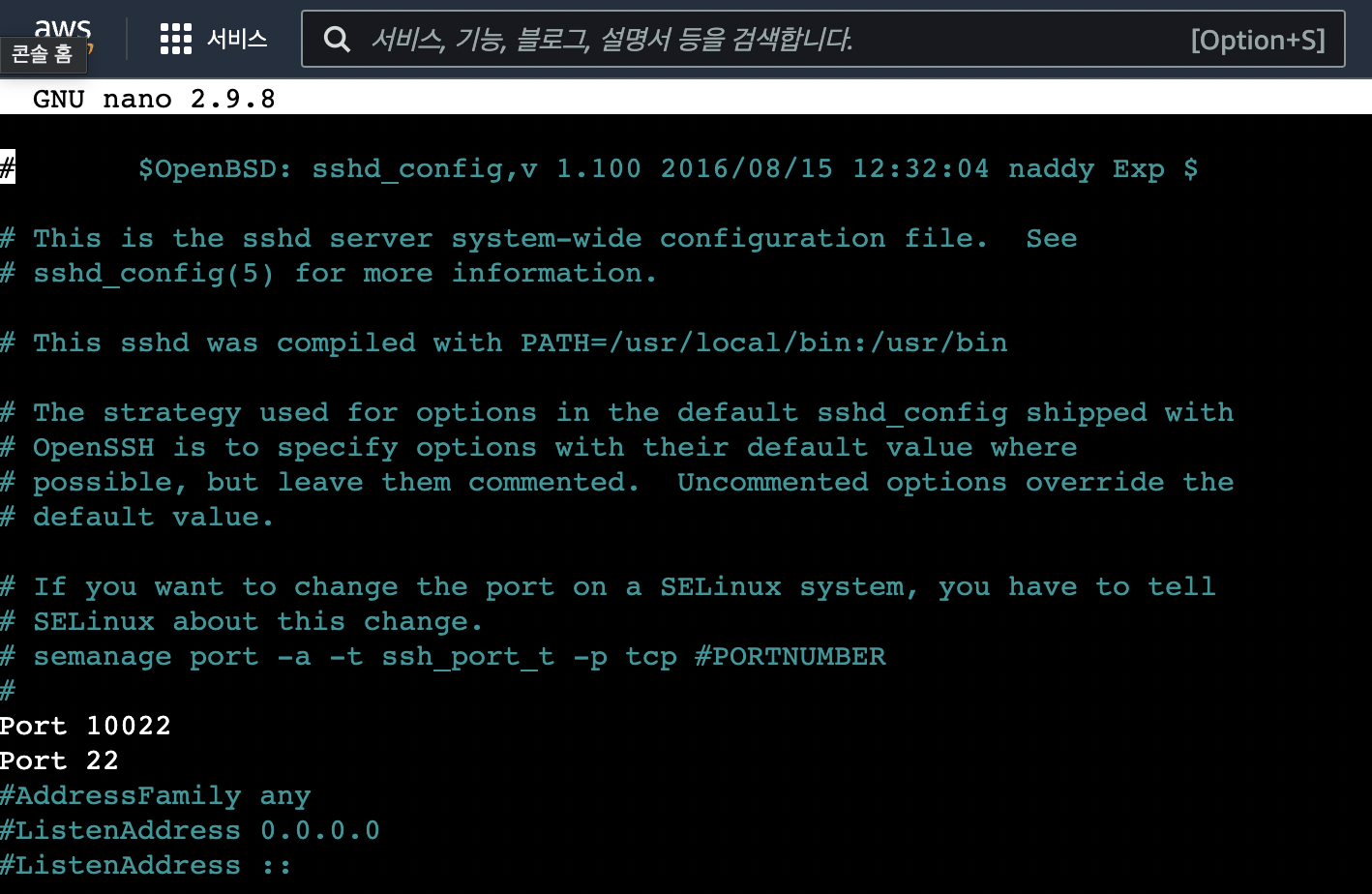
- 이후 10022 로 접속 가능
VPC Peering
-
다른 VPC와 통신을 하기 위한 설정
-
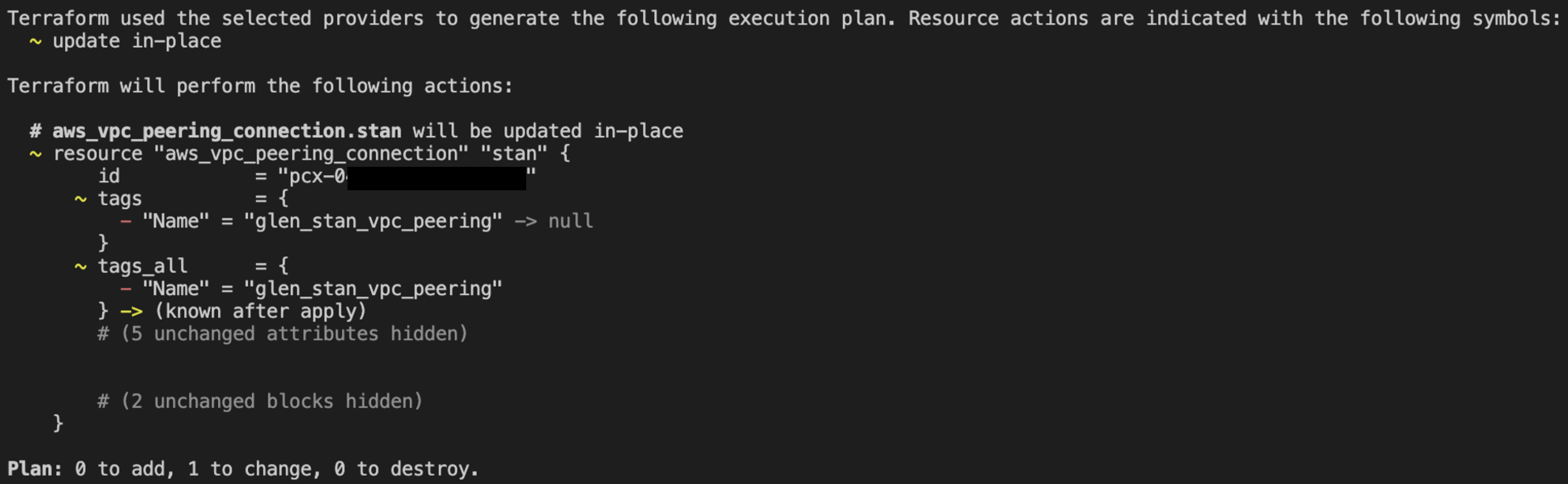
plan을 할때마다 change 발생함
-
accepter의 tag가 변경되지 않았는데 같은값이면 null 값이 들어가게됨
-
-
해결
- connection에도 같은 tag 값을 넣거나, 최초 accepter이후 해당 코드 제거
- accepter는 배포 후 제거해도 리소스 삭제하지 않음.(수락만 하는 기능이라 그런듯)
- connection에도 같은 tag 값을 넣거나, 최초 accepter이후 해당 코드 제거

어제보다 더 나은 엔지니어가 되자