
DOM(Document Object Model)
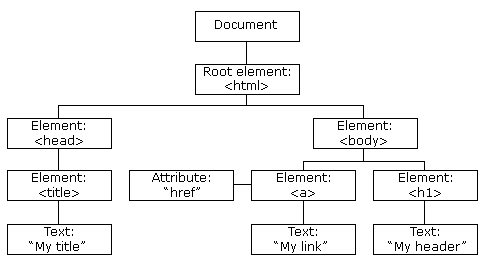
DOM Tree of Objects
https://www.w3schools.com/js/js_htmldom.asp
- DOM은 앞서 프로그래밍 언어가 해당 문서에 접근하여 읽고 조작할 수 있도록 API를 제공하는 인터페이스
- 어떤 프로그래밍 언어에 의존하지 않는 독립적인 인터페이스
- 문서객체모델 -웹문서는 태그로 구성됨 → 그 태그들은 서로 부모-자식관계가 있음. ⇒ 트리구조
- 자식 - 형제 코드
요소만 나오면 text가 빠짐.. 그냥 자식에는 ul(\n)으로 인해 text가 들어감
1.childNodes - console.log(kpop.childNodes)
2.children - console.log(kpop.children)
3.첫번째 자식 - console.log(kpop.firstChild)
4.첫번째 자식요소 - console.log(kpop.firstElementChild)
5.마지막 자식 - console.log(kpop.lastChild)
6.마지막자식요소 - console.log(kpop.lastElementChild)
7.마지막 자식요소의 컨텐츠 - console.log(child1.innerHTML)
                            console.log(kpop.lastElementChild.innerHTML)
8.첫번째 자식요소의 컨텐츠 - console.log(kpop.firstElementChild.innerHTML)
9.첫번째 자식의 형제 요소 - console.log(kpop.firstElementChild.nextElementSibling)
                            console.log(kpop.firstElementChild.nextElementSibling.innerHTML)
10.마지막 자식의 형제 요소 - console.log(kpop.lastElementChild.nextElementSibling)  //다음형제
                            console.log(kpop.lastElementChild.previousElementSibling)  //앞에 나온 형제
DOM의 데이터타입(Datatype)
- 프로퍼티(property) : DOM 객체의 멤버 변수. HTML 태그 속성 반영
- 메소드(method) : DOM 객체의 멤버 함수. HTML 태그를 제어
- 컬렉션(collection) : 정보를 집합적으로 표현하는 일종의 배열, 예를 들어 children 컬렉션은 DOM 객체의 모든 자식 DOM 객체에 대한 주소를 가짐
- 이벤트 리스너(event listener) : HTML 태그에 작성된 이벤트 리스너(onclick, onchange 등)
- 스타일(style) : 이 프로퍼티를 통해 HTML 태그에 적용된 CSS 스타일 시트에 접근 가능
- 스타일 제일 좋은건 css로 만들기 → 사이에
메소드: html 요소를 가져옴
-
getElementById 대신 css에서 사용했던 선택자로 요소 가져오기
-
querySelector 한개만 가져오는 메소드
-
querySelectorAll은 여러개 가져오는 메소드
-
요소를 만들어주는 메소드: createElement
-
요소를 추가해주는메소드 : appendChild
-
요소를 여러개 가져오는 메소드:getElementsByTagName, getElementsByClassName
-자식 요소를 가져오는 선택자
const tr1 = document.querySelector('tr:first-child')	//선택자로 요소 가져오기
console.log('tr1:',tr1)

-*****첫번째 tr에 새로운 td 태그 요소 만들어 추가하기******
const newtd = document.createElement("td")

-createElement("태그이름") : 지정된 이름의 태그 요소 만들기 => <td></td>
newtd.innerHTML='테스트1'
tr1.appendChild(newtd)		//tr1 변수로 지정된 요소의 마지막 자식 요소로 추가하기
- return 타입
-
forEach문은 List [] 만 가능 - 활용도는 query 가 더 좋음
- get → collection | query—> List
-
innerHTML 속성 X, value O (value → input, select...)
const twice1 = document.getElementsByTagName('tr') -> HTMLCollection   ->forEach문 불가능
const twice2 = document.querySelectorAll('tr')
const twice3 = document.querySelectorAll('.twice') ->NodeList
const twice4 = document.getElementsByClassName('.twice') // 2,3 ->NodeList  ->forEach문 가능
-
테이블
- th(tableHead), tbody, tfoot… | tr(table row), td(칸)
- 자바 스크립트 배열에 저장된 값으로 시간표 만들기
<table>
        <tr id="time"></tr>
        <tr id="todo"></tr>
</table>
<script>
        const time = ['09:00','11:00','12:30','14:00','16:45']
        const todo = ['수업','과제','점심식사','주간회의','자료조사']
        function makeTable(){
            //dom 메소드 이용하여 createElement, appendChild 이용해서 완성
            const tr1 = document.querySelector('#time')
            const newth1 = document.createElement('th')
            //let newth1 = document.createElement('th') ->let 으로 할 경우, 하나의 그릇만 만들어지기에 한번 더 사용해서 담아야함

            newth1.innerHTML='TIME'
            tr1.append(newth1)

            time.forEach((value)=>{
                const newtd1 = document.createElement('td')
                newtd1.innerHTML=value
                tr1.appendChild(newtd1)})

            const tr2 = document.querySelector('#todo')
            const newth2 = document.createElement('th')
            newth2.innerHTML='TODO'
            tr2.append(newth2)

            todo.forEach((value)=>{
                const newtd2 = document.createElement('td')
                newtd2.innerHTML=value
                tr2.appendChild(newtd2)})}
        makeTable()
필드셋

<fieldset>
   <legend>취미를 선택하세요</legend>
   <input type="checkbox" name="hobby" id="swimming" value="수영">    ->값을 가져오려면 value
   <label for = "swimming">수영</label>                               -> 수영은 innerHTML
   <input type="checkbox" name="hobby" id="ski" value="스키">
   <label for = "ski">스키</label>
   <input type="checkbox" name="hobby" id="football" value="축구">
   <label for = "football">축구</label>
   <input type="checkbox" name="hobby" id="baseball" value="야구">
   <label for = "baseball">야구</label>
   <input type="checkbox" name="hobby" id="running" value="달리기">
   <label for = "running">달리기</label>
</fieldset>
:) GITHUB: https://github.com/YJ2123412