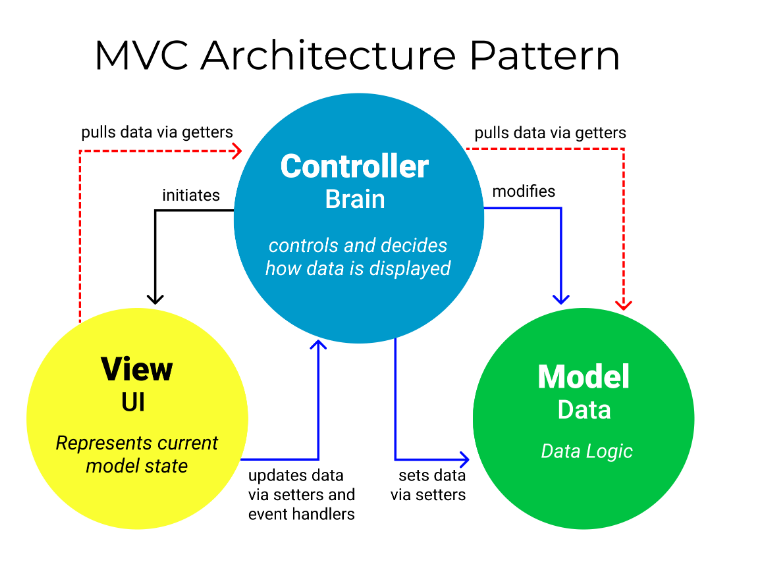
MVC
- MVC 패턴:하나의 서블릿이나 JSP로 처리하던 것을 컨트롤러와 뷰, 모델 영역으로 역할을 나눈 것 MVC 공식문서 컨트롤러(1개): HTTP 요청을 받아서 파라미터를 검증, 비즈니스 로직을 실행. →뷰에 전달할 결과 데이터를 조회, 모델에 저장 모델: 뷰에 출력할 데이터 보관 뷰: HTML을 생성하는 부분 다이나믹 프로젝트 생성시
- 배포 설명자(deployment descriptor)
-
배포 설명자는 이름이 web.xml인 파일
-
웹 애플리케이션의 배포 설명자는 애플리케이션의 클래스, 리소스, 구성 및 웹 서버가 이를 사용해서
웹 요청을 처리하는 방법을 기술
-
앱의 WAR(설치프로그램)에서 WEB-INF/ 디렉터리에 위치- -> web.xml
-
웹애플리케이션에 web.xml이 작성되어있지 않으면 톰캣에서 작성한 web.xml이 적용됨
- 코드
<?xml version="1.0" encoding="UTF-8"?>
<web-app xmlns:xsi="http://www.w3.org/2001/XMLSchema-instance" xmlns="http://xmlns.jcp.org/xml/ns/javaee" xsi:schemaLocation="http://xmlns.jcp.org/xml/ns/javaee http://xmlns.jcp.org/xml/ns/javaee/web-app_4_0.xsd" id="WebApp_ID" version="4.0">
  <display-name>jsp2_mvc</display-name>
  <welcome-file-list>
  <!-- 해당 순서대로 파일 실행함 -->
    <welcome-file>index.html</welcome-file>
		<welcome-file>index.jsp</welcome-file>
 </welcome-file-list>
- 코드
-
- 서블릿을 1개만 만들어서 프론트 컨트롤러 역할을 함
- 프론트 컨트롤러: url과 요청방식(GET or POST)에 따라 처리할 컨트롤러 객체를 생성 및 동작
- 프론트 컨트롤러에서 일부 파일 제외하기
-
정적 리소스 css, js, img, html 파일은 프론트 컨트롤러가 처리하지 않고 바로 해당 리소스로 응답하기
-web.xml
  <servlet-mapping>
  		<servlet-name>default</servlet-name>
  		<url-pattern>*.css</url-pattern>
  		<url-pattern>*.jpg</url-pattern>
  		<url-pattern>*.js</url-pattern>
  		<url-pattern>*.png</url-pattern>
  		<url-pattern>*.html</url-pattern>
  </servlet-mapping>
-
- 코드
@WebServlet(urlPatterns = {"/"},description = "모든 요청을 받는 서블릿") public class FrontController extends HttpServlet { private static final long serialVersionID =1L; private static final org.slf4j.Logger logger = LoggerFactory.getLogger(FrontController.class); //서블릿이 톰캣에서 실행되기 시작할때 (메모리에 로드될때)실행하는 메소드 @Override public void init() throws ServletException { RequestControllerMapping.init();}- get, post 상관없이 요청 처리하는 메소드
@Override
	protected void service(HttpServletRequest req, HttpServletResponse resp) throws ServletException, IOException {

		String url = req.getServletPath();
		String method = req.getMethod();
		logger.info("service 메소드: url - {}, method-{}",url, method);

		RequestMap map = new RequestMap(url,method);
		Controller controller =RequestControllerMapping.getController(map);

		if(controller!=null) {controller.handle(req,resp);}}
- get, post 상관없이 요청 처리하는 메소드
- Controller
- 코드
public interface Controller {
	//개발자 정의 - 인자를 doGet , doPost 와 동일한 형식으로 정의  / handle - >임의의 메소드명
	void handle(HttpServletRequest request, HttpServletResponse response)
				throws ServletException, IOException ;
}
- 코드
- RequestMap
- 코드
@Getter
@NoArgsConstructor
@AllArgsConstructor
@ToString
@EqualsAndHashCode			//필수. vo (불변객체) 로 정의하기 - Map의 key 객체로 사용하기 위함.
public class RequestMap {
	private String url;		//servlet Path
	private String method;	//GET,POST}
- 코드
- RequestControllerMapping
- 코드
public class RequestControllerMapping {

	private static final Map<RequestMap, Controller> mapping = new HashMap<>() ;
	//개발자가 만든 메소드
	public static void init() {
		mapping.put(new RequestMap("/member/join","GET"),new MemberJoinController());
		mapping.put(new RequestMap("/member/save","POST"),new MemberSaveController());
		mapping.put(new RequestMap("/member/modify","GET"),new MemberModifyController());
		mapping.put(new RequestMap("/community/list","GET"),new CommunityListController());
		mapping.put(new RequestMap("/community/write","GET"),new CommunityWriteController());
		mapping.put(new RequestMap("/mypage","GET"),new MyPageController());
		mapping.put(new RequestMap("/cart","GET"),new CartController());
		mapping.put(new RequestMap("/product/list","GET"),new ProductListController());
		mapping.put(new RequestMap("/login","GET"),new LoginController());}

	public static Controller getController(RequestMap key) {
		return mapping.get(key); //value에 해당하는 controller 객체 리턴}}
- 코드
- 내부 컨트롤러
- 코드
public class CommunityWriteController implements Controller{
	@Override
	public void handle(HttpServletRequest request, HttpServletResponse response) throws ServletException, IOException {
		RequestDispatcher dispatcher = request.getRequestDispatcher("write.jsp");
		dispatcher.forward(request, response);}}
- 코드
- JSP(이동될 페이지)
- 프론트 컨트롤러에서 일부 파일 제외하기
- web.xml
- 확장자 없는 url 형식이므로 정적 리소스까지 프론트 컨트롤러에서 함->정적 리소스 처리
- 없는 jsp 파일 요청하면 404 -> error-code 설정
- 잘못된 url은 예외 발생시킴(프론트 컨트롤러에서 구현)-> exception 설정
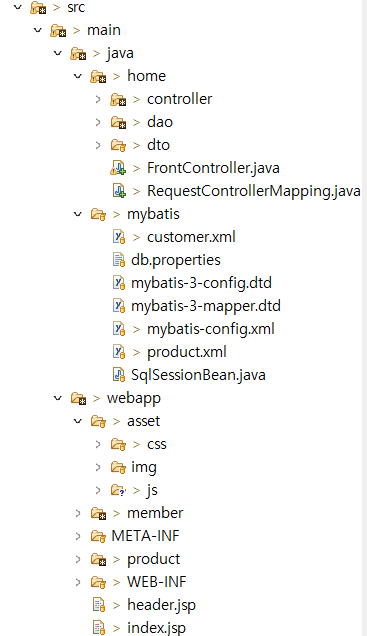
- 구조 사진
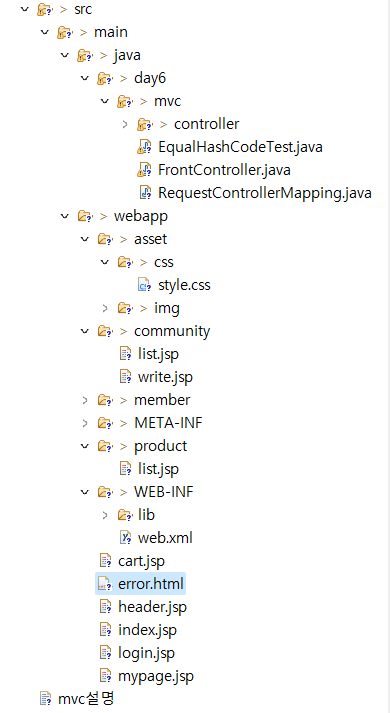
구현 방법 - .XML
-
XML: html처럼 태그를 사용하며 데이터를 저장. 단, html과 달리 지정된 태그 사용 X, 형식 생성 가능, 설정, 데이터 저장 등 다양하게 사용
- 예시: 톰캣의 서버 port 설정 = server.xml 파일의 내용
- 서버정보
db.properties-db.properties driver=oracle.jdbc.driver.OracleDriver url=jdbc:oracle:thin:@//localhost:1521/xe username= C##IDEV password=1234 # comment symbol
- config
mybatis-config.xml<?xml version="1.0" encoding="UTF-8"?> <!DOCTYPE configuration PUBLIC "-//mybatis.org//DTD Config 3.0//EN" "http://mybatis.org/dtd/mybatis-3-config.dtd"> <!-- mybatis가 데이터베이스에 연결하기 위한 설정(config)파일 https://mybatis.org/mybatis-3/ko/getting-started.html 참고 --> <!-- db 설정 --> <configuration> <!-- datasource 태그 안에 4개의 프로퍼티값이 저장된 파일 : 파일 위치한 패키지이름을 파일 시스템 디렉토리형식(/)으로 작성--> <properties resource="mybatis/db.properties"/> <!-- 타입 별칭 설정하기 --> <typeAliases> <typeAlias type="project.vo.BuyVo" alias="Buyvo"/> </typeAliases> <!-- jbc db 연결정보 --> <environments default="development"> <environment id="development"> <transactionManager type="JDBC"/> <!-- 데이터베이스 연결 풀 DBCP 설정 : ${ } 기호안의 값은 properties 파일에서 읽어옵니다. db연결 정보가 바뀔때 properties 파일의 값만 변경하거나 파일을 교체하면 되므로 관리가 쉽습니다. --> <dataSource type="POOLED"> <!-- DataBase Connection Pool(저장소) : 커넥션 객체를 여러개 생성해서 저장하고 사용자 요청이 있을때 풀에서 객체를 할당해 줍니다.요청에 대한 응답이 완료되면 다시 풀에 반환. 풀 관리는 톰캣에서 하고 구현시는 dataSource 객체를 설정해 주면 됩니다. --> <property name="driver" value="${driver}"/> <property name="url" value="${url}"/> <property name="username" value="${username}"/> <property name="password" value="${password}"/> </dataSource> </environment> </environments> <!-- SQL 매퍼 파일을 등록. --> <mappers> <!-- JDBC로 처리하는 상당부분의 코드와 파라미터 설정 및 조회결과와 dto객체 매핑을 해줍니다. --> <!-- 실행할 SQL 쿼리 저장한 파일. mapper파일위치와 파일명 오류나지 않도록 확인!! 테이블컬럼과 자바객체 변수(프로퍼티) 를 바로 매핑. --> <mapper resource="mybatis/buys.xml"/> <!-- resource 속성일 때 파일의 패키지명은 . 아니고 / 기호 사용합니다. sql mapper 파일은 여러개 사용될 수 있습니다. --> </mappers> </configuration>
- 서버정보
- 예시: 톰캣의 서버 port 설정 = server.xml 파일의 내용
-
매개변수
parameterType="BuyVo" <insert id="insert" parameterType="BuyVo"> -
리턴타입
resultType="BuyVo" <select id="selectAll" resultType="BuyVo"> -
mybatis와 get,set상관 X 생성자 상관 O +toString
-
@AllArgsConstructor → 커스텀 생성자: 컬럼명과 변수명 일치 안해도 O
@NoArgsConstructor → 기본 생성자: 객체 생성 후 setter로 동작하기에 컬럼명=변수명 -
최대한 DB의 column명과 동일하게 하기
-
동적 쿼리 만들기
-
where, if, trim(trim은 두번째 이상부터 사용)
-
<mapper namespace="tblproduct">
<!-- 동적 쿼리 예시: 상품 조회에 필요한 검색 필터. 아래 4개중 하나의 쿼리로 실행되게 할 수 있음-->

<!--예시: select * form tbl_product
where  category='B2' and pname like '%'||'사과'||'%'	=>파라미터가 모두 있을때
또는
select * form tbl_product
where category='B2'									=>keyword 파라미터가 없을때
또는
select * form tbl_product
where pname like '%'||'사과'||'%'						=>category 파라미터가 없을떄
또는
select * form TBL_PRODUCT							=> 파라미터가 모두 없을때(where 안붙음)
	  -->

	<select id="seach" resultType="ProductDto">
		select * form tbl_product
		<!--if 중의 하나라도 조건식이 생성됐을때만 where가 붙음  -->
		<!-- 아래 if의 test 값은 조건식.. keyword 파라미터 값이 null이 아닐때 -->
		<where>
			<if test = "category!=null">
			<!-- 앞의 조건식이 없으면 and는 제거됨(trim)  -->
				category=#{category}
			</if>
			<if test = "keyword!=null">
			  	<trim prefix="and">	<!-- 앞에 (pre) 내용이 있다면 해당 위치에 and를 찍겠다, 없으면 지우겠다 -->
				pname like '%'||#{keyword}||'%'
				</trim>
			</if>
		</where>
	</select>
-
순서
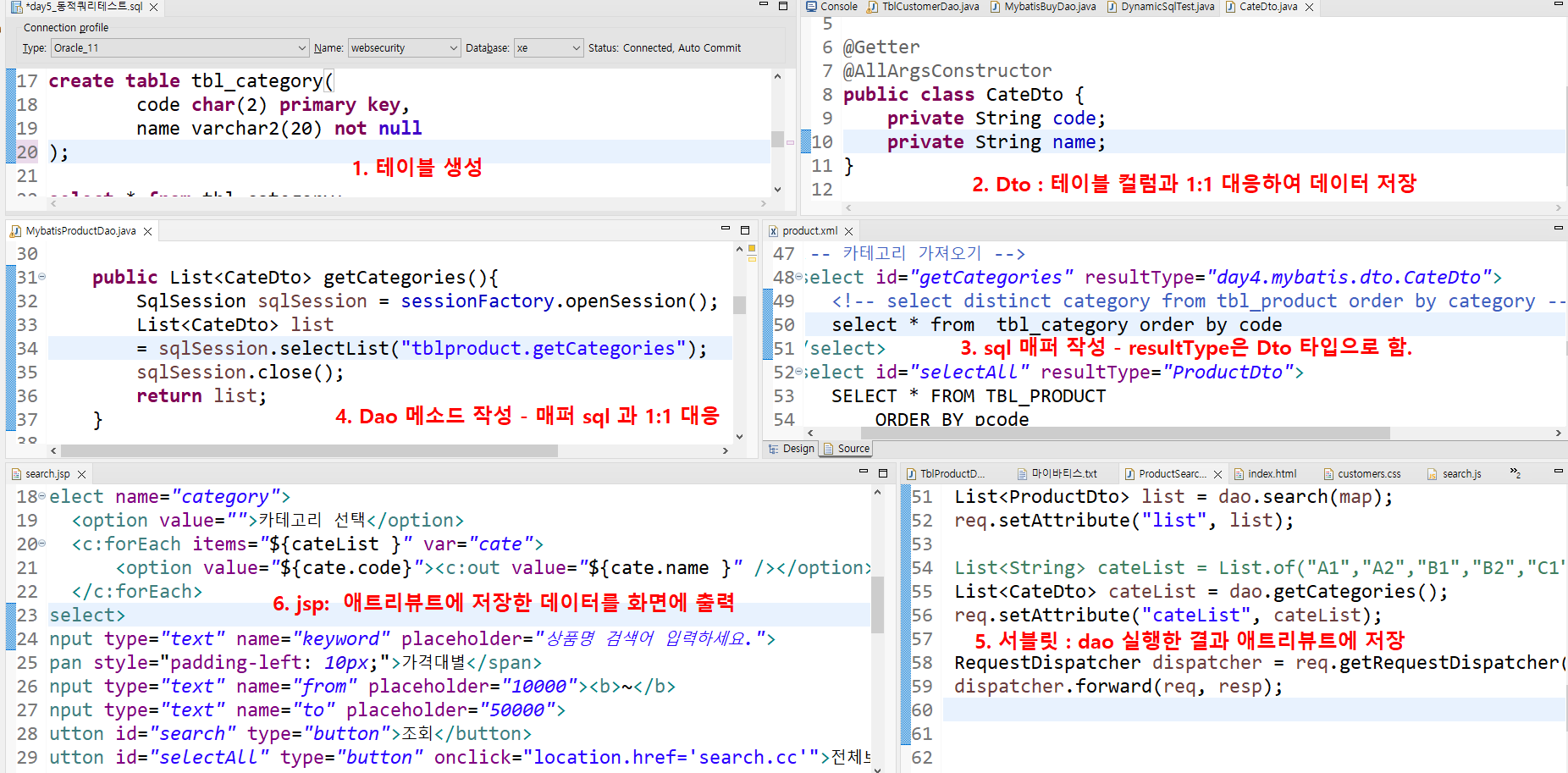
- 테이블 생성 → 2. Dto → 3. XML(sql) → 4. Dao → 5. 서블릿 → 6. JSP
- Dto: 데이터 저장
- Dao: 변수 X, 메소드(sql 실행)
- XML: SQL (마이바티스 사용시에만 사용, 참고용으로 만듬)
- 서블릿: req,resp 존재(둘이 한 쌍) → 사용자의 요청 처리 (dao 결과를 애트리뷰트에 저장)
- JSP: 화면(애트리뷰트에 저장된 데이터를 화면에 출력) - 서버에서 처리
- jsp에서의 value가 가장 중요.. 서버가 value를 받아서 실행하기에 →value를 무슨 값을 줄 지 고민
홈페이지 제작(MVC, Bastis)

:) GITHUB: https://github.com/YJ2123412