컴포넌트가 다양하게 재사용될 수 있는 것은 그때 그때 다르게 넣어줄 수 있는 Props 덕분이다.
-> 함수가 재사용될 수 있는것은 매개변수 덕분인것처럼!
-> 타입도 재사용되기 위해서 매개변수를 넣어서 제네릭하게 쓰는것과도 일맥상통.
// flex 로 가운데정렬
<div className="h-screen flex items-center justify-center">hello world</div>

// grid 로 가운데 정렬
<div className="h-screen grid place-items-center">hello world</div>;
1. Chip
- 인터페이스 설계 : 쓰는사람이 어떻게 쓸지 고민해보는 것.
* class name 을 편하게 만들기 위한 방법
- clsx
- CVA (class variance authority)
: 조합을 통해서 구현해야되는 수많은 클래스들을 복잡하게 조건문을 써서 해결하는 것이 아니라, 조합자체를 명시함으로써 선언적으로 해결할 수 있다.- CVA 의 return 값은 함수.
- A, B가 조합되었을때 어떤 클래스가 나와야하는지.
- defaultVariants 넣어서 초기값도 설정 가능
- 조합과 무관한 인자를 첫번째 클래스로 넣어줌
-> string 으로 써도 되고, 배열로 하나씩 넣어줘도 됨
->cva("text-sm border rounded-full px-2.5 py-0.5")/cva(["text-sm", "border", "rounded-full", "px-2.5", "py-0.5"]); - 조합과 관련된것을 두번째 인자로 넣어줌
- 타입 변경 전
interface ChipProps {
  label: string;
  intent?: "primary" | "secondary" | "danger" | "warning" | "info" | "default"; // intent 값이 선택이므로 안들어갈경우 undefined 여도 상관없다. -> defaultVariants 넣어놨으므로!
}
- 타입 변경 후
type ChipVariantsType = VariantProps<typeof chipVariants>;
type ChipProps = {
  label: string;
} & ChipVariantsType;
2. Button
✔️ Onclick / type / props
- onClick 이라는 props 를 버튼 컴포넌트에 안만들었음 + onClick 을 꺼내서 내려준적도 없음
- 스프레드 연산자로 props 를 가져와서 펼친다.
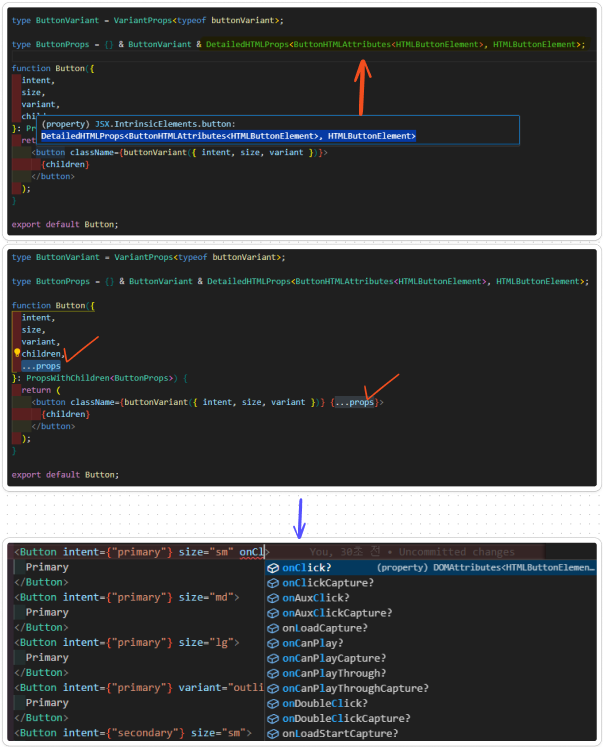
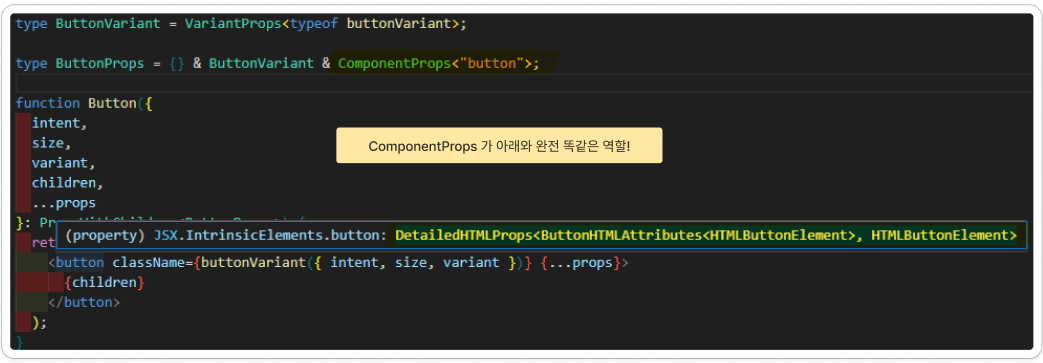
ComponentProps<"button"> = DetailedHTMLProps<ButtonHTMLAttributes<HTMLButtonElement>, HTMLButtonElement>
✔️ Button 컴포넌트가 Link 컴포넌트로 렌더링될지, 아니면 기본 HTML button 요소로 렌더링될지
type ButtonVariant = VariantProps<typeof buttonVariant>;

type ButtonProps = {} & ButtonVariant &
  (
    | ({} & ComponentProps<"button">)
    | ({ href: string } & ComponentProps<typeof Link>)
  );

function Button({
  intent,
  size,
  variant,
  children,
  ...props
}: PropsWithChildren<ButtonProps>) {
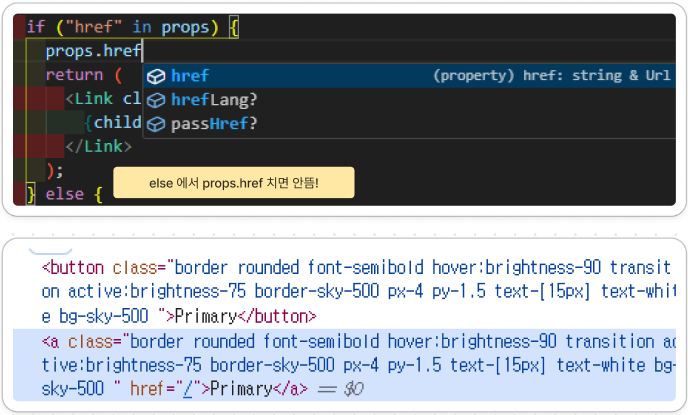
  if ("href" in props) {
    return (
      <Link className={buttonVariant({ intent, size, variant })} {...props}>
        {children}
      </Link>
    );
  } else {
    return (
      <button className={buttonVariant({ intent, size, variant })} {...props}>
        {children}
      </button>
    );
  }
}
if ("href" in props)
-> props 객체에 href 속성이 존재하는지 검사
-> 속성이 있으면 링크로, 없으면 일반 버튼으로 동작하게 함