다시 풀어볼 문제🙏
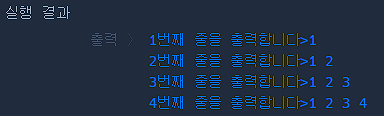
public class ArrayExam {
    public static void main(String[] args) {
        int [][] array = {{1}, {1, 2}, {1, 2, 3}, {1, 2, 3, 4}};

        // 2차원 배열 array를 출력합니다.
        for(int i = 0 ; i < array.length; i++) {
            System.out.print( (i+1) + "번째 줄을 출력합니다>");
            for(int j = 0; j< array[i].length; j++) {
                System.out.print(array[i][j]+" ");
            }
            System.out.println("");
        }
    }
}- 이차원 배열을 어떻게 생성하고 참조하는 지 참고하기(퀴즈 x)
public class ForEachExam {
    public static void main(String[] args) {
        int [] array = {1, 5, 3, 6, 7};
        //for each문을 이용해서 array의 값을 한 줄씩 출력하세요
        for (int a : array){
            System.out.println(a);
        }
    }
}foreach를 사용하면for문을 간결하게 표현 가능하다.
public class StringExam {
    public static void main(String[] args) {
        String str1 = new String("Hello world");
        String str2 = new String("Hello world");

        if( str1.equals(str2) ){
            System.out.println("str1과 str2는 같은 값을 가지고 있습니다.");
        }
        else{
            System.out.println("str1과 str2는 다른 값을 가지고 있습니다.");
        }
    }
}- str1, str2는 레퍼런스가 서로 다르다.
==을 통해 비교하면 서로 다르지만, 같은 문자열을 가지고 있는지 비교하고 싶다면equal을 사용하면 된다.
public class StringExam {
    public static void main(String[] args) {
        String str1 = "안녕하세요. ";
        String str2 = "벌써 여기까지 오셨네요. 끝까지 화이팅!!";

        String concatResult;
        String substringResult;

        // 아래쪽에 코드를 작성하세요.

        concatResult = str1.concat(str2);
        substringResult = str1.substring(2);


        // 이 아래는 정답 확인을 위한 코드입니다. 수정하지 마세요.
        System.out.println(concatResult);
        System.out.println(substringResult);
    }
}.concat을 사용하여 두 문자열을 함칠 수 있음.substring()을 사용하여 문자열을 잘라서 나타낼 수 있음.
substring(int1): int1부터 끝까지 표시
substring(int1, int2)int1부터 int2 앞까지 표시
실수한 부분👎
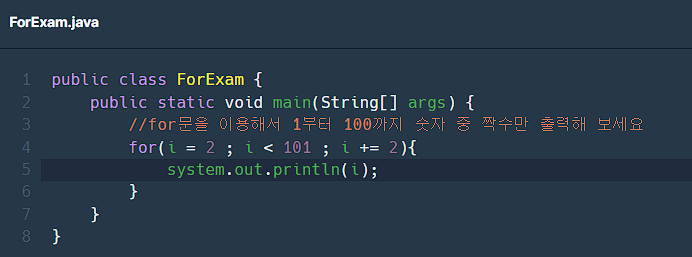
- for (i=2 ; ... ; )
i는 변수로 정의해줘야하므로 (int i = 2 ; ... ; ...)로 써야함 - system.out.println(...)
system의 s는 대문자(S)로 써야한다!
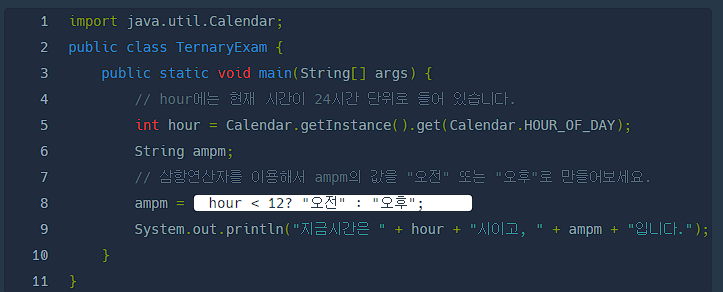
- 삼항연산자는
int a = 조건 ? 참일 경우의 값 : 거짓일 경우의 값 ;
의 형태이다.
중간에세미콜론(;)이 아닌 콜론(:)인 점 주의!!
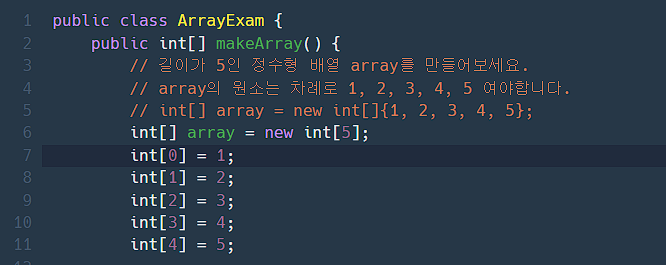
- 배열을 정의할 때는
int[0] = 1;이 아니라 아래와 같이 변수명을 적어줘야 한다.
int[] array = new int[5];
array[0] = 1;
array[1] = 2;
array[2] = 3;
array[3] = 4;
array[4] = 5
멋진 개발자가 되겠어요 :-)