HTML form 데이터
폼 데이터(form data)는 HTML 요소인 form 태그에 실려 전송되는 데이터를 말한다.
이번에도 src > main > resources > templates 디렉터리에 articles 디렉터리를 생성하고, 그 안에 new.mustache 뷰 페이지를 생성하였다.
{{>layouts/header}}

<form class="container" action="/articles/create" method="post">
    <div class="mb-3">
        <label class="form-label">제목</label>
        <input class="form-control" type="text" name="title">
    </div>
    <div class="mb-3">
        <label class="form-label">내용</label>
        <textarea class="form-control" rows="3" name="content"></textarea>
    </div>
    <button type="submit">Submit</button>
</form>

{{>layouts/footer}}
이렇게 작성하면
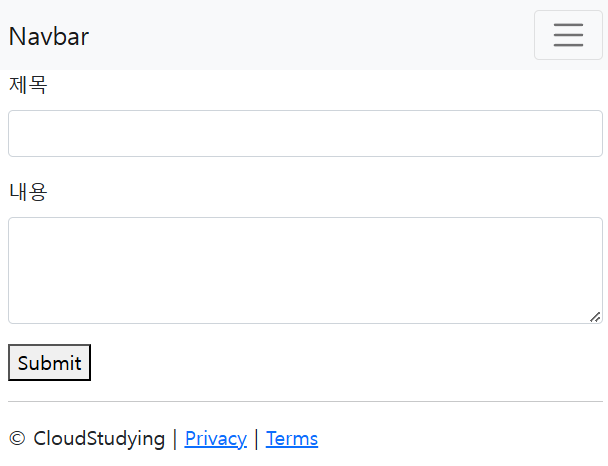
이렇게 작성 페이지가 나온다.
물론, 저 페이지에 가기 위해 컨트롤러를 만들어 준다.
package com.example.firstproject.controller;

import com.example.firstproject.dto.ArticleForm;
import com.example.firstproject.entity.Article;
import com.example.firstproject.repository.ArticleRepository;
import org.springframework.beans.factory.annotation.Autowired;
import org.springframework.stereotype.Controller;
import org.springframework.web.bind.annotation.GetMapping;
import org.springframework.web.bind.annotation.PostMapping;

@Controller
public class ArticleController {

    @GetMapping("/articles/new")
    public String newArticleForm() {
        return "articles/new";
    }
}
DTO
DTO(Data Transfer Object)는 form에서 입력한 데이터를 담아서 데이터베이스에 전달하는 역할을 하는 객체이다.
package com.example.firstproject.dto;

import com.example.firstproject.entity.Article;

public class ArticleForm {
    private String title;		// 제목을 받을 필드
    private String content;		// 내용을 받을 필드


    // 전송받은 제목과 내용을 필드에 저장하는 생성자 추가
    public ArticleForm(String title, String content) {
        this.title = title;
        this.content = content;
    }

    // 데이터를 잘 받았는지 확인할 toString() 메서드 추가
    @Override
    public String toString() {
        return "ArticleForm{" +
                "title='" + title + '\'' +
                ", content='" + content + '\'' +
                '}';
    }

}
이런식으로 작성하는데, 데이터를 받을 필드를 생성하고, 단축키 [Alt + Insert]로 생성자와 toString() 메서드를 쉽게 추가할 수 있다.
toString()은 데이터를 잘 받았는지 확인할 때 쓴다.
해당 클래스는 com.example.firstproject.dto에 ArticleForm이란 이름으로 생성하였다.
데이터베이스와 JPA
데이터베이스는 쉽게 말해 데이터를 모아놓은 창고이다.
DB 프로그램으로는 MySQL, 오라클, 마리아DB 등 다양한 종류가 있는데, 참고서에는 H2 DB를 사용하였다.
DB는 자바 언어가 아닌 SQL(Structured Query Language)이라는 언어를 사용하여 명령을 내린다.
자바로 바로 명령을 내리는 방법도 존재하는데, 이 때 사용하는 도구가 JPA(Java Persistence API)이다.
JPA의 핵심 도구로는 엔티티(entity)와 리파지터리(repository)가 있다.
- 엔티티 : 자바 객체를 DB가 이해할 수 있게 만든 것으로, 이를 기반으로 테이블이 만들어진다.
- 리파지터리 : 엔티티가 DB 속 테이블에 저장 및 관리될 수 있게 하는 인터페이스이다.
	@Autowired      // 스프링 부트가 미리 생성해 놓은 리파지터리 객체 주입(DI)
    private ArticleRepository articleRepository;

    @PostMapping("/articles/create")
    public String createArticle(ArticleForm form) {     // 폼 데이터를 DTO로 받기
        System.out.println(form.toString());            // DTO에 폼 데이터가 잘 담겼는지 확인

        // 1. DTO를 엔티티로 변환
        Article article = form.toEntity();
        System.out.println(article.toString());         // DTO가 엔티티로 잘 변환되는지 확인 출력

        // 2. 리파지터리로 엔티티를 DB에 저장
        Article saved = articleRepository.save(article);	// article 엔티티를 저장해 saved 객체에 반환
        System.out.println(saved.toString());           // article이 DB에 잘 저장되는지 확인 출력
        return "";
    }
ArticleController 클래스에 해당 내용을 입력해준다.
new.mustache를 보면 form 태그에 method="post"라는 값이 있다. get 방식과 post 방식이 있는데, 해당 부분은 뒤에서 더 자세히 다룰 예정.
어쨌든 post로 데이터를 받아왔기 때문에 @PostMapping 어노테이션을 사용한다.
package com.example.firstproject.entity;

import jakarta.persistence.*;

@Entity		// 엔티티 선언
public class Article {
    @Id		// 엔티티의 대푯값 지정
    @GeneratedValue(strategy = GenerationType.IDENTITY)		// 자동 생성 기능 추가(숫자가 자동으로 매겨짐)
    private Long id;
    @Column
    private String title;		// title 필드 선언, DB 테이블의 title 열과 연결됨
    @Column
    private String content;		// content 필드 선언, DB 테이블의 content 열과 연결됨

	// Article 생성자 추가
    public Article(Long id, String title, String content) {
        this.id = id;
        this.title = title;
        this.content = content;
    }

    // toString() 메서드 추가
    @Override
    public String toString() {
        return "Article{" +
                "id=" + id +
                ", title='" + title + '\'' +
                ", content='" + content + '\'' +
                '}';
    }
}
com.example.firstproject.entity 패키지를 생성하고, 해당 패키지에 Article 클래스를 위 생성하여 위 코드를 작성한다.
해당 클래스가 엔티티임을 선언하기 위해 @Entity 어노테이션을 붙여준다. @Entity는 JPA에서 제공하는 어노테이션으로, 해당 어노테이션이 붙은 클래스를 기반으로 DB에 테이블이 생성된다. 테이블 명은 클래스 이름과 동일하게 생성된다.
DTO 코드를 작성할 때와 같이 각 필드를 선언하고, @Column 어노테이션을 붙여 DB에서 인식할 수 있게 한다.
그리고 엔티티의 대푯값을 id로 선언하고 @Id 어노테이션을 붙여준다. 이어서 @GeneratedValue 어노테이션을 붙여 대푯값을 자동으로 생성하게 한다.
그리고 ArticleForm에 toEntity() 메서드를 만들어 준다.
    public Article toEntity() {
        return new Article(null, title, content);
    }
toEntity() 메서드에서는 폼 데이터를 담은 DTO 객체를 엔티티로 변환한다. 전달값은 Article 클래스의 생성자 형식에 맞게 작성하면 된다. 그런데 ArticleForm 객체에 id 정보는 없기 때문에, 전달값을 null로 입력해준다.
그리고 이번엔 com.example.firstproject.repository 패키지를 생성하고, 해당 패키지에 ArticleRepository라는 이름의 Interface를 생성해준다.
package com.example.firstproject.repository;

import com.example.firstproject.entity.Article;
import org.springframework.data.repository.CrudRepository;

public interface ArticleRepository extends CrudRepository<Article, Long> {
}
여기서 CrudRepository 인터페이스를 상속받았는데, CrudRepository는 JPA에서 제공하는 인터페이스로 이를 상속하여 엔티티를 관리(생성, 조회, 수정, 삭제)할 수 있다. CrudRepository에 홑화살괄호(<>)를 붙이고 그 안에 클래스 타입과 엔티티의 대푯값 타입을 입력해준다.
또한 ArticleController에 articleRepository 필드를 생성하면서 @Autowired 어노테이션을 붙였는데, 이렇게 하면 스프링 부트가 알아서 만들어 놓은 객체를 가져다가 연결해준다. 이를 의존성 주입(DI, Dependency injection)이라고 한다.
그럼 이제 DB에 잘 저장되는지 확인을 해본다.
웹 브라우저에서 localhost:8080/articles/new 를 열어
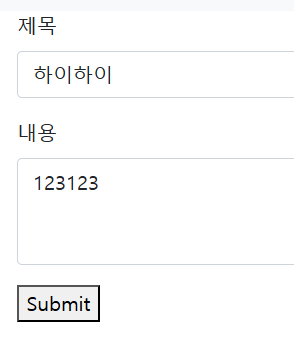
이렇게 입력하여 Submit 버튼을 눌러주면
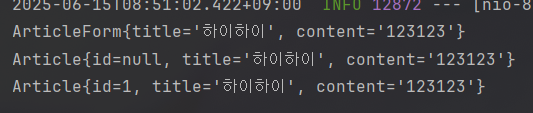
이렇게 결괏값이 나옴을 확인할 수 있다.
그리고 DB 데이터를 따로 조회할 수도 있는데, 웹 브라우저에 localhost:8080/h2-console 페이지로 들어가면
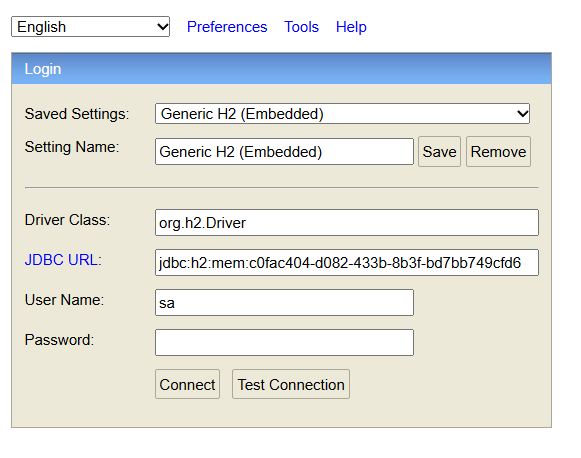
이런 페이지가 나온다.
JDBC URL에는 인텔리제이의 Run 탭에서 jdbc:h2:mem:... 형식의 주소를 확인하여 복붙하면 된다.
참고로 해당 메모리 주소는 컴퓨터마다 다르고 서버를 재시작할 때마다 바뀐다.
Connect 버튼을 누르면
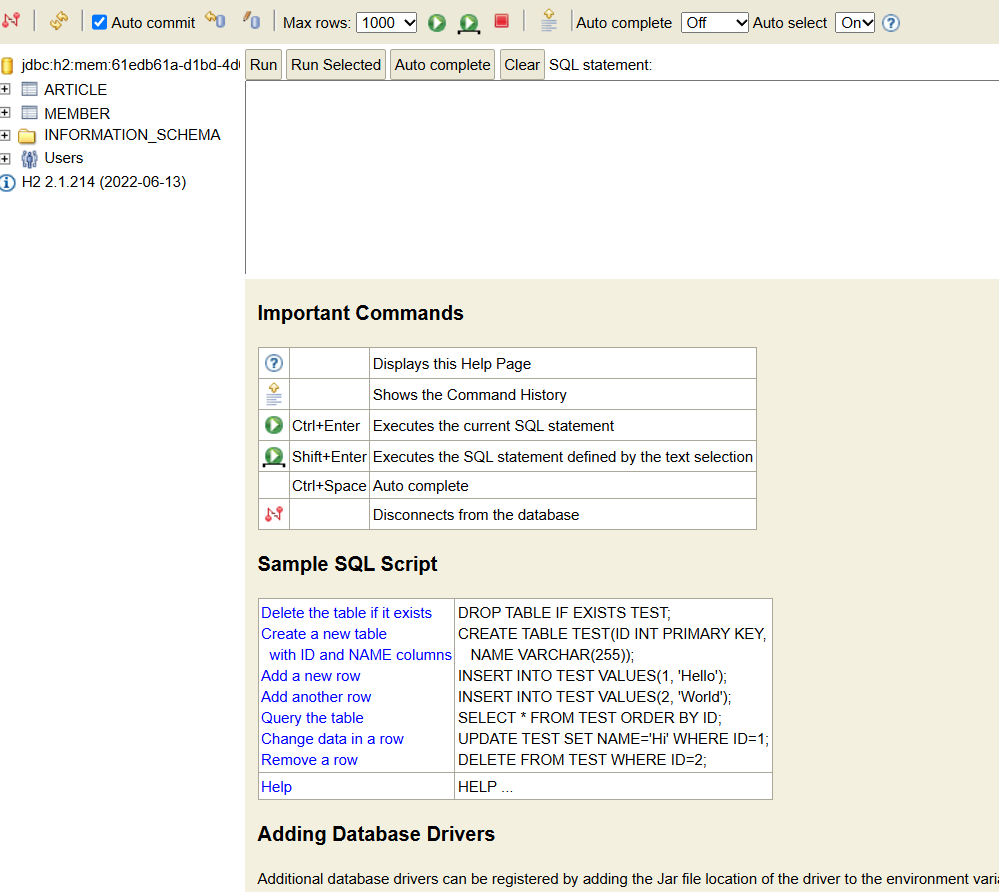
이런 페이지가 나온다. 입력창에 SQL을 입력하여 Run을 눌러 작동할 수 있다.
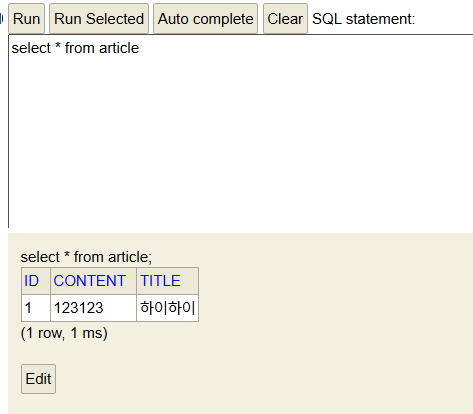
이런 식으로.